
1. Introduction
Thank you for choosing the VIDVIE BT859 Magnetic Wireless Neck Headset. This manual provides essential information for setting up, operating, and maintaining your device. Please read it carefully to ensure proper use and to maximize the performance and lifespan of your headset.
2. Package Contents
Please check the package for the following items:
- VIDVIE BT859 Magnetic Wireless Neck Headset
- Ear Cushions (various sizes)
- Headband (integrated with headset)
- USB Charging Cable (not explicitly listed but standard for such devices)
- User Manual
3. Product Overview
The VIDVIE BT859 headset features a comfortable neckband design with magnetic earbuds for secure storage. It utilizes Bluetooth 5.0 for stable wireless connectivity and includes Active Noise Cancellation for an enhanced listening experience.
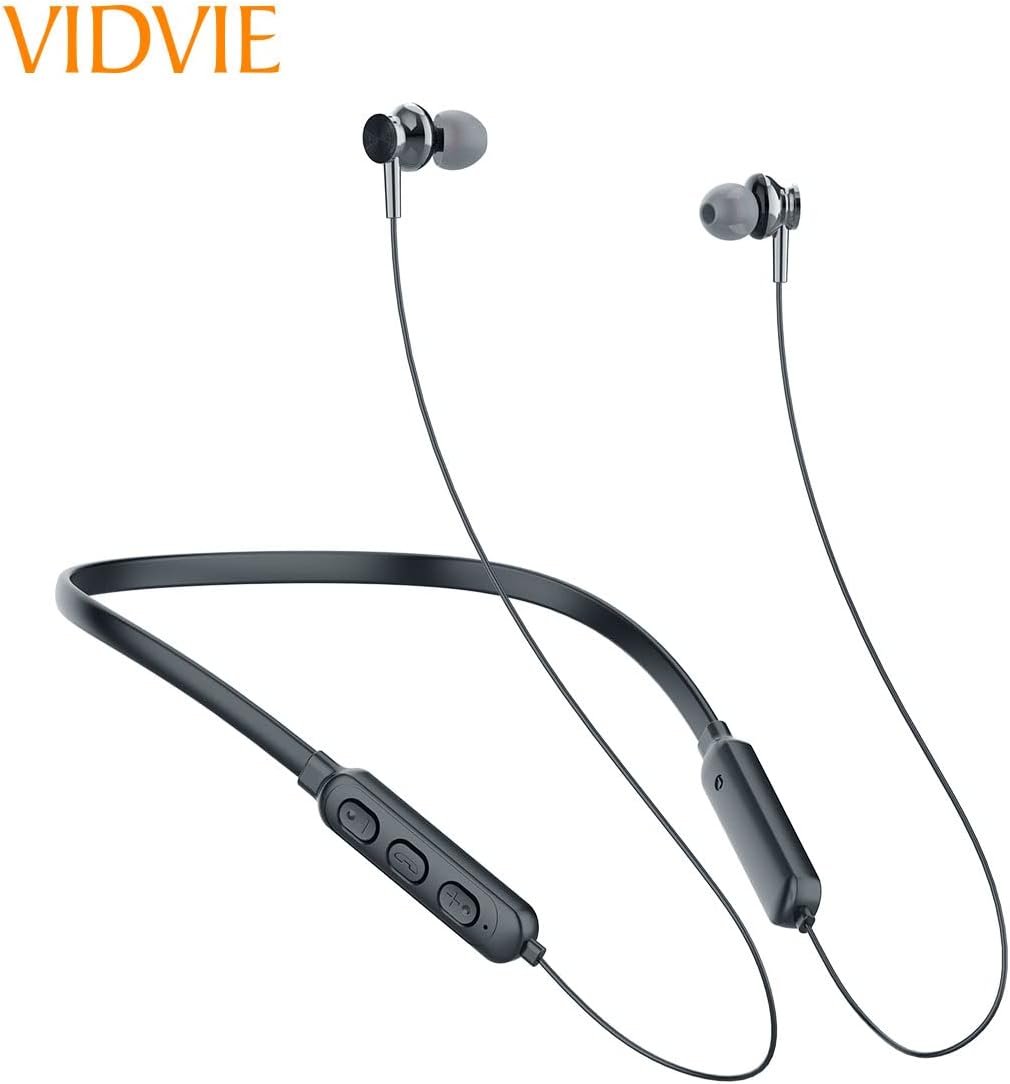
Figure 3.1: Front view of the VIDVIE BT859 headset, showcasing the neckband and magnetic earbuds.

Figure 3.2: Packaging of the VIDVIE BT859 headset, illustrating key features and a diagram of the control panel with buttons and microphone.
Control Panel Functions:
- Volume Up (+) / Next Track: Short press for volume up, long press for next track.
- Multi-function Button (Center): Press and hold to power on/off. Short press to play/pause music or answer/end calls. Double press to redial.
- Volume Down (-) / Previous Track: Short press for volume down, long press for previous track.
- Microphone: For hands-free calling.
- LED Indicator: Displays power, charging, and pairing status.
- Charging Port: For connecting the USB charging cable.
4. Setup
4.1 Charging the Headset
- Connect the USB charging cable to the charging port on the headset.
- Connect the other end of the cable to a USB power source (e.g., computer USB port, wall adapter).
- The LED indicator will illuminate during charging.
- Charging typically takes approximately 1.5 hours. The LED indicator will change or turn off once fully charged.
A full charge provides approximately 4.5 hours of working time.
4.2 Bluetooth Pairing
- Ensure the headset is fully charged.
- Press and hold the Multi-function button until the LED indicator flashes red and blue alternately, indicating pairing mode.
- On your device (smartphone, tablet, etc.), enable Bluetooth.
- Search for available Bluetooth devices and select "BT859" from the list.
- Once connected, the LED indicator will typically flash blue slowly or remain solid blue.
- If prompted for a password, enter "0000".
The headset will automatically attempt to reconnect to the last paired device when powered on.
5. Operating Instructions
5.1 Power On/Off
- Power On: Press and hold the Multi-function button for approximately 3 seconds until the LED indicator flashes blue.
- Power Off: Press and hold the Multi-function button for approximately 3 seconds until the LED indicator flashes red and then turns off.
5.2 Music Playback
- Play/Pause: Short press the Multi-function button.
- Next Track: Long press the '+' button.
- Previous Track: Long press the '-' button.
5.3 Call Management
- Answer/End Call: Short press the Multi-function button.
- Reject Call: Press and hold the Multi-function button for approximately 2 seconds.
- Redial Last Number: Double press the Multi-function button.
5.4 Volume Control
- Volume Up: Short press the '+' button.
- Volume Down: Short press the '-' button.
5.5 Active Noise Cancellation (ANC)
The VIDVIE BT859 features Active Noise Cancellation. Refer to the device's physical controls for a dedicated ANC button or a specific button combination to activate or deactivate this feature. Typically, a separate button or a long press on a specific button controls ANC.
6. Maintenance
- Cleaning: Use a soft, dry cloth to clean the headset. Do not use abrasive cleaners or solvents.
- Storage: Store the headset in a cool, dry place away from direct sunlight and extreme temperatures. The magnetic earbuds help prevent tangling.
- Battery Care: To prolong battery life, charge the headset regularly, even if not in use for extended periods. Avoid fully discharging the battery frequently.
- Water Exposure: This headset is not waterproof. Avoid exposure to water or excessive moisture.
7. Troubleshooting
| Problem | Possible Cause | Solution |
|---|---|---|
| Headset does not power on | Low battery | Charge the headset fully. |
| Cannot pair with device | Headset not in pairing mode; Bluetooth off on device; device too far | Ensure headset is in pairing mode (flashing red/blue). Turn on Bluetooth on your device. Move headset closer to device (within 10 meters). |
| No sound | Volume too low; headset not connected; incorrect audio output selected | Increase volume on both headset and device. Re-pair the headset. Check audio output settings on your device. |
| Poor sound quality | Interference; device too far; low battery | Move away from sources of interference. Ensure device is within range. Charge the headset. |
8. Specifications
- Model: BT859
- Brand: VIDVIE
- Speaker Diameter: 10mm
- Bluetooth Version: 5.0
- Working Time: Approximately 4.5 hours
- Charging Time: Approximately 1.5 hours
- Color: Grey
- Headphones Ear Placement: In Ear
- Headphones Form Factor: In Ear
- Noise Control: Active Noise Cancellation
- Connectivity Technology: Bluetooth
- Wireless Communication Technology: Bluetooth
- Included Components: Ear Cushions, Headband
- Package Dimensions: 20.6 x 14 x 2.4 cm
- Weight: 110 g
- Age Range Description: Adult
9. Safety Information
Please observe the following safety guidelines:
- Do not disassemble, repair, or modify the headset.
- Keep the headset away from extreme temperatures, direct sunlight, and open flames.
- Avoid exposing the headset to water or other liquids.
- Do not use the headset at excessively high volumes for prolonged periods to prevent hearing damage.
- Use only the provided or a certified charging cable.
- Dispose of the headset and its battery responsibly according to local regulations.
10. Warranty and Support
For warranty information or technical support, please refer to the documentation included with your purchase or contact your retailer. Keep your proof of purchase for any warranty claims.