
Perlegear PGPIMFK1, PGLT1
Perlegear TV Wall Mounts Instruction Manual
Models: PGPIMFK1 (Full Motion) & PGLT1 (Tilting)
Introduction
This manual provides detailed instructions for the safe and proper installation, operation, and maintenance of your Perlegear TV Wall Mounts. This bundle includes two distinct models: the PGPIMFK1 Full Motion TV Wall Mount and the PGLT1 Tilting TV Wall Mount. Please read this manual thoroughly before beginning installation and keep it for future reference.

Image: The Perlegear PGPIMFK1 Full Motion TV Wall Mount (top) and PGLT1 Tilting TV Wall Mount (bottom).
Safety Information
WARNING: Failure to read and follow all instructions may result in personal injury, property damage, or voiding of warranty. If you do not understand these instructions or have doubts about the safety of the installation, please contact Perlegear customer service.
- Do not install on walls that are not structurally sound. Ensure the mounting surface can safely support the combined weight of the mount and the television.
- Do not exceed the maximum weight capacity specified for each mount.
- Always use a stud finder to locate wood studs or ensure you are mounting into solid concrete/brick with appropriate anchors.
- Keep children and pets away during installation.
- Check all connections and fasteners periodically to ensure they remain secure.
Setup and Installation
Proper installation is critical for the safety and functionality of your TV wall mount. Ensure you have all necessary tools and hardware before beginning.
1. Verify TV Compatibility
Before installation, confirm your TV's VESA pattern, weight, and size are compatible with the specific mount you intend to use.
- PGPIMFK1 (Full Motion): Compatible with VESA patterns from 100x100mm to 400x400mm. Fits 26-60 inch TVs.
- PGLT1 (Tilting): Compatible with VESA patterns from 200x100mm to 600x400mm. Fits 32-80 inch TVs.

Image: Compatibility table for the PGLT1 Tilting TV Mount, showing VESA patterns and weight capacities for different TV sizes.
2. Wall Plate Installation
Locate suitable mounting points (wood studs or solid concrete/brick) in your wall. Mark the drilling positions accurately using the wall plate as a template. Drill pilot holes and secure the wall plate using the provided hardware appropriate for your wall type.

Image: Illustrates the ease of installation, showing two individuals lifting a TV towards a pre-installed full motion wall mount. This image also highlights the 5-year warranty.
3. Attaching Brackets to TV
Attach the TV brackets to the back of your television using the correct screws and spacers for your TV's VESA holes. Ensure the brackets are securely fastened and level.
4. Mounting TV to Wall Plate
Carefully lift the TV with the attached brackets and hook them onto the wall plate. For the PGPIMFK1 (Full Motion) mount, ensure the safety lock function is engaged after mounting to prevent accidental dislodgement. For the PGLT1 (Tilting) mount, ensure the security screws are tightened.

Image: Close-up details of the PGPIMFK1 Full Motion mount, highlighting key design elements such as the safety lock function, seamless welding, tilt adjustment design, and screen level adjustment.
Operating Your TV Mount
PGPIMFK1 Full Motion Mount Adjustments
The PGPIMFK1 mount offers extensive adjustability to optimize your viewing experience:
- Tilt: Adjust the vertical tilt angle from +5° to -12° to reduce glare and find the perfect viewing angle.
- Swivel: Swivel the TV horizontally up to ±45° (left to right) to view from different seating positions. The maximum swivel angle depends on your TV size.
- Level Adjustment: Rotate the TV ±3° to ensure it is perfectly level after installation.
- Extension/Retraction: The mount can extend up to 14.9 inches from the wall and retract to a slim 3.2 inches.
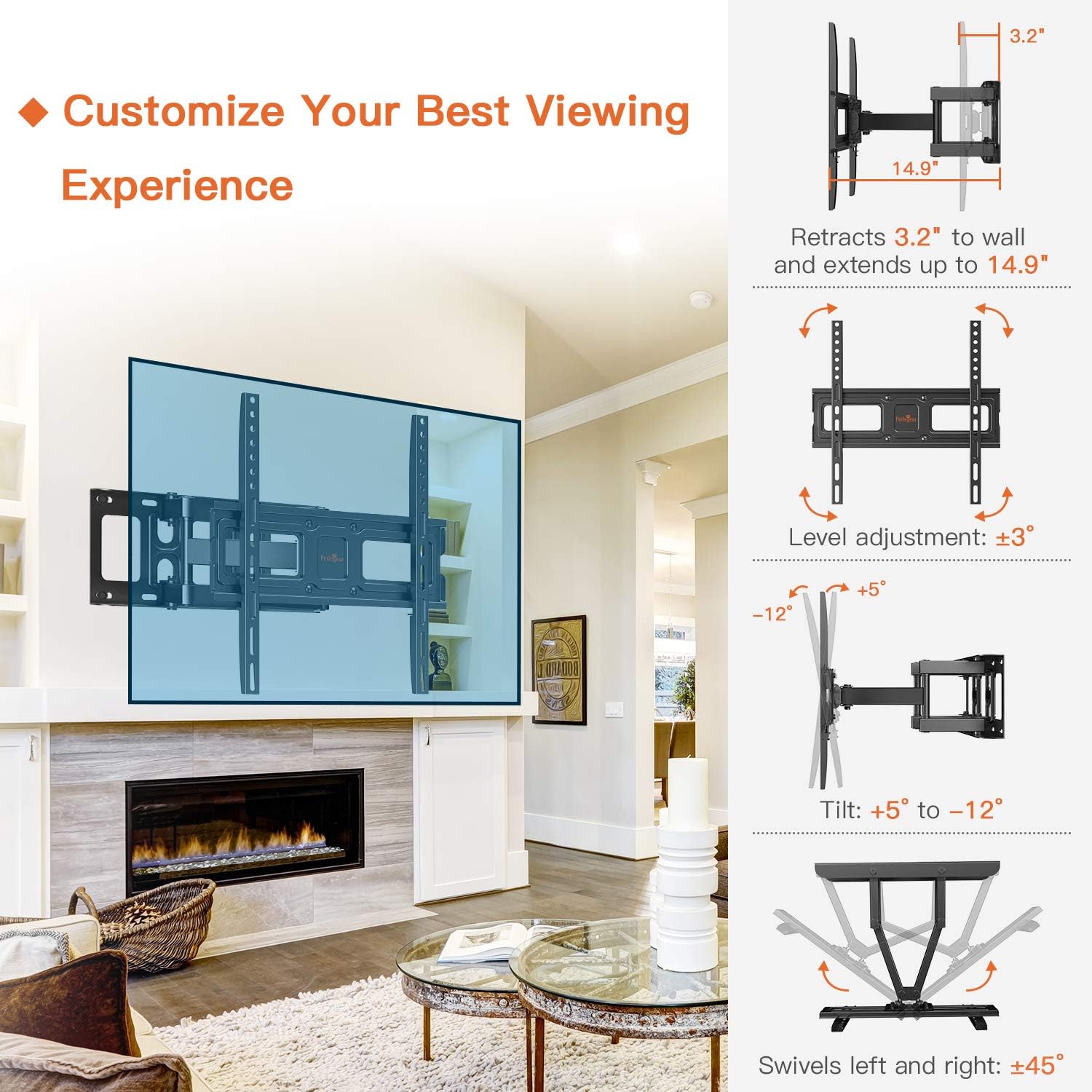
Image: Visual representation of the PGPIMFK1 Full Motion mount's capabilities, including its ability to retract, extend, adjust level, tilt, and swivel for customized viewing.
PGLT1 Tilting Mount Adjustments
The PGLT1 mount provides convenient tilting functionality:
- Tilt: Adjust the vertical tilt angle from +5° to -15° using the tool-free adjustment knob. This helps in reducing glare and achieving a comfortable viewing angle.
- Low Profile: This mount maintains a low profile of 2.1 inches from the wall, providing a sleek appearance.
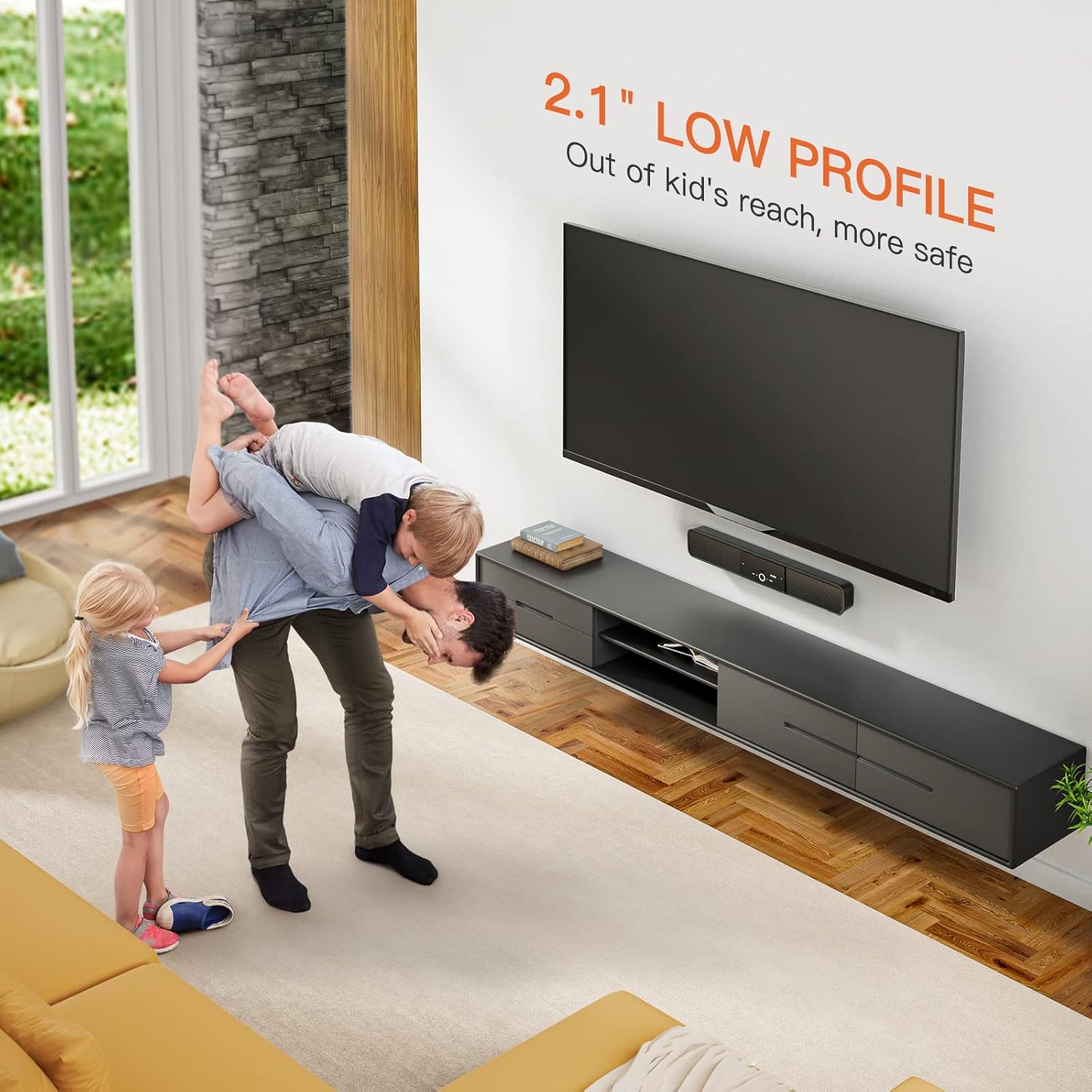
Image: A TV mounted with the PGLT1 Tilting Mount, illustrating the range of tilt adjustment and the easy-to-use tool-free knob for setting the angle.
Maintenance
To ensure the longevity and safe operation of your Perlegear TV wall mount, periodic maintenance is recommended:
- Cleaning: Dust the mount regularly with a soft, dry cloth. Avoid using abrasive cleaners or solvents that could damage the finish.
- Inspection: Periodically check all screws, bolts, and connections to ensure they are tight and secure. Over time, vibrations or adjustments can cause fasteners to loosen.
- Lubrication: If the full motion mount's articulating arms become stiff, a small amount of silicone-based lubricant can be applied to the pivot points.
Troubleshooting
If you encounter issues during or after installation, refer to the following common troubleshooting tips:
- TV Not Level: For the PGPIMFK1, use the ±3° level adjustment feature. For both mounts, ensure the wall plate is level before drilling. Re-check the tightness of all screws on the TV brackets.
- Mount Feels Loose: Immediately remove the TV and re-check all wall plate fasteners and TV bracket screws. Ensure you have mounted into a solid structural element (stud, concrete) and used appropriate anchors.
- Difficulty Adjusting: Ensure no cables are snagged or obstructing movement. For the PGPIMFK1, check if the arms are fully extended or retracted, which might limit further movement in that direction. For the PGLT1, ensure the tilt knob is loosened before attempting to adjust.
- Missing Parts: If any parts are missing from the package, do not proceed with installation. Contact Perlegear customer service for assistance.
Specifications
| Feature | PGPIMFK1 (Full Motion) | PGLT1 (Tilting) |
|---|---|---|
| TV Size Compatibility | 26 - 60 inches | 32 - 80 inches |
| VESA Compatibility | 100x100mm - 400x400mm | 200x100mm - 600x400mm |
| Tilt Angle | +5° to -12° | +5° to -15° |
| Swivel Angle | ±45° (TV size dependent) | N/A |
| Level Adjustment | ±3° | N/A |
| Wall Distance (Retracted) | 3.2 inches | 2.1 inches |
| Wall Distance (Extended) | 14.9 inches | N/A |
| Movement Type | Articulating, Rotate, Swivel, Tilt | Tilt |
Warranty and Customer Support
Perlegear stands behind the quality of its products. Your TV wall mount comes with a 5-year warranty, as indicated on the product packaging and promotional materials.
For any questions, concerns, or assistance with installation or operation, please do not hesitate to contact Perlegear customer service. Our team is available to provide professional support via email or through our customer service center.
Please visit the official Perlegear website or refer to your product packaging for the most current contact information.
Ask a question about this manual
Ask about setup, troubleshooting, compatibility, parts, safety, or missing instructions. Manuals+ will review the question and use this page’s manual context to help answer it.