
1. Introduction
The PNI SVM2000VA single-phase voltage stabilizer with servomotor is engineered to maintain a stable output voltage. It automatically adjusts the voltage to the preset value when mains voltage fluctuates, ensuring consistent power delivery to connected devices.
2. Product Overview
The PNI SVM2000VA is a high-capacity, high-efficiency servomotor voltage stabilizer designed for long service life and reliable performance. It features no wave distortion and automatic voltage regulation. This stabilizer is suitable for a wide range of applications, including electromechanical equipment, industrial machinery, air conditioners, televisions, home appliances, power tools, and refrigerators, all of which benefit from stable voltage.
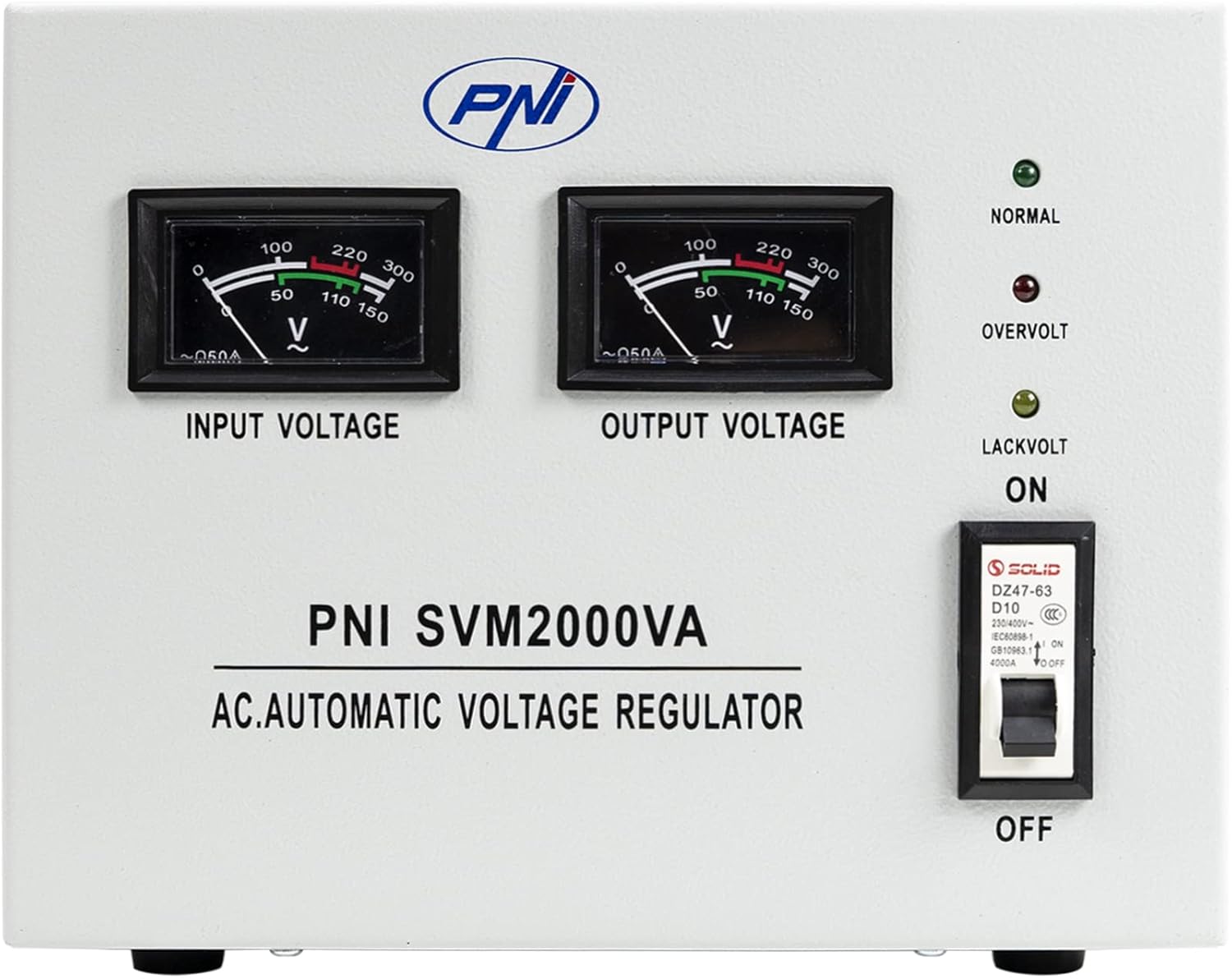
Figure 2.1: Front view of the PNI SVM2000VA Voltage Stabilizer, showing input and output voltage meters and control switches.

Figure 2.2: Angled view of the PNI SVM2000VA, highlighting the ventilation slots on the side for heat dissipation.

Figure 2.3: Rear view of the PNI SVM2000VA, showing the input and dual output terminals for connecting devices.
Key Features:
- Single-phase servomotor voltage stabilization.
- High capacity and efficiency with no waveform distortion.
- Automatic voltage adjustment for stable output.
- Integrated ventilation for effective heat dissipation.
- Built-in circuit breaker for overload and short circuit protection.
- Additional protections: start delay, mechanical error, overcurrent, and overtemperature.
3. Setup Instructions
Before connecting the stabilizer, ensure the power switch is in the OFF position. Place the unit on a stable, flat surface with adequate ventilation around the side vents.
Connecting Your Devices:
- Input Connection: Connect the main power supply to the "INPUT" terminals (L for Live, N for Neutral) on the rear panel. Ensure proper grounding using the dedicated ground terminal.
- Output Connection: Connect your electronic devices to the "OUTPUT" terminals. The unit provides two 230V output sets (L for Live, N for Neutral). Ensure the total power consumption of connected devices does not exceed the stabilizer's rated capacity (1600W).
- Secure Connections: Verify all connections are secure to prevent loose wiring and potential hazards. The 3-strip connections on the rear panel have undergone multiple tests to ensure safe usage.
Video 3.1: Demonstration of the PNI SVM2000VA Voltage Stabilizer's features, including its input/output connections and operational indicators.
4. Operating Instructions
Once all connections are made, you can begin operating the voltage stabilizer.
Powering On:
- Ensure all connected devices are turned off before powering on the stabilizer.
- Flip the main power switch on the front panel to the "ON" position.
- The stabilizer will undergo a brief start-up delay. Observe the input and output voltage meters to confirm stable operation.
Indicators and Meters:
- Input Voltage Meter: Displays the incoming voltage from the mains.
- Output Voltage Meter: Displays the stabilized voltage supplied to your devices. This should ideally be close to 230V.
- NORMAL Indicator: Illuminates when the voltage is within the normal operating range.
- OVERVOLT Indicator: Illuminates if the output voltage exceeds safe limits.
- LACKVOLT Indicator: Illuminates if the output voltage drops below safe limits.
The servomotor mechanism will automatically adjust the output voltage to compensate for fluctuations in the input voltage, ensuring a consistent and safe power supply to your electronics.
5. Maintenance
Regular maintenance ensures the longevity and optimal performance of your PNI SVM2000VA voltage stabilizer.
- Cleaning: Periodically clean the exterior of the unit with a soft, dry cloth. Do not use liquid cleaners or solvents.
- Ventilation: Ensure the ventilation openings on both sides of the unit are clear of dust and obstructions. These vents are crucial for effectively dispersing heat generated during operation. Blocked vents can lead to overheating and reduced performance.
- Inspection: Regularly inspect power cords and connections for any signs of damage or wear. Replace any damaged components immediately.
- Storage: If storing the unit for an extended period, ensure it is kept in a cool, dry place away from direct sunlight and extreme temperatures.
6. Troubleshooting
This section provides solutions to common issues you might encounter with your voltage stabilizer.
| Problem | Possible Cause | Solution |
|---|---|---|
| No power/Unit not turning on | Power cord not connected; Main switch off; Circuit breaker tripped. | Check power cord connection; Turn main switch ON; Reset the built-in circuit breaker. |
| Output voltage is unstable | Extreme input voltage fluctuations; Overload. | This is normal during severe fluctuations, the stabilizer is working. Reduce connected load if consistently unstable. |
| OVERVOLT or LACKVOLT indicator is on | Input voltage outside operating range; Internal fault. | Disconnect devices and turn off the stabilizer. Wait for mains voltage to normalize. If issue persists, contact support. |
| Unit is overheating | Blocked ventilation; Overload. | Ensure vents are clear; Reduce connected load. |
If the problem persists after attempting these solutions, please contact PNI customer support.
7. Specifications
| Feature | Detail |
|---|---|
| Model Name | SVM2000VA |
| Wattage | 1600 watts |
| Power Source | Vehicle DC Socket (Note: This seems to be a misclassification in the source data, as the product is a 230V AC stabilizer. Users should refer to the product's actual input voltage range.) |
| Recommended Uses | Vehicles, Camping and RVs, Emergency Power Supply, Devices requiring stable voltage |
| Brand | PNI |
| Manufacturer | Onlineshop SRL |
| Item Weight | 16.63 pounds (approx. 7.54 kg) |
| Product Dimensions | 10.55 x 9.41 x 8.07 inches (approx. 26.8 x 23.9 x 20.5 cm) |
| Input Voltage Range | 170Vac-260Vac |
| Output Voltage | 230V±3% |
| Overvoltage Protection | 250V±5V |
| Undervoltage Protection | 183V±5V |
| Shortcircuit Protection | Fuse |
| Max Current | 7.2A |
| Working Temperature | -5°C ~ +45°C |
8. Safety Information
Please read and understand all safety precautions before operating the PNI SVM2000VA Voltage Stabilizer.
- Do not open the casing of the stabilizer. There are no user-serviceable parts inside. Refer all servicing to qualified personnel.
- Ensure the unit is properly grounded to prevent electrical shock.
- Do not expose the unit to water, moisture, or extreme temperatures.
- Avoid placing the unit in direct sunlight or near heat sources.
- Ensure adequate ventilation around the unit to prevent overheating.
- Do not overload the stabilizer beyond its rated capacity. This can cause damage to the unit and connected appliances.
- Keep out of reach of children.
9. Warranty and Support
For warranty information, technical support, or service inquiries, please contact the manufacturer, Onlineshop SRL, or your local distributor. Refer to your purchase documentation for specific warranty terms and conditions.
Manufacturer Contact: comenzi@pni.ro