
1. Introduction
This instruction manual provides detailed guidance for the assembly, installation, and maintenance of your Samsung VG-SESB11K/XC Studio Stand. This stand is designed to provide a freestanding display solution for compatible Samsung The Frame televisions, offering an easel-like aesthetic. Please read this manual thoroughly before proceeding with installation to ensure correct setup and safe operation.
2. Safety Information
Observe the following safety precautions to prevent injury or damage to your product and property:
- Weight Limit: Ensure your television's weight and size are within the stand's specified limits. This stand is compatible with televisions up to 50 inches.
- Stable Surface: Always place the assembled stand on a flat, stable, and level surface to prevent tipping.
- Assembly: Follow all assembly steps precisely. Do not skip steps or use unauthorized parts.
- Children and Pets: Keep children and pets away from the stand during assembly. Do not allow them to climb on or play with the stand or attached television.
- Cable Management: Secure all cables to prevent tripping hazards and accidental dislodgement of the television.
- Moving the Stand: When moving the stand with a television attached, always do so with assistance and lift carefully to avoid strain or damage.
3. Package Contents
Verify that all components are present before beginning assembly. If any parts are missing or damaged, contact Samsung customer support.
- Studio Stand Legs (3 pieces)
- Central Support Column
- Mounting Plate for Television
- Assembly Hardware (screws, washers, etc.)
- Instruction Manual

Figure 3.1: Fully assembled Samsung VG-SESB11K/XC Studio Stand.
4. Setup and Installation
Tools required: Phillips head screwdriver.
- Assemble the Base: Attach the three stand legs to the central support column. Ensure all connections are secure and tightened according to the included hardware instructions.
- Attach Mounting Plate: Secure the television mounting plate to the top of the central support column. Verify that it is oriented correctly for your television model.
- Prepare Television: Carefully place your compatible Samsung The Frame television face down on a soft, clean surface. Attach the appropriate mounting brackets (usually provided with the TV or stand) to the back of the television using the specified screws.
- Mount Television: With assistance, carefully lift the television and align the mounting brackets on the TV with the mounting plate on the stand. Secure the television to the stand using the provided screws and hardware. Ensure the television is firmly attached and stable.
- Cable Management: Route all necessary cables (power, HDMI, One Connect cable for The Frame TVs) through the designated cable management channel within the central support column. This helps maintain a clean appearance and prevents cable damage.
- Final Placement: Carefully move the assembled stand and television to its desired location. Ensure the floor is level and the stand is stable.
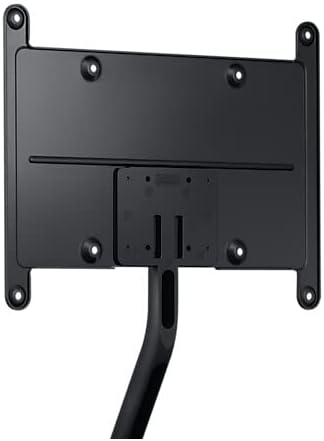
Figure 4.1: Detail of the mounting plate for television attachment.

Figure 4.2: Frontal view of the mounting plate, illustrating attachment points.
5. Operating Instructions
The Samsung VG-SESB11K/XC Studio Stand is a passive support structure. Its primary function is to securely hold your television in a freestanding position. Once assembled and the television is mounted, no further "operation" is required beyond ensuring stability and proper cable management.
- Placement: Position the stand in a location where it will not be easily bumped or disturbed.
- Cable Routing: Regularly check that cables are neatly routed through the central column and are not pinched or strained.
- Stability Check: Periodically verify the stability of the stand and the security of the television attachment.
6. Maintenance
Regular maintenance helps prolong the life and appearance of your studio stand.
- Cleaning: Wipe the stand with a soft, dry cloth. For stubborn marks, a slightly damp cloth with mild soap can be used, followed by drying. Avoid abrasive cleaners or solvents.
- Hardware Check: Periodically inspect all screws and connections to ensure they remain tight. Retighten if necessary.
- Environmental Conditions: Avoid exposing the stand to extreme temperatures, high humidity, or direct sunlight for prolonged periods, as this may affect the material.
7. Troubleshooting
If you encounter issues with your Samsung VG-SESB11K/XC Studio Stand, refer to the following common solutions:
- Stand is Unstable:
- Ensure all leg connections and the central column are securely tightened.
- Verify the stand is placed on a completely flat and level surface.
- Confirm the television is properly mounted and centered.
- Missing Parts:
- Carefully check all packaging materials.
- If parts are genuinely missing, contact Samsung customer support with your product model and purchase information.
- Television Does Not Fit:
- Confirm your television's VESA mounting pattern and screen size are compatible with the stand. This stand is designed for televisions up to 50 inches.
- Ensure you are using the correct screws and spacers for your specific television model.
8. Specifications
| Brand | Samsung |
| Model Number | VG-SESB11K (Part Number), 716865 (Item Model Number) |
| Compatible Devices | Televisions (specifically Samsung The Frame TVs) |
| Maximum Screen Size | 50 Inches |
| Material | Aluminum |
| Mounting Type | Floor Stand (also listed as Ceiling Mount in some specifications, but primarily functions as a floor stand) |
| Movement Type | Tilt |
| Product Dimensions | 99.97 x 67.57 x 103.15 cm; 4.7 kg (approximate assembled dimensions) |
| Model Year | 2022 |
9. Warranty and Support
For warranty information, technical support, or to inquire about replacement parts, please contact Samsung customer service. Refer to your product's packaging or the official Samsung website for the most current contact details and warranty terms applicable to your region.
Online Support: www.samsung.com/support