
ENGINDOT X-1
ENGiNDOT Tire Inflator Portable Air Compressor User Manual
Model: X-1
Introduction
Thank you for choosing the ENGiNDOT Tire Inflator Portable Air Compressor. This compact and versatile device is designed for convenient and accurate inflation of various items, including car tires, bicycle tires, balls, and other inflatables. Featuring a powerful 150 PSI maximum pressure, an intuitive LED screen, pressure monitoring, and an auto-stop function, it ensures efficient and safe operation. This manual provides essential information for proper setup, operation, maintenance, and troubleshooting to ensure optimal performance and longevity of your device.

Image: The ENGiNDOT Tire Inflator Portable Air Compressor, showcasing its compact design and included accessories like the air hose and charging cables.
Package Contents
Please verify that all items are present in your package:
- 1 x ENGiNDOT Tire Inflator (Model X-1)
- 1 x Air Hose
- 1 x Micro USB Charging Cable
- 1 x DC 12V Car Charger Cable
- 1 x Backup Fuse
- 1 x Carrying Pouch
- 3 x Converters (for Balloon/Ball/Valve)
- 1 x User Manual (this document)

Image: A visual representation of all items included in the product package, such as the inflator, various nozzles, and cables.
Product Overview
Familiarize yourself with the components and controls of your ENGiNDOT Tire Inflator:

Image: A detailed diagram of the ENGiNDOT Tire Inflator, highlighting key parts such as the LCD display, control buttons, USB ports, and air hose interface.
- Rubber Handle: For comfortable grip.
- LCD Display: Shows current pressure, target pressure, and battery level.
- Unit Switch Button: Toggles between PSI, BAR, KPA, Kg/cm².
- Power Switch Button: Turns the device on/off and starts/stops inflation.
- LED Light: Provides illumination for night use.
- Air Hose Interface: Connection point for the air hose.
- USB Input/Output Ports: For charging the device and using it as a power bank.
- 12V DC Port: For connecting to a car's 12V charging socket.
Setup
Initial Charging
Before first use, fully charge the tire inflator. It can be charged via the included Micro USB cable (using a standard USB power adapter, not included) or the 12V DC car charger cable.
- Connect the Micro USB charging cable to the inflator's USB input port and to a USB power source.
- Alternatively, connect the 12V DC car charger cable to the inflator's 12V DC port and to your vehicle's 12V socket.
- The LCD display will indicate charging status. Charge until the battery icon shows full.
Attaching the Air Hose
Screw the air hose firmly onto the air hose interface of the inflator.
Operation
Powering On/Off
Press and hold the Power Switch button to turn the inflator on or off.
Setting Pressure Units
With the device on, press the Unit Switch button to cycle through available pressure units: PSI, BAR, KPA, and Kg/cm².
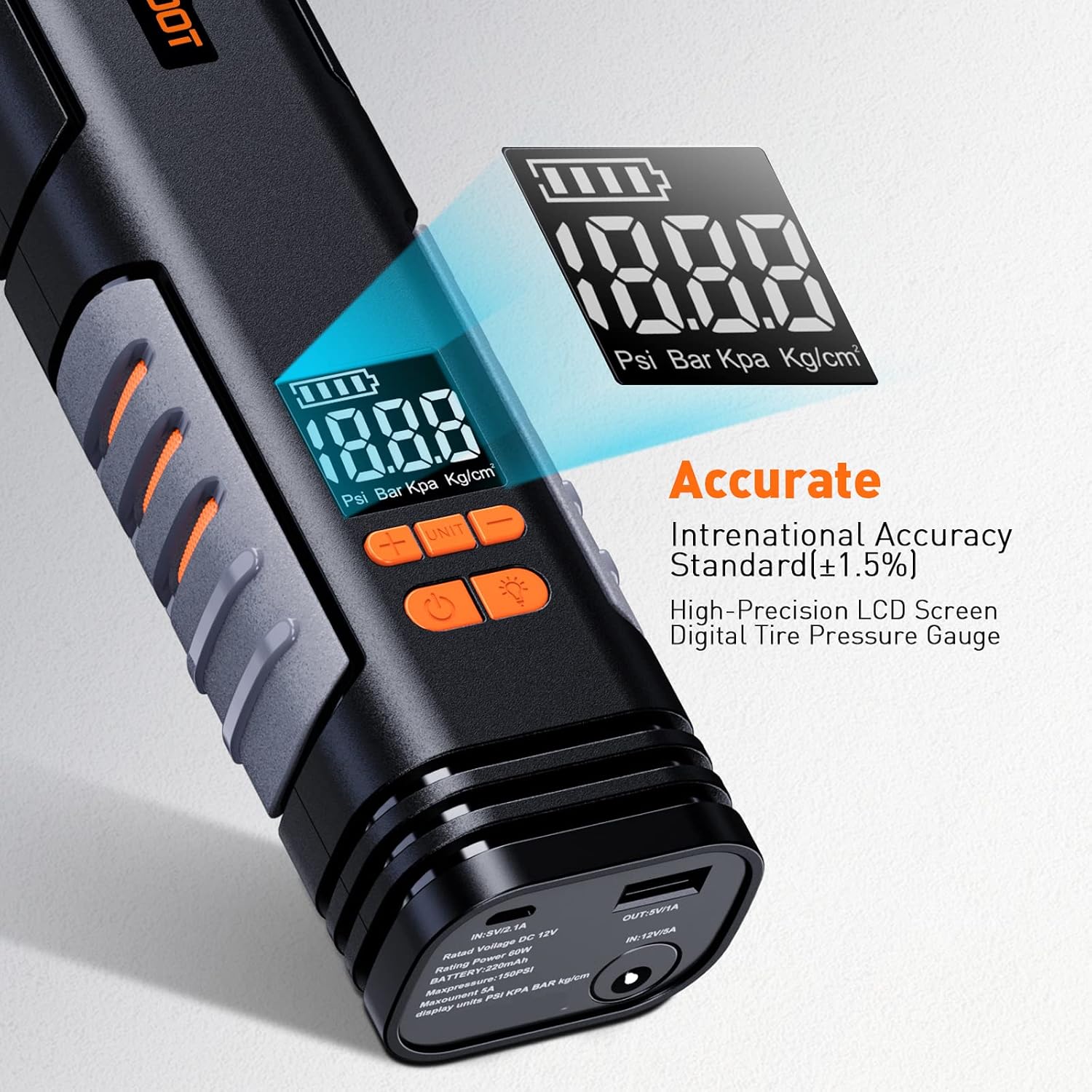
Image: A close-up view of the inflator's LCD screen, showing the digital pressure gauge and unit selection options.
Setting Target Pressure
Use the '+' and '-' buttons to adjust the desired target pressure. The display will show the preset value.
Inflating Items
- Connect the air hose to the item you wish to inflate. Use the appropriate converter nozzle if necessary.
- Ensure the connection is secure to prevent air leakage.
- Press the Power Switch button to begin inflation. The device will display the real-time pressure.
- The inflator will automatically stop once the preset target pressure is reached.

Image: The ENGiNDOT Tire Inflator connected to a car tire, demonstrating its use for vehicle inflation.
Inflation Speed Examples:
- Car Tire (standard 185/65/R15): Approximately 8 minutes (0-35PSI) or 4 minutes (25-35PSI).
- Bicycle Tire: Approximately 2 minutes.
- Basketball: Approximately 0.5 minutes.
- Swimming Ring: Approximately 0.5 minutes.
Note: This inflator is not suitable for tires requiring pressure over 40 PSI, such as those on trucks or vans.

Image: A visual guide illustrating the approximate inflation times for a basketball, swimming ring, car tire, and bicycle tire.
Using the LED Light
The built-in LED light has two modes: constant on and flashing. Press the light button to cycle through these modes. This feature is useful for illumination in low-light conditions or as a signal light.
Using as a Power Bank
The inflator can also serve as a power bank to charge mobile phones and other devices. Connect your device's charging cable to the USB output port on the inflator.

Image: The ENGiNDOT Tire Inflator connected to a smartphone via a USB cable, demonstrating its power bank functionality.
Maintenance
Cleaning
Wipe the exterior of the inflator with a soft, damp cloth. Do not use harsh chemicals or abrasive cleaners. Ensure the device is dry before storage.
Storage
Store the inflator in a cool, dry place, away from direct sunlight and extreme temperatures. Use the provided carrying pouch for protection and organization of accessories.
Battery Care
To prolong battery life, charge the device fully at least once every three months, even if not in regular use. Avoid completely draining the battery before recharging.
Troubleshooting
| Problem | Possible Cause | Solution |
|---|---|---|
| Device does not turn on. | Low or no battery charge. | Charge the device fully using either the Micro USB or 12V DC car charger. |
| Inflation is slow or ineffective. | Air hose not securely connected; incorrect nozzle used; item requires higher pressure than device supports. | Ensure air hose is tightly screwed on. Use the correct nozzle for the item. Confirm the item's required pressure is within the device's 150 PSI limit (not for tires over 40 PSI). |
| Device stops before reaching target pressure. | Battery is low; device overheated. | Recharge the battery. Allow the device to cool down if it feels hot. The device has overheating protection. |
| LED light not working. | Device is off; malfunction. | Ensure the device is powered on. If still not working, contact customer support. |
Specifications
| Feature | Detail |
|---|---|
| Brand | ENGINDOT |
| Model Name | ENGiNDOT X1 |
| Part Number | X-1 |
| Max Pressure | 150 PSI |
| Air Flow Capacity | 15 LPM |
| Power Source | Battery (2200mAh/27.7Wh Lithium-Ion) & Corded Powered (12V DC) |
| Voltage | 12 Volts |
| Wattage | 60 watts |
| Noise Level | 90 dB |
| Product Dimensions | 9.5 x 2.5 x 1.7 inches |
| Item Weight | 1.62 pounds (26 Ounces) |
| Material | ABS+TPE |
| Color | Black |
| Cord Length (12V DC) | 9.8 Feet |
| Special Features | Pressure Detection, Auto-Stop, LED Light, Power Bank Function |

Image: An internal view of the inflator, highlighting its advanced safety system with heat dissipation grilles for overheating protection.
Warranty and Support
Warranty Information
ENGiNDOT products are designed and manufactured to the highest quality standards. For specific warranty details regarding your Tire Inflator Portable Air Compressor, please refer to the warranty card included in your product packaging or visit the official ENGiNDOT website. Keep your purchase receipt as proof of purchase for warranty claims.
Customer Support
If you encounter any issues or have questions about your ENGiNDOT Tire Inflator, please contact our customer support team. Contact information can typically be found on the product packaging, the official ENGiNDOT website, or through your retailer's support channels.
Related documentsX-1


Ask a question about this manual
Ask about setup, troubleshooting, compatibility, parts, safety, or missing instructions. Manuals+ will review the question and use this page’s manual context to help answer it.