
1. Introduction
The PQWT GT500 Series Groundwater Detector is an advanced geophysical instrument designed for efficient and accurate underground water detection. Utilizing natural electric field exploration, this device helps identify groundwater sources for well drilling and hydrological surveys. It features automatic mapping, data storage, and a user-friendly interface to streamline the detection process.
This manual provides essential information for the proper setup, operation, maintenance, and troubleshooting of your PQWT GT500 series detector. Please read it thoroughly before using the device to ensure optimal performance and longevity.
2. Product Overview
The PQWT GT500 series detector is a portable, high-precision instrument. It is designed to collect and analyze electric field components of different frequencies to map underground geological structures and identify water-bearing formations.
2.1 Key Features
- Automatic Mapping: The device automatically generates curve maps, profile maps, and 3D renderings of underground structures.
- Depth Capabilities: Detects targets at depths of 100m, 150m, 300m, or 500m, depending on the specific model variant.
- Efficient Data Collection: Collects 18 points of data with a single wiring setup, enabling fast detection.
- Data Storage: Capable of storing data for over 999 survey lines, facilitating comprehensive reporting.
- Supplementary Measurement Function: Allows for extended geological structure analysis by performing additional measurements.
2.2 Components
The PQWT GT500 series typically includes the following components:

Figure 1: Included components of the PQWT GT500 series groundwater detector.
- Host Machine: The main detection unit with a 10.1-inch industrial-level high-definition display.
- Tool Bag: For carrying accessories.
- Electrode Rods: Standard 22 pieces for ground contact.
- Batteries: Rechargeable lithium-ion batteries.
- Cable: 2.5m point pitch, 10m line pitch, 54.7m total length.
- Charging Stand: For charging multiple batteries simultaneously.
- Charger (AC): For wall outlets.
- Charger (Car): For vehicle charging.
- Data Cable: For connecting to a computer.
- Strap: For carrying the host machine.
3. Setup
Proper setup is crucial for accurate readings. Follow these steps to prepare your PQWT GT500 for operation:
3.1 Unpacking and Inspection
- Carefully unpack all components from the carrying case.
- Inspect each item for any signs of damage during transit. Report any damage to your supplier immediately.
- Ensure all listed components are present.
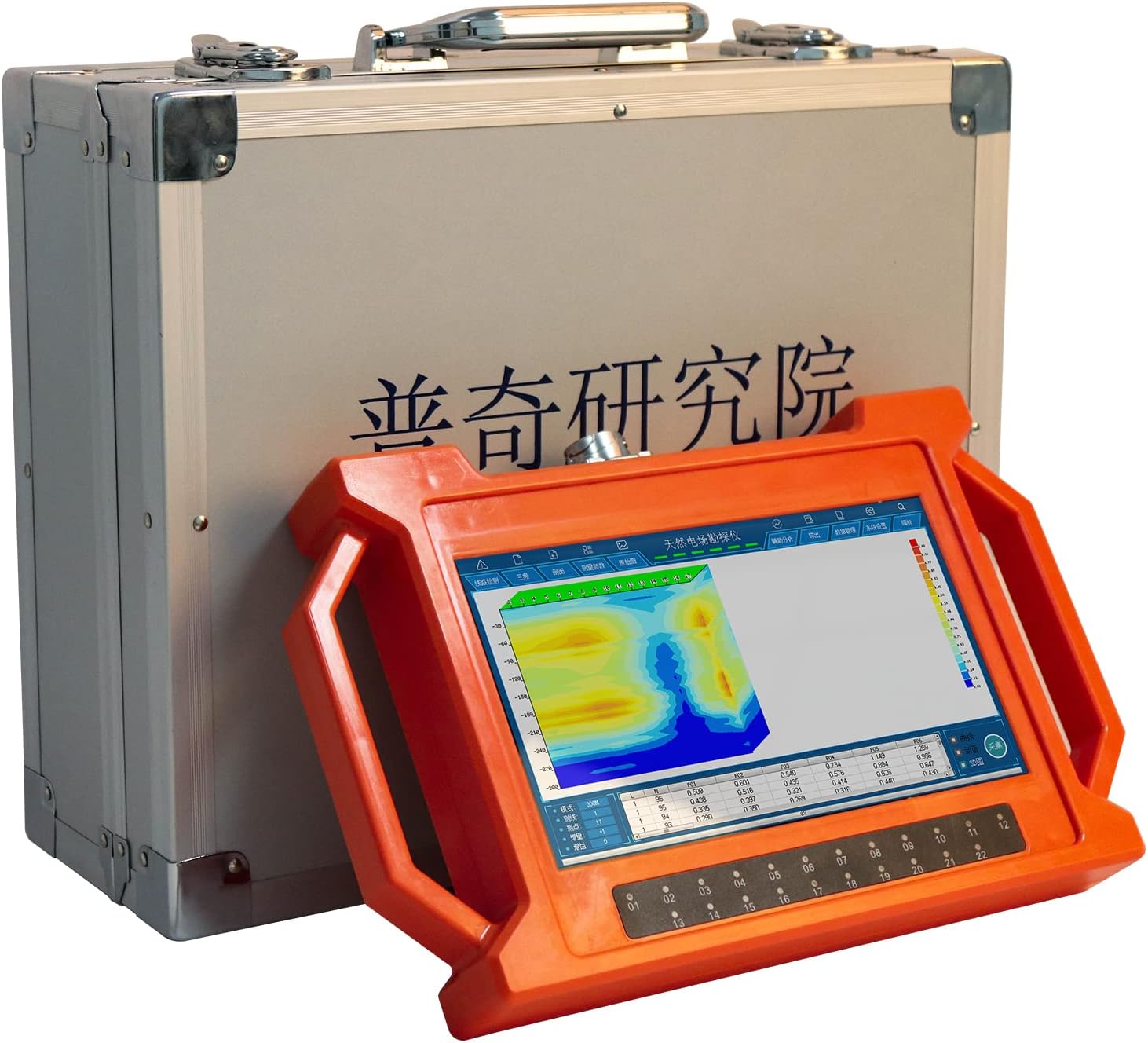
Figure 2: The PQWT GT500 host machine and its carrying case.
3.2 Battery Charging
- Insert the lithium-ion batteries into the charging stand.
- Connect the AC charger to the charging stand and a power outlet.
- Allow batteries to fully charge before first use. The charging indicator on the stand will show charging status.
3.3 Connecting Electrodes and Cables
- Lay out the main cable in the desired survey line.
- Connect the electrode rods to the designated points along the cable. Ensure good electrical contact with the ground.
- Connect the main cable to the host machine's input port.
4. Operating Instructions
This section outlines the general procedure for conducting a groundwater survey with the PQWT GT500.
4.1 Field Deployment
- Select a suitable survey area, ensuring minimal electromagnetic interference.
- Position the host machine in a stable location.
- Deploy the electrodes and cables according to your survey design. Ensure electrodes are firmly inserted into the ground for optimal contact.

Figure 3: A user conducting a field survey with the PQWT GT500.
4.2 Powering On and Initial Settings
- Press and hold the power button on the host machine to turn it on.
- Navigate through the initial setup menu to select language, date, and time.
- Choose the desired detection depth (e.g., 150m, 300m, 500m) based on your model and survey requirements.
4.3 Data Collection
- From the main menu, select the 'Start Survey' option.
- The device will guide you through the data collection process, typically collecting 18 points of data per survey line.
- Monitor the display for real-time readings and progress.
- Once data collection is complete, the device will automatically begin processing and mapping.

Figure 4: Close-up of the PQWT GT500 display during data collection.
4.4 Supplementary Measurement
To analyze the extension of geological structures, use the supplementary measurement function. This involves taking additional readings in front of or behind the initial survey line to gather more comprehensive data.
5. Data Analysis
The PQWT GT500 automatically processes collected data into visual maps for easier interpretation.
5.1 Interpreting Maps
- Curve Maps: Display variations in electrical resistivity along the survey line.
- Profile Maps: Provide a cross-sectional view of the underground structure, highlighting potential water zones.
- 3D Renderings: Offer a comprehensive three-dimensional visualization of the subsurface, aiding in the identification of water-bearing layers.
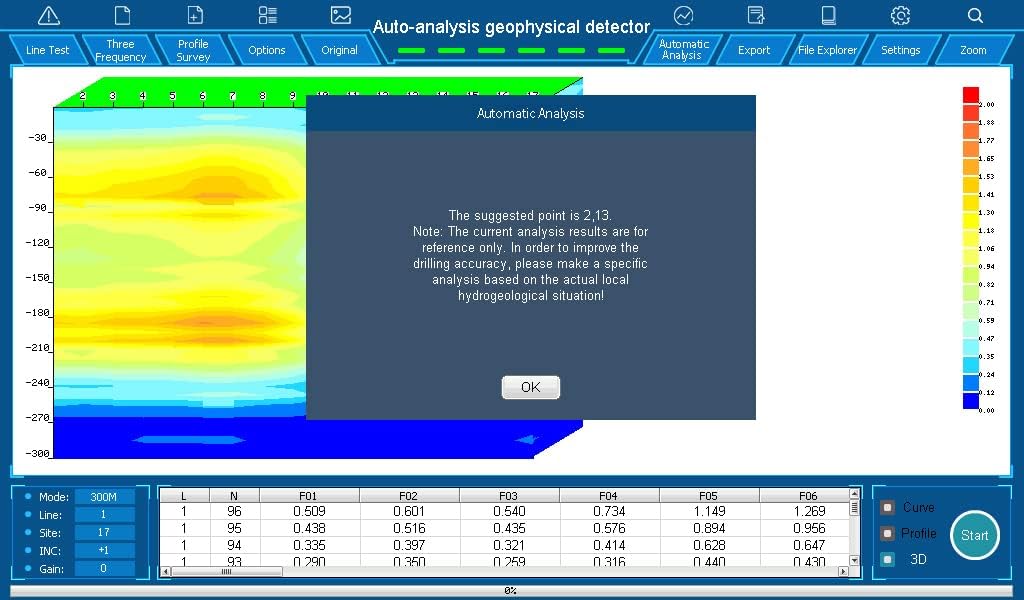
Figure 5: Automatic analysis screen displaying a suggested drilling point.
5.2 Automatic Analysis Results
The device provides an automatic analysis with a suggested point for drilling. It is important to note that these results are for reference only. For improved drilling accuracy, always consider the specific local hydrogeological situation and consult with geological experts.
6. Maintenance
Regular maintenance ensures the longevity and accuracy of your PQWT GT500 detector.
6.1 Cleaning
- After each use, wipe the host machine and cables with a soft, dry cloth to remove dust and dirt.
- Clean electrode rods thoroughly to remove any soil or debris that could affect conductivity.
- Avoid using harsh chemicals or abrasive materials for cleaning.
6.2 Battery Care
- Always use the provided charger and charging stand.
- Do not overcharge or completely discharge the batteries.
- Store batteries in a cool, dry place when not in use.
6.3 Storage
- Store the device and all accessories in the original carrying case to protect them from physical damage and environmental factors.
- Keep the device in a dry environment, away from direct sunlight and extreme temperatures.
7. Troubleshooting
This section addresses common issues you might encounter with your PQWT GT500 detector.
7.1 Device Not Powering On
- Check Battery Level: Ensure batteries are fully charged.
- Battery Insertion: Verify that batteries are correctly inserted into the host machine.
- Power Button: Ensure the power button is pressed and held for a few seconds.
7.2 Inaccurate Readings or No Data
- Electrode Contact: Ensure all electrode rods have good, firm contact with the ground. Moisten the ground if it is too dry.
- Cable Connections: Verify all cables are securely connected to the host machine and electrodes.
- Environmental Interference: Operate away from strong electromagnetic fields (e.g., power lines, large metal structures).
- Survey Parameters: Double-check that the selected depth and other survey parameters match your requirements.
7.3 Display Issues
- Brightness: Adjust screen brightness settings.
- Restart Device: Power off and restart the device.
If problems persist after attempting these solutions, please contact customer support.
8. Specifications
The following table details the technical specifications for the PQWT GT500 series groundwater detector:

Figure 6: Main Parameter Description for PQWT GT Series.
| Feature | Specification |
|---|---|
| Brand | PQWT |
| Model Number | GT500A |
| Optional Depth | 150m / 300m / 500m |
| Measuring Time | 8-10 minutes (for 500m depth) |
| Maximum Number of Channels | 18 channels |
| Minimum Resolution | 0.001mV |
| Points Selection | 1-18 points optional |
| Controller | 32-bit high-speed CPU |
| A/D Conversion | 16 bits, 1Msps |
| Working Temperature | -20°C ~ 50°C |
| Power Consumption | 9W |
| Measurement Data Unit | Electric field components of different frequencies of magnetotelluric field Vs (mV) |
| Display Screen Unit | 10.1 inch industrial-level high-definition display (resolution 1024*600) |
| Standby Time | 8 hours |
| Cable | 2.5m point pitch, 10m line pitch, 54.7m in total length |
| Electrode | Standard 22 pieces |
| Host Weight | 1.95 kg |
| Item Weight | 18.5 Kilograms (total package) / 40.7 pounds |
| Product Dimensions | 18.11 x 7.48 x 16.14 inches |
| Power Source | AC |
| Voltage | 3.7 Volts (DC) |
| Measurement Accuracy | 95% |
| Usage | Outdoor Use |
| Battery Cell Type | Lithium Ion |
9. Warranty and Support
9.1 Warranty Information
The PQWT GT500 series detector comes with the following warranty:
- Host Machine: Guaranteed for two years from the date of purchase.
- Cable: Guaranteed for one year from the date of purchase.
- Charger and Charging Stand: Guaranteed for one month from the date of purchase.
- Other Accessories: Battery, data cable, and other accessories are not covered under warranty.
This warranty covers manufacturing defects under normal use. It does not cover damage caused by misuse, accidents, unauthorized modifications, or improper maintenance.
9.2 Customer Support
For technical assistance, warranty claims, or any questions regarding your PQWT GT500 series groundwater detector, please contact your authorized dealer or the manufacturer directly. Please have your model number and purchase date available when contacting support.


