
1. Safety Information
Read all instructions carefully before using the microwave oven to prevent fire, electric shock, personal injury, or exposure to excessive microwave energy.
- Do not attempt to operate this oven with the door open or if the door is damaged.
- Do not place any metal objects, aluminum foil, or metal-trimmed dishes in the microwave.
- Ensure proper ventilation during operation.
- Always supervise children when they are using the microwave.
- Do not heat sealed containers, as they may explode.
- Clean the microwave regularly to prevent grease buildup, which can be a fire hazard.
2. Product Overview
The GASLAND OTR1902S microwave oven combines microwave cooking with an integrated ventilation system, designed for over-the-range installation. It offers a spacious interior and multiple cooking functions.
Key Features:
- Multi-Stage Precise Cooking: 1,000 watts with 11 variable power levels and 2-stage cooking capability.
- One-Touch Start: 9 convenient presets (popcorn, potato, veggies, pizza, snack menu, melt/soften, auto reheat, auto cook, auto defrost) and an 'Add 30 Seconds' function.
- Efficient Airflow & LED Lights: 2-speed, 400 CFM ventilation fan to remove cooking odors, operating under 62dB. Features 2-watt LED lighting for illuminating the stovetop.
- Large Capacity: 1.9 cu. ft. interior space with a removable rack for double cooking and a turntable with an on/off function for flexible cooking.
- 2-in-1 Sleek Design: Combines microwave and hood functions, saving counter space and providing kitchen ventilation.

Figure 2.1: The GASLAND OTR1902S microwave oven in a kitchen setting, installed above a stove.
3. Setup
This microwave oven is designed for over-the-range installation. Ensure you have the necessary tools and assistance for safe and proper mounting.
Dimensions:

Figure 3.1: Built-in dimensions for the GASLAND OTR1902S microwave oven. The unit measures approximately 15.28 inches deep, 29.92 inches wide, and 16.42 inches high.
- Product Dimensions: 15.28 x 29.92 x 16.42 inches
- Required Cabinet Width: 30 inches
- Minimum Cabinet Depth: 13 inches
Included Components:

Figure 3.2: The microwave oven comes with a removable rack, a glass turntable, turntable support, and two grease filters.
- Removable Rack
- Glass Turntable
- Turntable Support
- Grease Filters (x2)
4. Operating Instructions
The control panel provides various options for cooking and convenience. Familiarize yourself with the buttons and their functions.
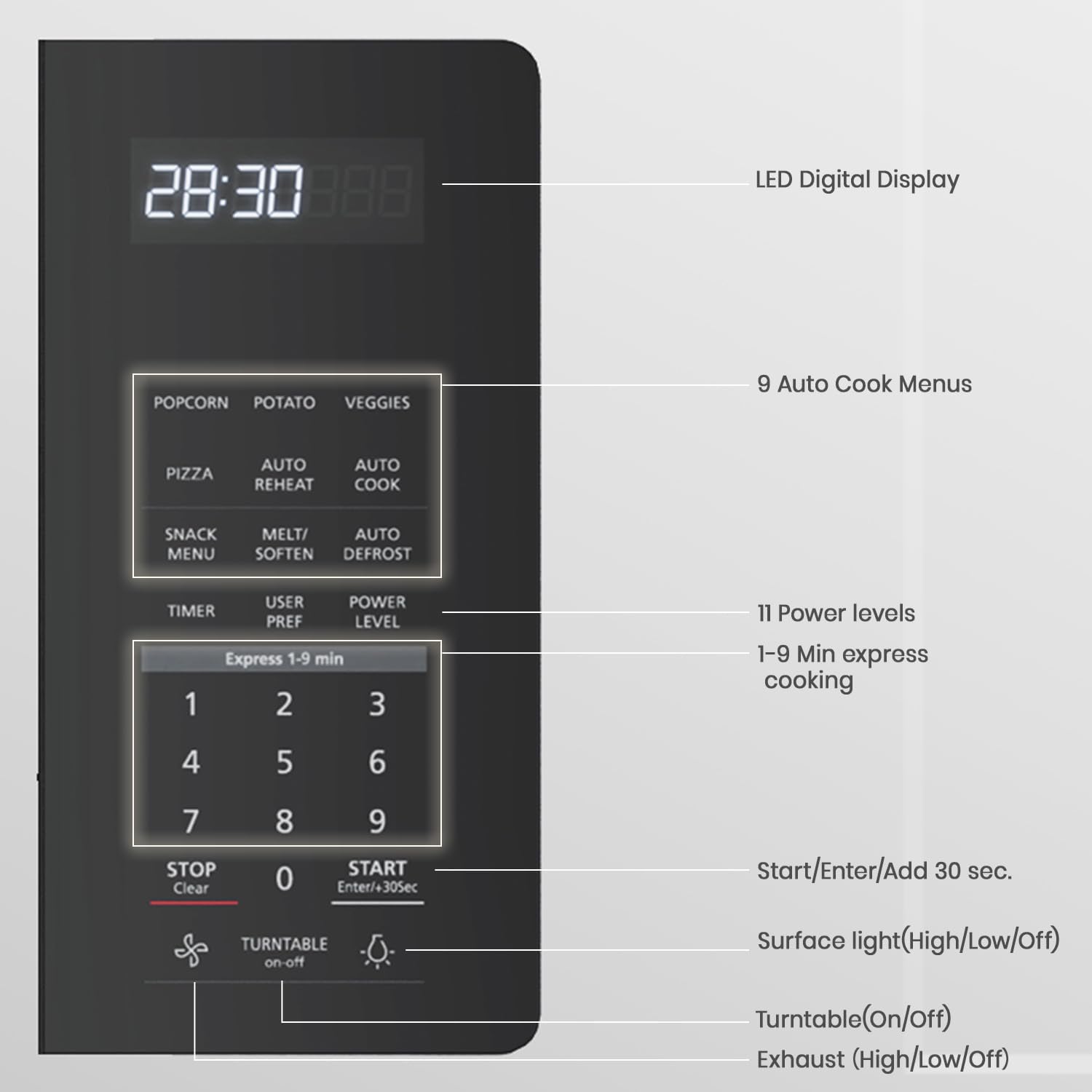
Figure 4.1: Detailed view of the control panel, highlighting the LED Digital Display, 9 Auto Cook Menus, 11 Power Levels, Express Cook, Start/Enter/+30 Sec, Surface Light, Turntable On/Off, and Exhaust Fan controls.
Control Panel Functions:
- Convenience Cooking: Popcorn, Potato, Veggies, Pizza, Snack Menu, Melt/Soften, Auto Reheat, Auto Cook, Auto Defrost. Press the desired button for pre-programmed cooking.
- Express Cook (1-9 min): Press any number from 1 to 9 for instant cooking for that many minutes at 100% power.
- Power Level: Adjusts microwave power from 1 (lowest) to 11 (highest). Press 'Power Level' then the desired number.
- Timer On/Off: Use as a kitchen timer.
- Add 30 Sec: Adds 30 seconds to the current cooking time or starts cooking for 30 seconds at 100% power.
- Turntable On/Off: Activates or deactivates the turntable rotation.
- Surface Light (High/Low/Off): Controls the light illuminating the stovetop below the microwave.
- Vent Fan (High/Low/Off): Controls the 2-speed exhaust fan.
- Set Clock: Sets the time on the LED display.
- Cancel/Off: Stops cooking or clears settings. Hold for 3 seconds to activate/deactivate Child Lock.
- Start/Pause: Starts or pauses the cooking cycle.
Using Power Levels:

Figure 4.2: The microwave offers 11 power levels, from Level 1 (100% power) for high-heat cooking like boiling, to Levels 10-11 (0-10% power) for low-heat tasks like softening butter.
One-Touch Cooking Presets:
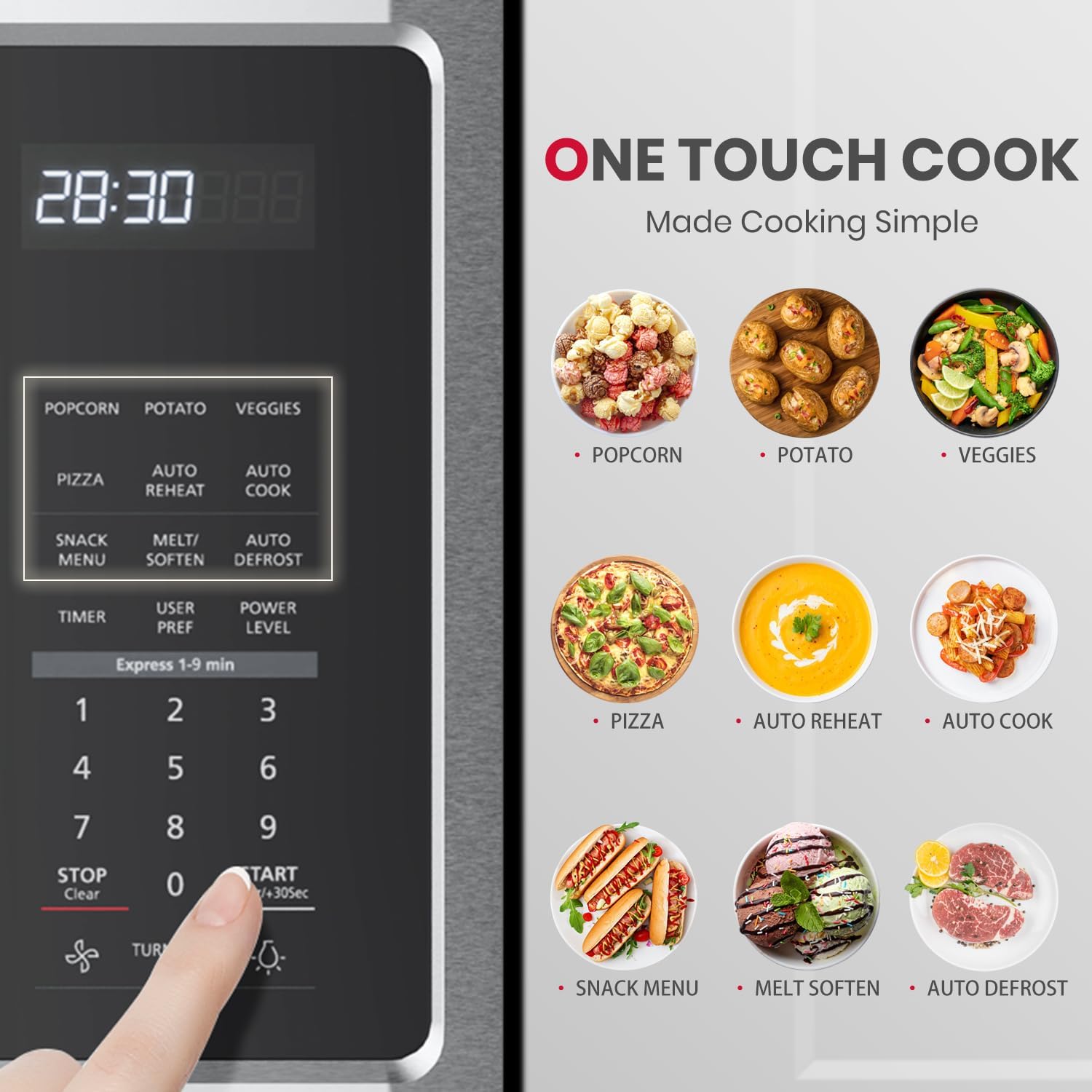
Figure 4.3: The control panel features dedicated buttons for Popcorn, Potato, Veggies, Pizza, Snack Menu, Melt/Soften, Auto Reheat, Auto Cook, and Auto Defrost for simplified cooking.
Ventilation System:

Figure 4.4: The 400 CFM two-speed venting system effectively removes odors, vapors, and grease from your kitchen. Use the 'Vent Fan' button to select High, Low, or Off.
Stovetop Lighting:

Figure 4.5: The 2-watt LED surface light provides bright illumination for your cooktop. Use the 'Surface Light' button to toggle between High, Low, and Off settings.
How to Use the Microwave Oven OTR1603 OTR1902:
Video 4.1: This official seller video provides a detailed guide on how to use the GASLAND OTR1902S microwave oven, covering various functions and cooking modes.
5. Maintenance
Regular cleaning and maintenance will ensure the longevity and optimal performance of your microwave oven.
Cleaning the Interior:

Figure 5.1: The microwave interior is designed for easy cleaning. Simply wipe the cavity with a damp cloth. The grease filters are also washable with hot water.
- Wipe the interior cavity with a soft, damp cloth and mild detergent after each use.
- For stubborn stains, place a bowl of water with lemon slices inside and microwave for 2-3 minutes. The steam will loosen the grime for easier wiping.
Cleaning the Turntable:
- The glass turntable and its support ring are removable and can be washed by hand or in the dishwasher.
Cleaning Grease Filters:
- The grease filters located underneath the microwave should be removed and cleaned regularly (monthly or as needed) with hot water and detergent.
6. Troubleshooting
If you encounter any issues with your microwave oven, refer to the following common troubleshooting tips:
| Problem | Possible Cause | Solution |
|---|---|---|
| Microwave does not start | Door not closed properly; Power cord unplugged; Blown fuse/tripped circuit breaker. | Ensure door is securely closed; Check power connection; Reset circuit breaker or replace fuse. |
| Food not heating | Incorrect power level/cooking time; Metal objects inside. | Adjust power level and cooking time; Remove any metal items. |
| Excessive noise during operation | Turntable not seated correctly; Fan operating at high speed. | Ensure turntable is properly placed; Adjust vent fan speed if desired. |
| Light not working | Light bulb burned out. | Replace the light bulb (refer to service manual for instructions). |
7. Specifications
| Feature | Specification |
|---|---|
| Brand Name | GASLAND |
| Model Info | OTR1902S |
| Item Weight | 61.7 pounds (28.04 Kilograms) |
| Product Dimensions | 15.28 x 29.92 x 16.42 inches |
| Energy Use | 1000 Watts |
| Capacity | 1.9 Cubic Feet |
| Installation Type | Over-the-Range |
| Special Features | Child Safety Lock, Defrost, Express Cook, One Touch Cooking, Turntable |
| Oven Cooking Mode | Electric |
| Color | Silver |
| Voltage | 120 Volts |
| Material Type | Stainless Steel |
| Inner Material Type | Stainless Steel |
| Included Components | A removable rack, Turntable |
8. Warranty & Support
For warranty information, technical support, or service inquiries, please refer to the documentation included with your product or contact GASLAND customer support directly. Keep your purchase receipt for warranty claims.