
1. Introduction
The Gator Frameworks Elite Series rolling rack sidecar cabinet is designed for versatile storage and organization in various environments, from recording studios to home listening spaces. This manual provides essential information for the assembly, operation, and maintenance of your GFW-ELITESIDECAR-BLK unit.

Figure 1: Gator Frameworks Elite Sidecar Cabinet in Black Finish.
Video 1: Overview of the Elite Series Sidecar Cabinet. This video demonstrates the features and potential uses of the cabinet.
2. Safety Information
Please read and understand all safety instructions before assembling or using the cabinet. Failure to follow these instructions may result in injury or damage to the product.
- Always assemble the cabinet according to the instructions provided.
- Ensure the cabinet is stable and balanced before use.
- Do not overload the shelves or the slide-out tray. The slide-out tray supports up to 35 lbs (16 kg).
- Keep the cabinet away from heat sources.
- Do not place heavy objects on top of the cabinet that exceed its structural capacity.
- If using the removable wheels, ensure they are securely attached before moving the cabinet.
- Always supervise children when they are near the cabinet.
3. Product Features
The GFW-ELITESIDECAR-BLK cabinet offers several key features designed for functionality and convenience:
- Versatile Storage & Organization: Designed to hold turntables, vinyl records, phono preamps, mixers, and various accessories.
- Adjustable Rack Space: Configurable for 4U, 8U, or 12U of rack-mounted gear, suitable for preamps and effects processors.
- Soft-Close Slide-Out Tray: Features height adjustment and an underside grip, supporting up to 35 lbs (16 kg).
- Spacious Top Surface: Provides an ideal area for tabletop audio interfaces, small mixers, and other music production equipment.
- Cabinet Storage & Cable Management: Includes a soft-close door, adjustable shelves, and a rear cable passthrough cutout for tidy organization.

Figure 2: The soft-close slide-out tray, ideal for turntables or other equipment.

Figure 3: Rear cable passthrough cutout for organized cable management.
4. Setup and Assembly
Assembly of the Gator Frameworks Elite Sidecar Cabinet is required. Please follow the manufacturer's instructions carefully. It is recommended to lay out all parts and hardware before beginning assembly to ensure all components are present.
- Unpacking: Carefully unpack all components and verify against the parts list provided in the manufacturer's packaging.
- Tools Required: A drill may be necessary in addition to the tools listed in the manufacturer's instructions.
- Component Identification: Pay close attention to the labeling of parts and hardware. Some users have noted discrepancies in diagrams for hinge orientation and screw placement; refer to the physical components and adjust as needed for proper fit.
- Legs and Wheels: The cabinet includes metal legs with leveling feet. Optional removable wheels are also provided for mobility. Ensure chosen feet or wheels are securely attached.

Figure 4: Cabinet shown with optional caster wheels for mobility.

Figure 5: Cabinet shown with leveling feet for stability on uneven surfaces.
5. Operating Instructions
This section details how to utilize the various features of your sidecar cabinet.
5.1. Configuring Rack Space
The open compartment of the cabinet is designed to accommodate rack-mounted equipment. It can be configured for 4U, 8U, or 12U of rack space. Install your rack rails (not included) according to the desired height and secure your equipment. Ensure proper ventilation for all installed devices.
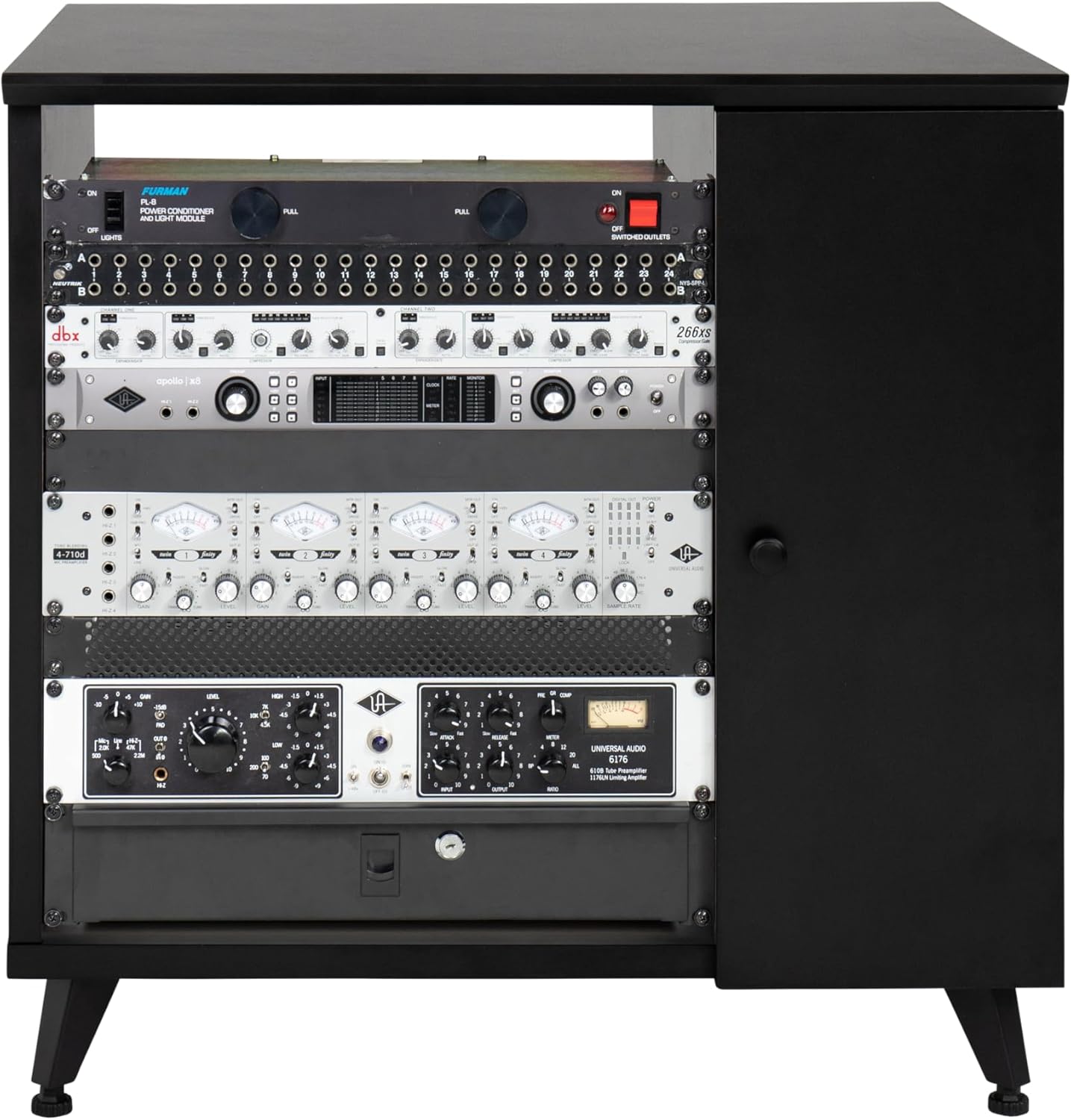
Figure 6: Example of rack-mounted equipment installed in the cabinet.
5.2. Using the Slide-Out Tray
The soft-close slide-out tray is suitable for turntables, small controllers, or other frequently accessed items. To use:
- Gently pull the tray forward using the underside grip until it extends fully.
- Place your equipment on the tray, ensuring it does not exceed the 35 lbs (16 kg) weight limit.
- To retract, push the tray back into the cabinet. The soft-close mechanism will engage for a smooth closure.
The tray's height can be adjusted during assembly to suit your specific needs.

Figure 7: The slide-out tray in its extended position, holding a turntable.
5.3. Utilizing Cabinet Storage
The enclosed cabinet section features a soft-close door and adjustable shelves. This area is ideal for storing vinyl records, accessories, or other items you wish to keep out of sight.
- Open the soft-close door to access the storage compartment.
- Adjust the shelves to your desired height by repositioning the shelf pins.
- Use the rear cable passthrough cutout to route cables from equipment stored inside the cabinet to external devices, maintaining a clean setup.

Figure 8: The cabinet storage area with the door open, revealing adjustable shelves.
6. Maintenance
To ensure the longevity and appearance of your Gator Frameworks Elite Sidecar Cabinet, follow these simple maintenance guidelines:
- Cleaning: Wipe the surfaces with a damp cloth. Avoid harsh chemicals or abrasive cleaners, which can damage the finish.
- Inspection: Periodically check all fasteners and connections to ensure they remain tight. Re-tighten if necessary.
- Weight Limits: Adhere to the specified weight limits for shelves and the slide-out tray to prevent structural damage.
7. Troubleshooting
This section addresses common issues that may arise during assembly or use.
7.1. Assembly Difficulties
- Missing or Mislabeled Parts: If you find parts are missing or incorrectly labeled, contact Gator Frameworks customer support immediately. Do not attempt to force parts that do not fit.
- Hinge Alignment: If the soft-close door hinges do not align correctly, double-check the orientation against the instructions. Some diagrams may require careful interpretation; ensure the hinges are installed to allow for proper door closure and adjustment.
- Pilot Holes: If pilot holes are absent or misaligned, use a drill with an appropriate bit size, exercising caution to avoid damaging the material.
7.2. Stability Issues
- Uneven Surface: Use the adjustable leveling feet to stabilize the cabinet on uneven floors. If using wheels, ensure all wheels are locked when stationary.
- Overloading: Ensure the cabinet is not overloaded, especially the slide-out tray, which has a weight limit of 35 lbs (16 kg). Distribute weight evenly.
8. Specifications
| Feature | Detail |
|---|---|
| Model Number | GFW-ELITESIDECAR-BLK |
| Product Dimensions (D x W x H) | 24"D x 30"W x 30"H |
| Item Weight | 49.1 Pounds |
| Material Type | Metal (legs), Wood (cabinet) |
| Finish Type | Powder Coated (legs), Black Finish (cabinet) |
| Number of Shelves | 1 (adjustable) |
| Slide-Out Tray Weight Limit | 35 Pounds (16 kg) |
| Special Feature | Customizable rack space (4U, 8U, 12U), Soft-close door/tray, Cable management |
| Included Components | Shelves, Legs (with leveling feet or optional wheels) |
| Required Assembly | Yes |
| Recommended Uses | Pro audio gear, Home hi-fi system |

Figure 9: Dimensional overview of the cabinet (Height: 30", Width: 24", Length: 30", Rackable Depth: 22").
9. Warranty and Support
Manufacturer Warranty: The Gator Frameworks Elite Furniture Series Sidecar Cabinet comes with a 3-year manufacturer's warranty.
For warranty claims, technical support, or inquiries regarding missing parts, please contact Gator Frameworks customer service directly. Refer to the contact information provided in your product packaging or visit the official Gator Frameworks website for assistance.
You can visit the Gator Frameworks Store for more product information and support resources.