
RORIOS AA-SY005
RORIOS Men's Analog Quartz Watch
User Manual
1. Product Overview
The RORIOS Men's Analog Quartz Watch is a versatile timepiece designed for daily wear, combining classic aesthetics with modern functionality. It features a durable silicone strap, a high-quality quartz movement, and a mineral crystal glass for scratch resistance and clear visibility.
Key features include:
- Multifunctional sub-dials supporting stopwatch and date calendar.
- Luminous hands for clear time visibility in low-light conditions.
- 3ATM daily water resistance, suitable for splashes and light rain.
- High-quality silicone band for comfort and durability.
- Premium mineral crystal glass for enhanced scratch resistance.

Figure 1: Front view of the RORIOS Men's Analog Quartz Watch with black dial and silicone strap.
2. Setup
2.1 Unboxing and Initial Inspection
Upon receiving your RORIOS watch, carefully open the exquisite gift leather box. Verify that the package includes:
- 1x RORIOS Watch
- 1x User Manual and Warranty Card
- 1x Exquisite Gift Watch Leather Box

Figure 2: The RORIOS watch presented in its elegant gift box.
2.2 Setting the Time and Date
To set the time and date on your RORIOS watch, follow these steps:
- Pull out the crown: Gently pull the crown (the knob on the side of the watch) to the first or second gear position.
- Set the date (First Gear): If your watch has a date function, pull the crown to the first gear. Turn the crown clockwise or counter-clockwise to adjust the date. Push the crown back in once the date is set.
- Set the time (Second Gear): Pull the crown to the second gear. Turn the crown to move the hour and minute hands to the correct time. Ensure you differentiate between AM and PM for the 24-hour indicator if present.
- Push the crown back in: Once the time is set, push the crown fully back into its original position to start the watch movement and ensure water resistance.

Figure 3: Diagram illustrating the watch crown positions for setting time and calendar, along with sub-dial functions (Minutes, Second, Hour Hand Dial, Calendar).
3. Operating Instructions
3.1 Using the Chronograph Function
Your RORIOS watch features a chronograph (stopwatch) function. To use it:
- Start/Stop: Press the top button (often labeled "Start/Stop Button" or similar) to begin timing. Press it again to stop the timer.
- Reset: Press the bottom button (often labeled "Reset") to reset the chronograph hands back to zero.
Refer to Figure 3 for the location of the Start/Stop and Reset buttons.
3.2 Luminous Function
The hands and hour markers on your RORIOS watch are designed with a luminous coating. This allows you to read the time clearly in dark environments.
The luminous material absorbs light during the day and emits a glow in the dark. For optimal luminescence, expose the watch to bright light (natural or artificial) for a period before entering a dark area.

Figure 4: The practical luminous function of the watch, showing hands and markers glowing in the dark after absorbing light.
3.3 Water Resistance
This RORIOS watch is 3ATM (30 meters) water resistant. This means it is suitable for daily use and can withstand splashes, rain, and hand washing. It is not suitable for showering, bathing, swimming, snorkeling, or diving.
Important: Do not operate the crown or buttons while the watch is wet or submerged in water, as this can compromise the water resistance seal.

Figure 5: Illustration of the watch's daily life water resistance, showing its ability to withstand rain, sweat, and hand-washing.
4. Maintenance
4.1 Cleaning Your Watch
To maintain the appearance and longevity of your RORIOS watch:
- Wipe the watch case and silicone strap regularly with a soft, dry cloth.
- For stubborn dirt on the silicone strap, a slightly damp cloth with mild soap can be used, but ensure to dry it thoroughly afterwards.
- Avoid using harsh chemicals, solvents, or abrasive cleaners, as these can damage the watch's finish or strap material.
4.2 Storage
When not wearing your watch, store it in a cool, dry place, away from direct sunlight, extreme temperatures, and strong magnetic fields. The original gift box is ideal for storage.
4.3 Battery Replacement
The watch is powered by a high-quality quartz movement, which uses a battery. The battery life typically lasts for several years. When the watch stops or the second hand starts skipping, it indicates a low battery. Battery replacement should be performed by a qualified watch technician to ensure proper sealing and water resistance.
5. Troubleshooting
| Problem | Possible Cause | Solution |
|---|---|---|
| Watch not running or running intermittently. | Low battery; Crown not fully pushed in. | Replace battery (professional service recommended); Push crown fully in. |
| Date not changing correctly. | Date set during prohibited hours (typically 9 PM - 3 AM); Incorrect crown position. | Avoid setting date during prohibited hours; Ensure crown is in the first gear for date adjustment. |
| Chronograph hands not resetting to zero. | Requires calibration. | Consult a watch technician for chronograph hand calibration. |
| Condensation inside the watch. | Exposure to extreme temperature changes; Water resistance compromised. | Seek professional service immediately to prevent damage. Avoid extreme temperature changes. |
6. Specifications
| Model Number | AA-SY005 |
| Movement | High-Quality Quartz Movement |
| Dial Diameter | 44 MM |
| Dial Thickness | 11 MM |
| Band Width | 24 MM |
| Strap Length | 255 MM |
| Weight | 80g |
| Water Resistance | 3ATM (30 meters) - Daily waterproof, not for swimming or diving. |
| Case Material | Stainless Steel |
| Strap Material | Silicone |
| Glass Material | Mineral Crystal Glass |
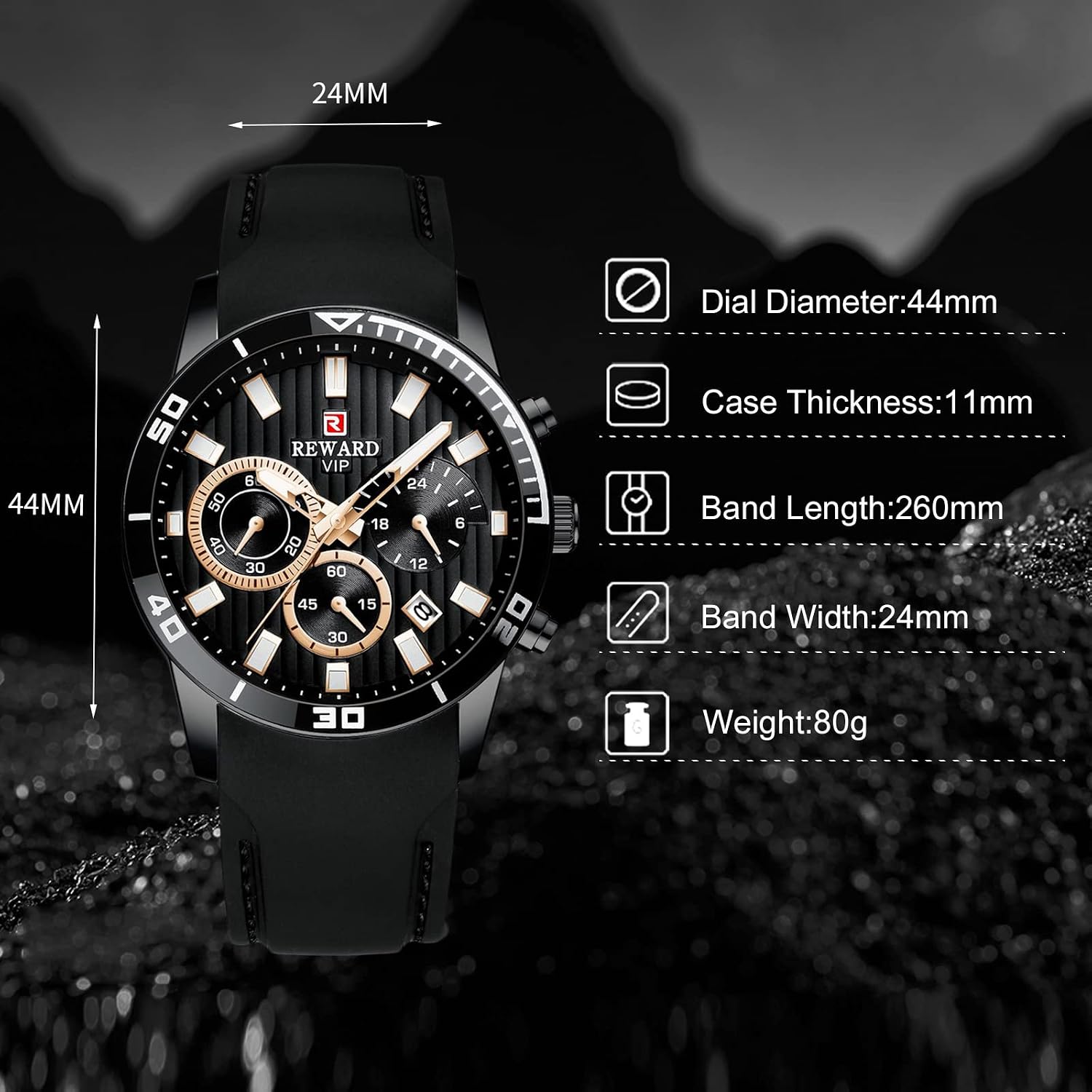
Figure 6: Visual representation of the watch dimensions, including dial diameter, case thickness, band width, and band length.
7. Warranty and Support
Your RORIOS watch comes with a user manual and warranty. RORIOS is committed to providing satisfactory products and services.
If you encounter any problems with your watch, please contact RORIOS customer service promptly. They will provide a satisfactory solution.
For service inquiries, please refer to the contact information provided on the warranty card included in your package or visit the official RORIOS website.
Ask a question about this manual
Ask about setup, troubleshooting, compatibility, parts, safety, or missing instructions. Manuals+ will review the question and use this page’s manual context to help answer it.