
ANNLOV SDG-5485
ANNLOV LCD Digital Microscope User Manual
Model: SDG-5485
1. Introduction
This manual provides detailed instructions for the proper use and maintenance of your ANNLOV LCD Digital Microscope. Please read this manual thoroughly before operating the device to ensure optimal performance and longevity.

Image 1: ANNLOV LCD Digital Microscope with included 32GB TF card.
2. What's in the Box
Verify that all components are present in the package:
- ANNLOV 4.3'' Digital Microscope x 1
- Aluminum Alloy Base x 1
- Adjustable Stand x 1
- User Manual x 1
- 32GB TF Card x 1
- USB Cables x 1

Image 2: Contents of the ANNLOV LCD Digital Microscope package.
3. Setup Instructions
- Assemble the Stand: Attach the adjustable stand to the aluminum alloy base. Ensure it is securely fastened.
- Mount the Microscope: Carefully attach the digital microscope unit to the adjustable stand. The unit should slide into place and be secured by the locking mechanism.
- Insert TF Card: Locate the micro SD card slot on the microscope unit. Insert the provided 32GB TF card into the slot until it clicks. This card is essential for saving images and videos.
- Power On: Press and hold the power button on the microscope unit to turn it on. The 4.3-inch LCD screen should illuminate.
- Initial Focus Adjustment: Place a sample object on the base. Adjust the microscope's height using the stand's adjustment knob until the object is roughly in focus on the screen. Fine-tune the focus using the focus wheel on the microscope unit.

Image 3: Proper setup and usage of the microscope for observation.
4. Operating Instructions
4.1. Magnification and Focus
The microscope offers 50X-1000X digital magnification. To adjust focus, first position the lens close to the object. Then, slowly rotate the focus wheel on the microscope unit until the image on the 4.3-inch screen is clear.

Image 4: Demonstrating various magnification levels on a leaf sample.
4.2. Adjustable LED Lighting
The microscope is equipped with 8 adjustable LED lights. Use the sliding switch to control the brightness, ensuring optimal illumination for clear viewing of small details in various environments.
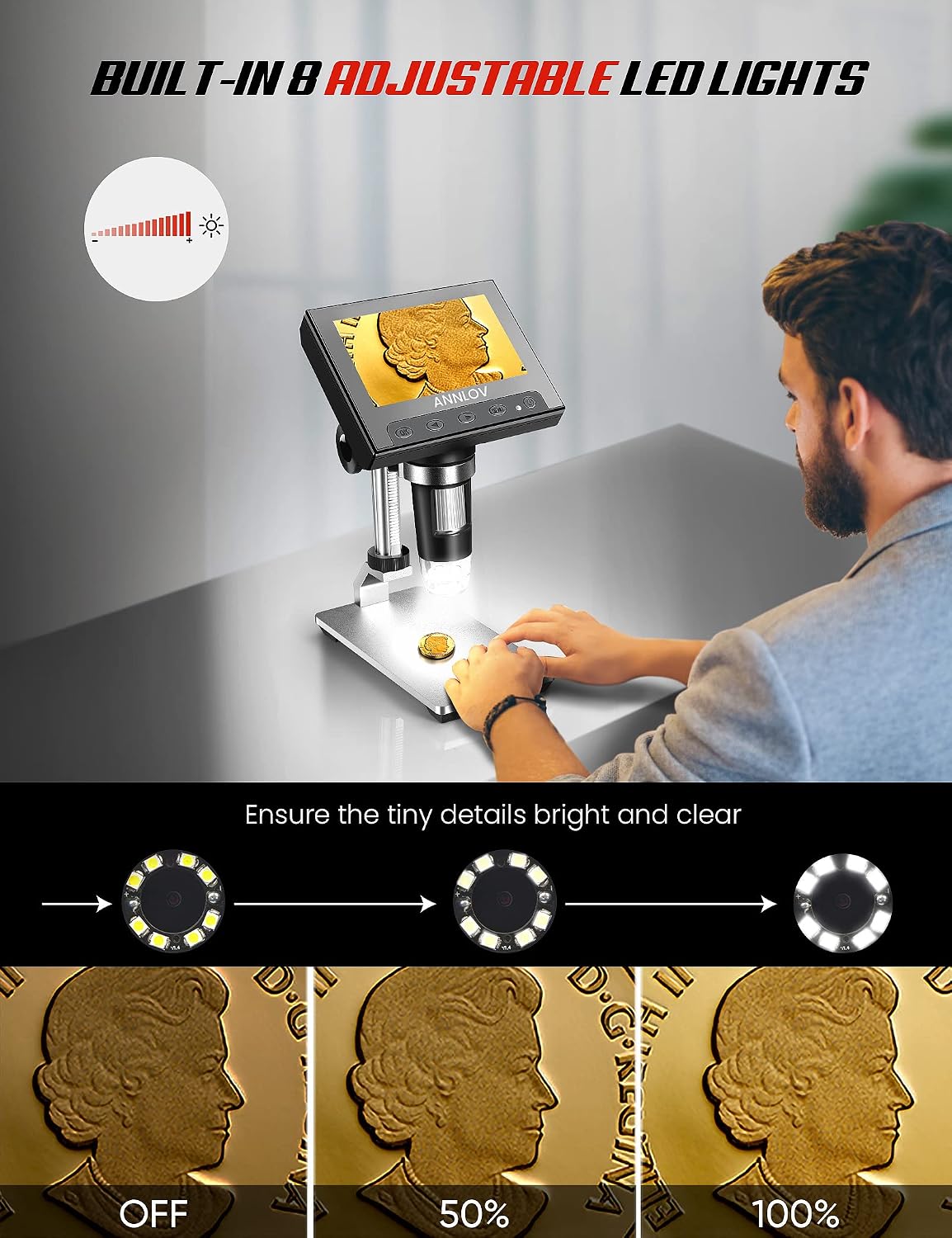
Image 5: Adjusting the 8 LED lights for optimal viewing.
4.3. Photo and Video Capture
Images and videos captured during observation are saved directly to the inserted 32GB micro SD card. Refer to the on-screen menu for options to capture photos or record videos.

Image 6: Photo and video recording functions.
4.4. PC Connection
The microscope can be connected to a PC via a USB cable for viewing objects on a larger display. This feature is compatible with Windows XP, Win7, Win8.1, Win10, or higher. Note: This microscope does not support Mac OS.

Image 7: Connecting the microscope to a PC.
For Windows users, if the default "Windows Camera" application does not work, consider downloading "Hiview" from the Microsoft Store as an alternative viewing software.
4.5. Example Observations
The microscope is suitable for observing various items such as circuit boards, coins, jewelry, gemstones, hair, rocks, and stamps. It is not intended for cellular or medical purposes.
Video 1: Demonstration of the ANNLOV LCD Digital Microscope viewing various objects including coins, circuit boards, and toy gears, highlighting its magnification capabilities.
5. Maintenance
- Cleaning the Lens: Use a soft, lint-free cloth specifically designed for optical lenses to gently clean the microscope lens. Avoid abrasive materials or harsh chemicals.
- Cleaning the Screen: Wipe the LCD screen with a soft, dry cloth. For stubborn smudges, slightly dampen the cloth with water, then wipe dry immediately.
- Storage: Store the microscope in a dry, dust-free environment when not in use. Protect it from extreme temperatures and direct sunlight.
- Battery Care: The device contains a Lithium Polymer battery. For optimal battery life, avoid fully discharging the battery frequently and store the device with a partial charge if not used for extended periods.
6. Troubleshooting
| Problem | Possible Cause | Solution |
|---|---|---|
| No image on screen | Device not powered on; battery low; lens cap on; focus too far off. | Ensure device is powered on and charged. Remove lens cap. Adjust focus wheel. |
| Image is blurry | Incorrect focus; insufficient lighting. | Adjust the focus wheel. Increase LED brightness. Ensure the object is stable. |
| Cannot save photos/videos | TF card not inserted; TF card full; TF card corrupted. | Insert TF card correctly. Delete old files or replace TF card. Format TF card (this will erase all data). |
| PC connection not working | Incorrect USB mode; incompatible OS (Mac); driver issue. | Ensure microscope is in PC mode. Verify OS is Windows. Try different USB port/cable. Install "Hiview" software if needed. |
7. Specifications
| Feature | Detail |
|---|---|
| Model Number | SDG-5485 |
| Screen Size | 4.3 inches |
| Magnification | 50X-1000X |
| Light Source | 8 Adjustable LED Lights |
| Storage | Supports up to 32GB TF Card (32GB included) |
| PC Compatibility | Windows XP, Win7, Win8.1, Win10 or higher (Not Mac OS compatible) |
| Product Dimensions | 8 x 6 x 3 inches |
| Item Weight | 1.63 pounds (0.74 kg) |
| Battery | 1 Lithium Polymer battery (included) |
| Material | ABS, Metal |
8. Warranty and Support
For warranty information or technical support, please contact ANNLOV customer service. A user review mentioned support@annlovusa.com as a contact for assistance with PC connectivity issues.
You can also visit the official ANNLOV store on Amazon for more product information and support resources: ANNLOV Store
Related documentsSDG-5485

Ask a question about this manual
Ask about setup, troubleshooting, compatibility, parts, safety, or missing instructions. Manuals+ will review the question and use this page’s manual context to help answer it.