
1. Introduction
Thank you for choosing the GOLON RX-177LED Rechargeable Radio. This device is designed to provide versatile audio entertainment and emergency illumination. It features a multi-band tuner (FM, AM, SW), supports MP3 playback via USB and SD card, and includes a built-in LED emergency flashlight. This manual provides essential information for safe and effective use of your radio.
2. Safety Instructions
- Do not expose the unit to rain, moisture, or extreme temperatures.
- Avoid disassembling or modifying the device, as this may void the warranty and pose safety risks.
- Keep the unit away from direct sunlight and heat sources.
- Use only the specified power adapter for charging.
- Ensure proper ventilation when operating the radio for extended periods.
- Dispose of batteries responsibly according to local regulations.
3. Package Contents
Please check the box for the following items:
- GOLON RX-177LED Rechargeable Radio
- Power Adapter
If any items are missing or damaged, please contact your retailer.
4. Product Overview
Familiarize yourself with the main components of your GOLON RX-177LED radio:

Figure 1: Front View. This image displays the front of the GOLON RX-177LED radio, featuring a prominent 'X-BASS' labeled speaker on the left and a frequency tuning display on the right. The display shows FM, AM, and SW bands with corresponding frequency scales.

Figure 2: Top View with Controls. A top-down perspective of the GOLON RX-177LED radio, highlighting the integrated carrying handle and the control panel located on the top edge. Visible controls include buttons for LED light, power, and playback functions, along with a volume knob and tuning wheel.
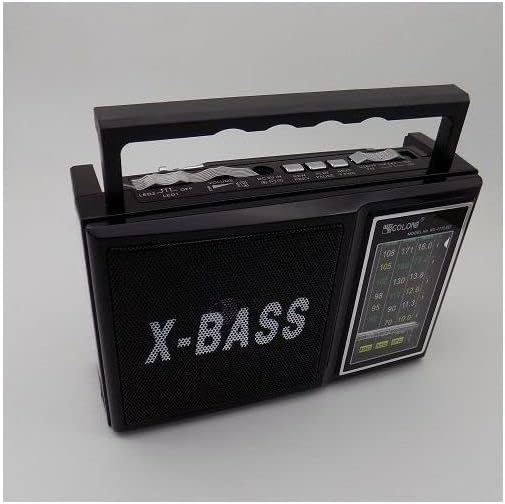
Figure 3: Side View with Flashlight. This image shows the side of the GOLON RX-177LED radio, clearly featuring the built-in emergency flashlight. The flashlight consists of a main LED bulb and multiple smaller LED lights arranged below it, designed for illumination.

Figure 4: Side View with Ports. A detailed side view of the GOLON RX-177LED radio, illustrating the connectivity options. This includes a USB port for external storage, an SD card slot for media playback, and a DC IN port for connecting the power adapter.
5. Setup
5.1 Powering the Device
The GOLON RX-177LED radio can be powered in two ways:
- AC Power: Connect the provided power adapter to the DC IN port on the side of the radio (refer to Figure 4) and plug the other end into a standard 220V AC power outlet.
- Battery Power: For portable use, insert two 1.5V (R20) batteries into the battery compartment, ensuring correct polarity. The unit can operate for more than 3 hours on medium volume with these batteries.
5.2 Charging the Internal Battery
When connected to AC power, the internal rechargeable battery will automatically charge. An indicator light may show the charging status. Ensure the unit is fully charged before first use for optimal battery life.
6. Operating Instructions
6.1 Radio Operation
- Turn On/Off: Use the power switch/button (refer to Figure 2) to turn the radio on or off.
- Select Band: Use the band selector switch to choose between FM, AM, or SW (Shortwave) bands.
- Tune to Stations: Extend the telescopic antenna for better reception, especially for FM and SW bands. Rotate the tuning dial (refer to Figure 2) to scan for available stations. The frequency display will show the current tuning.
- Adjust Volume: Rotate the volume knob (refer to Figure 2) to increase or decrease the audio output.
6.2 USB/SD Card Playback
- Insert Media: Insert a USB flash drive into the USB port or an SD card into the SD card slot (refer to Figure 4). Ensure the media contains MP3 audio files.
- Select Mode: Switch the function selector to the 'MP3' or 'USB/SD' mode. The radio should automatically begin playing audio files from the inserted media.
- Playback Controls: Use the playback control buttons (if available, typically Play/Pause, Next/Previous Track) on the top panel (refer to Figure 2) to manage your audio.
6.3 Emergency Flashlight Operation
To activate the built-in LED emergency flashlight (refer to Figure 3), locate the dedicated LED switch/button on the control panel (refer to Figure 2) and toggle it to the 'ON' position. Toggle it back to 'OFF' to turn off the flashlight.
7. Maintenance
- Cleaning: Wipe the exterior of the radio with a soft, dry cloth. Do not use abrasive cleaners or solvents.
- Battery Care: If using external R20 batteries, remove them if the unit will not be used for an extended period to prevent leakage.
- Storage: Store the radio in a cool, dry place away from direct sunlight and moisture when not in use.
8. Troubleshooting
| Problem | Possible Cause | Solution |
|---|---|---|
| No power | Power adapter not connected; internal battery discharged; external batteries depleted or incorrectly inserted. | Ensure power adapter is securely connected and plugged in. Charge the internal battery. Replace external R20 batteries, checking polarity. |
| Poor radio reception | Antenna not extended; weak signal; interference. | Fully extend the telescopic antenna. Reposition the radio for better signal. Try tuning to a different station. |
| No sound from USB/SD | Incorrect mode selected; USB/SD card not inserted correctly; no compatible files on media; volume too low. | Ensure 'MP3' or 'USB/SD' mode is selected. Reinsert USB/SD card. Verify MP3 files are present. Increase volume. |
| Flashlight not working | Flashlight switch off; internal battery discharged. | Ensure flashlight switch is in the 'ON' position. Charge the internal battery. |
9. Specifications
| Feature | Specification |
|---|---|
| Model Number | RX-177LED |
| Brand | GOLON |
| Color | Black |
| Tuner Technology | FM, AM, SW (3-Band) |
| Power Source | Corded Electric (AC 220V) / 2 x 1.5V (R20) Batteries |
| Power Consumption | 5W |
| Voltage | 220 Volts |
| Special Features | Built-In LED Flashlight, Rechargeable |
| Connectivity | USB, SD Card Slot |
| Compatible Devices | Speaker (for audio output) |
| Material Type | Engineered Material |
| Item Weight | 780 g |
| Item Dimensions (L x W x H) | 12 x 6 x 15 cm |
| Included Components | Power Adapter |
10. Warranty and Support
This product comes with a standard manufacturer's warranty. For specific warranty details, please refer to the documentation provided at the time of purchase or contact your retailer. If you encounter any issues or require technical assistance, please reach out to GOLON customer support or your authorized dealer.