
Introduction
Thank you for purchasing the CHIFENCHY Portable Magnetic Bluetooth Golf Speaker. This manual provides essential information for setting up, operating, and maintaining your speaker. Please read it thoroughly before use to ensure optimal performance and longevity of your device.
What's in the Box
- CHIFENCHY Portable Magnetic Bluetooth Golf Speaker
- USB-C Charging Cable
- 3.5mm Audio Jack Cable
- User Guide
- Bike Mount (Optional accessory, may be included depending on package)
Product Overview
The CHIFENCHY Portable Magnetic Bluetooth Golf Speaker is designed for outdoor use, offering robust sound and versatile mounting options. It features a durable, waterproof design and strong magnets for secure attachment.
Key Features:
- Powerful Sound: 30W output with deep bass and stereo sound capabilities.
- Magnetic Attachment: Built-in super strong magnets for secure mounting on metal surfaces like golf carts.
- IPX7 Waterproof: Designed to withstand water immersion, making it suitable for various outdoor conditions.
- Long Playtime: Up to 24 hours of continuous music playback on a single charge.
- Bluetooth 5.3: Ensures stable and efficient wireless connectivity.
- Multi-Sync Pairing: Connect two speakers for an enhanced stereo experience.
- Built-in Carabiner: For easy attachment to golf bags or other gear.
- Integrated Bottle Opener: A convenient feature for outdoor activities.
Component Identification:
- Front Grille: Houses the speaker drivers and passive radiator.
- Top Panel: Control buttons (Power, EX-BASS, Mode, Volume/Track, Play/Pause).
- Side Panel (Left): Built-in carabiner.
- Side Panel (Right): Waterproof flap covering charging port (USB-C), AUX-in port, and TF card slot.
- Bottom Panel: Strong magnets, bottle opener, and tripod screw hole.
Setup
1. Charging the Speaker
Before first use, fully charge the speaker. Use the provided USB-C cable and a compatible 5V/2A charger (not included). The LED indicator will show charging status.
- Steady Red LED: Charging.
- Light Off: Fully charged.
2. Connecting a Bluetooth Device
- Power On: Long press the Power button (⏻) for 2-3 seconds to turn on the speaker. The LED indicator will flash blue, indicating it's in pairing mode.
- Enable Bluetooth: On your mobile device, enable Bluetooth and search for "MelodyFlow" in the list of available devices.
- Pair: Select "MelodyFlow" to connect. The LED indicator will turn solid blue once connected.
The speaker will automatically connect to the last paired device when powered on, if within range.
3. Multi-Sync Pairing (TWS Mode)
To achieve true wireless stereo sound, you can pair two CHIFENCHY speakers together.
- Power On Both Speakers: Turn on both speakers. Ensure neither speaker is connected to any Bluetooth device.
- Enter Multi-Sync Mode: On one speaker (this will be the primary speaker), double-press the Mode button (M) quickly. The primary speaker's LED will flash blue and green.
- Pair: The two speakers will automatically connect to each other. Once paired, the primary speaker's LED will flash blue and green, and the secondary speaker's LED will be solid blue.
- Connect to Device: Now, connect your mobile device to the primary speaker via Bluetooth as described in step 2.
For optimal stereo experience, place the speakers within 10 meters of each other.
Video: CHIFENCHY Golf Cart Bluetooth Speakers Waterproof with Mount. This video demonstrates the speaker's magnetic mounting and waterproof capabilities on a golf cart.
Operating Instructions
Control Buttons:
- Power Button (⏻):
- Long press: Power On/Off.
- EX-BASS Button:
- Short press: Enable/Disable Enhanced Bass.
- Mode Button (M):
- Short press: Switch between Bluetooth, TF (MicroSD card), and AUX modes.
- Double press quickly: Enter multi-sync mode (for TWS pairing).
- Long press: Disconnect Bluetooth.
- Volume Down / Previous Track Button (- / ⏴):
- Short press: Volume down.
- Long press: Previous track.
- Play/Pause / Call Button (▶ / ✆):
- Short press: Play/Pause music.
- Short press: Answer/End a call.
- Long press: Reject a call.
- Volume Up / Next Track Button (+ / ⏵):
- Short press: Volume up.
- Long press: Next track.
Playing Music from a Memory Card (TF Card)
Insert a TF card (MicroSD card) with music files into the TF card slot. The speaker will automatically switch to TF card mode and begin playback. Use the Mode button (M) to switch to this mode if already in another mode.
Using the AUX-in Mode
Connect your non-Bluetooth device to the speaker using the provided 3.5mm audio jack cable. The speaker will automatically switch to AUX mode. Use the Mode button (M) to switch to this mode if already in another mode.
Magnetic Mounting
The speaker features strong built-in magnets. Simply place the speaker against any magnetic metal surface for secure attachment. Ensure the surface is clean and free of debris for the best hold.
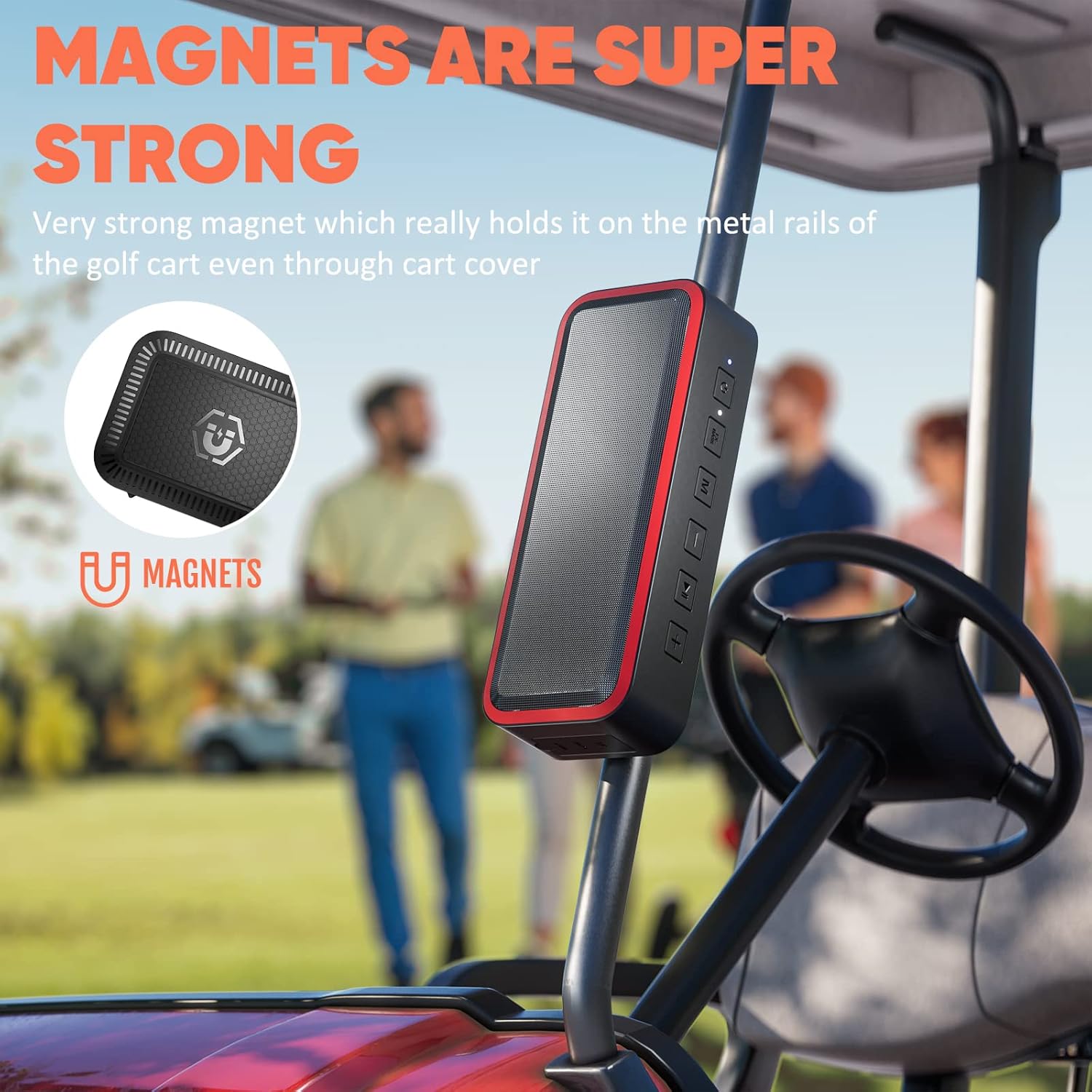
Image: The CHIFENCHY Portable Golf Speaker securely attached to the metal frame of a golf cart using its strong built-in magnets.

Image: A CHIFENCHY Portable Golf Speaker mounted magnetically to a golf cart, demonstrating its secure hold even over a cart cover.
Carabiner Use
Utilize the integrated carabiner to clip the speaker onto your golf bag, backpack, or other loops for convenient portability.

Image: The CHIFENCHY Portable Golf Speaker attached to a golf bag via its built-in carabiner, highlighting its portability.
Bottle Opener
The speaker includes a built-in bottle opener on its bottom panel for added convenience during outdoor activities.
Maintenance
- Cleaning: Wipe the speaker with a soft, damp cloth. Do not use harsh chemicals or abrasive cleaners.
- Storage: Store the speaker in a cool, dry place away from direct sunlight and extreme temperatures.
- Waterproof Seal: Ensure the waterproof flap covering the ports is securely closed when not in use or when exposed to water to maintain IPX7 rating.
Troubleshooting
| Problem | Possible Cause | Solution |
|---|---|---|
| Speaker does not power on. | Low battery. | Charge the speaker fully. |
| Cannot pair via Bluetooth. | Speaker is not in pairing mode or too far from device. | Ensure speaker is in pairing mode (flashing blue LED) and within 10 meters of your device. Disconnect from other devices if necessary. |
| No sound or low volume. | Volume too low on speaker or device; incorrect mode. | Increase volume on both speaker and device. Press the Mode button (M) to ensure correct input mode (Bluetooth, TF, AUX). |
| Bluetooth connection drops frequently. | Interference or device too far. | Move closer to the paired device. Avoid obstacles between the speaker and device. Ensure no other devices are interfering. |
| Speaker shuts off unexpectedly. | Low battery or potential unit malfunction. | Ensure the speaker is fully charged. If the issue persists after charging, contact customer support. |
Specifications
| Brand: | CHIFENCHY |
| Model Name: | SF20250914B09TQDC8LF |
| Speaker Type: | Dual Speaker |
| Connectivity Technology: | Bluetooth 5.3 |
| Speaker Maximum Output Power: | 30 Watts |
| Water Resistance Level: | IPX7 Waterproof |
| Playtime: | Up to 24 hours |
| Battery Capacity: | 3500 Milliamp Hours |
| Product Dimensions: | 3.07"D x 7.68"W x 1.81"H |
| Item Weight: | 1.32 pounds (598 Grams) |
| Material: | Plastic |
| Special Features: | Bass Boost, Built-in Microphone, Magnetic, Shockproof, Stereo Pairing, USB Port, Built-in Bottle Opener. |
Warranty & Support
For warranty information or technical support, please refer to the contact details provided in the packaging or visit the official CHIFENCHY website. Keep your purchase receipt for warranty claims.