
Introduction
This manual provides instructions for the setup, operation, and maintenance of your 121AV Universal LG Remote Control, model AKB75095308. This remote is designed to be compatible with various LG Ultra HD TVs, offering a convenient replacement or secondary control unit.
Setup
1. Battery Installation
The remote control requires two AAA batteries (not included). Follow these steps to install them:
- Locate the battery compartment cover on the back of the remote control.
- Press down on the tab and slide the cover downwards to open the compartment.
- Insert two AAA batteries, ensuring the positive (+) and negative (-) terminals align correctly with the markings inside the compartment.
- Slide the battery compartment cover back into place until it clicks securely.
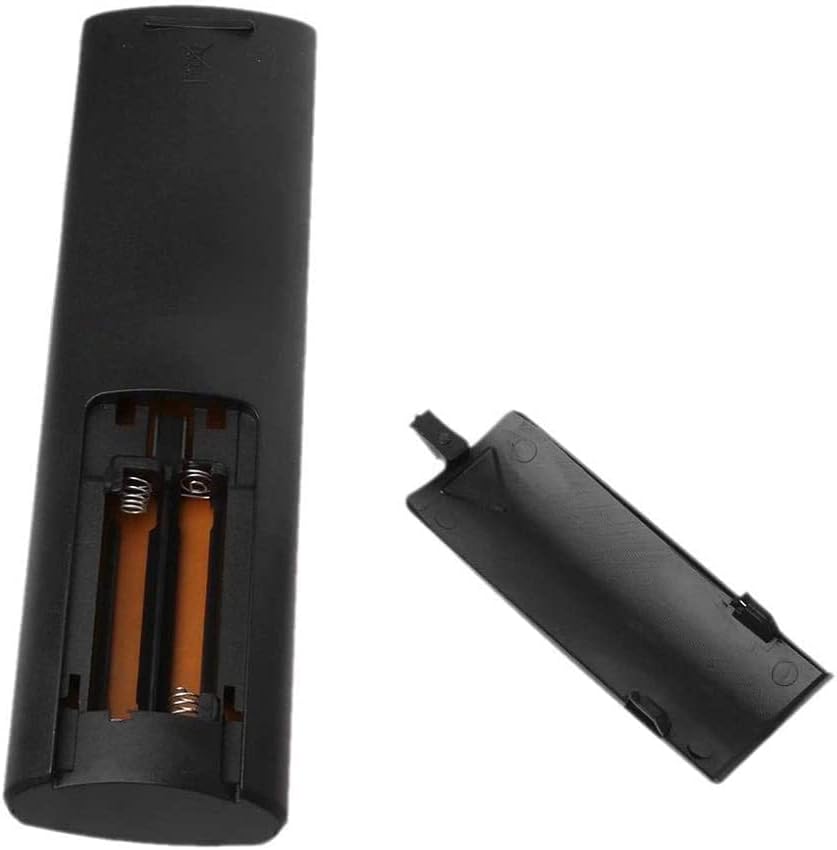
Figure 1: Battery compartment with cover removed, showing slots for two AAA batteries.
2. Initial Use
This 121AV Universal LG Remote Control is pre-programmed for compatible LG TVs and typically does not require any manual setup or code entry. Simply install the batteries and point the remote towards your LG TV to begin operation.
Operating Instructions
Familiarize yourself with the buttons and their functions on your remote control.

Figure 2: Overview of the 121AV Universal LG Remote Control.
Button Functions:
- Power (●): Turns the TV on or off.
- Number Pad (0-9): Direct channel selection.
- LIST: Displays a list of channels or programs.
- QUICK ACCESS / ⓘINFO: Accesses quick settings or displays program information.
- GUIDE: Opens the electronic program guide.
- Volume Up/Down (▲/▼): Adjusts the sound volume.
- Channel Up/Down (▲/▼): Changes TV channels.
- Navigation Buttons (◀ ▲ ▶ ▼): Navigates through menus and options.
- OK: Confirms a selection.
- NETFLIX: Direct access to the Netflix application.
- amazon: Direct access to the Amazon Prime Video application.
- BACK: Returns to the previous screen or menu.
- EXIT: Exits the current menu or application.
- TEXT: Activates or deactivates teletext.
- AD: Audio Description button.
- REC●: Record button (if supported by TV).
- T.OPT / MAGIC LINK: Accesses TV options or Magic Link features.
- LIVE TV: Switches to live television broadcast.
- Color Buttons (Red, Green, Yellow, Blue): Functionality varies depending on the TV menu or application.
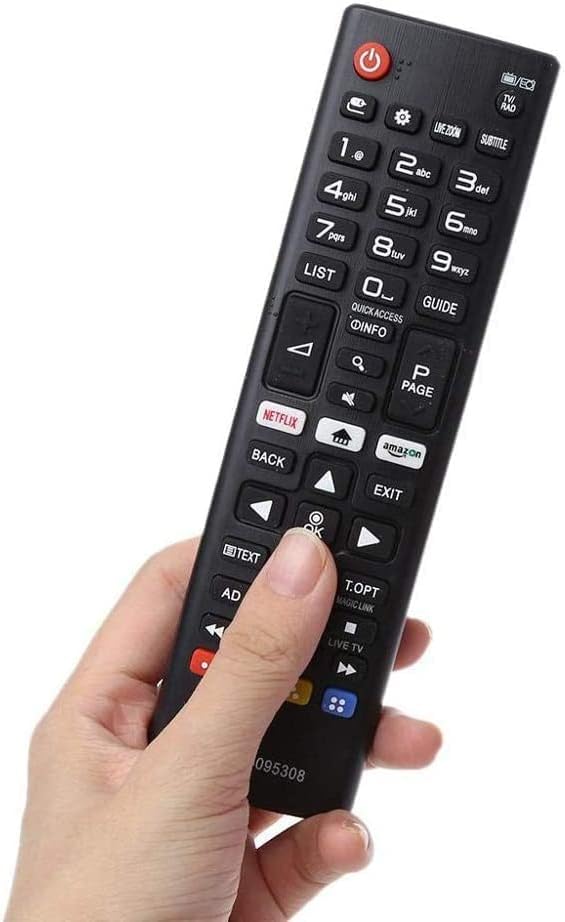
Figure 3: The remote control's ergonomic design for comfortable handling.
Maintenance
Battery Replacement
Replace batteries when the remote control's response becomes sluggish or stops working. Always replace both batteries at the same time with new AAA batteries. Do not mix old and new batteries, or different types of batteries.
Cleaning
To clean the remote control, gently wipe its surface with a soft, dry cloth. For stubborn dirt, slightly dampen the cloth with water. Avoid using harsh chemicals, abrasive cleaners, or excessive moisture, as these can damage the remote.
Troubleshooting
- Remote not responding:
- Check if the batteries are installed correctly with the correct polarity.
- Replace old batteries with new ones.
- Ensure there are no obstructions between the remote control and the TV's infrared receiver.
- Make sure you are within the effective operating range of the TV.
- Specific buttons not working:
- This remote is designed for LG TVs. Ensure your TV is an LG model.
- Some advanced functions or smart TV features may require specific TV models or settings. Refer to your TV's manual for details.
Specifications
| Model Number | AKB75095308 |
| Brand | 121AV |
| Special Feature | Universal |
| Color | Black |
| Max Number of Supported Devices | 1 (LG TVs) |
| Item Weight | 2.46 ounces (approx. 70 grams) |
| Package Dimensions | 6.65 x 1.85 x 0.87 inches (approx. 16.9 x 4.7 x 2.2 cm) |
Compatible LG TV Models
This remote control is compatible with a wide range of LG Ultra HD TVs, including but not limited to the following models:
- 24MT49S
- 24TL520S-PZ
- 28MT49S
- 28TK420SPZAEK
- 28TK420S-PZAEK
- 28TL520S-PZ
- 32LJ590
- 32LJ590U
- 32LJ610V
- 32LK6100
- 32LK6100PLB
- 32LK610BPLB
- 32LK6200PLA
- 43LJ594
- 43LJ594V
- 43LJ614V
- 43LJ624V
- 43LJ634V
- 43LK5900PLA
- 43LK6100PLB
- 43UJ630
- 43UJ630V
- 43UJ634V
- 43UJ635V
- 43UJ651V
- 43UJ670V
- 43UK6200PLA
- 43UK6300PLB
- 43UK6400PLF
- 43UK6470PLC
- 43UK6500PLA
- 43UK6750PLD
- 49LJ594
- 49LJ594V
- 49LJ614V
- 49LJ624V
- 49LK5900PLA
- 49LK6100PLB
- 49UJ630
- 49UJ630V
- 49UJ634V
- 49UJ635V
- 49UJ651V
- 49UJ670
- 49UJ670V
- 49UK6200PLA
- 49UK6300PLB
- 49UK6400PLF
- 49UK6470PLC
- 50UK6470PLC
- 50UK6500PLA
- 50UK6750PLD
- 55LJ615V
- 55LJ625V
- 55UJ630
- 55UJ630V
- 55UJ634V
- 55UJ635V
- 55UJ651V
- 55UJ670
- 55UJ670V
- 55UK6200PLA
- 55UK6300PLB
- 55UK6400PLF
- 55UK6470PLC
- 55UK6500PLA
- 55UK6750PLD
- 60UJ630V
- 60UJ634V
- 60UJ651V
- 60UK6200PLA
- 65UJ630V
- 65UJ634V
- 65UJ651V
- 65UJ670V
- 65UK6300PLB
- 65UK6400PLF
- 65UK6470PLC
- 65UK6500PLA
- 65UK6750PLD
- 70UJ675V
- 70UK6500PLB
- 75UJ675V
- 75UK6200PLB
- 75UK6500PLA
Warranty and Support
For warranty information or technical support regarding your 121AV Universal LG Remote Control, please refer to the documentation provided with your purchase or contact the manufacturer directly. Specific warranty terms and support channels may vary.