
1. Introduction
This manual provides detailed instructions for the safe and efficient operation of your RD B-42 Portable Bluetooth Speaker. Please read this manual thoroughly before using the product and retain it for future reference.
2. Package Contents
- RD B-42 Portable Bluetooth Speaker
- USB Charging Cable
- User Manual
3. Product Overview
Familiarize yourself with the speaker's components and controls.

Figure 3.1: Front view of the RD B-42 Portable Bluetooth Speaker, showcasing the speaker grille and RD logo.
3.1 Control Buttons

Figure 3.2: Top panel control buttons: Volume Down (-), Mode (M), Volume Up (+).
- - Button: Short press for Volume Down, Long press for Previous Track.
- M Button (Mode): Short press to switch between Bluetooth, USB, TF Card, and AUX modes. Long press for Play/Pause.
- + Button: Short press for Volume Up, Long press for Next Track.
3.2 Ports and Switches
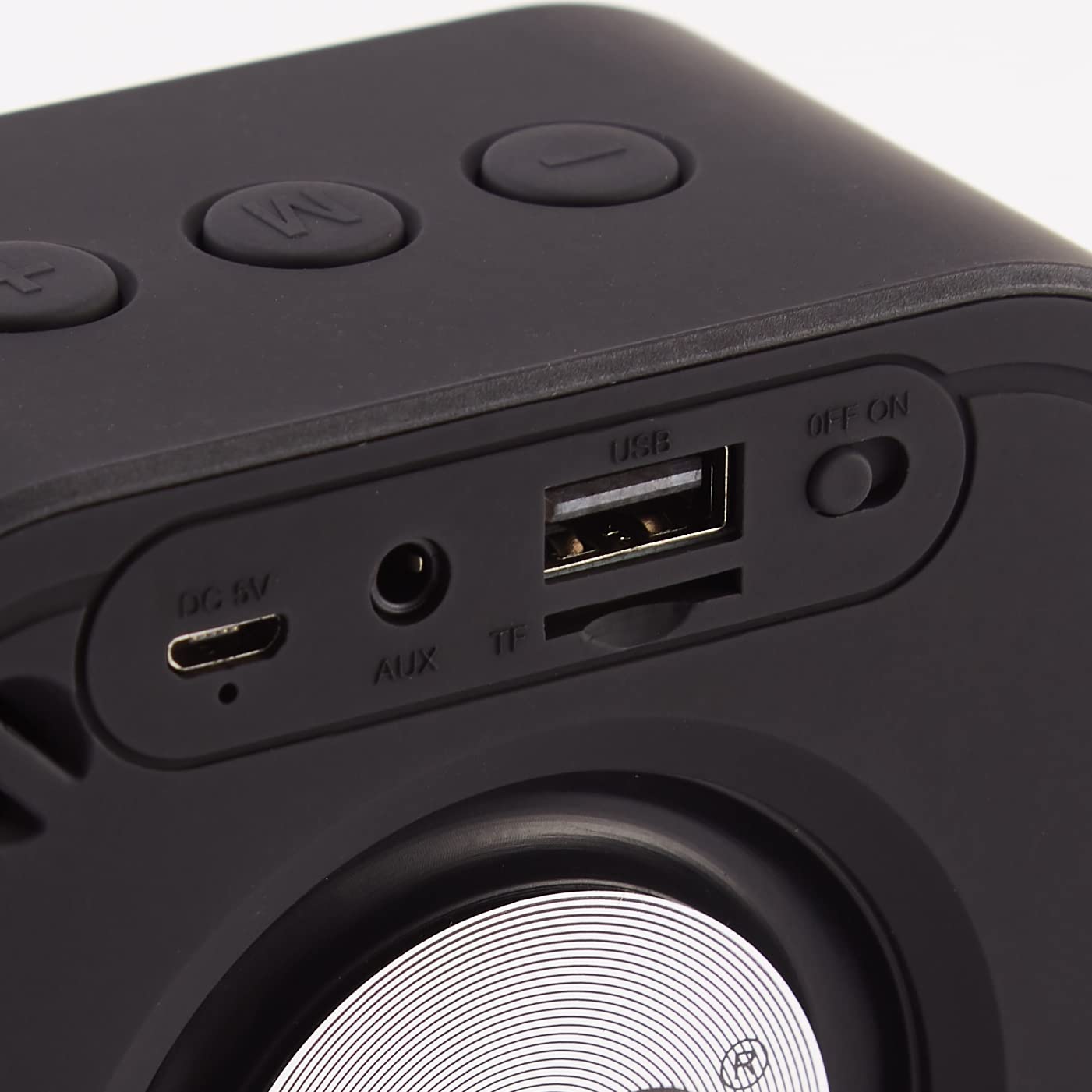
Figure 3.3: Rear panel ports and power switch: DC 5V (charging), AUX IN, TF Card Slot, USB Port, ON/OFF switch.
- DC 5V Port: For charging the speaker using the provided USB cable.
- AUX IN Port: Connect external audio devices via a 3.5mm audio cable.
- TF Card Slot: Insert a TF (microSD) card for direct music playback.
- USB Port: Insert a USB drive for direct music playback.
- ON/OFF Switch: Slide to power the speaker on or off.
4. Setup
4.1 Charging the Speaker
- Connect the small end of the USB charging cable to the DC 5V port on the speaker.
- Connect the standard USB end of the cable to a USB power adapter (not included) or a computer's USB port.
- The charging indicator light will illuminate during charging. It typically takes approximately 2 hours for a full charge.
- Once fully charged, the indicator light may change color or turn off, depending on the model.
Note: Ensure the speaker is fully charged before first use to maximize battery life.
4.2 Powering On/Off
- To power on, slide the ON/OFF switch to the "ON" position. You will hear an audible prompt.
- To power off, slide the ON/OFF switch to the "OFF" position.
5. Operating Instructions
5.1 Bluetooth Pairing
- Ensure the speaker is powered on and in Bluetooth mode. If not, short press the "M" button to switch to Bluetooth mode. The speaker will indicate it is ready for pairing (e.g., a flashing LED or audible prompt).
- On your mobile device (smartphone, tablet, computer), enable Bluetooth and search for available devices.
- Select "RD B-42" from the list of found devices.
- Once paired, the speaker will provide an audible confirmation, and the LED indicator will typically stop flashing.
- You can now play audio from your device through the RD B-42 speaker.
5.2 USB Playback Mode
- Insert a USB flash drive containing MP3 audio files into the USB port on the speaker.
- The speaker should automatically switch to USB mode and begin playing audio. If not, short press the "M" button to select USB mode.
- Use the "+" and "-" buttons for track navigation and the "M" button (long press) for play/pause.
5.3 TF Card Playback Mode
- Insert a TF (microSD) card containing MP3 audio files into the TF card slot on the speaker.
- The speaker should automatically switch to TF Card mode and begin playing audio. If not, short press the "M" button to select TF Card mode.
- Use the "+" and "-" buttons for track navigation and the "M" button (long press) for play/pause.
5.4 AUX Mode
- Connect one end of a 3.5mm audio cable (not included) to the AUX IN port on the speaker.
- Connect the other end of the audio cable to the headphone jack or audio output of your external device.
- Short press the "M" button to switch to AUX mode.
- Control playback and volume directly from your connected external device.
5.5 Call Function (Bluetooth Mode)
- When a call comes in during Bluetooth mode, the speaker will ring.
- Short press the "M" button to answer the call.
- Short press the "M" button again to end the call.
- Long press the "M" button to reject an incoming call.
6. Maintenance
- Keep the speaker away from extreme temperatures, direct sunlight, and moisture.
- Clean the speaker with a soft, dry cloth. Do not use abrasive cleaners or solvents.
- Avoid dropping or subjecting the speaker to strong impacts.
- When not in use for extended periods, charge the speaker at least once every three months to maintain battery health.
7. Troubleshooting
| Problem | Possible Cause | Solution |
|---|---|---|
| Speaker does not power on. | Low battery. | Charge the speaker for at least 30 minutes. |
| Cannot pair via Bluetooth. | Speaker not in pairing mode; device Bluetooth off; too far from speaker. | Ensure speaker is in Bluetooth mode and discoverable. Turn Bluetooth on your device. Move device closer to speaker (within 10 meters). |
| No sound. | Volume too low; incorrect mode selected; audio source issue. | Increase speaker and device volume. Press "M" to cycle through modes. Check audio source playback. |
| USB/TF card not playing. | Incorrect file format; card/drive not inserted correctly; corrupted media. | Ensure files are MP3 format. Reinsert card/drive. Try a different card/drive. |
8. Specifications
- Model: RD B-42
- Bluetooth Version: v5.0
- Output Power: 5W
- Battery Capacity: 1200 mAh
- Playback Time: Up to 8 hours (at moderate volume)
- Charging Time: Approximately 2 hours
- Connectivity: Bluetooth, USB, TF Card, AUX
- Water Resistance: IPX4 (Splash-proof)
- Control Method: Touch Buttons
- Dimensions (LxWxH): 5.3 x 10.8 x 10.7 cm
- Weight: 460 g
- Manufacturer: GUANGZHOU LANTEL ELECTRONIC TECHNOLOGY CO. LTD
9. Warranty Information
The RD B-42 Portable Bluetooth Speaker comes with a 6-month manufacturer warranty from the date of purchase. This warranty covers manufacturing defects and workmanship under normal use.
The warranty does not cover:
- Damage caused by misuse, abuse, neglect, or accident.
- Unauthorized repair or modification.
- Normal wear and tear.
- Damage caused by external factors such as power surges or liquid exposure beyond IPX4 rating.
Please retain your purchase receipt as proof of purchase for warranty claims.
10. Customer Support
For any queries, technical assistance, or warranty claims, please contact RD customer support:
- Email: support@rdaccessories.in
- Phone: +91-93260 81617

Figure 10.1: RD Customer Care Contact Information.


