
FITCAMX For Bentley Flying Spur 2020-2021
FITCAMX Dash Cam User Manual
Model: For Bentley Flying Spur 2020-2021
Brand: FITCAMX
1. Introduction
The FITCAMX Dash Cam is an integrated 4K stealth car recorder designed to seamlessly blend with your vehicle's interior, offering a clean, OEM-like appearance. It provides ultra-high-definition video recording, advanced safety features, and convenient smartphone connectivity.
Key Features:
- OEM Look & Perfect Fit: Designed to integrate perfectly behind the rearview mirror, eliminating visible wires.
- Ultra Clear 4K Video: Records videos up to 2160P/30fps with Novatek Chip + CMOS Sensor and f/1.6 big aperture lens for superior clarity.
- Enhanced Night Vision: Automatically balances exposure for clear license plate visibility even at night.
- Built-in WiFi & APP Control: Easily preview, manage, download, edit, and share videos via the dedicated smartphone application.
- Loop Recording: Automatically overwrites the oldest footage when the memory card is full, ensuring continuous recording.
- G-Sensor: Detects sudden collisions and automatically locks current video files to prevent overwriting.
2. What's in the Box
- FITCAMX Dash Cam Unit
- Power Cable
- Removal Pry Tool
- User Manual (this document)
- 64GB MicroSD Card (pre-installed or included separately)
3. Setup and Installation
The FITCAMX Dash Cam is designed for a plug-and-play installation, integrating seamlessly with your vehicle's existing wiring without the need for cable routing or splicing.
Installation Steps:
- Remove Original Cover: Carefully use the provided pry tool to remove the original plastic cover behind your rearview mirror. This exposes the vehicle's wiring.
- Connect Power Cable: Locate the designated power port (usually a sensor or mirror power source) within the exposed area. Connect the dash cam's power cable to this port. Ensure a secure connection.
- Install Dash Cam Unit: Align the dash cam unit with the opening and gently push it into place. Ensure all clips engage securely for a firm fit.
- Test Functionality: Start your vehicle to confirm the dash cam powers on and begins recording automatically.
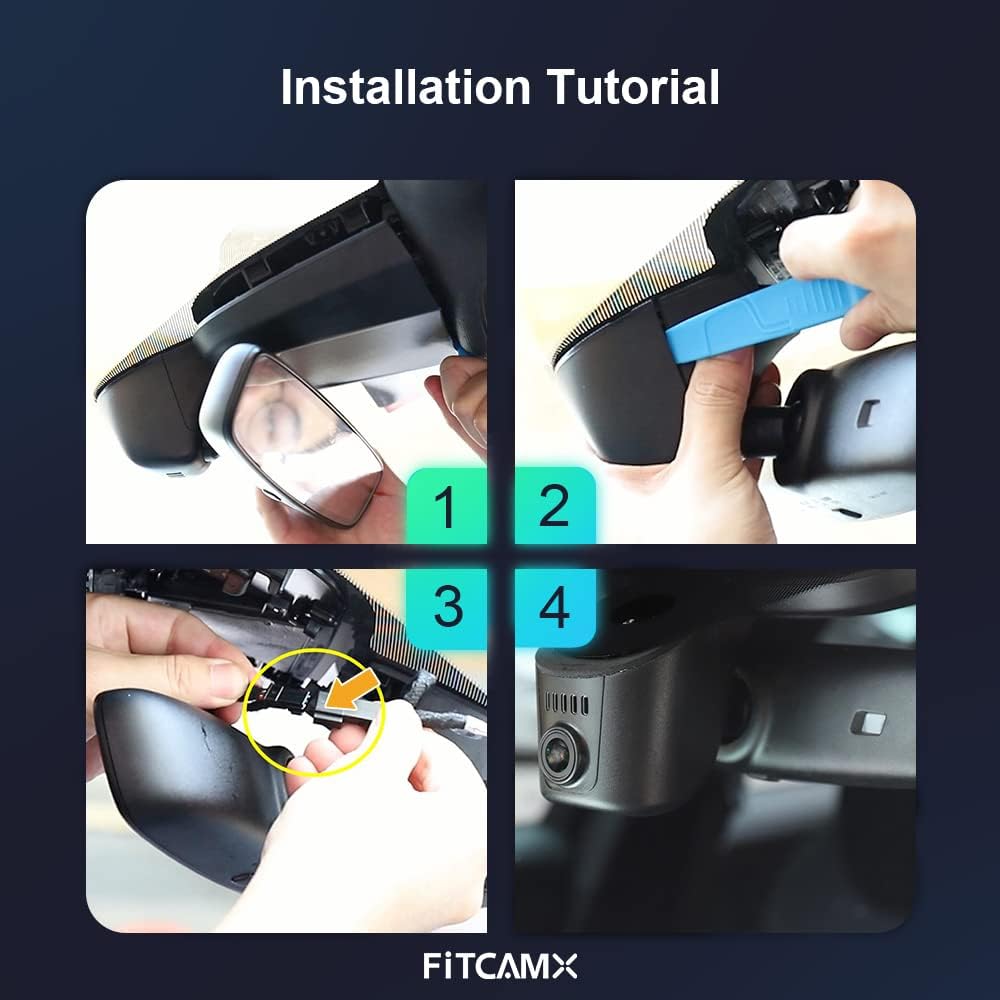
Figure 3.1: Visual guide for the four-step installation process.
Video 3.2: Official installation tutorial for the Fitcamx Dash Cam for Bentley models. This video demonstrates the process of removing the original cover, connecting the power cable, and installing the dash cam unit.

Figure 3.3: Comparison showing the vehicle's interior before and after dash cam installation, highlighting the seamless OEM integration.
4. Operating Instructions
Automatic Recording:
The dash cam automatically powers on and begins recording when your vehicle starts. Recording stops when the vehicle is turned off.
Smartphone App & WiFi Connection:
The built-in WiFi allows you to connect your smartphone to the dash cam via the dedicated FITCAMX app. This enables live preview, video management, downloading, editing, and sharing of footage.

Figure 4.1: Overview of the FITCAMX smartphone application features, including live preview and video management.
Loop Recording:
The dash cam employs seamless loop recording. When the MicroSD card memory is full, the oldest unlocked footage will be automatically deleted to make space for new recordings, ensuring continuous operation.
G-Sensor (Collision Detection):
The integrated G-Sensor detects sudden impacts or collisions. Upon detection, it automatically triggers emergency recording, saving and locking the current video segment to a separate file. This prevents critical footage from being overwritten by loop recording.

Figure 4.2: Illustration of how Loop Recording manages storage and how the G-Sensor protects important event footage.
5. Maintenance
- Operating Temperature: The dash cam is designed to operate within a temperature range of -20°C to 85°C (-4°F to 185°F). Avoid prolonged exposure to temperatures outside this range to ensure optimal performance and longevity.
- Cleaning: Use a soft, dry cloth to clean the lens and the dash cam body. Do not use abrasive cleaners or solvents.
- MicroSD Card: Periodically format the MicroSD card (at least once a month) through the app or dash cam settings to maintain optimal recording performance and prevent data corruption.
6. Troubleshooting
- No Preview in App: If you experience issues with live preview in the app, please ensure that your phone's cellular data is turned off when connected to the dash cam's WiFi.
- No Parking Mode: This model does not include a built-in parking mode. If parking monitoring is required, please consult FITCAMX for information on compatible upgrades or accessories (e.g., fuse box cable).
- Dash Cam Not Powering On: Check all cable connections to ensure they are secure. Verify that the vehicle's power source is active.
- Video Quality Issues: Ensure the lens is clean and free from obstructions. Check that the MicroSD card is not full or corrupted. Try formatting the card.
7. Specifications
| Feature | Detail |
|---|---|
| Brand | FITCAMX |
| Model | For Bentley Flying Spur 2020-2021 |
| Video Capture Resolution | 4K (2160P/30fps) |
| Optical Sensor Technology | CMOS |
| Aperture | f/1.6 |
| Connectivity Technology | Wi-Fi |
| Control Method | App |
| Mounting Type | Rearview Mirror Mount |
| Color | Black |
| Operating Temperature | -20°C to 85°C (-4°F to 185°F) |
| Manufacturer | Dongguan Daozhi Electronic Technology Co., Ltd. |
| Batteries | 1 Lithium Metal battery required (included) |
8. Warranty and Support
FITCAMX is committed to innovation and quality, providing reliable products for safe driving. We offer 24/7 technical support to assist you with any questions or issues you may encounter.
For detailed warranty information and to contact support, please refer to the official FITCAMX website or the contact information provided with your purchase.