
Shelly 3800235262122
Shelly Duo Smart LED Bulb User Manual
Model: 3800235262122
Brand: Shelly
1. Introduction
The Shelly Duo is a Wi-Fi enabled smart bulb designed to adjust lighting to suit your mood. It features a dimmer slider for brightness control and can manage on/off cycles based on sunrise and sunset schedules. With an integrated web server, it can operate as a standalone device and is designed for standard E27 light sockets. It offers two lighting modes: warm white and cold white. Setup is simple and intuitive via the Shelly app. This manual provides detailed instructions for installation, operation, and maintenance of your Shelly Duo Smart LED Bulb.
2. Safety Information
Please read these safety instructions carefully before installing or operating your Shelly Duo bulb. Failure to follow these instructions may lead to malfunction, fire, or electric shock.
- Ensure the power supply is switched off before installation or removal of the bulb.
- This device is intended for indoor use only.
- Do not expose the bulb to direct water or excessive humidity.
- Do not attempt to disassemble or modify the bulb. This will void the warranty.
- Use only in appropriate E27 lamp holders.
- Keep out of reach of children.
3. Product Overview
The Shelly Duo Smart LED Bulb combines energy efficiency with smart control, allowing you to customize your lighting experience. Key features include:
- Wi-Fi connectivity for remote control.
- Dimmable functionality to adjust brightness.
- Adjustable color temperature (warm white to cold white).
- E27 standard base for easy installation.
- Compatible with Amazon Alexa and Google Home for voice control.
- Integrated web server for standalone operation.

Image: The Shelly Duo Smart LED Bulb, showing its E27 base and the Shelly DUO logo on the side.
4. Setup
4.1 Physical Installation
- Ensure the power to the light fixture is turned off at the main circuit breaker.
- Carefully screw the Shelly Duo bulb into a standard E27 light socket until it is snug. Do not overtighten.
- Restore power to the light fixture. The bulb should light up, indicating it is ready for app configuration.

Image: Side view of the Shelly Duo Smart LED Bulb, illustrating its standard E27 base for installation.
4.2 App Configuration (Shelly App)
The Shelly app is essential for controlling and managing your Shelly Duo bulb. Follow these steps to set up your device:
- Download the Shelly App: Search for "Shelly Cloud" in your smartphone's app store (iOS App Store or Google Play Store) and download it.
- Create a User Profile: Open the app and follow the on-screen instructions to create a new user account.
- Add Device: From the main screen, navigate to the "Add Device" section or tap the '+' icon.
- Connect to Wi-Fi: The app will guide you to connect the Shelly Duo to your home Wi-Fi network. Ensure your phone is connected to the same Wi-Fi network (2.4 GHz recommended).
- Assign to Room: Once connected, you can assign the bulb to a specific room within the app for better organization and control.
For detailed app instructions and advanced features, refer to the Shelly Cloud app's in-app help or the official Shelly website.
5. Operating Instructions
Once configured, you can control your Shelly Duo bulb using the Shelly app or voice commands.
5.1 Using the Shelly App
- On/Off Control: Tap the bulb icon in the app to toggle it on or off.
- Brightness Adjustment: Use the dimmer slider within the bulb's control interface to adjust the light intensity.
- Color Temperature: Select between warm white and cold white modes, or use a slider to fine-tune the color temperature to your preference.
- Scenes and Groups: Create custom scenes (e.g., "Movie Night" with dim, warm light) or group multiple Shelly bulbs together for synchronized control.
- Schedules: Set schedules for the bulb to turn on/off or change settings automatically based on time, sunrise/sunset, or other conditions.
5.2 Voice Control (Alexa & Google Home)
The Shelly Duo is compatible with popular voice assistants. To enable voice control:
- Link Shelly Account: In your Amazon Alexa or Google Home app, search for the "Shelly" skill/service and link it to your Shelly Cloud account.
- Discover Devices: Once linked, ask your voice assistant to "discover devices" or manually initiate device discovery in the app.
- Voice Commands: You can now use commands like:
- "Alexa, turn on the living room light."
- "Hey Google, dim the bedroom light to 50%."
- "Alexa, set the kitchen light to warm white."
6. Maintenance
The Shelly Duo bulb requires minimal maintenance. Follow these guidelines to ensure its longevity:
- Cleaning: Before cleaning, ensure the bulb is cool and the power is off. Wipe the bulb with a soft, dry cloth. Do not use liquid cleaners or abrasive materials.
- Storage: If storing the bulb for an extended period, keep it in a cool, dry place away from direct sunlight.
7. Troubleshooting
If you encounter issues with your Shelly Duo bulb, try the following solutions:
- Bulb not turning on:
- Check if the light fixture has power.
- Ensure the bulb is screwed in properly.
- Test the bulb in another working E27 socket.
- Cannot connect to Wi-Fi:
- Ensure your Wi-Fi network is 2.4 GHz.
- Check your Wi-Fi password.
- Move the bulb closer to your Wi-Fi router.
- Restart your router and try again.
- Perform a factory reset on the bulb (refer to Shelly support for specific reset procedures, usually involves power cycling multiple times).
- App not responding:
- Close and reopen the Shelly app.
- Check your internet connection.
- Ensure the Shelly Cloud servers are operational (check Shelly's official website or social media).
If problems persist, contact Shelly customer support.
8. Specifications
| Feature | Specification |
|---|---|
| Brand | Shelly |
| Model Number | 3800235262122 |
| Base Type | E27 |
| Light Type | LED |
| Power Consumption | 9 Watts |
| Luminous Flux | 800 lm |
| Color Temperature | Warm White, Cold White (2700K - 6500K) |
| Voltage | 230 Volts |
| Special Feature | Dimmable |
| Average Life | 30000 Hours |
| Product Dimensions (L x W x H) | 12.5 x 12.5 x 6.3 cm |
| Item Weight | 50 g |
| Energy Efficiency Rating | F |
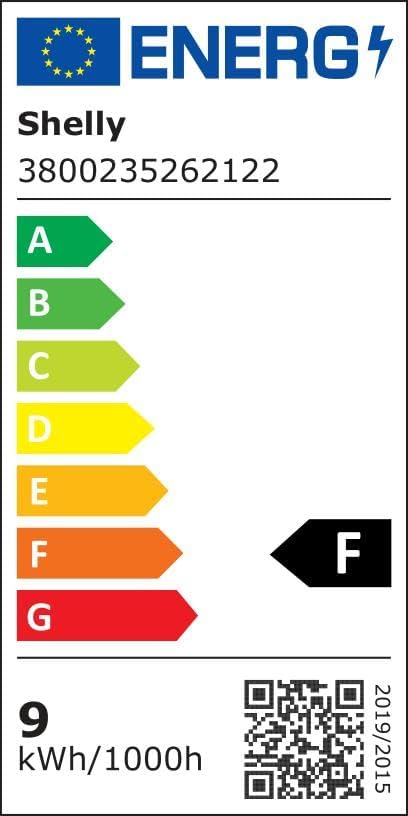
Image: Energy efficiency label for Shelly Duo, showing an 'F' rating. For more details, visit the EPREL database (QR code 893282).

Image: Alternative energy efficiency label for Shelly Duo. For more details, visit the EPREL database (QR code 1007490).
9. Warranty & Support
Shelly products are designed for reliability and performance. For information regarding warranty terms and conditions, please refer to the official Shelly website or the documentation provided with your purchase.
For technical support, troubleshooting assistance, or to explore more Shelly products, please visit the official Shelly website:
You can also find more information and products on the Shelly Brand Store on Amazon.
Ask a question about this manual
Ask about setup, troubleshooting, compatibility, parts, safety, or missing instructions. Manuals+ will review the question and use this page’s manual context to help answer it.