
Introduction
Thank you for choosing the Relybo GT221 High Power Rechargeable LED Flashlight. This flashlight is designed for superior illumination and durability, making it ideal for various outdoor activities, emergencies, and daily use. It features an advanced XHM100 chip for an extremely bright and penetrating beam, a variable focus design, and multiple operating modes. Please read this manual carefully to ensure proper use and maintenance of your device.
Package Contents
Please verify that all items listed below are included in your package:
- 1 x Relybo GT221 Rechargeable LED Flashlight
- 1 x Rechargeable Battery
- 1 x USB-C Charging Cable
- 1 x Lanyard
- 1 x Battery Holder
- 1 x Battery Tube
- 1 x Gift Box
- 1 x Instruction Manual

Image: All components included in the Relybo GT221 flashlight package, laid out neatly.
Setup
Follow these steps to install the battery and prepare your flashlight for first use:
- Remove Protective Film: Carefully remove any protective film or sticker from the rechargeable battery.
- Unscrew Tail Cap: Twist the tail cap of the flashlight counter-clockwise to remove it.
- Identify Polarity: Observe the positive (+) and negative (-) poles on the battery and inside the flashlight's battery compartment.
- Insert Battery: Insert the rechargeable battery into the flashlight, ensuring the positive (+) end faces towards the head of the flashlight.
- Secure Tail Cap: Screw the tail cap back on clockwise until it is securely tightened.

Image: A step-by-step visual guide demonstrating how to correctly install the battery into the flashlight.
Operating Instructions
Power On/Off and Mode Selection
The Relybo GT221 features two independent switches for versatile control:
- Left Switch (Emergency Modes): Press the left switch to activate Strobe or SOS modes. This allows for quick access to emergency signaling.
- Right Switch (Main Illumination): Press the right switch to turn the flashlight on/off and cycle between High brightness and Continuous Dimming mode. To turn off the flashlight while in High or Continuous Dimming mode, press the right switch again.

Image: Illustration of the flashlight's two switches and their corresponding light modes: Strobe, SOS, High, and Continuous Dimming.
Continuous Dimming Function
For precise brightness control, use the continuous dimming feature:
- While the flashlight is on in Continuous Dimming mode (via the right switch), press and hold the right switch.
- The brightness will smoothly adjust between 500 and 1,000,000 lumens.
- Release the button once your desired brightness level is achieved.

Image: A hand pressing and holding the right switch to activate the continuous dimming mode, showing the smooth transition of light intensity.
Focus Adjustment (Floodlight/Spotlight)
The flashlight features a variable focus design to adapt to different lighting needs:
- Gently push or pull the head of the flashlight forward or backward.
- Pushing the head forward will narrow the beam into a focused spotlight, ideal for long-distance illumination (over 1500m).
- Pulling the head backward will widen the beam into a floodlight, suitable for illuminating a broad area (up to 280m²).
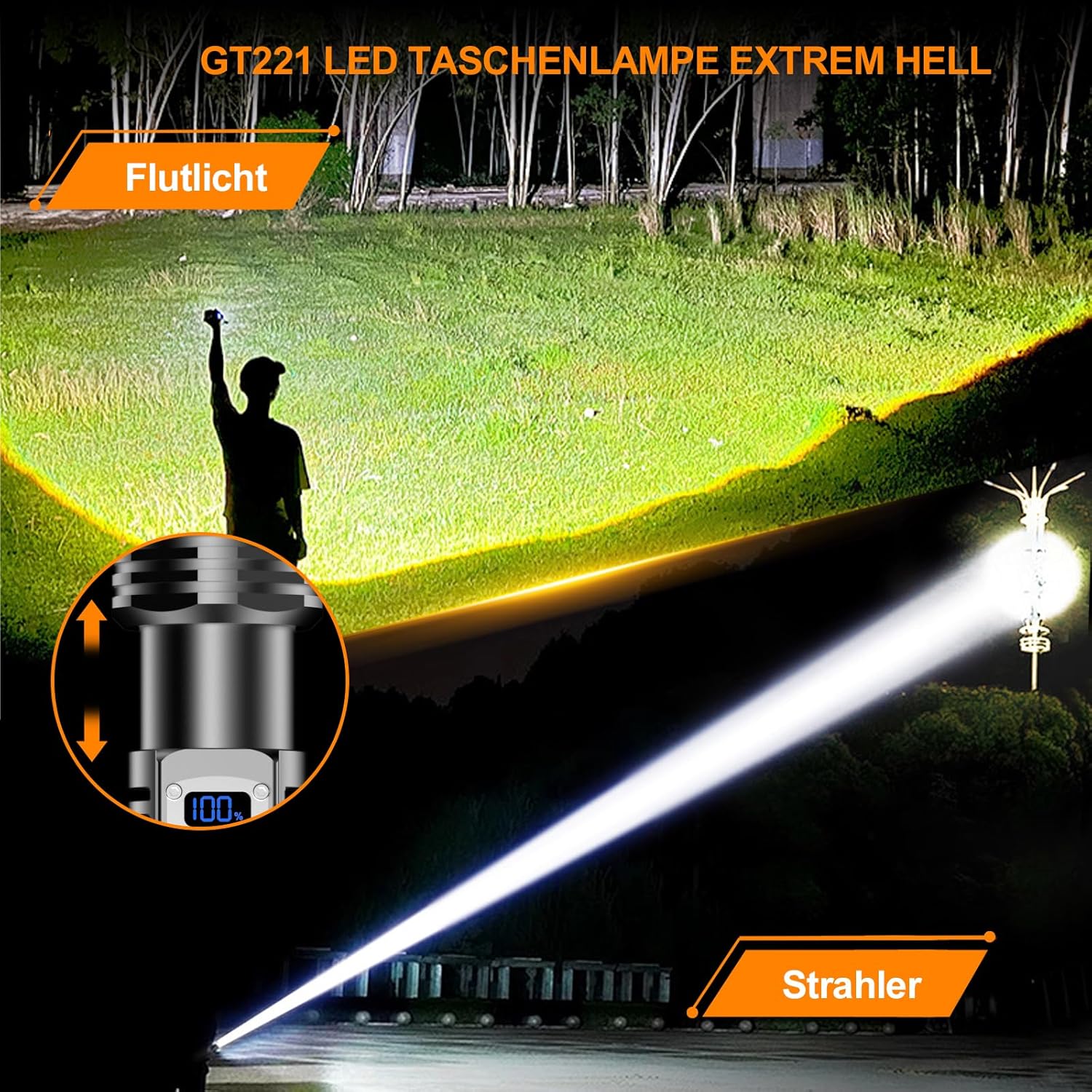
Image: A person using the flashlight, illustrating the difference between a wide floodlight beam and a narrow, long-distance spotlight beam.
Charging and Power Bank Function
The flashlight is equipped with a built-in USB-C charging port and can also function as a power bank:
- Charging the Flashlight: Connect the included USB-C cable to the flashlight's charging port and plug the other end into a USB power source (e.g., wall adapter, car charger, computer). The LCD display will show the charging progress.
- Power Bank Function: In an emergency, you can use the flashlight's USB output port to charge other devices, such as your mobile phone. Connect your device to the flashlight using a compatible USB cable.
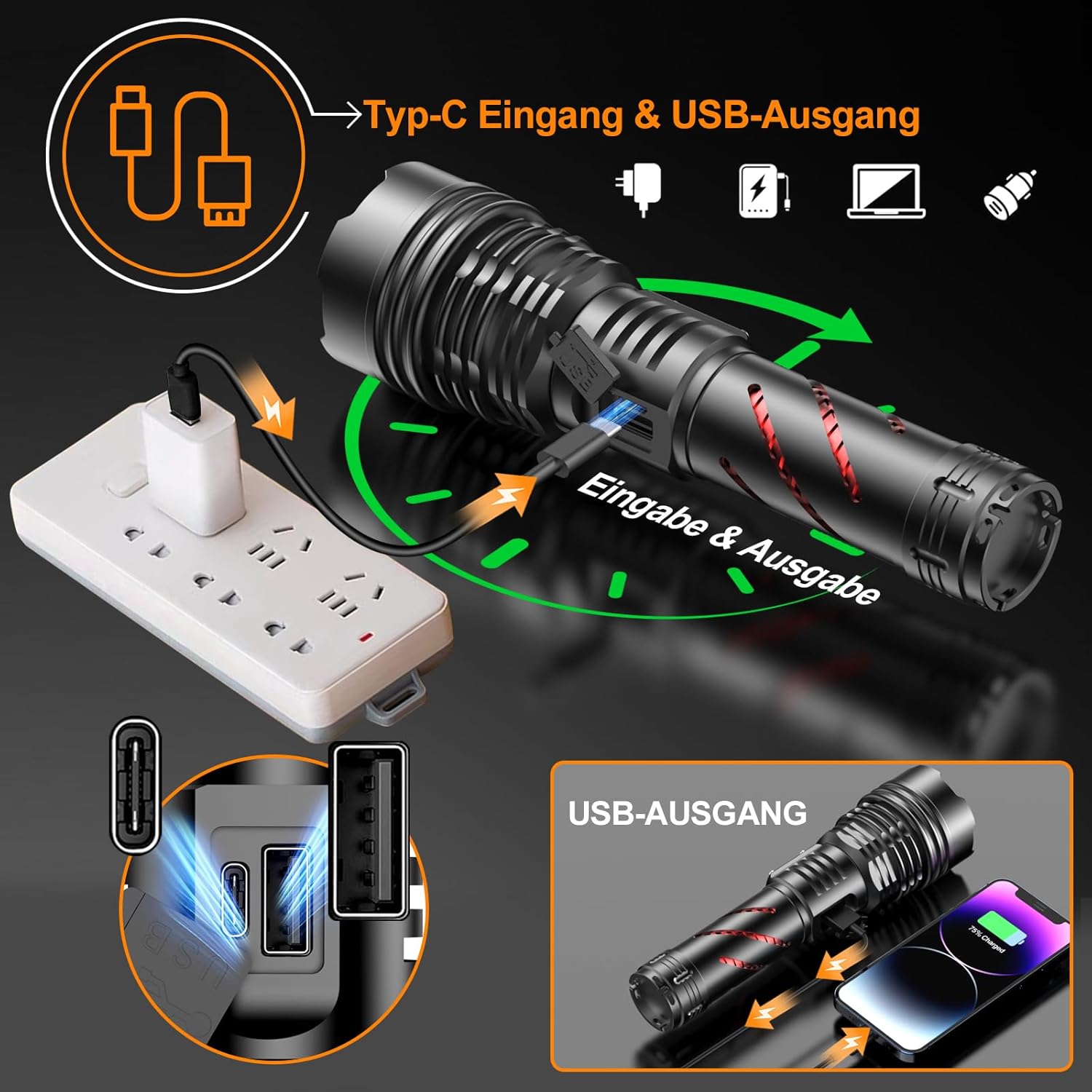
Image: The flashlight connected to a power source for charging, and also connected to a smartphone to demonstrate its power bank capability.
Maintenance
To ensure the longevity and optimal performance of your Relybo GT221 flashlight, follow these maintenance guidelines:
- Cleaning: Wipe the flashlight's exterior with a soft, damp cloth. Do not use abrasive cleaners or solvents.
- Storage: Store the flashlight in a cool, dry place away from direct sunlight and extreme temperatures. If storing for extended periods, remove the battery.
- Battery Care: Recharge the battery regularly, even if not in frequent use, to maintain its health. Avoid fully discharging the battery.
- Water Resistance: The flashlight has an IPX6 water resistance rating, meaning it is protected against powerful water jets. While durable, avoid prolonged submersion. Ensure the charging port cover is securely closed to maintain water resistance.
- Durability: The aluminum alloy casing provides resistance to pressure and impacts. The spiral anti-slip design on the handle helps prevent accidental drops.

Image: The flashlight being splashed with water, highlighting its IPX6 water resistance, along with insets showing its impact resistance against glass and a tire.
Troubleshooting
If you encounter any issues with your Relybo GT221 flashlight, please refer to the following common problems and solutions:
| Problem | Possible Cause | Solution |
|---|---|---|
| Flashlight does not turn on. | Battery is dead or incorrectly installed. | Charge the battery. Ensure the battery is inserted with correct polarity and the tail cap is tightened. |
| Light is dim or flickers. | Low battery charge. Loose connections. | Recharge the battery. Ensure the tail cap and head are securely tightened. |
| Cannot adjust focus. | Mechanism might be stiff or obstructed. | Apply gentle force to slide the head. Ensure no debris is obstructing the mechanism. |
| Charging not working. | Faulty cable or power source. Charging port obstruction. | Try a different USB-C cable and power adapter. Check the charging port for debris. |
If the problem persists after trying these solutions, please contact Relybo customer service for further assistance.
Specifications
Detailed technical specifications for the Relybo GT221 Flashlight:
- Brand: Relybo
- Model Number: GT221
- Product Dimensions: 18.2 x 4.3 x 5.8 cm
- Weight: 550 g
- Battery Type: Rechargeable Lithium Ion (1 AAA mentioned in some specs, but product uses a larger rechargeable battery)
- Material: Aluminum Alloy
- Light Source Type: LED (XHM100 chip)
- Luminous Flux: 1,000,000 Lumens
- Water Resistance: IPX6
- Special Features: 2 Switches, Continuous Dimming, Anti-slip Grip, High Power, Adjustable Light Modes, Rechargeable, Power Bank Function, LCD Battery Display
- Charging Port: USB-C

Image: The flashlight displaying its LCD battery percentage and key dimensions.
Safety Information
Please observe the following safety precautions to prevent injury or damage to the flashlight:
- Eye Safety: Do not shine the flashlight directly into eyes or at other people/animals. The high intensity light can cause temporary vision impairment or permanent eye damage.
- Children: Keep the flashlight out of reach of children.
- Disassembly: Do not attempt to disassemble or modify the flashlight. This can void the warranty and cause damage or injury.
- Battery Handling: Use only the specified rechargeable battery. Do not expose batteries to fire or extreme heat. Dispose of batteries according to local regulations.
- Heat: The flashlight may become warm during prolonged use at high brightness settings. This is normal. Avoid touching the head of the flashlight when hot.
Warranty and Support
Relybo is committed to providing high-quality products and excellent customer service. Your Relybo GT221 flashlight comes with a standard manufacturer's warranty against defects in materials and workmanship.
If you have any questions, concerns, or require assistance with your product, please do not hesitate to contact our customer service team. We are dedicated to providing the best solution in the shortest possible time.
For support, please visit the Relybo store on Amazon or refer to the contact information provided in your purchase documentation.