
PAKEWAY 6L WiFi Automatic Feeder
PAKEWAY Automatic Pet Feeder User Manual
Model: 6L WiFi Automatic Feeder
1. Introduction
Thank you for choosing the PAKEWAY Automatic Pet Feeder. This intelligent device is designed to provide a convenient and reliable feeding solution for your cats and dogs, ensuring they receive their meals on time, even when you are away. With its large capacity, app control, and dual power supply, this feeder simplifies pet care and promotes healthy eating habits. Please read this manual thoroughly before use to ensure proper setup, operation, and maintenance.
2. Safety Instructions
- This appliance is for indoor use only.
- Use only dry pet food with this feeder. Do not use wet, canned, or moist food.
- Keep the feeder on a stable, level surface to prevent tipping.
- Do not immerse the main feeder body in water or any other liquid.
- Ensure the power adapter cable is not chewed by pets. Use the battery backup feature for added safety during power outages.
- Keep out of reach of children and pets when not in use or during cleaning.
- Unplug the feeder before cleaning or performing any maintenance.
- Do not attempt to disassemble or repair the feeder yourself. Contact customer support for assistance.
3. Product Components
The PAKEWAY Automatic Pet Feeder consists of the following main components:
- Feeder Body (with control panel and food outlet)
- Food Storage Barrel (transparent)
- Lid with Desiccant Box
- Stainless Steel Feeding Bowl
- Type-C Power Cable and Adapter (not always included, check packaging)

Image: Overview of the PAKEWAY Automatic Pet Feeder, showing its main body, transparent food barrel, stainless steel bowl, and a smartphone demonstrating the app interface.
4. Setup Guide
4.1 Unpacking and Assembly
- Carefully remove all components from the packaging.
- Place the feeder body on a flat, stable surface.
- Insert the stainless steel feeding bowl into its designated slot at the base of the feeder.
- Ensure the food storage barrel is securely seated on the feeder body.
4.2 Power Supply
The feeder supports dual power supply for reliable operation.
- Primary Power: Connect the Type-C power cable to the feeder's power port and plug the adapter into a wall outlet.
- Backup Power: For uninterrupted feeding during power outages, install 3 D-cell batteries (not included) into the battery compartment located at the bottom of the feeder. The app will display the battery level.
4.3 App Installation and Connection
- Download the 'PAKEWAY Smart' app from your smartphone's app store (iOS App Store or Google Play Store).
- Open the app and register for an account or log in.
- Follow the in-app instructions to add your device. Ensure your phone is connected to a 2.4GHz Wi-Fi network.
- The app will guide you through the pairing process, which typically involves pressing a button on the feeder to enter pairing mode.

Image: A smartphone screen showing the 'Intelligent Feeding Schedule' interface within the PAKEWAY app, demonstrating how users can set feeding times and amounts. A dog is visible next to the feeder.
4.4 Filling the Food Barrel
- Remove the lid from the top of the food storage barrel.
- Fill the barrel with dry pet food. The feeder has a 6-liter capacity, approximately 3.5 kg of dry food.
- Place a desiccant bag (if desired, for freshness) into the designated moisture-proof box under the lid.
- Securely close the lid, ensuring it twists to isolate air and prevent oxidation.

Image: Close-up of the transparent food storage barrel, highlighting its large capacity of 6 liters, equivalent to approximately 3.5 kg of dry food.
5. Operating Instructions
5.1 Personalized Feeding Plan (App Control)
The PAKEWAY app allows you to create a customized feeding schedule for your pet:
- Open the PAKEWAY Smart app and select your feeder device.
- Navigate to the 'Meal Plan' or 'Schedule' section.
- You can set up to 10 feeding programs per day.
- For each program, specify the feeding time and the number of servings. Each serving is approximately 8 grams. The feeder supports a maximum of 16 servings per meal.
- The app also provides a line chart of feeding data for the last 7 days, helping you monitor your pet's intake.
5.2 Manual Remote Feeding
To dispense food instantly, use the manual feeding function in the app. This is useful for giving extra treats or meals outside of the scheduled times.
5.3 Monitoring and Alerts
The app allows you to monitor the feeder's status:
- Food Level: Check the remaining amount of food in the barrel. The built-in infrared sensor will beep and alert you via the app when food is low.
- Battery Level: Monitor the backup battery status directly from the app.

Image: Detailed view of the feeder's internal structure, highlighting the built-in infrared sensor chip that automatically detects remaining food and provides intelligent reminders.
5.4 Freshness Preservation
The feeder incorporates a triple freshness technique to keep food fresh:
- Twist Lid: The snap-on cover isolates air, preventing food from oxidizing.
- Moisture-Proof Box: A built-in compartment allows you to add a desiccant bag to absorb moisture, keeping food crispy.
- Concealed Outlet: The hidden food outlet reduces moisture penetration and prevents pets from accessing the food directly.

Image: An exploded view diagram showcasing the three key features for preserving food freshness: the airtight snap-on cover, the integrated moisture-proof box for desiccant, and the concealed food outlet.
6. Maintenance and Cleaning
Regular cleaning is essential to ensure your pet's health and the feeder's longevity.
6.1 Disassembly for Cleaning
The following parts are fully removable for easy cleaning:
- Sealing Lid
- Food Storage Barrel
- Stainless Steel Feeding Bowl
- Base (can be detached from the main body for thorough cleaning of the food path)
6.2 Cleaning Instructions
- Unplug the feeder from the power outlet and remove any backup batteries.
- Empty any remaining food from the barrel.
- Wash the lid, food storage barrel, and stainless steel bowl with mild soap and water. Rinse thoroughly and dry completely before reassembling.
- Wipe the main feeder body and the food dispensing mechanism with a damp cloth. Do not submerge the main body in water.
- Ensure all parts are completely dry before reassembling and refilling with food.
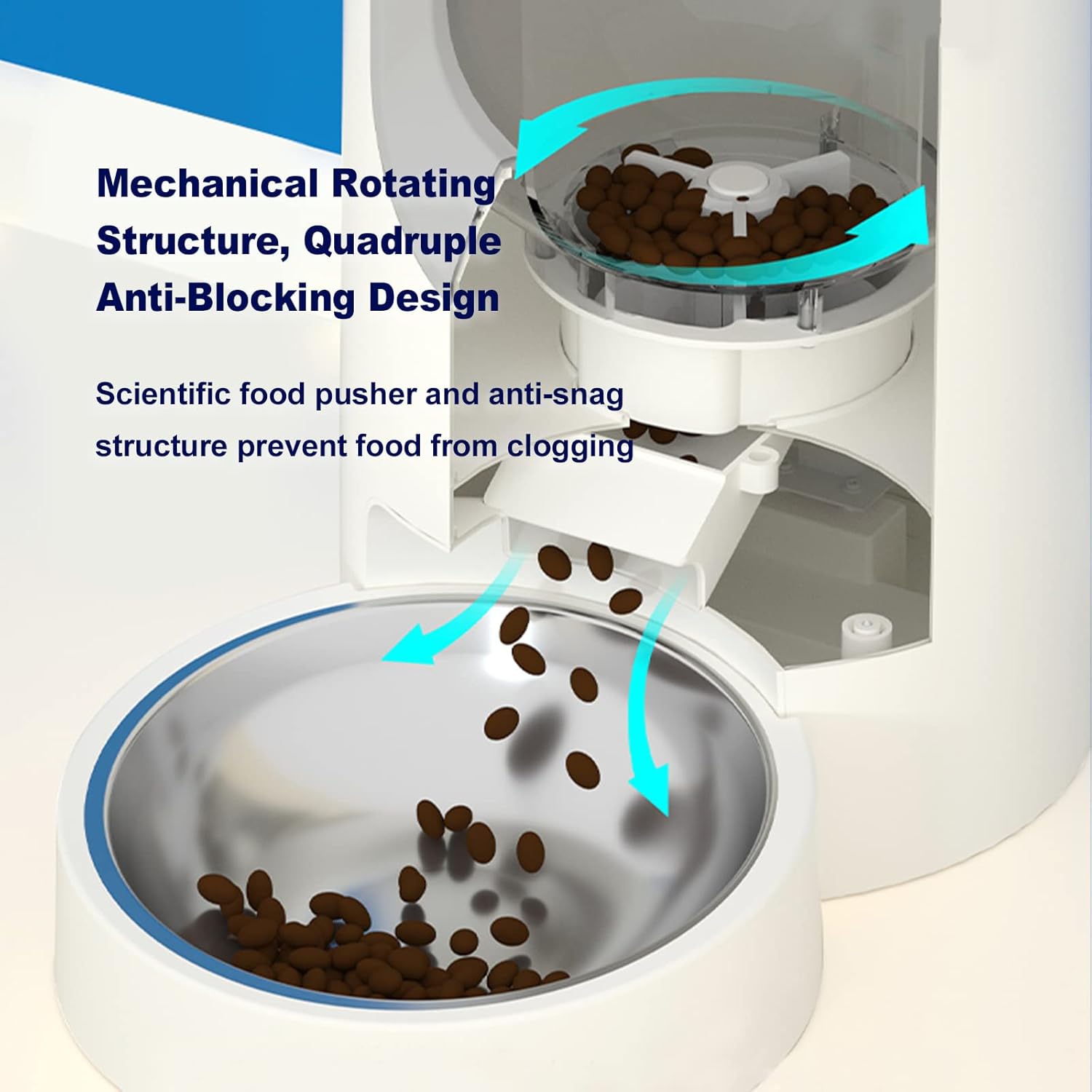
Image: An internal view illustrating the mechanical rotating structure and quadruple anti-blocking design, which ensures uniform food dispensing and prevents clogging.
7. Troubleshooting
| Problem | Possible Cause | Solution |
|---|---|---|
| Feeder not dispensing food. | Food jam/clog; low food level; power issue. | Check food path for obstructions. Refill food barrel. Verify power connection and battery level. |
| App cannot connect to feeder. | Incorrect Wi-Fi password; feeder not in pairing mode; 5GHz Wi-Fi network. | Ensure correct Wi-Fi password. Put feeder into pairing mode (refer to app instructions). Connect phone to a 2.4GHz Wi-Fi network. |
| Food not staying fresh. | Lid not sealed properly; desiccant bag needs replacement. | Ensure lid is securely twisted and sealed. Replace desiccant bag regularly (every 1-2 months). |
| Infrared sensor not detecting food level. | Sensor is dirty or obstructed. | Clean the infrared sensor window with a soft, dry cloth. |
8. Specifications
| Feature | Detail |
|---|---|
| Brand | PAKEWAY |
| Model | 6L WiFi Automatic Feeder |
| Capacity | 6 Liters (approx. 3.5 kg dry food) |
| Dimensions (L x W x H) | Approx. 24.5 x 24.2 x 41.7 cm |
| Item Weight | 3.5 kg |
| Material | Plastic body, Stainless Steel bowl |
| Power Supply | Type-C cable (primary), 3 x D-cell batteries (backup) |
| Connectivity | Wi-Fi (2.4GHz only) |
| Target Species | Cats and Dogs (Small to Large Breeds) |

Image: A visual representation of the feeder's dimensions, indicating its height (370mm), width (323mm), and depth (193mm).
9. Warranty and Support
For warranty information, technical support, or any questions regarding your PAKEWAY Automatic Pet Feeder, please refer to the contact information provided on the product packaging or visit the official PAKEWAY website. Please have your product model and purchase details ready when contacting support.
Ask a question about this manual
Ask about setup, troubleshooting, compatibility, parts, safety, or missing instructions. Manuals+ will review the question and use this page’s manual context to help answer it.