
Introduction
The Honeywell Home Smart Color Wi-Fi Programmable Touch Screen Thermostat (Model RTH9600WF2022) offers advanced control over your home's heating and cooling system. This ENERGY STAR certified thermostat features a customizable color display, remote management via a mobile app, and compatibility with popular smart home platforms like Amazon Alexa and Google Assistant. It is designed to provide optimal comfort and energy efficiency through flexible programming options and smart response technology.

Figure 1: Front view of the Honeywell Home Smart Color Wi-Fi Thermostat, showing its vibrant color touchscreen display with indoor and outdoor temperature readings.
Key Features
- ENERGY STAR Certified: Helps save energy, track heating and cooling usage, and provides personalized tips for reducing energy consumption.
- Remote Control: Manage your home's comfort and energy usage from anywhere using the dedicated mobile app or compatible smart home partners like Amazon Alexa, Google Assistant, and Microsoft Cortana.
- Customizable Color Screen: Personalize the high-definition display to match your home's décor with a wide range of color options.
- On-Screen Comfort Information: View indoor and outdoor temperature, humidity, and daily weather forecasts directly on the thermostat screen.
- Smart Response Technology: Learns your home's heating and cooling cycle times to deliver the desired temperature precisely when you want it.
- Smart Alerts: Receive notifications for air filter changes, temperature fluctuations, and internet connection issues.
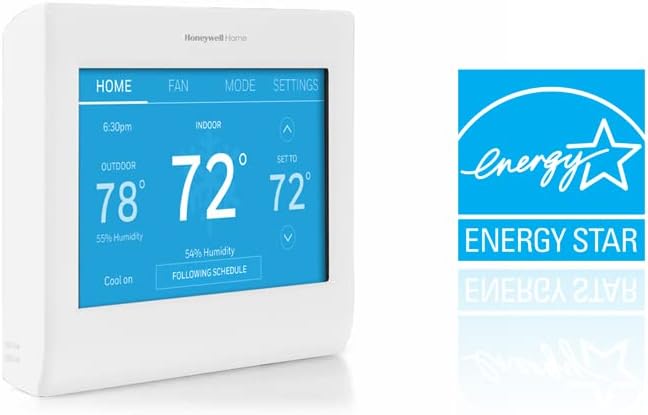
Figure 2: The thermostat is ENERGY STAR certified, indicating its energy-saving capabilities.

Figure 3: The thermostat integrates seamlessly with smart home ecosystems like Amazon Alexa and Google Assistant for voice control.
Compatibility
This thermostat is compatible with most 24-volt heating and cooling systems, including:
- Forced air (gas, oil, or electric)
- Hot water and steam systems
- Heat pumps with electric backup
Important: A C-wire (common wire) is REQUIRED for continuous power. This thermostat is NOT compatible with electric baseboard heat (120-240V) or line volt heating systems.
Before purchasing or installing, it is crucial to verify your home's wiring and system compatibility. If you are unsure, consult a professional HVAC technician or Honeywell Home customer support.

Figure 4: Detailed compatibility chart illustrating supported HVAC system types and the necessity of a C-wire.
Setup
Installation of the Honeywell Home Smart Color Wi-Fi Thermostat typically involves replacing an existing thermostat. Ensure you turn off power to your HVAC system at the circuit breaker before beginning. The thermostat comes with mounting hardware and a quick start guide to assist with the process.
- Power Off: Turn off power to your heating and cooling system at the circuit breaker.
- Remove Old Thermostat: Carefully remove your old thermostat from the wall plate. Take a picture of the wiring connections before disconnecting any wires. This will serve as a reference for connecting the new thermostat.
- Mount New Backplate: Install the new thermostat's backplate using the provided screws and drywall anchors if needed.
- Connect Wires: Connect the wires to the corresponding terminals on the new backplate, referencing the picture taken earlier. Ensure the C-wire is connected.
- Attach Thermostat: Secure the new thermostat onto its mounted backplate.
- Power On: Restore power to your HVAC system at the circuit breaker.
- Initial Setup: Follow the on-screen prompts to configure your thermostat, including Wi-Fi connection and basic settings.

Figure 5: The back of the thermostat unit, illustrating the wiring terminals for connection to your HVAC system.
Operating Instructions
Home Screen Overview
The home screen provides an at-a-glance view of essential information:
- Indoor Temperature: Current temperature inside your home.
- Outdoor Temperature & Humidity: Real-time outdoor conditions (requires Wi-Fi connection).
- Set To Temperature: Your desired temperature setting.
- System Status: Indicates if the system is heating, cooling, or off.
- Following Schedule: Shows if the thermostat is operating based on a programmed schedule.
Fan Settings
Access the "FAN" tab to control your system's fan operation:
- On: The fan runs continuously.
- Automatic: The fan runs only when the heating or cooling system is active. This is the most energy-efficient setting.
- Circulate: The fan runs randomly for approximately 35% of the time to help circulate air throughout your home, even when heating/cooling is not active.
Mode Selection
Tap the "MODE" tab to select your desired system operation:
- Heat: The system will only heat your home.
- Cool: The system will only cool your home.
- Off: The heating and cooling system is turned off.
- Auto: (If configured) The thermostat automatically switches between heating and cooling to maintain your set temperature range.
Settings and Scheduling
The "SETTINGS" tab provides access to advanced features and customization:
- Create/Edit Schedule: Set up personalized heating and cooling schedules for different times of the day and days of the week. This allows for energy savings by adjusting temperatures when you are away or sleeping.
- View Schedule Summary: Review your current programmed schedule.
- Color Themes: Change the background color of your thermostat's display to match your preference.
- Vacation Mode: Optimize energy usage while you are away for an extended period.
- Preferences: Adjust various thermostat preferences, such as temperature units (°F/°C) and time format.
- Equipment Status: View information about your connected HVAC equipment.
- Wi-Fi Setup: Reconfigure or connect to a new Wi-Fi network.
- System Setup: Access advanced system configuration options (typically for professional installers).

Figure 6: The thermostat offers flexible programming options to align with your daily schedule or utility company's peak rate pricing.
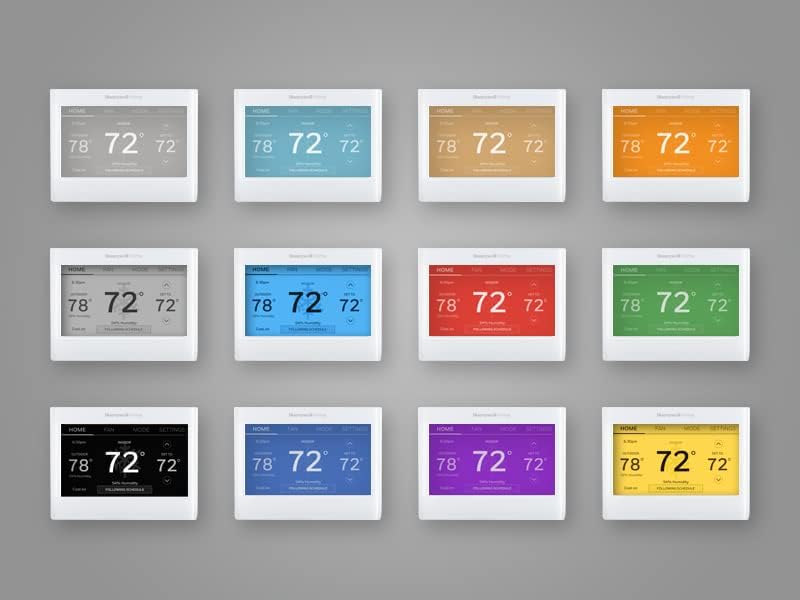
Figure 7: The thermostat's screen can be customized with a wide array of background colors to suit your aesthetic preferences.

Figure 8: Receive smart alerts, such as low temperature notifications, directly on your smartphone via the connected app.
Maintenance
- Air Filter Reminders: The thermostat can be configured to remind you when it's time to change your air filter, ensuring optimal system performance and air quality.
- Cleaning the Screen: To clean the touchscreen, gently wipe it with a soft, damp cloth. Avoid using abrasive cleaners or sprays directly on the screen.
Troubleshooting
If you encounter issues with your Honeywell Home Smart Color Wi-Fi Thermostat, try the following common troubleshooting steps:
- No Power/Blank Screen:
- Check the circuit breaker for your HVAC system to ensure power is on.
- Verify that the C-wire is properly connected at both the thermostat and the HVAC system.
- Heating/Cooling Not Working:
- Ensure the system mode is set correctly (Heat, Cool, or Auto).
- Check that the set temperature is appropriate for the desired action (e.g., set lower than room temperature for cooling).
- Confirm that your HVAC system is receiving power.
- Wi-Fi Connectivity Issues:
- Ensure your home Wi-Fi network is active and functioning correctly.
- Restart your Wi-Fi router.
- Go to the thermostat's Wi-Fi Setup menu to re-establish the connection.
- Inaccurate Temperature Readings:
- Ensure the thermostat is not exposed to direct sunlight, drafts, or heat sources (e.g., lamps, appliances) that could affect its sensor.
For more detailed troubleshooting or persistent issues, refer to the full user manual (PDF) available online or contact Honeywell Home customer support.
Specifications
| Feature | Specification |
|---|---|
| Brand | Honeywell Home |
| Model Name | Smart Color Thermostat |
| Product Dimensions | 1"D x 4.75"W x 3.5"H |
| Controller Type | IFTTT, Google Assistant, Amazon Alexa, iOS, Android |
| Special Feature | Smart Response Technology, Selectable Color Touchscreen, Works with Amazon Alexa, ENERGY STAR certified |
| Color | White |
| Connectivity Technology | Wi-Fi |
| Power Source | 24 Volts (C-Wire Required) |
| Item Weight | 11.2 ounces |
| Display Type | LCD |
| Control Method | App, Touch |
| Mounting Type | Wall Mount |
| UPC | 194159008144 |
| Item Model Number | RTH9600WF2022 |
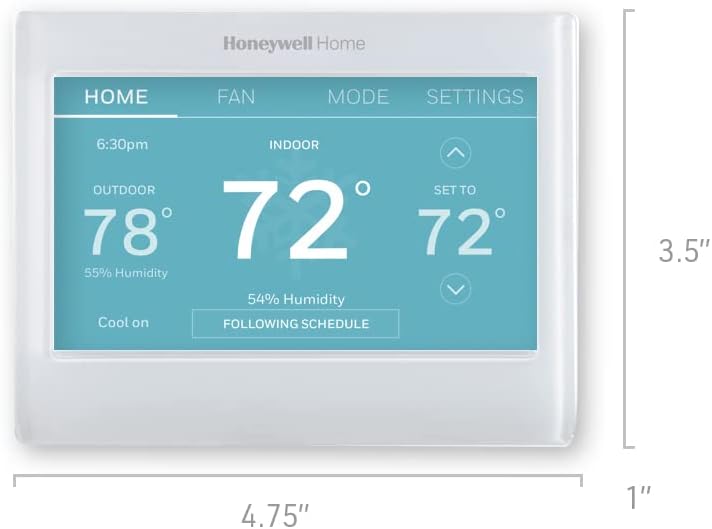
Figure 9: Physical dimensions of the thermostat for installation planning.
Warranty and Support
The Honeywell Home Smart Color Wi-Fi Programmable Touch Screen Thermostat comes with a 2-year limited warranty. For warranty claims or technical support, please contact Honeywell Home customer service.
Additional resources:
- User Guide (PDF): Download User Guide
- User Manual (PDF): Download User Manual