
Norcent N32--D1
Norcent N32-D1 32-Inch 720P LED LCD HDTV with Built-in DVD Player - User Manual
Model: N32-D1 | Brand: Norcent
Introduction
This manual provides comprehensive instructions for the setup, operation, and maintenance of your Norcent N32-D1 32-Inch 720P LED LCD HDTV with a built-in DVD player. Please read this manual thoroughly before operating the unit to ensure proper use and to maximize your viewing experience.

Front view of the Norcent N32-D1 TV, showcasing its display and integrated DVD player design.
Setup Instructions
1. Unpacking and Placement
Carefully remove the TV from its packaging. Place the TV on a stable, flat surface or mount it on a wall using a compatible VESA mount (sold separately). Ensure adequate ventilation around the TV.
2. Attaching the Stands
If using the included stands, align each stand with the corresponding slots on the bottom of the TV. Secure them firmly with the provided screws. Refer to the diagram below for proper stand attachment.

Bottom view of the TV, illustrating the stand attachment points.
3. Connecting Devices
The Norcent N32-D1 offers multiple connectivity options. Connect your external devices such as cable boxes, gaming consoles, or media players to the appropriate ports on the back of the TV.
- HDMI: For high-definition audio and video.
- USB: For media playback from USB drives.
- VGA: For connecting to a computer.
- Digital TV Tuner Cable: For connecting to an antenna or cable TV source.

Rear view of the TV, highlighting the input ports and the built-in DVD player.
4. Power Connection
Plug the power cord into the TV's power input, then into a standard electrical outlet.
Operating Instructions
1. Basic TV Operation
Use the included remote control to power on/off the TV, adjust volume, change channels, and select input sources. The TV supports 720P, 480P, and 480i signals.
2. Built-in DVD Player Operation
The N32-D1 features a convenient side-loading DVD player. To insert a disc, gently slide it into the disc slot on the side of the TV with the label facing up. The TV will automatically switch to DVD mode or prompt you to do so.
To eject a disc, locate the EJECT button on the remote control or on the TV's side panel (often near the disc slot). Pressing this button will release the disc. Some users have noted that the eject mechanism can be audible during operation; this is normal for this model.
3. V-Chip Functionality
The built-in V-Chip allows parents to block content based on program ratings. Access the V-Chip settings through the TV's main menu to configure content restrictions. This feature helps ensure child safety by controlling access to inappropriate programming.
Maintenance
Cleaning the TV
Before cleaning, unplug the TV from the power outlet. Use a soft, dry cloth to wipe the screen and cabinet. For stubborn marks, lightly dampen the cloth with water or a mild, non-abrasive screen cleaner. Never spray liquid directly onto the TV.
DVD Player Care
Keep the DVD player slot free of dust and debris. Avoid inserting damaged or dirty discs, as this can affect playback quality and potentially damage the player mechanism.
Troubleshooting
| Problem | Possible Cause / Solution |
|---|---|
| No Power | Ensure the power cord is securely plugged into both the TV and a working electrical outlet. Check the power indicator light on the TV. |
| No Picture / Poor Picture Quality | Verify the correct input source is selected (e.g., HDMI 1, AV, DVD). Check cable connections for looseness or damage. Adjust picture settings (brightness, contrast, etc.) in the TV menu. |
| No Sound | Check the volume level and ensure the TV is not muted. Verify audio cable connections if using external speakers. |
| DVD Player is Loud During Operation | Some operational noise from the DVD mechanism (loading, unloading, or during playback) is normal for this model. If the noise is excessive or accompanied by playback issues, ensure the disc is clean and undamaged. |
| Cannot Eject DVD Disc | Ensure the TV is powered on. Press the dedicated EJECT button on the remote control or on the TV's side panel. If the disc is stuck, power cycle the TV (unplug for 30 seconds, then plug back in) and try again. |
Specifications
| Feature | Detail |
|---|---|
| Brand | Norcent |
| Model Name | N32-D1 |
| Screen Size | 32 Inches |
| Display Technology | LED |
| Resolution | 720p (1280x720 max) |
| Aspect Ratio | 16:9 |
| Connectivity Technology | HDMI, USB, VGA, Digital TV Tuner Cable |
| Special Feature | Built-in DVD Player, Flat Design, V-Chip |
| Product Dimensions (D x W x H) | 6.3"D x 28.7"W x 18.7"H |
| Item Weight | 12.77 pounds |
| On-mode Power Consumption | 45.0 watts |
| First Available Date | September 24, 2020 |
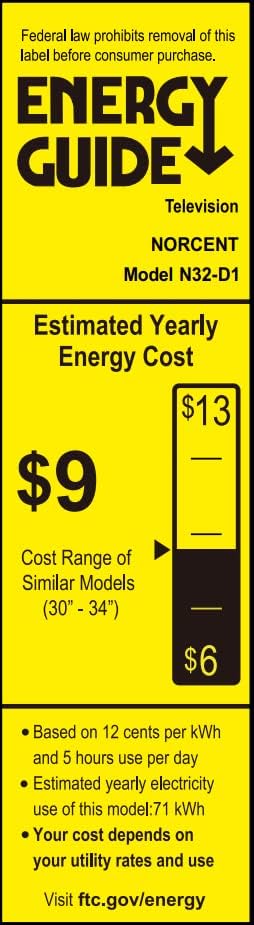
Energy Guide label for the Norcent N32-D1, indicating estimated yearly energy cost and consumption.
Warranty and Support
For warranty information and technical support, please refer to the documentation included with your purchase or visit the official Norcent website. Keep your purchase receipt for warranty claims.
For additional assistance, you may contact Norcent customer service. Contact details are typically available on the manufacturer's website or in the product packaging.
Ask a question about this manual
Ask about setup, troubleshooting, compatibility, parts, safety, or missing instructions. Manuals+ will review the question and use this page’s manual context to help answer it.