
1. Introduction
Thank you for choosing the Gamalta LED Aquarium Light AL-300. This manual provides essential information for the safe and effective operation of your new aquarium light. Please read these instructions carefully before installation and use, and retain them for future reference.
2. Safety Information
- Ensure the power supply voltage matches the requirements specified for the light.
- Do not operate the light with a damaged cord or plug.
- Always unplug the light from the power outlet before performing any maintenance, cleaning, or when not in use.
- This product is designed for indoor use with aquariums only. Do not immerse the light unit or controller in water. While the light unit features a waterproof baffle, the controller and power adapter are not waterproof.
- Keep out of reach of children.
- Avoid looking directly into the LED lights for extended periods, as this may cause eye strain.
3. Package Contents
Verify that all components are present in the package:
- Gamalta LED Aquarium Light Unit (AL-300)
- Extendable Brackets (2x)
- Inline Controller with Power Cord
- Power Adapter
4. Product Overview
The Gamalta LED Aquarium Light AL-300 is designed to provide optimal lighting for freshwater planted tanks, featuring a full spectrum of colors and a 24/7 natural lighting cycle. Its robust construction ensures durability and efficient performance.

The Gamalta LED Aquarium Light, model AL-300, features a sleek design with multi-color LEDs and an inline controller for easy operation.
4.1. Light Unit Features
- Full Spectrum LEDs: Equipped with WRGB large light beads to create an optimal condition for fish and aquatic plants.
- Aluminum Shell: Features grooves for excellent heat dissipation, ensuring longevity.
- Waterproof Baffle: A waterproof glue seal prevents water droplets from entering the LED array.
- Extendable Brackets: Adjustable brackets accommodate aquariums from 12 to 18 inches in length.

This image details the premium construction of the light, featuring an aluminum shell with grooves for efficient heat dissipation and a waterproof baffle with a glue seal to protect against water droplets.
4.2. Controller Features
The inline controller provides intuitive access to all lighting functions.
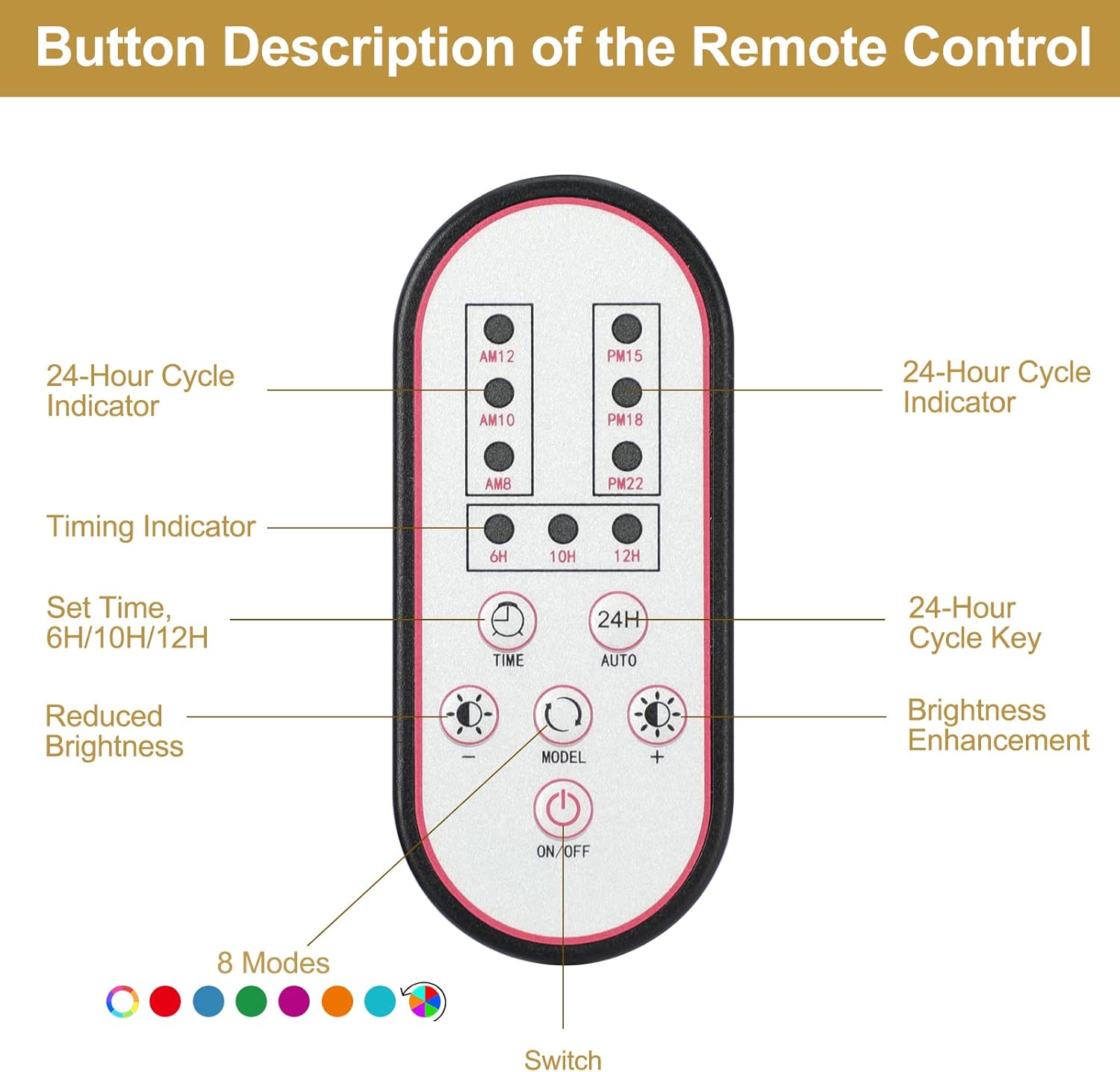
A detailed view of the remote control, showing buttons for 24-hour cycle, timing (6H/10H/12H), brightness adjustment (+/-), mode selection (8 modes), and power (ON/OFF).
5. Setup Instructions
- Attach Brackets: Slide the extendable brackets onto both ends of the light unit.
- Position Light: Place the light unit on top of your aquarium. Adjust the brackets to fit the width of your tank (12-18 inches). Ensure the light is securely seated.
- Connect Power: Connect the inline controller to the light unit, then connect the power adapter to the controller. Plug the power adapter into a standard electrical outlet.
- Initial Power On: Press the ON/OFF button on the controller to turn on the light.

The image demonstrates the easy installation process, highlighting the adjustable brackets that allow the light to fit various aquarium sizes.
6. Operating Instructions
6.1. Power On/Off
Press the ON/OFF button on the controller to turn the light on or off.
6.2. 24/7 Natural Mode
Activate the 24/7 natural mode by pressing the 24H AUTO button. This mode simulates a natural lighting cycle from sunrise to night, providing an ideal environment for aquatic life. The 6 time indicators on the controller serve as a reference for the initial run time setting, which can be adjusted based on your local time.

This diagram illustrates the 24/7 natural lighting cycle, simulating gradient orange light for sunrise (6 AM - 8 AM), gradient white light during the day, and gradient blue light at night to mimic a natural habitat.
Note: In 24/7 cycle mode, the timing and brightness adjustment keys cannot be operated manually.
6.3. Color Modes
Press the MODE button to cycle through the available color options. The light offers 7 distinct color modes:
- WRGB (Full Spectrum)
- Red
- Blue
- Green
- Purple
- Orange
- Cyan
After cycling through these individual colors, the light will enter an automatic color cycle mode. Pressing MODE again will exit the automatic cycle and return to WRGB.
6.4. Brightness Adjustment
Use the + and - buttons to adjust the light brightness. Each press changes the brightness by 10%. For stepless dimming, press and hold either the + or - button.

This image illustrates the brightness adjustment capability of the light, allowing users to increase or decrease the intensity to suit different aquatic environments.
6.5. Timer Settings
The TIME button allows you to set an automatic shutdown timer for 6 hours, 10 hours, or 12 hours. Press the button repeatedly to cycle through these options. The light will automatically turn off after the selected duration.

A visual representation of the timer cycle options, including 6-hour, 10-hour, and 12-hour settings for automatic power on and off, simulating day and night.
6.6. Memory Function
The light features a memory storage function, retaining your last selected settings (color mode, brightness, and timer) even after power interruption.

This graphic emphasizes the memory storage function of the light, which retains settings for the controller, RGB+W colors, dynamic effects, and 24/7 mode, offering plenty of time and color settings.
7. Maintenance
7.1. Cleaning
- Always unplug the light before cleaning.
- Wipe the light unit with a soft, damp cloth. Do not use abrasive cleaners or solvents.
- Ensure the light is completely dry before plugging it back in.
7.2. Heat Dissipation
The aluminum shell with grooves is designed for efficient heat dissipation. Ensure that the grooves are not obstructed to maintain optimal performance and longevity of the LEDs.
8. Troubleshooting
- Light does not turn on:
- Check if the power adapter is securely plugged into the outlet and the controller.
- Ensure the controller is properly connected to the light unit.
- Press the ON/OFF button on the controller.
- Colors are not changing or brightness cannot be adjusted:
- Verify that the light is not in 24/7 Natural Mode, as manual adjustments are disabled in this mode.
- Ensure you are pressing the correct MODE or brightness adjustment buttons.
- Timer function is not working:
- Confirm the light is not in 24/7 Natural Mode.
- Ensure the TIME button is pressed to select a duration (6H, 10H, or 12H).
9. Specifications

A graph illustrating the full spectrum light output, highlighting blue and red wavelengths for biological growth. A table provides specifications for various models (HD-YG-300, HD-YG-500, HD-YG-700, HD-YG-900, HD-YG-1200) including wattage, LED quantity, light size, and application range.
| Feature | Detail |
|---|---|
| Model | AL-300 (HD-YG-300) |
| Wattage | 10 watts |
| Light Size | 12 inches |
| Application Tank Size | 12 - 18 inches |
| LED Quantity | 58 PCS |
| Input Voltage | AC 100-240V |
| Output Voltage | DC 20V |
| Material | Aluminum |
| Special Features | Dimmable, Full Spectrum, Waterproof |
| Product Dimensions | 11.81"D x 4"W x 1.46"H |
| Item Weight | 1.34 pounds |
| Power Cable Length | 5.4 ft |

A technical diagram providing the dimensions of the light unit and the power cable length.
10. Warranty & Support
10.1. Warranty Information
This Gamalta LED Aquarium Light AL-300 comes with a 90-day warranty from the date of purchase, covering manufacturing defects. Please retain your proof of purchase for warranty claims.
10.2. Customer Support
If you have any questions, concerns, or require assistance with your Gamalta aquarium light, please do not hesitate to contact our customer service team. We are dedicated to assisting you in resolving any issues.

An image providing customer support information, including an email address for inquiries regarding the Gamalta aquarium light.
Email: Support@gamalta-home.com