
QT Shopping TG 117
QT Shopping TG 117 Portable Wireless Bluetooth Speaker User Manual
Model: TG 117
Introduction
Thank you for purchasing the QT Shopping TG 117 Portable Wireless Bluetooth Speaker. This manual provides essential information for setting up, operating, and maintaining your speaker. Please read it carefully before use to ensure optimal performance and longevity of your device.
Package Contents
Verify that all items listed below are included in your package:
- 1 x QT Shopping TG 117 Bluetooth Speaker
- 1 x Micro USB Charging Cable
- 1 x 3.5mm Audio Cable
- 1 x User Manual
Product Overview
Familiarize yourself with the speaker's components and controls.

Image: Top and side view of the QT Shopping TG 117 speaker, indicating the Power button, Volume controls, Menu button, TF Card Slot, DC 5V charging port, USB Port, and AUX Port.
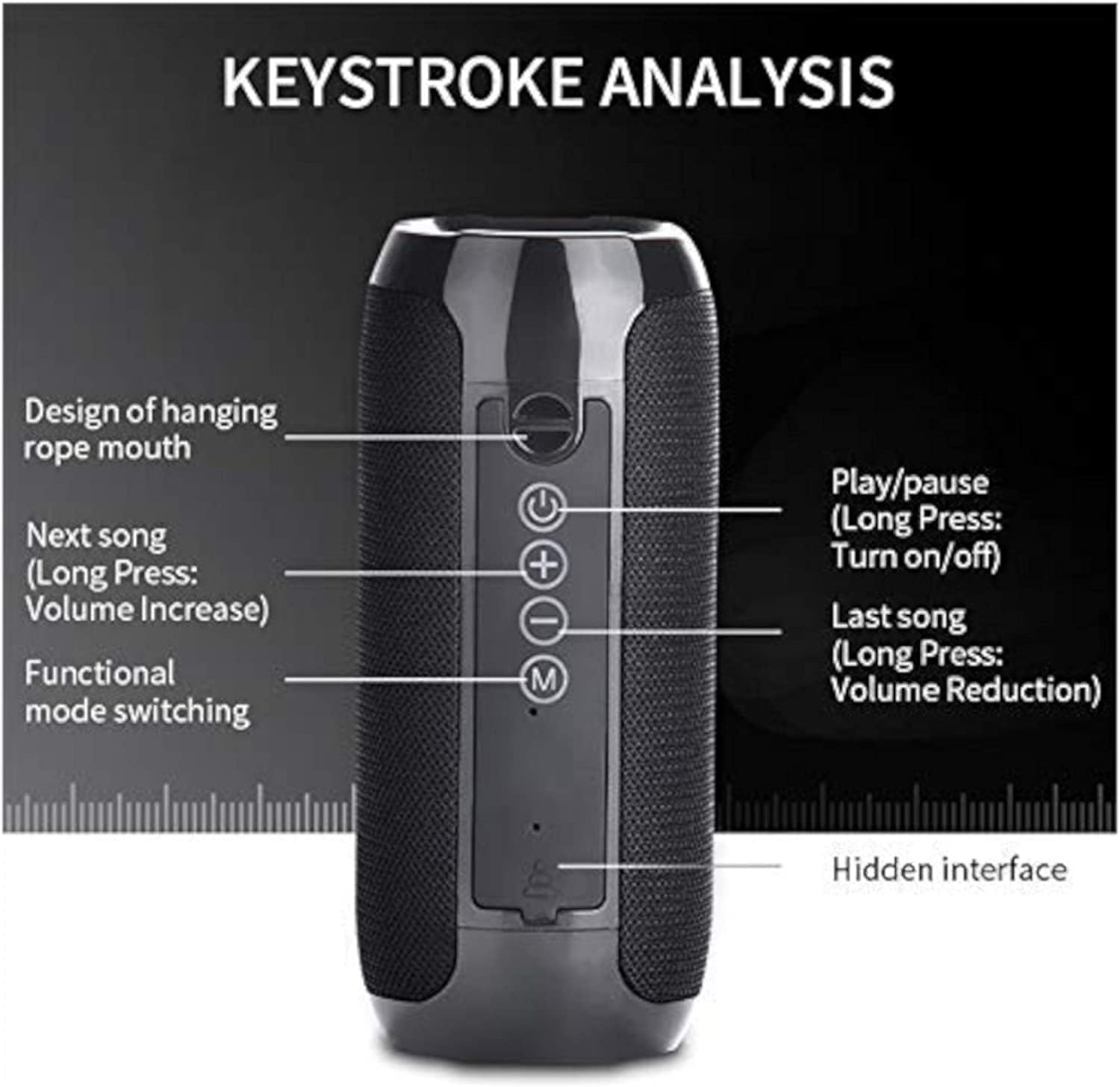
Image: Detailed diagram of the speaker's control panel, showing functions for each button: Play/Pause (long press for On/Off), Next Song (long press for Volume Increase), Last Song (long press for Volume Reduction), and Functional Mode Switching.
Setup
1. Charging the Speaker
- Connect the micro USB charging cable to the DC 5V port on the speaker.
- Connect the other end of the USB cable to a USB power adapter (not included) or a computer's USB port.
- The charging indicator light will illuminate. A full charge typically takes 2-3 hours.
- Disconnect the cable once fully charged.
2. Powering On/Off
- To power on, long press the Power button (often combined with Play/Pause) for 4 seconds or more until the blue indicator light flashes rapidly.
- To power off, long press the Power button again.
3. Bluetooth Pairing
- Ensure the speaker is powered on and in Bluetooth pairing mode (blue light flashing rapidly).
- On your device (smartphone, tablet, etc.), enable Bluetooth and search for available devices.
- Select "TG 117" from the list of found devices.
- Once connected, the blue light will flash intermittently, and you will hear a confirmation tone.
4. Auxiliary (AUX) Connection
- Connect one end of the 3.5mm audio cable to the AUX port on the speaker.
- Connect the other end to the headphone jack of your audio device.
- The speaker will automatically switch to AUX mode.
5. TF Card (MicroSD) Playback
- Insert a TF card (MicroSD card) with MP3 audio files into the TF Card Slot.
- The speaker will automatically detect the card and begin playing music.
6. FM Radio
- Press the 'M' (Mode) button to switch to FM Radio mode.
- In FM mode, short press the Play/Pause button to automatically scan and save available radio stations.
- Use the Next/Previous track buttons to navigate between saved stations.
Operating Instructions
Basic Controls
- Play/Pause: Short press the Play/Pause button.
- Volume Up: Long press the '+' button.
- Volume Down: Long press the '-' button.
- Next Track: Short press the '+' button.
- Previous Track: Short press the '-' button.
- Mode Switch: Short press the 'M' button to cycle through Bluetooth, FM Radio, AUX, and TF Card modes.
Hands-Free Calling
The speaker supports hands-free calling when connected via Bluetooth.

Image: The QT Shopping TG 117 speaker next to a smartphone displaying an incoming call, illustrating the one-button switch for music and call functions.
- Answer Call: Short press the Play/Pause button when an incoming call rings.
- End Call: Short press the Play/Pause button during a call.
- Reject Call: Long press the Play/Pause button when an incoming call rings.
Maintenance
Cleaning
- Wipe the speaker with a soft, dry cloth.
- Do not use abrasive cleaners, alcohol, or chemical solvents, as these may damage the surface.
Water Resistance (IPX5)

Image: The QT Shopping TG 117 speaker with water droplets splashing around it, demonstrating its IPX5 splash-proof capability.
- The speaker is rated IPX5, meaning it is protected against low-pressure water jets from any direction.
- It is splash-proof and rainproof, suitable for outdoor use near water (e.g., beach, poolside).
- Do not submerge the speaker in water.
Battery Care
- To prolong battery life, avoid fully discharging the speaker frequently.
- Charge the speaker regularly, even if not in use for extended periods.
- Store the speaker in a cool, dry place away from extreme temperatures.
Troubleshooting
| Problem | Possible Solution |
|---|---|
| Speaker does not power on. | Ensure the battery is charged. Connect to a power source and try again. |
| Cannot pair via Bluetooth. | Ensure the speaker is in pairing mode (blue light flashing rapidly). Turn off and on Bluetooth on your device. Move closer to the speaker. |
| No sound or low volume. | Check volume levels on both the speaker and your connected device. Ensure the correct input mode (Bluetooth, AUX, TF) is selected. |
| FM radio reception is poor. | Move the speaker to a location with better signal. Ensure the charging cable is connected, as it may act as an antenna. |
| Speaker disconnects frequently. | Ensure your device is within the Bluetooth operating range (typically 10 meters/33 feet). Avoid obstacles between the speaker and your device. |
Specifications
| Feature | Detail |
|---|---|
| Model | TG 117 |
| Brand | QT Shopping |
| Speaker Type | Dual Speaker |
| Audio Driver Size | 52 mm |
| Speaker Maximum Output Power | 10 Watts (2 x 5W) |
| Connectivity Technology | Bluetooth, Auxiliary (3.5mm), TF Card, USB |
| Wireless Communication Technology | Bluetooth, FM Radio |
| Bluetooth Version | 3.0 (as per product description) |
| Battery Capacity | 1200 mAh |
| Playtime | 3-10 hours (varies by volume and content) |
| Charging Time | 2-3 hours |
| Water Resistance Rating | IPX5 |
| Control Method | Button, Voice (for hands-free calls) |
| Product Dimensions | 8.5 x 4 x 0.5 inches (approximate) |
| Item Weight | 11.4 ounces / 322 grams |
Warranty and Support
For any questions, concerns, or support needs regarding your QT Shopping TG 117 speaker, please contact QT Shopping customer service. Refer to your purchase documentation for specific warranty details and contact information.
Ask a question about this manual
Ask about setup, troubleshooting, compatibility, parts, safety, or missing instructions. Manuals+ will review the question and use this page’s manual context to help answer it.