
1. Introduction
Thank you for purchasing the Walk Audio H204 True Wireless Fabric Speaker. This manual provides essential information for setting up, operating, and maintaining your speaker. Please read it thoroughly before use to ensure optimal performance and safety.
2. Safety Information
To prevent damage or injury, please observe the following safety precautions:
- Do not expose the speaker to extreme temperatures, direct sunlight, or open flames.
- Avoid dropping or subjecting the speaker to strong impacts.
- Keep the speaker away from water and liquids. While it is waterproof, prolonged submersion or exposure to high-pressure water jets should be avoided.
- Do not attempt to disassemble, repair, or modify the speaker yourself. Contact qualified service personnel for assistance.
- Use only the provided USB cable for charging.
- Keep out of reach of children.
3. Package Contents
Please check the box for the following items:
- Walk Audio H204 True Wireless Fabric Speaker
- USB Charging Cable
- User Manual (this document)

Image: The retail packaging box for the Walk Audio H204 speaker, displaying the product name and key features.
4. Product Overview
Familiarize yourself with the speaker's components and controls.

Image: Top-down view of the Walk Audio H204 speaker, showcasing its fabric grille, control buttons, and integrated strap.
Control Buttons (Top Panel)
- Power Button: Press and hold to power on/off.
- Play/Pause Button: Press to play or pause music. Press to answer/end calls.
- Volume Down / Previous Track: Press to decrease volume. Press and hold for previous track.
- Volume Up / Next Track: Press to increase volume. Press and hold for next track.
- Mode Button (M): Press to switch between Bluetooth, USB, Micro SD, and AUX modes.
- Bass Boost Button: Press to activate/deactivate Bass Boost.
Ports (Rear Panel)
- USB-A Port: For USB drive playback.
- Micro SD Card Slot: For Micro SD card playback.
- AUX Input: For connecting external audio devices via 3.5mm audio cable (not included).
- Micro-USB Charging Port: For charging the speaker.
5. Setup
5.1 Charging the Speaker
Before first use, fully charge the speaker. Connect the provided USB charging cable to the speaker's Micro-USB port and the other end to a USB power adapter (not included) or a computer's USB port. The charging indicator light will illuminate during charging and turn off when fully charged.

Image: Visual representation of the speaker's battery performance, indicating approximately 2-3 hours of play time, 2-3 hours of charge time, and 2-3 hours of standby time.
5.2 Power On/Off
Press and hold the Power button on the top panel for approximately 3 seconds to turn the speaker on or off. A sound prompt will indicate the power status.
5.3 Bluetooth Pairing
- Turn on the speaker. It will automatically enter Bluetooth pairing mode, indicated by a flashing LED light.
- Enable Bluetooth on your smartphone, tablet, or other compatible device.
- Search for "Walk Audio H204" in the list of available Bluetooth devices.
- Select "Walk Audio H204" to connect. A sound prompt will confirm successful pairing.
- Once paired, the speaker will automatically connect to the last paired device when powered on, if the device's Bluetooth is active and within range.
5.4 Other Playback Modes
The Walk Audio H204 supports multiple input sources:
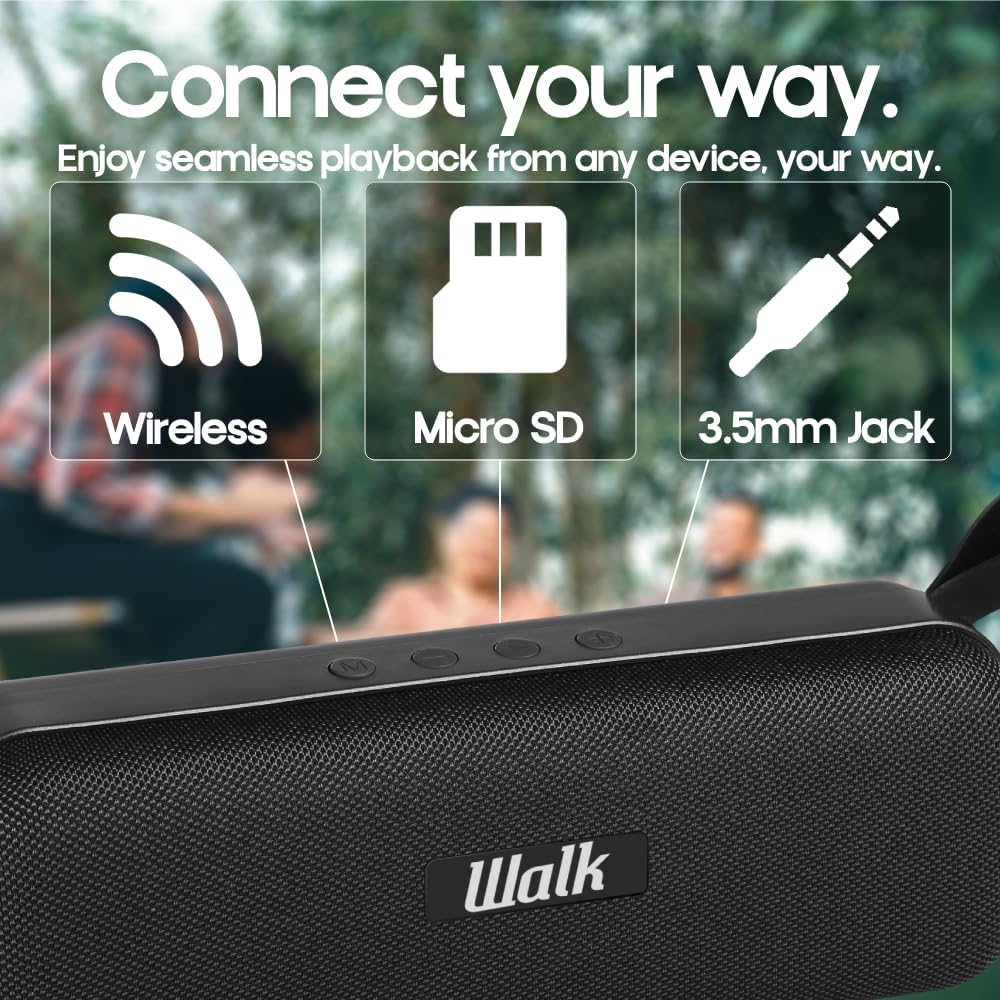
Image: The speaker highlighting its wireless (Bluetooth), Micro SD, and 3.5mm Jack (AUX) connectivity options.
- USB Playback: Insert a USB flash drive into the USB-A port. The speaker will automatically switch to USB mode and begin playing audio files.
- Micro SD Card Playback: Insert a Micro SD card into the Micro SD card slot. The speaker will automatically switch to Micro SD mode and begin playing audio files.
- AUX Input: Connect an external audio device (e.g., MP3 player) to the AUX port using a 3.5mm audio cable. Press the 'M' (Mode) button to switch to AUX mode.
5.5 True Wireless Stereo (TWS) Pairing
You can pair two Walk Audio H204 speakers together for a stereo sound experience.

Image: Two Walk Audio H204 speakers shown wirelessly connected, illustrating the True Wireless Stereo (TWS) feature for enhanced sound.
- Ensure both H204 speakers are powered on and not connected to any Bluetooth device.
- On one speaker (this will be the primary speaker), double-press the Play/Pause button. The speaker will enter TWS pairing mode.
- The two speakers will automatically connect to each other. A sound prompt will confirm successful TWS pairing.
- Once paired, connect your device to the primary speaker via Bluetooth as described in section 5.3. Audio will now play through both speakers in stereo.
6. Operating Instructions
6.1 Basic Music Controls
- Play/Pause: Press the Play/Pause button.
- Volume Up: Press the Volume Up (+) button.
- Volume Down: Press the Volume Down (-) button.
- Next Track: Press and hold the Volume Up (+) button.
- Previous Track: Press and hold the Volume Down (-) button.
6.2 Call Functions (Bluetooth Mode)
When connected to a smartphone via Bluetooth, you can manage calls using the speaker's integrated microphone.
- Answer Call: Press the Play/Pause button.
- End Call: Press the Play/Pause button during a call.
- Reject Call: Press and hold the Play/Pause button for 2 seconds.
6.3 Bass Boost Function
Press the Bass Boost button to activate or deactivate the enhanced bass feature. This can enrich the low-frequency audio output.

Image: The Walk Audio H204 speaker placed on an outdoor table with drinks, demonstrating its portability and suitability for various environments.
7. Maintenance
- Clean the speaker with a soft, dry cloth. Do not use abrasive cleaners or solvents.
- Store the speaker in a cool, dry place when not in use.
- If the speaker will not be used for an extended period, charge it periodically to maintain battery health.
8. Troubleshooting
| Problem | Solution |
|---|---|
| Speaker does not turn on. | Ensure the speaker is charged. Connect it to a power source using the USB cable. |
| Cannot pair via Bluetooth. |
|
| No sound. |
|
| Sound distortion. |
|
| TWS pairing fails. |
|
9. Specifications
| Model Number | H204 |
| Brand | Walk Audio |
| Connectivity Technology | Bluetooth 5.0, USB, AUX |
| Speaker Output Power | 2 x 5 Watts (Total 10W) |
| Speaker Size | 52 mm |
| Frequency Response | Up to 20 KHz |
| Battery Capacity | 1200 mAh Lithium-ion |
| Play Time | 2-3 Hours (approx.) |
| Charge Time | 2-3 Hours (approx.) |
| Dimensions (L x W x H) | 24.3 x 7.3 x 9.3 cm |
| Weight | 638 grams |
| Special Features | Bass Boost, Integrated Microphone, Portable, Waterproof, True Wireless Stereo (TWS) |
| Compatible Devices | Smartphones, Tablets |
10. Warranty and Support
Walk Audio products are designed for reliability and performance. For warranty information and customer support, please refer to the warranty card included with your purchase or visit the official Walk Audio website. Keep your proof of purchase for warranty claims.
For further assistance, please contact our customer support team.


