1. Product Overview
The Vremi 12000 BTU Portable Air Conditioner with Heat (Model VRM050520N) is a versatile climate control solution designed for rooms up to 350 square feet. This multi-functional unit offers cooling, heating, fan-only operation, and dehumidification modes, providing comfort throughout the year. Its compact design, built-in castors, and integrated handles ensure easy portability between rooms.

Image: The Vremi 12000 BTU Portable Air Conditioner with Heat, a white unit, is shown in a modern living room next to a window with its exhaust hose connected. A sofa and a plant are also visible.
2. Safety Information
Please read all safety instructions carefully before operating the unit. Failure to follow these instructions may result in electric shock, fire, or personal injury.
- Always place the unit on a flat, stable surface.
- Ensure the unit remains in an upright position for at least 4 hours before initial use or after transport.
- Do not operate the unit with a damaged power cord or plug.
- Keep children and pets away from the unit during operation.
- Maintain adequate clearance around the unit for proper airflow.
- Do not insert objects into the air vents.
3. Package Contents
Verify that all items are present in the package:
- Portable Air Conditioner Unit
- Exhaust Hose
- Window Slider Kit (adjustable panels)
- Hose Adapters (2)
- Remote Control
- Drainage Tube
- User Manual
4. Setup and Installation
4.1 Initial Placement
Place the portable AC unit on a flat, stable surface. For optimal performance, ensure the unit remains in an upright position for at least 4 hours before plugging it in and operating it for the first time. This allows the refrigerant to settle.
4.2 Window Kit Assembly
The adjustable window slider kit is designed for easy installation in various window types (vertical or horizontal sliding windows).
- Measure your window opening.
- Assemble the window kit panels by sliding them together and securing them with the provided wing nuts to match your window's width or height.
- Place the assembled window kit into the window opening and close the window sash against it to create a seal.

Image: A person is shown installing the adjustable window slider kit into a window frame, demonstrating the ease of setup.
4.3 Exhaust Hose Connection
The exhaust hose expels hot air from the unit to the outside, which is crucial for effective cooling.
- Screw the round hose adapters onto both ends of the flexible exhaust hose.
- Attach one end of the assembled exhaust hose to the exhaust outlet on the back of the portable AC unit.
- Connect the other end of the exhaust hose to the opening in the installed window kit.
- Ensure all connections are tight to prevent hot air from re-entering the room. The hose can extend up to 60 inches for flexible placement.

Image: A hand is shown connecting the flexible exhaust hose to the back of the portable air conditioner unit, illustrating the hose attachment process.
5. Operating Instructions
The unit can be operated using the control panel on top of the unit or the included remote control.
5.1 Control Panel
The control panel features an LED display and touch buttons for various functions:
- Power Button: Turns the unit On/Off.
- Mode Button: Cycles through Cool, Heat, Fan, and Dry (Dehumidify) modes.
- Temperature Up/Down Arrows: Adjusts the desired temperature (range 55-81°F).
- Fan Speed Button: Selects High or Low fan speed.
- Timer Button: Sets the auto-on/off timer.
- Sleep Button: Activates quiet operation mode.
- Swing Button: Activates the automatic louver swing for wider air distribution.

Image: A detailed view of the unit's top-mounted control panel with an LED display and various function buttons, alongside the remote control.
5.2 Remote Control
The remote control provides convenient access to all functions from a distance.
- All functions available on the control panel are also accessible via the remote.
- Insert two AAA batteries (not included) into the remote control.

Image: A close-up of the white remote control, showing buttons for power, mode, fan speed, temperature adjustment, timer, and sleep mode.
5.3 Operating Modes
- Cool Mode: Provides powerful cooling to lower room temperature.
- Heat Mode: Offers heating functionality to warm the room.
- Fan Mode: Circulates air without cooling or heating.
- Dry (Dehumidify) Mode: Removes excess moisture from the air, ideal for humid conditions.
- Sleep Mode: Operates at a lower fan speed and adjusts the temperature gradually for quiet, comfortable sleep.

Image: Graphic displaying icons for Cool, Fan, Dry, Sleep, and Heat modes, indicating the unit's multi-functional capabilities.
6. Maintenance
Regular maintenance ensures optimal performance and longevity of your portable air conditioner.
6.1 Air Filter Cleaning
The reusable air filter should be cleaned weekly to maintain air quality and unit efficiency.
- Turn off and unplug the unit.
- Locate and remove the air filter from the back of the unit.
- Rinse the filter under running water until clean.
- Allow the filter to air dry completely before re-installing.
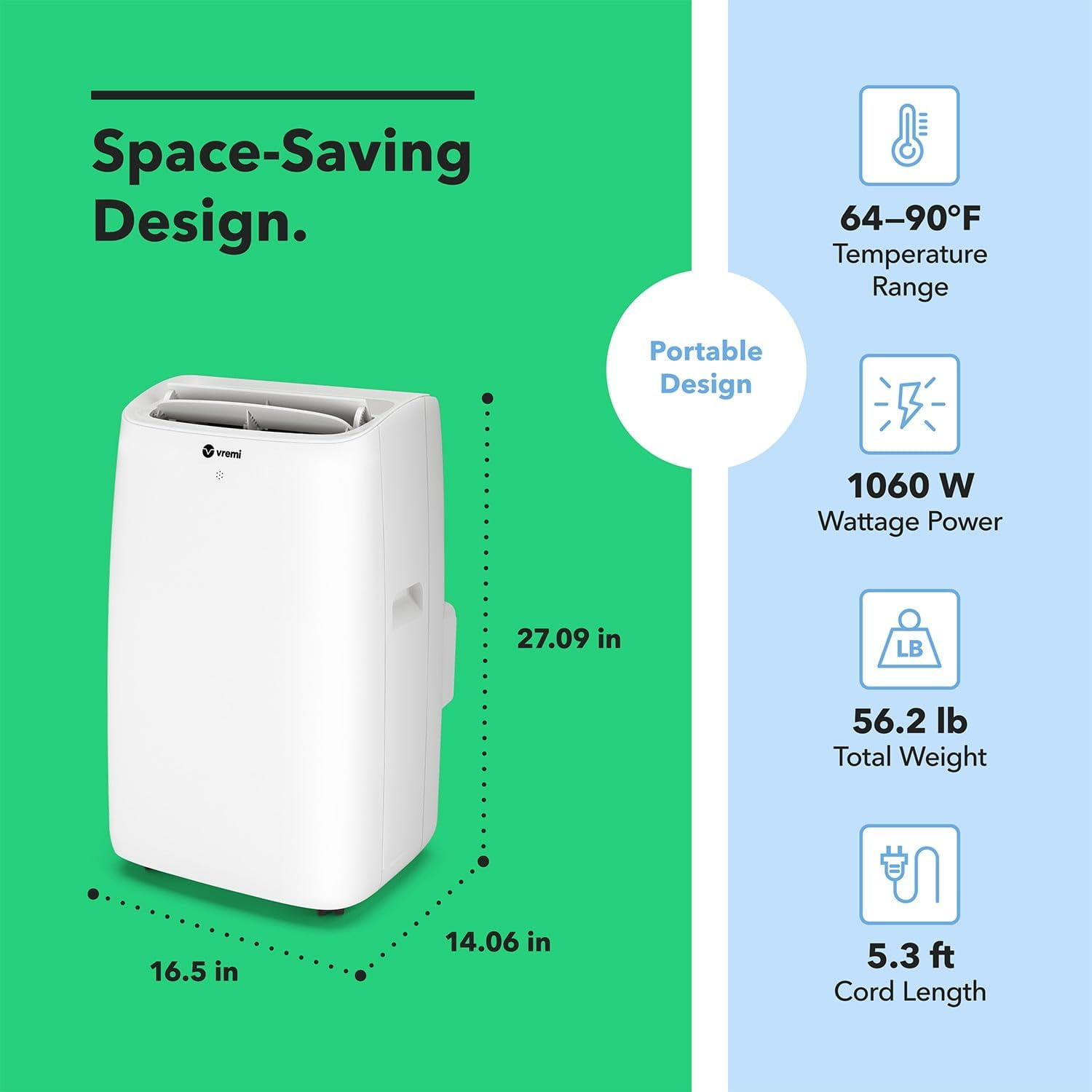
Image: A hand is shown cleaning the removable air filter under a running faucet, emphasizing the 'easy to clean' feature.
6.2 Water Drainage
The unit collects moisture during cooling and dehumidifying operations. When the internal water tank is full, the "Water Full" indicator will illuminate, and the unit will stop operating until drained.
- Manual Drainage: Place a shallow pan or bucket under the drainage outlet located at the bottom rear of the unit. Remove the rubber stopper to allow water to drain. Replace the stopper once the tank is empty.
- Continuous Drainage: For continuous dehumidification, attach the provided drainage tube to the drainage outlet and direct the other end to a suitable floor drain or a larger container.
7. Troubleshooting
If you encounter issues, refer to the following common troubleshooting steps:
- Unit does not turn on: Check if the power cord is securely plugged into a grounded outlet. Ensure the "Water Full" indicator is not lit; if it is, drain the water tank.
- Unit is not cooling/heating effectively: Verify that the desired temperature is set correctly. Check if the air filter is clean. Ensure the exhaust hose is properly installed and sealed to prevent air leakage. Confirm that windows and doors are closed.
- "Water Full" indicator is on: The internal water tank is full. Refer to section 6.2 for drainage instructions.
For further assistance, please contact Vremi customer support.
8. Specifications
| Feature | Detail |
|---|---|
| Brand | Vremi |
| Model Name | VRM050520N |
| Cooling Power | 12000 BTU (ASHRAE) / 8150 BTU (New DOE) |
| Floor Area Coverage | Up to 350 Square Feet |
| Product Dimensions | 14.09"D x 16.5"W x 27.09"H |
| Noise Level | 52 Decibels |
| Temperature Range | 55-81°F |
| Operating Modes | Cool, Heat, Fan, Dehumidify, Sleep |
| Control Method | Touch, Remote Control |
| Filter Type | Pre-Filter (Reusable) |
| Portability | Built-in Castors and Handles |
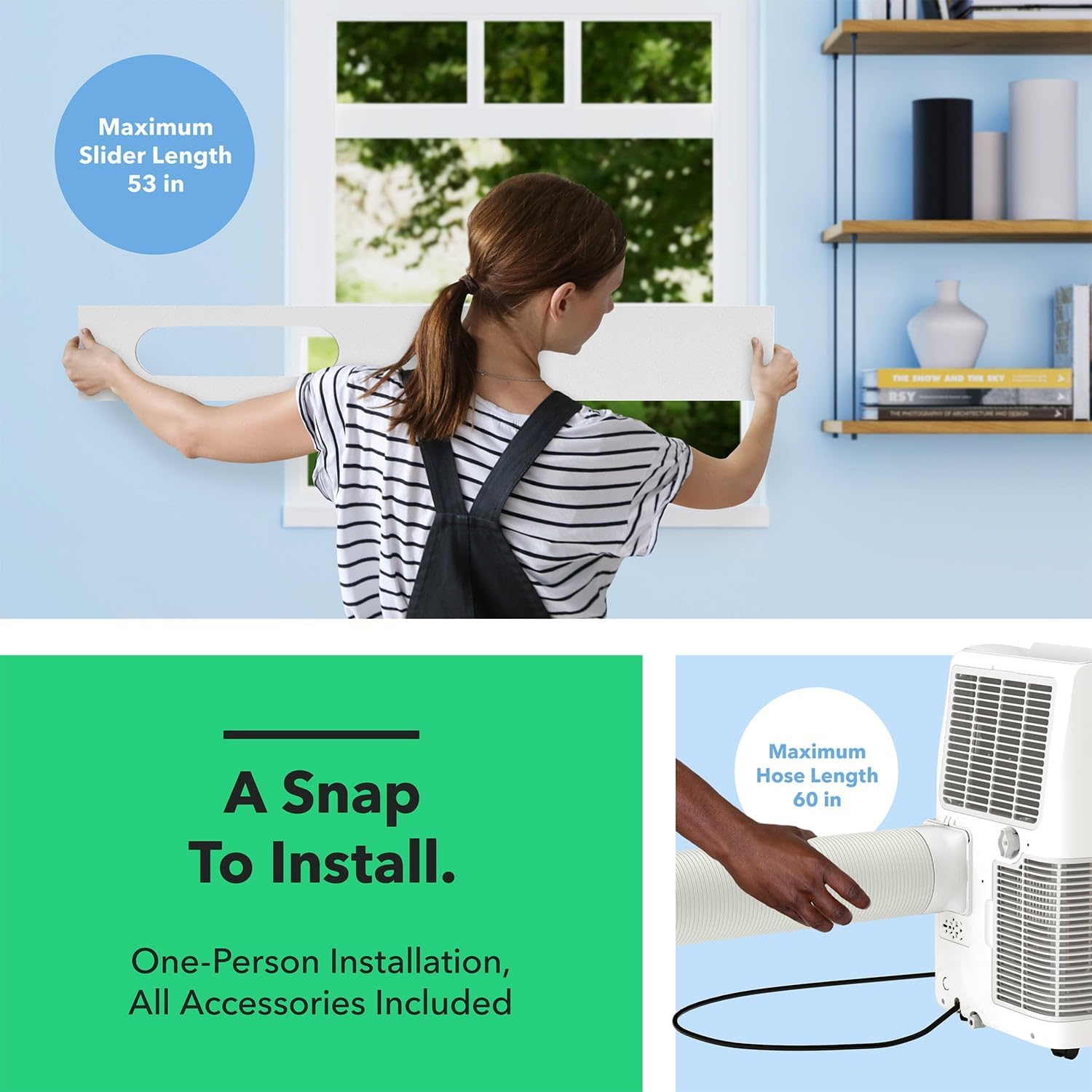
Image: A graphic illustrating the dimensions (depth, width, height) and weight of the portable air conditioner, along with its temperature range and wattage.
9. Warranty and Customer Support
This Vremi product comes with a limited warranty. For detailed warranty information, product registration, or technical support, please refer to the contact information provided in the original packaging or visit the official Vremi website.