
1. Product Overview
The Wurkkos TS21 is a high-performance Everyday Carry (EDC) flashlight designed for versatility and durability. It features three LUMINUS SST20 emitters, providing a maximum output of 3500 lumens and a beam distance of up to 217 meters. Equipped with a USB-C port for convenient charging and discharge (power bank function), a magnetic tailcap, and a two-way holding clip, the TS21 is suitable for various activities including exploring, camping, hiking, fishing, and dog walking.

Figure 1: Wurkkos TS21 Flashlight with included USB-C charging cable. The image highlights the flashlight's design and its charging accessory.

Figure 2: The Wurkkos TS21 illuminating a path at night, demonstrating its powerful beam. Icons indicate key features: 3500 Lumens output, 217 meters beam distance, Anduril UI, and magnetic tailcap.
2. Package Contents
- Wurkkos TS21 Flashlight
- Rechargeable 21700 Battery (5000mAh, pre-installed)
- USB-C Charging Cable
- Two-way Pocket Clip
- Spare O-rings
- Wrist Strap
- User Manual (this document)
3. Setup and Initial Use
3.1 Battery Preparation
Before first use, ensure the battery's insulation sheet is removed. Unscrew the tailcap counter-clockwise, remove the clear plastic insulation disc located between the battery and the spring, and then re-screw the tailcap clockwise until it is finger-tight.
3.2 Charging the Battery
The TS21 features a built-in USB-C charging port. Connect the provided USB-C cable to the flashlight's port and to a compatible USB power source (e.g., wall adapter, computer USB port, power bank). The side switch LED will indicate charging status:
- Blinking Blue: Charging in progress.
- Solid Blue: Charging complete.
Charging time is approximately 3-6 hours, depending on the power of your charging head. The flashlight supports input and output current up to 3A.

Figure 3: Illustration of the USB-C port for both input charging (from wall adapter, car charger, or laptop) and output discharge (charging a mobile phone).
4. Operating Instructions
The Wurkkos TS21 utilizes the Anduril 2.0 user interface, which offers both simple and advanced modes. For detailed operation, refer to the Anduril 2.0 UI diagram (often found online or in specialized flashlight forums) as its full functionality is extensive. Below are basic operations:
4.1 Basic Operation (Simple UI)
- Turn On/Off: Single click the side switch.
- Brightness Adjustment: While on, press and hold the side switch to ramp brightness up or down. Release and press again to reverse direction.
- Moonlight Mode: From OFF, press and hold the side switch for approximately 1 second.
- Turbo Mode: From ON or OFF, double-click the side switch.
- Battery Check: From OFF, triple-click the side switch. The main LED will flash out the voltage (e.g., 3 flashes, pause, 8 flashes for 3.8V).
4.2 Advanced Features
- Magnetic Tailcap: The integrated magnetic tailcap allows the flashlight to be securely attached to ferrous metal surfaces, providing hands-free illumination.
- Power Bank Function: The USB-C port can also function as a power output, allowing you to charge small electronic devices like mobile phones.
- Automatic Temperature Regulation (ATR): The flashlight automatically reduces brightness when the driver temperature reaches 45°C (113°F) to prevent overheating. This ensures the longevity of the flashlight and its components. The temperature threshold can be adjusted in advanced settings.
- Pocket Clip: The included two-way pocket clip allows for secure attachment to clothing, bags, or other gear for easy carrying.
- Waterproof Rating: The TS21 has an IPX8 waterproof rating, meaning it can be submerged in water up to 2 meters for 30 minutes.

Figure 4: The magnetic tailcap feature, demonstrating how the flashlight can be attached to a metal surface for hands-free operation, such as during vehicle repair.
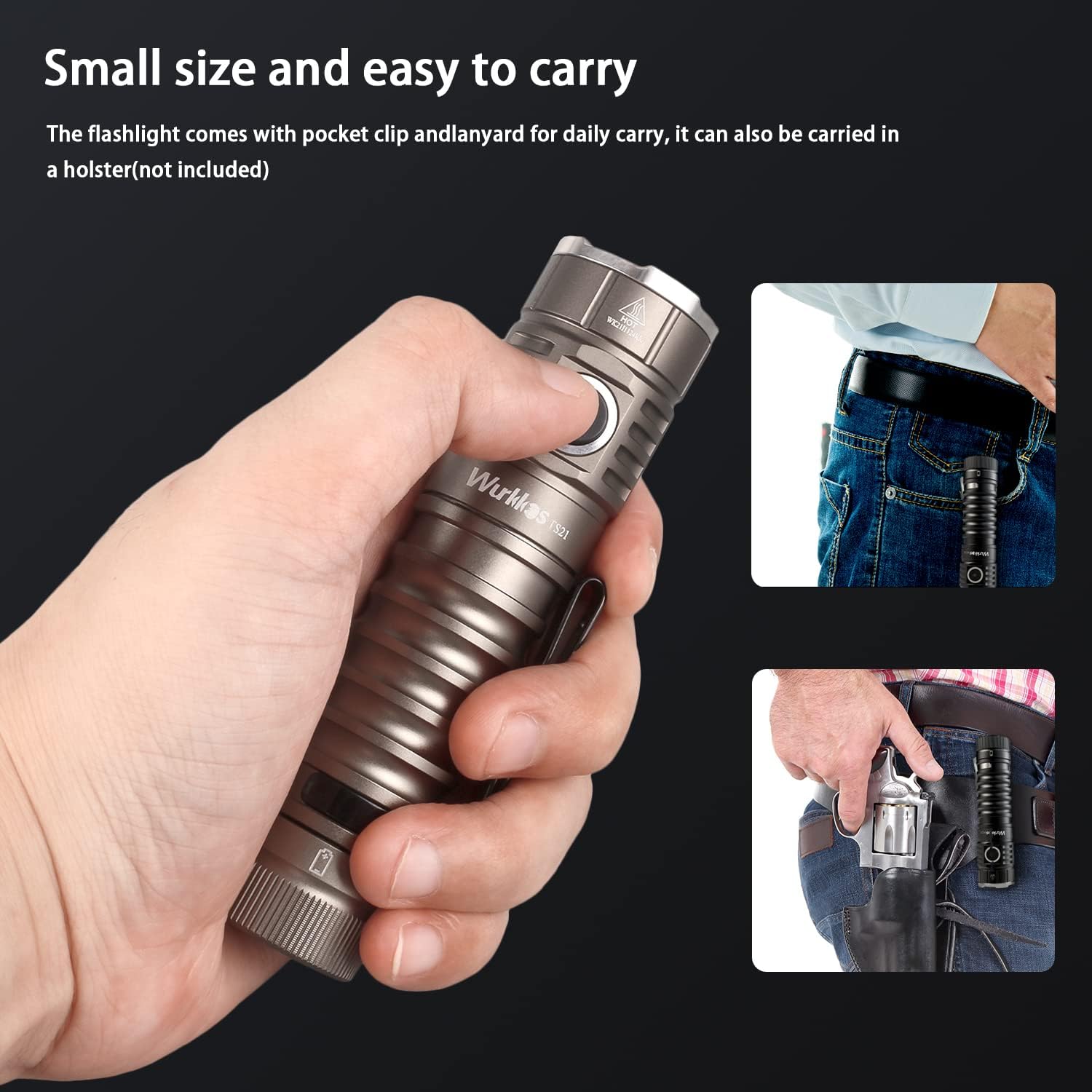
Figure 5: The compact size of the Wurkkos TS21, shown held in hand and demonstrating its portability when clipped to a pocket or carried in a holster.

Figure 6: The Wurkkos TS21 demonstrating its IPX8 waterproof capability by being submerged in water. This rating ensures reliable performance in wet conditions.
5. Maintenance
- Cleaning: Clean the flashlight body with a soft, damp cloth. For the lens, use a lens cleaning cloth. Do not use abrasive cleaners or solvents.
- O-rings: Periodically inspect the O-rings for wear and tear. Lubricate them with silicone grease to maintain the waterproof seal. Replace if damaged.
- Threads: Keep the threads clean and lightly lubricated to ensure smooth operation of the tailcap and head.
- Battery Storage: If storing the flashlight for an extended period, it is recommended to remove the battery or slightly unscrew the tailcap (about a quarter turn) to prevent parasitic drain from the switch LED.
6. Troubleshooting
| Problem | Possible Cause | Solution |
|---|---|---|
| Flashlight does not turn on. | Battery insulation sheet not removed. Battery is depleted. Tailcap or head is loose. | Remove insulation sheet. Charge the battery. Tighten tailcap and head. |
| Flashlight flickers or turns off unexpectedly. | Low battery. Loose connections. Dirty contacts. | Charge the battery. Tighten all parts. Clean battery and flashlight contacts. |
| Flashlight gets hot quickly. | Operating on high/turbo mode for extended periods. ATR not functioning correctly (unlikely). | This is normal for high-lumen flashlights. The ATR system will reduce brightness to manage heat. Reduce output if discomfort occurs. |
| Battery not charging. | Faulty USB-C cable or power source. Charging port obstruction. | Try a different USB-C cable and power source. Ensure charging port is clean and free of debris. |
If the problem persists after attempting these solutions, please contact Wurkkos customer support for further assistance.
7. Specifications
| Feature | Detail |
|---|---|
| Model | TS21 |
| LED Emitters | 3x LUMINUS SST20 |
| Maximum Output | 3500 Lumens |
| Maximum Beam Distance | 217 meters (238 yards) |
| Power Source | 1x 21700 Lithium Ion Battery (included) |
| Charging | USB-C (Input/Output up to 3A) |
| Material | Aerospace grade 6061 aluminum alloy |
| Waterproof Rating | IPX8 (up to 2 meters for 30 minutes) |
| Dimensions | Approx. 113mm (length) x 28mm (head diameter) |
| Weight | 49 Grams (without battery), 156g (with battery) |
| Special Features | Magnetic Tailcap, Two-way Pocket Clip, Power Bank Function, ATR Technology |
8. Warranty and Support
Wurkkos is committed to providing high-quality products and satisfactory customer service. For any questions, concerns, or issues regarding your TS21 flashlight, please contact the Wurkkos after-sales service team. They aim to reply quickly and resolve problems fundamentally.
While specific warranty periods may vary by region or retailer, Wurkkos stands behind its products. Please retain your proof of purchase for any warranty claims.
For the most up-to-date support information, please visit the official Wurkkos website or contact their customer service directly.