
Midea C18-RK18W01
Midea 1800W 3000 Series Induction Cooker
Model: C18-RK18W01
User Manual
1. Important Safety Information
Please read all instructions carefully before using the Midea Induction Cooker. Retain this manual for future reference.
- Electrical Safety: Ensure the power outlet matches the cooker's voltage (120V AC). Do not immerse the appliance, cord, or plug in water or other liquids. Always unplug the cooker when not in use and before cleaning.
- Heat Warning: The ceramic plate will be hot after cooking. Do not touch the surface immediately after use. Allow it to cool completely.
- Cookware Compatibility: Use only induction-compatible cookware such as cast aluminum, enameled iron or steel, cast iron, or magnetic-bottom stainless steel. Non-compatible cookware will not heat.
- Ventilation: Do not block the ventilation openings. Ensure adequate space around the cooker for proper airflow.
- Overheat Protection: The cooker is equipped with overheat protection. If the temperature becomes too high, the unit will automatically shut off.
- Voltage Warning: The unit includes a voltage warning system to protect against power fluctuations.
- Children and Pets: Keep the appliance out of reach of children and pets.
2. Product Overview
The Midea 1800W 3000 Series Induction Cooker is a portable countertop appliance designed for efficient and safe cooking. It features a sleek glass panel stovetop and an intuitive LED display with touch controls.

Figure 2.1: Midea Induction Cooker (Model C18-RK18W01)
Key Features:
- 1800W power for rapid heating.
- Digital LED display with touch controls.
- Adjustable power settings from 200-1800 watts.
- 3-hour timer function.
- Pre-set cooking controls for convenience.
- Pause function for temporary interruptions.
- Safety features: overheat protection and voltage warning.
- Easy-to-clean glass panel stovetop.

Figure 2.2: Control Panel Layout
3. Setup
Follow these steps for initial setup of your induction cooker:
- Unpacking: Carefully remove the cooker from its packaging. Retain packaging materials for future storage or transport.
- Placement: Place the induction cooker on a stable, flat, heat-resistant surface. Ensure there is at least 4 inches (10 cm) of clear space around all sides for proper ventilation. Do not place it near heat sources or on metallic surfaces that could interfere with induction.
- Power Connection: Plug the power cord into a standard 120V AC electrical outlet. The unit will emit a beep and the display will show 'OFF' or similar standby indicator.
- Cookware Check: Before placing cookware on the cooker, ensure it is induction-compatible. A simple test is to see if a magnet sticks to the bottom of the pot or pan. The bottom of the cookware should be flat and have a diameter between 4.7 inches (12 cm) and 10.2 inches (26 cm) for optimal performance.
4. Operating Instructions
This section details how to operate your Midea Induction Cooker.

Figure 4.1: Cooker in Operation
4.1 Powering On/Off
- To Turn On: Place induction-compatible cookware with contents on the center of the ceramic plate. Press the Start/Stop button. The display will illuminate, and the cooker will enter a default cooking mode (e.g., 'Fry' or a default power level).
- To Turn Off: Press the Start/Stop button again during operation. The cooker will stop heating, and the display will show 'OFF'.
4.2 Adjusting Power/Temperature
- After turning on, you can adjust the power level or temperature.
- Press the Power button to cycle through power settings (200-1800 watts). Use the + and - buttons to fine-tune the power level.
- Press the Temp button to switch to temperature control mode. Use the + and - buttons to adjust the desired temperature.
- The Fry button may activate a specific pre-set frying temperature/power.
4.3 Using the Timer
- While cooking, press the Timer button. The display will show a default time or '00:00'.
- Use the + and - buttons to set the desired cooking time, up to 3 hours.
- Once the time is set, the display will revert to showing the power/temperature, and the timer will count down.
- When the timer reaches zero, the cooker will automatically shut off and emit a sound.
4.4 Pause Function
- Press the Pause button during cooking to temporarily stop the heating process. The display will flash or show 'PAUSE'.
- Press the Pause button again to resume cooking at the previous settings.
5. Maintenance
Proper maintenance ensures the longevity and optimal performance of your Midea Induction Cooker.
- Cleaning the Glass Panel: After the cooker has completely cooled down, wipe the glass surface with a soft, damp cloth and mild detergent. For stubborn stains, use a non-abrasive ceramic hob cleaner. Do not use abrasive pads, harsh chemicals, or steel wool.
- Cleaning the Body: Wipe the exterior body with a soft, damp cloth. Do not allow water to enter the ventilation openings.
- Storage: Ensure the cooker is clean and dry before storing. Store it in a cool, dry place, away from direct sunlight and moisture.
- Do Not Disassemble: Do not attempt to disassemble or repair the cooker yourself. Refer to qualified service personnel for any repairs.
6. Troubleshooting
If you encounter issues with your Midea Induction Cooker, refer to the following common problems and solutions:
| Problem | Possible Cause | Solution |
|---|---|---|
| Cooker does not turn on. | No power supply; Cookware not detected or incompatible. | Check if the plug is securely inserted and the outlet has power. Ensure compatible cookware is placed centrally on the cooking zone. |
| Cookware is not heating. | Cookware is not induction-compatible; Cookware is too small or too large. | Use only induction-compatible cookware. Ensure cookware diameter is within the recommended range (4.7"-10.2"). |
| Display shows an error code (e.g., 'E0', 'E1'). | Overheat; Voltage issue; Internal malfunction. | Unplug the unit and let it cool down for 10-15 minutes. Check power supply for stability. If the issue persists, contact customer support. |
| Fan noise during operation. | Normal operation. | The cooling fan operates to dissipate heat from internal components. This is normal. |
If the problem persists after attempting these solutions, please contact Midea customer support.
7. Specifications
Detailed technical specifications for the Midea Induction Cooker Model C18-RK18W01:
| Feature | Specification |
|---|---|
| Model Number | C18-RK18W01 |
| Brand | Midea |
| Color | Black |
| Wattage | 1800 watts |
| Heating Elements | 1 |
| Product Dimensions (D x W x H) | 12.99" x 11.42" x 2.56" |
| Item Weight | 7.24 pounds (3.29 Kilograms) |
| Controls Type | Digital |
| Burner Type | Radiant (Induction) |
| Power Source | AC |
| UPC | 687636001597 |
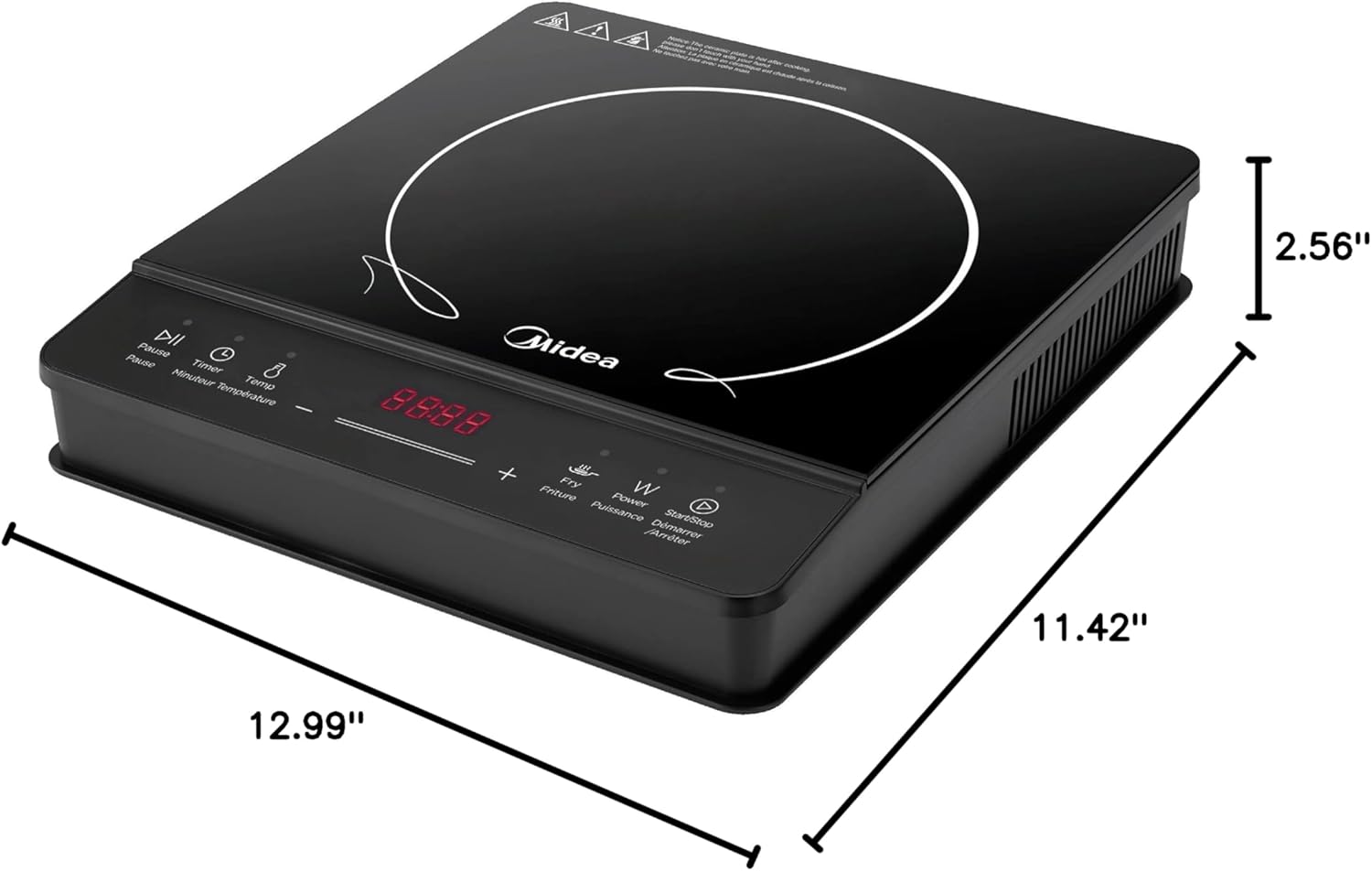
Figure 7.1: Product Dimensions
8. Warranty and Support
Midea products are manufactured to high-quality standards and are backed by a limited warranty. For specific warranty terms and conditions, please refer to the warranty card included with your product or visit the official Midea website.
For technical support, troubleshooting assistance, or to inquire about replacement parts, please contact Midea customer service. Contact information can typically be found on the product packaging, the official Midea website, or by searching for 'Midea customer support' online.
When contacting support, please have your product model number (C18-RK18W01) and purchase date ready.
Related documentsC18-RK18W01


Ask a question about this manual
Ask about setup, troubleshooting, compatibility, parts, safety, or missing instructions. Manuals+ will review the question and use this page’s manual context to help answer it.