Introduction
The ASUS TUF Gaming F15 is a robust gaming laptop designed for performance and durability. Equipped with powerful NVIDIA GeForce graphics and an Intel Core processor, it delivers a smooth experience for gaming and multitasking. This manual provides essential information to help you set up, operate, maintain, and troubleshoot your device.

Figure 1: ASUS TUF F15 Gaming Laptop Overview
1. Setup
1.1 Unboxing and Initial Setup
Upon unboxing your ASUS TUF F15, ensure all components are present:
- ASUS TUF F15 Laptop (Model: FX506LH-AS51)
- Power cord & Adapter
- Warranty Card
1.2 Connecting Power
- Connect the power adapter to the laptop's power input port.
- Plug the power cord into a wall outlet.
- The battery indicator light will illuminate, indicating charging.
1.3 First Boot
Press the power button located on the top-right of the keyboard deck to turn on your laptop. Follow the on-screen instructions to complete the Windows 11 Home setup process.
1.4 Port Overview
Familiarize yourself with the various ports available on your laptop for connectivity:
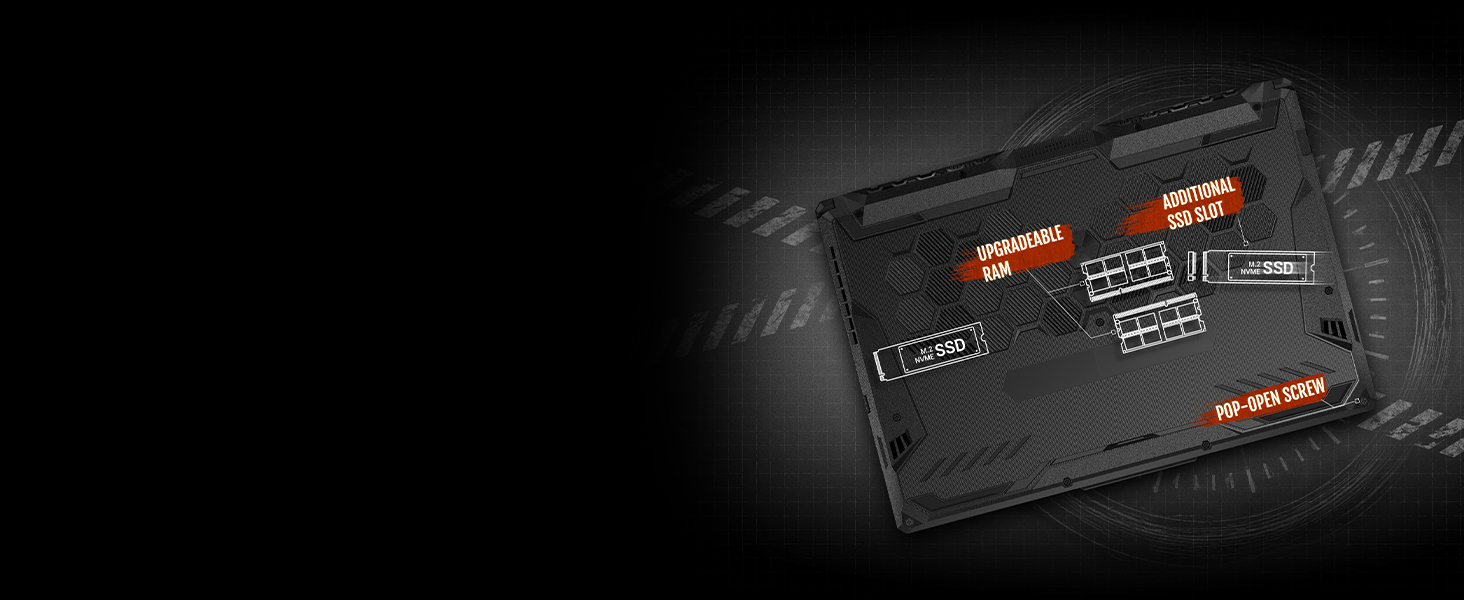
Figure 2: Laptop Port Layout
- Left Side: Power Input, RJ45 LAN port, HDMI 2.0b, 2x USB 3.2 Gen 1 Type-A, USB 3.2 Gen 2 Type-C (with DisplayPort support), 3.5mm Audio Jack.
- Right Side: 1x USB 3.2 Gen 1 Type-A, Kensington Lock.
1.5 Keyboard and Touchpad
The ASUS TUF F15 features an RGB backlit keyboard optimized for gaming, rated for 20-million keystroke durability. The touchpad includes dedicated left and right click buttons for precise control.

Figure 3: Keyboard Layout with RGB Backlighting
2. Operating Your Laptop
2.1 Display Features
Experience smooth visuals with the 15.6-inch Full HD (1920 x 1080) IPS-Type Display, featuring a 144Hz refresh rate and Adaptive Sync technology for tear-free gaming.
2.2 Performance Overview
Your laptop is powered by an Intel Core i5-10300H Processor and NVIDIA GeForce GTX 1650 graphics with 4GB GDDR6. It comes with 8GB DDR4 RAM and a 512GB PCIe NVMe M.2 SSD for fast loading times and ample storage.
2.3 Cooling System
The TUF F15 incorporates a patented Anti-Dust Cooling (ADC) system with self-cleaning dual fans to extend system longevity and maintain optimal performance during intense usage.

Figure 4: Cooling System Heat Pipes

Figure 5: Anti-Dust Cooling Mechanism
2.4 Audio Features
Enjoy immersive sound with 7.1-channel surround sound and AI Noise Cancellation technology, enhancing your gaming and communication experience.

Figure 6: Crystal Clear Audio Features
2.5 Gaming Experience
The powerful hardware allows you to play the latest games with smooth frame rates. The 144Hz display ensures a competitive edge in fast-paced titles.
2.6 Connectivity and External Displays
The laptop supports Wi-Fi 6 (802.11ax) for fast and stable wireless connections. You can connect external monitors via the HDMI 2.0b port or the USB 3.2 Gen 2 Type-C port with DisplayPort support for an expanded workspace or enhanced gaming setup.
3. Maintenance
3.1 Cleaning and Care
- Regularly clean the display with a soft, lint-free cloth.
- Use compressed air to clear dust from the keyboard and ventilation grilles.
- The laptop's self-cleaning fan technology helps prevent dust buildup internally, contributing to long-term stability.
3.2 Upgrading Components
The ASUS TUF F15 features an Easy Upgrade Design, allowing for convenient expansion of RAM and storage. A pop-open screw provides access to the internal components.

Figure 7: Upgradeable RAM and SSD Slots
- RAM: Two DDR4 RAM slots are available for memory upgrades.
- Storage: An additional M.2 SSD slot and a 2.5-inch SATA drive bay are available for storage expansion.
3.3 Battery Care
To maximize battery lifespan, avoid frequently discharging the battery completely. It is recommended to keep the laptop plugged in when possible during intensive tasks.
4. Troubleshooting
If you encounter issues with your ASUS TUF F15, consider the following basic troubleshooting steps:
- No Power: Ensure the power adapter is securely connected to both the laptop and a working power outlet.
- Display Issues: Check external monitor connections if applicable. Try adjusting display brightness using the keyboard function keys.
- Performance Slowdown: Close unnecessary applications. Ensure the laptop is well-ventilated and not overheating.
- Connectivity Problems: For Wi-Fi, ensure your router is working and the laptop's Wi-Fi is enabled. For wired connections, check the Ethernet cable.
For more detailed troubleshooting and advanced solutions, please refer to the official User Manual PDF:
5. Specifications
| Feature | Specification |
|---|---|
| Brand | ASUS |
| Model Name | ASUS TUF Gaming F15 |
| Item Model Number | FX506LH-AS51 |
| Screen Size | 15.6 Inches |
| Screen Resolution | 1920 x 1080 pixels (FHD) |
| Processor | Intel Core i5-10300H (2.5 GHz, 4 cores) |
| RAM | 8 GB DDR4 |
| Hard Drive | 512 GB PCIe NVMe M.2 SSD |
| Graphics Coprocessor | NVIDIA GeForce GTX 1650 |
| Graphics Card Ram Size | 4 GB |
| Wireless Type | 802.11ax (Wi-Fi 6) |
| Operating System | Windows 11 Home |
| Item Weight | 6 pounds |
| Product Dimensions | 14.13 x 10.08 x 0.97 inches |
| Color | Bonfire Black |
| Average Battery Life | 7.7 Hours |
6. Warranty & Support
Your ASUS TUF F15 Gaming Laptop comes with a standard manufacturer's warranty. Please refer to the included Warranty Card for specific terms and conditions.
For technical support, driver downloads, and further assistance, please visit the official ASUS support website:


