Introduction
This manual provides essential instructions for the installation, operation, and maintenance of your BOSS Audio Systems NX2500.4 Onyx 4-Channel Mosfet Bridgeable Amplifier. Please read this manual thoroughly before attempting to install or operate the amplifier to ensure proper use and to prevent damage to the unit or your vehicle's audio system. Keep this manual for future reference.
The BOSS Audio Systems NX2500.4 is a high-performance 4-channel amplifier designed to deliver powerful and clear audio output for your car audio system. It features Mosfet power supply and bridgeable channels for flexible configuration.
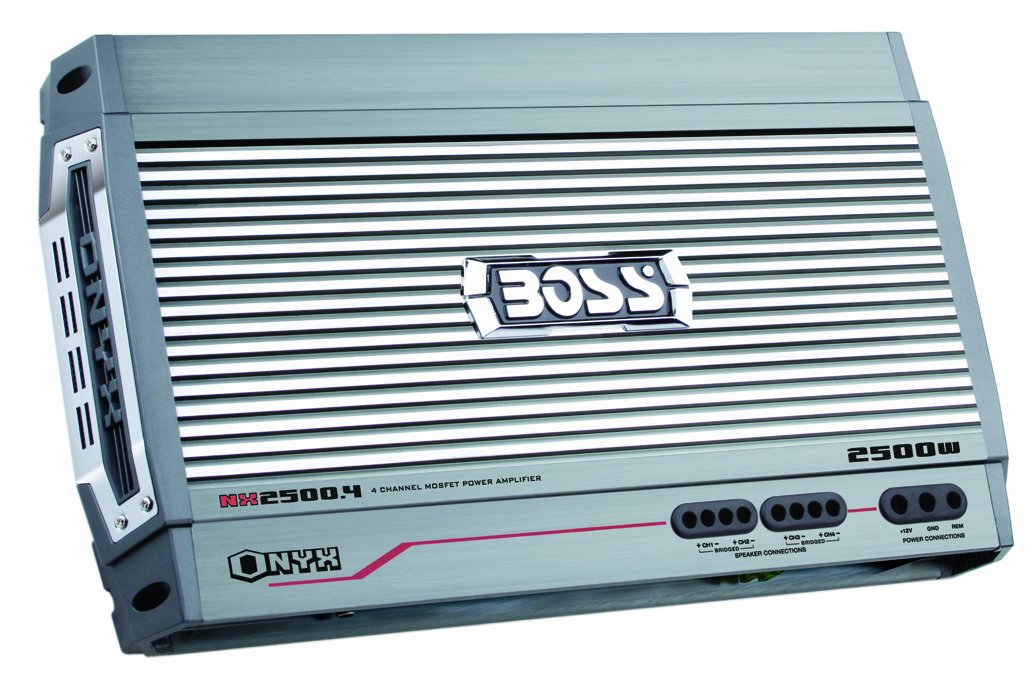
Figure 1: Front view of the BOSS Audio Systems NX2500.4 Onyx 4-Channel Amplifier. This image displays the amplifier's casing and general appearance.
Safety Information
Always observe the following safety precautions during installation and operation:
- Disconnect the vehicle's negative battery terminal before starting any installation.
- Ensure all wiring is properly routed and secured to prevent pinching or damage.
- Use appropriate gauge wiring for power, ground, and speaker connections as specified in the installation section.
- Do not mount the amplifier in locations where it may be exposed to excessive moisture or direct sunlight.
- Avoid operating the amplifier at excessively high volumes for prolonged periods to prevent hearing damage.
- If you are unsure about any part of the installation process, consult a professional car audio installer.
Setup and Installation
1. Unpacking
Carefully remove the amplifier from its packaging. Inspect the unit for any signs of damage that may have occurred during shipping. If damage is found, contact your dealer immediately.
2. Mounting the Amplifier
The NX2500.4 amplifier is designed for freestanding mounting. Choose a secure location in your vehicle that allows for adequate ventilation and is protected from moisture. Common mounting locations include the trunk, under a seat, or behind a rear seat. Ensure the mounting surface is solid and can support the amplifier's weight.
- Place the amplifier in the desired mounting location and mark the positions for the mounting screws.
- Drill pilot holes if necessary, ensuring not to damage any vehicle components beneath the mounting surface.
- Secure the amplifier using appropriate screws and washers.
3. Wiring Connections
Proper wiring is crucial for optimal performance and safety. Refer to the following guidelines for connecting power, ground, remote, speaker, and RCA cables.
Power and Ground Connections
- Power (BATT+): Connect a heavy-gauge cable (typically 4-gauge or larger, depending on total system power) directly from the positive terminal of the vehicle's battery to the BATT+ terminal on the amplifier. Install an in-line fuse holder within 18 inches (45 cm) of the battery.
- Ground (GND): Connect a heavy-gauge cable of the same size as the power cable from the GND terminal on the amplifier to a clean, unpainted metal surface of the vehicle's chassis. Ensure a good electrical connection by scraping away any paint or rust.
- Remote (REM): Connect a smaller gauge wire (typically 18-gauge) from the REM terminal on the amplifier to the remote turn-on output of your head unit. This wire turns the amplifier on and off with your car's stereo.
Speaker Connections
Connect your speakers to the amplifier's speaker output terminals. The NX2500.4 is a 4-channel amplifier, allowing for various configurations (e.g., four speakers, two speakers bridged, or two speakers plus a subwoofer bridged). Ensure correct polarity (+ to + and - to -) for all speaker connections.
RCA Input Connections
Connect RCA cables from the pre-amp outputs of your head unit to the RCA input jacks on the amplifier. Use high-quality shielded RCA cables to minimize noise.
Operating the Amplifier
1. Initial Power-Up
After all connections are made and double-checked, reconnect the vehicle's negative battery terminal. Turn on your car's head unit. The amplifier's power indicator LED should illuminate, indicating it is receiving power and is operational.
2. Adjusting Controls
The NX2500.4 amplifier typically features several adjustable controls to fine-tune your audio system:
- Gain Control: This matches the amplifier's input sensitivity to the output level of your head unit. Start with the gain set to minimum, then slowly increase it until you hear distortion, then back off slightly.
- Crossover (LPF/HPF): These filters allow you to direct specific frequency ranges to your speakers. A Low Pass Filter (LPF) allows only low frequencies to pass, typically used for subwoofers. A High Pass Filter (HPF) allows only high frequencies to pass, typically used for full-range or component speakers. Adjust these based on your speaker types and desired sound.
- Bass Boost: This control provides an increase in bass output at a specific frequency. Use sparingly to avoid distortion and potential speaker damage.
Adjust these controls incrementally and listen carefully to the sound output to achieve the desired audio quality.
Maintenance
The BOSS Audio Systems NX2500.4 amplifier requires minimal maintenance to ensure long-term performance.
- Cleaning: Periodically wipe the amplifier's exterior with a soft, dry cloth to remove dust and dirt. Do not use harsh chemicals or abrasive cleaners.
- Ventilation: Ensure that the amplifier's cooling fins are free from obstructions to allow for proper heat dissipation.
- Wiring Inspection: Annually inspect all power, ground, remote, and speaker wires for any signs of wear, fraying, or loose connections. Tighten any loose terminals.
Troubleshooting
If you experience problems with your amplifier, refer to the following troubleshooting guide before contacting technical support.
| Symptom | Possible Cause | Solution |
|---|---|---|
| No Power / No Indicator Light | Blown fuse; Loose power/ground connection; Faulty remote turn-on wire. | Check and replace fuse; Verify all power and ground connections are secure; Ensure remote wire is connected and receiving 12V from head unit. |
| No Sound Output | Loose RCA cables; Incorrect speaker wiring; Amplifier in protect mode; Head unit settings. | Check RCA connections; Verify speaker wiring polarity and connections; Check for overheating or short circuits; Ensure head unit volume is up and source is selected. |
| Distorted Sound | Gain set too high; Improper crossover settings; Damaged speakers; Poor ground connection. | Reduce gain setting; Adjust LPF/HPF settings; Inspect speakers for damage; Ensure ground connection is clean and secure. |
| Amplifier Overheating | Insufficient ventilation; Low impedance speaker load; Prolonged high volume use. | Ensure adequate airflow around amplifier; Verify speaker impedance matches amplifier's capabilities; Reduce volume or allow amplifier to cool. |
Specifications
The following are key specifications for the BOSS Audio Systems NX2500.4 Onyx 4-Channel Amplifier:
- Brand: BOSS Audio Systems
- Model Number: NX2500.4
- Number of Channels: 4
- Output Power: 2500 Watts (Peak)
- Mounting Type: Freestanding
- Product Dimensions (L x W x H): 18.3 x 2.38 x 10 inches
- Item Weight: 12.6 pounds
- UPC: 656942657651
Warranty and Support
Information regarding the specific warranty terms and customer support contact details for the BOSS Audio Systems NX2500.4 amplifier was not provided in the product data. For warranty claims or technical assistance, please refer to the documentation included with your purchase or visit the official BOSS Audio Systems website.


