
Brondi Stone+
BRONDI Stone+ Mobile Phone User Manual
Model: Stone+ | Brand: Brondi
1. Introduction
This manual provides essential information for the safe and efficient use of your BRONDI Stone+ mobile phone. Please read it carefully before using the device and keep it for future reference. The BRONDI Stone+ is a user-friendly flip phone designed for clear communication and essential mobile functions.

BRONDI Stone+ Mobile Phone, open view, displaying the 2.4-inch screen with icons for Maxi Display, Camera 1.3 MP, Notification LED, and Active Flip, alongside the large, easy-to-use keypad.
2. Setup
2.1 Inserting the SIM Card and Battery
To begin using your phone, you must first insert a valid SIM card and the provided battery.
- Carefully remove the back cover of the phone.
- Insert your SIM card(s) into the designated slot(s) with the gold contacts facing down. Ensure it clicks into place.
- Insert the battery, aligning the contacts correctly.
- Replace the back cover until it securely snaps into place.

Rear view of the BRONDI Stone+ Mobile Phone, closed, showing the 1.3 MP camera lens and LED flash. The back cover can be removed for SIM and battery access.
2.2 Charging the Battery
Before first use, fully charge the phone's battery.
- Connect the Micro USB cable to the charging port on the phone.
- Plug the other end of the cable into a compatible power adapter and then into a wall outlet.
- The charging indicator on the screen will show the charging status. Disconnect the charger once the battery is full.
3. Operating Instructions
3.1 Powering On/Off
- To Power On: Press and hold the Power/End Call button (red button) until the screen lights up.
- To Power Off: Press and hold the Power/End Call button until the power-off options appear, then select 'Power off'.
3.2 Making Calls
- Open the flip to activate the phone.
- Enter the phone number using the keypad.
- Press the Call button (green button) to initiate the call.
- To end a call, press the Power/End Call button.
3.3 Receiving Calls
- When an incoming call rings, open the flip or press the Call button to answer.
- To reject a call, press the Power/End Call button.
3.4 Sending and Receiving SMS
- Navigate to the 'Messages' menu from the main screen.
- Select 'Write message' to compose a new SMS.
- Enter the recipient's number or select from contacts.
- Type your message and press 'Send'.
- Received messages will appear in your 'Inbox'.
3.5 Using the Camera
The BRONDI Stone+ is equipped with a 1.3 MP camera.
- From the main menu, select 'Camera'.
- Frame your shot using the screen as a viewfinder.
- Press the 'OK' button to capture the photo.
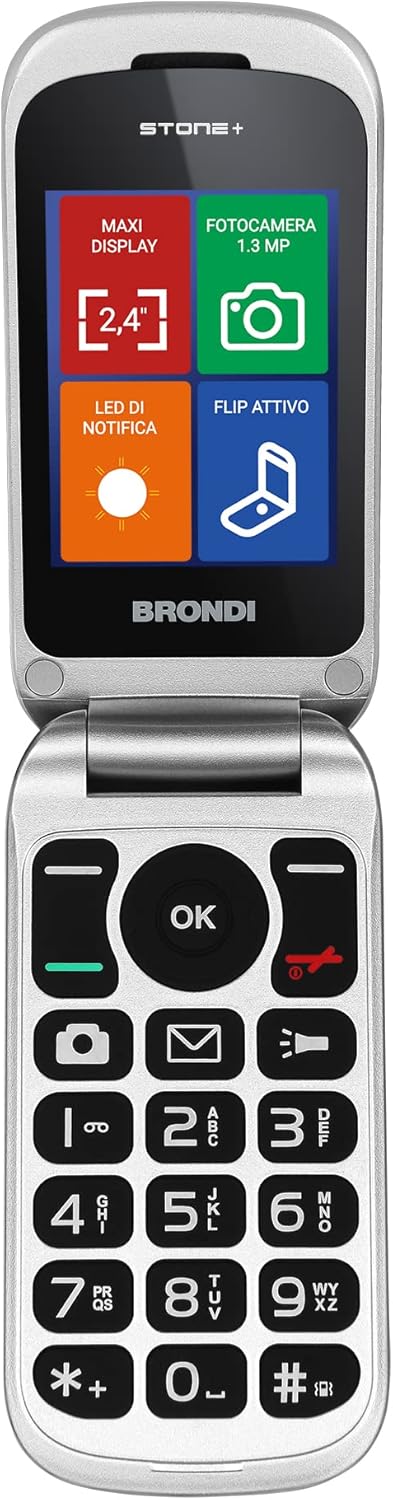
Close-up of the BRONDI Stone+ Mobile Phone's open display and keypad, emphasizing the clear screen and large, well-spaced buttons for easy dialing and navigation.
3.6 Using the Flashlight
The phone features an integrated LED flashlight.
- To turn on the flashlight, locate the dedicated flashlight button or function key (refer to your phone's specific keypad layout).
- Press the button to toggle the flashlight on or off.

BRONDI Stone+ Mobile Phone with its integrated LED flashlight activated, demonstrating its utility in low-light conditions.
4. Maintenance
Proper maintenance ensures the longevity of your BRONDI Stone+.
- Cleaning: Use a soft, dry cloth to clean the phone's surface. Avoid liquid cleaners or abrasive materials.
- Battery Care: Do not expose the battery to extreme temperatures. Avoid fully discharging the battery frequently to prolong its lifespan.
- Storage: If storing the phone for an extended period, ensure it is powered off and stored in a cool, dry place.
5. Troubleshooting
If you encounter issues with your BRONDI Stone+, refer to the following common problems and solutions:
| Problem | Possible Solution |
|---|---|
| Phone does not turn on | Ensure the battery is charged. Check if the battery is correctly inserted. |
| No network signal | Check if the SIM card is properly inserted. Move to an area with better network coverage. |
| Cannot make or receive calls | Verify network signal. Ensure your SIM card is active and has sufficient credit/plan. |
| Battery drains quickly | Reduce screen brightness. Close unused applications. Limit background activities. |
| Keypad unresponsive | Restart the phone. Ensure no physical obstruction is present. |
6. Specifications
Key technical specifications for the BRONDI Stone+ mobile phone:
| Feature | Detail |
|---|---|
| Brand | Brondi |
| Model Name | Stone+ |
| Model Number | 10278082 |
| Display Size | 2.4 Inches |
| Display Resolution | 320 x 240 |
| Camera Resolution | 1.3 Megapixels |
| Connectivity | Bluetooth, Micro USB |
| Cellular Technology | GSM |
| Operating System | Proprietary |
| Special Features | Camera, Flashlight |
| Battery Composition | Lithium-ion |
| Color | Red |
7. Warranty and Support
For information regarding warranty coverage and customer support for your BRONDI Stone+ mobile phone, please refer to the warranty card included in the product packaging or visit the official Brondi website. You may also contact Brondi customer service directly for assistance with product inquiries, technical support, or service requests.
Ask a question about this manual
Ask about setup, troubleshooting, compatibility, parts, safety, or missing instructions. Manuals+ will review the question and use this page’s manual context to help answer it.