
Brondi Stone+
Brondi Stone+ User Manual
Model: 10278080
Introduction
This manual provides essential information for the proper use, setup, and maintenance of your Brondi Stone+ mobile phone. Please read this manual carefully before using your device to ensure optimal performance and longevity.
The Brondi Stone+ is a clamshell mobile phone designed for ease of use, featuring an active flip mechanism, dual SIM capability, and a clear 2.4-inch display. It includes practical features such as a notification LED, a comfortable rubberized keypad, and quick access keys for common functions.
What's in the Box
Upon opening the package, please verify that all components are present and in good condition:
- Brondi Stone+ Mobile Phone
- Battery
- Charger (Micro-USB)
- Earphones
If any item is missing or damaged, please contact your retailer or Brondi customer support.
Setup
1. Battery Installation
Locate the battery compartment cover on the back of the phone. Gently slide or lift the cover to remove it. Insert the provided Lithium-Ion battery, ensuring the gold contacts align with the phone's terminals. Replace the battery compartment cover until it clicks into place.

Image: Rear view of the Brondi Stone+ phone, showing the area where the battery is installed.
2. SIM Card Installation
The Brondi Stone+ supports Dual SIM cards. With the battery removed, locate the SIM card slots. Carefully insert your SIM card(s) into the designated slots, ensuring the cut corner aligns correctly. Refer to the diagram inside the battery compartment if needed. Reinstall the battery and cover after inserting the SIM cards.
3. Initial Charging
Before first use, fully charge the phone's battery. Connect the micro-USB end of the charger cable to the charging port on the phone (typically located on the bottom or side). Plug the other end into a power outlet. The charging indicator on the phone's screen or an external LED will illuminate. Allow the phone to charge until the battery indicator shows full capacity.

Image: The Brondi Stone+ phone in an open position, displaying its 2.4-inch screen and large, easy-to-use keypad.
Operating Instructions
Powering On/Off
To power on the phone, press and hold the Power/End Call button (usually marked with a red phone icon) until the screen illuminates. To power off, press and hold the same button until a power-off option appears on the screen, then confirm.
Making Calls
Open the phone's flip. Use the large, rubberized keypad to dial the desired phone number. Press the Call button (usually marked with a green phone icon) to initiate the call. To end a call, close the flip or press the Power/End Call button.
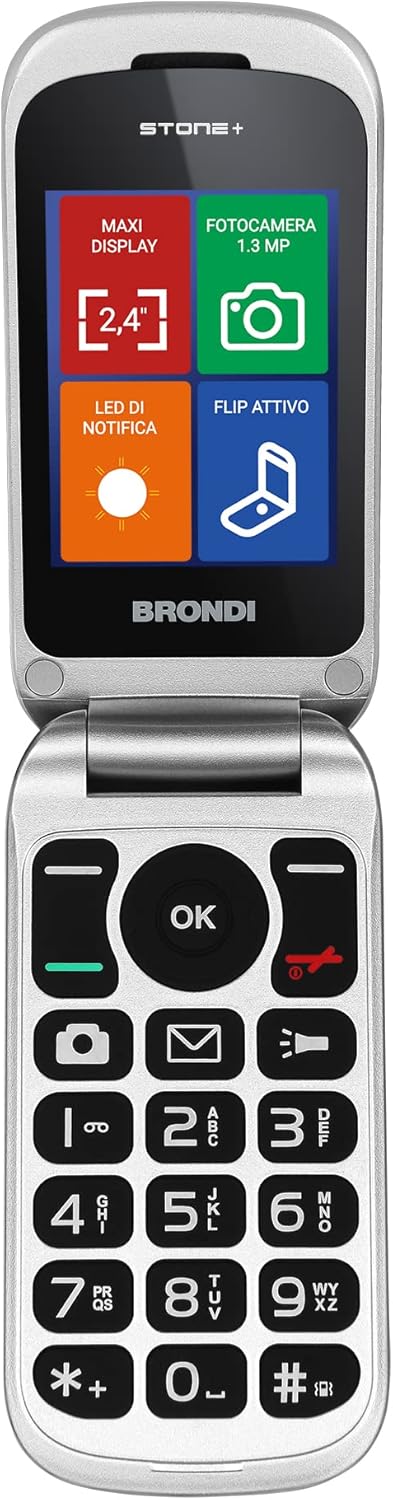
Image: A direct view of the Brondi Stone+ phone, highlighting the clear display and the layout of the large, tactile keypad buttons.
Sending Messages
Press the dedicated Messages quick access key (often an envelope icon) to enter the messaging menu. Select "New Message" or "Create Message". Enter the recipient's number and type your message using the keypad. Press the Send option to transmit the message.
Notification LED
The Brondi Stone+ features a notification LED on the exterior flip. This LED will illuminate to indicate incoming calls, missed calls, and new messages, allowing you to check for notifications without opening the phone.

Image: The Brondi Stone+ phone in its closed position, with a visible notification LED on the top surface.
Quick Access Keys
The keypad includes three dedicated quick access keys for frequently used functions:
- Camera: Press the camera icon key to quickly launch the 1.3 MP camera.
- Messages: Press the envelope icon key to access your messages.
- Flashlight: Press the flashlight icon key to turn the built-in flashlight on or off.

Image: The Brondi Stone+ phone in a closed state, demonstrating its active flashlight feature emitting a beam of light.
Maintenance
To ensure the longevity and optimal performance of your Brondi Stone+ phone, follow these maintenance guidelines:
- Cleaning: Use a soft, dry cloth to clean the phone's exterior. Avoid using liquid cleaners, aerosols, or abrasive materials.
- Environmental Conditions: Keep the phone away from extreme temperatures (hot or cold), direct sunlight, and high humidity.
- Water Exposure: This phone is not waterproof. Avoid exposing it to water or other liquids.
- Battery Care: Do not expose the battery to high temperatures or dispose of it in fire. Use only the original charger provided. If the phone will not be used for an extended period, charge the battery periodically to maintain its health.
- Storage: Store the phone in a cool, dry place when not in use.
Troubleshooting
If you encounter issues with your Brondi Stone+ phone, refer to the following common problems and solutions:
| Problem | Possible Solution |
|---|---|
| Phone does not turn on. | Ensure the battery is correctly installed and fully charged. Press and hold the Power button for several seconds. |
| Cannot make or receive calls. | Check if the SIM card is properly inserted. Verify that you have network signal. Ensure the phone is not in airplane mode. |
| Battery not charging. | Check if the charger is properly connected to both the phone and the power outlet. Try using a different power outlet. Ensure the charging port is clean and free of debris. |
| Keypad not responding. | Restart the phone. Ensure the phone is not locked. |
| Poor call quality. | Move to an area with better network coverage. Check the volume settings. |
If the problem persists after trying these solutions, please contact Brondi customer support.
Specifications
| Feature | Detail |
|---|---|
| Brand | Brondi |
| Model Name | Stone+ |
| Model Number | 10278080 |
| Operating System | Proprietary |
| Screen Size | 2.4 Inches |
| Resolution | 320 x 240 pixels |
| Cellular Technology | GSM |
| Connectivity Technology | Bluetooth, Micro-USB |
| Wireless Service Provider | Unlocked |
| Color | Black |
| Battery | 1 Lithium Ion battery (included) |
| Product Dimensions | 10.3 x 5 x 1.9 cm |
| Item Weight | 87 grams |
| Camera | 1.3 MP |
Warranty and Support
For warranty information, please refer to the documentation provided with your purchase or visit the official Brondi website. Keep your proof of purchase for any warranty claims.
For technical support, troubleshooting assistance, or to inquire about spare parts, please contact Brondi customer service. You can find contact details on the official Brondi website or through the retailer where you purchased the product.
Visit the official Brondi Store for more information: Brondi Store on Amazon