
1. Introduction
The WAITLOVER Digital Aneng MH11 Megohmmeter is an insulation series digital tester designed for precise resistance measurement and insulation resistance testing. It utilizes a high and low loss inductive energy storage DC voltage converter to generate 250V, 500V, or 1000V DC voltage from a 12V source. This device is equipped with a digital LCR bridge for accurate measurements. Its compact design, wide measurement range, backlight display, and test lock feature make it suitable for various applications, including insulation resistance testing in motors, cables, electromechanical equipment, communication equipment, and power devices. The ergonomic strap-based design allows for convenient two-handed operation.
2. Safety Information
WARNING: To avoid electric shock or personal injury, read all safety information before using this product.
- Always ensure the device is in good working condition before use.
- Do not use the meter if it appears damaged or if the test leads are damaged.
- Do not apply more than the rated voltage, as marked on the meter, between the terminals or between any terminal and earth ground.
- Use caution when working with voltages above 30V AC RMS, 42V peak, or 60V DC. Such voltages pose a shock hazard.
- Always disconnect power to the circuit under test and discharge all high-voltage capacitors before making resistance measurements.
- Ensure proper battery installation and replacement as per instructions.
- Do not operate the meter in explosive gas, vapor, or dust environments.
- Keep fingers behind the finger guards on the test probes during testing.
3. Package Contents
Upon opening the package, please verify that all items listed below are present and in good condition:
- 1 x Digital Aneng MH11 Megohmmeter
- 1 x Alligator Clip
- 1 x Test Lead Set
- 1 x Instruction Manual (this document)
- 1 x Packing Box
4. Product Features
- Voltage Testing Function: Capable of testing both AC and DC voltage.
- Multi-Testing Function: Supports resistance testing, diode testing, continuity testing, and buzzer functions.
- LCD Display: Features a 4-digit large display for accurate, easy-to-read results.
- Accurate Measurement: Provides precise measurements and allows for data retention for convenient viewing.
- Wide Application: Widely used to diagnose and resolve various automotive and household electrical issues.
- Automatic Discharge Function: After testing, the device automatically discharges, ensuring safety and accuracy.
- Durable Drop Case: Equipped with an anti-drop silicone material case for all-round protection against damage.
5. Product Overview and Components
Familiarize yourself with the components of the Digital Aneng MH11 Megohmmeter:

Figure 5.1: Front view of the Aneng MH11 Megohmmeter with labeled components.
- AC Voltage Measurement Positive Input Terminal: Used for AC voltage measurements.
- G: Protection End Jack: Used when the measured object requires a guard ring to eliminate leakage effects. The guard ring wire connects to this terminal.
- L Terminal High Voltage Output Test Terminal: One of the high voltage output terminals for testing.
- E Terminal High Voltage Output Test Terminal: The other high voltage output terminal for testing.
- Power Adapter Jack DC12V: Input for external DC 12V power supply.
- LCD Display: Shows measurement data and unit symbols.
- Power Switch (POWER): Self-locking power switch to turn the device on/off.
- High Voltage Measurement Resistance Indicator Light: Illuminates when high voltage is present during measurement.
- Test Button: Initiates the test sequence.
- Resistance Range Selection Switch (RANGE): Used to cycle through different resistance measurement ranges.
- 250V Power Switch: Selects 250V output for insulation testing.
- 500V Power Switch: Selects 500V output for insulation testing.
- 1000V Power Switch: Selects 1000V output for insulation testing.
- AC750V AC Voltage Measurement Switch: Selects AC 750V range for voltage measurement.

Figure 5.2: Dimensions of the Aneng MH11 Megohmmeter and its test leads.
The device measures approximately 165mm (6.5in) x 120mm (4.72in) x 57mm (2.25in). The test leads are 140mm (5.51in) long with 1.5mm (0.05in) probe tips.
6. Setup
6.1 Battery Installation
The Aneng MH11 Megohmmeter requires 8 AA batteries for operation. To install or replace batteries:
- Ensure the device is powered off.
- Locate the battery compartment on the rear of the device.
- Open the battery compartment cover.
- Insert 8 AA batteries, observing the correct polarity (+/-) as indicated inside the compartment.
- Close the battery compartment cover securely.
6.2 Connecting Test Leads
Connect the provided test leads to the appropriate terminals on the meter:
- For insulation resistance testing, connect the red test lead to the 'E' terminal and the black test lead to the 'L' terminal.
- For AC voltage measurement, connect the test leads to the 'ACV' and 'G' terminals.
- For other multimeter functions, refer to the specific test setup in the operating instructions.
7. Operating Instructions
7.1 Powering On/Off
Press the POWER button to turn the device on. This is a self-locking switch. Press it again to turn the device off.
7.2 Insulation Resistance Testing
The Aneng MH11 offers 250V, 500V, and 1000V test voltages for insulation resistance measurements.
- Ensure the device is powered on.
- Connect the test leads to the 'E' and 'L' terminals.
- Select the desired test voltage (250V, 500V, or 1000V) by pressing the corresponding button on the right side of the meter. The selected voltage will be indicated on the display.
- Connect the test leads to the circuit or component under test.
- Press and hold the TEST button. The high voltage measurement resistance indicator light will illuminate, and the measurement will be displayed on the LCD.
- Release the TEST button to stop the measurement. The device features an automatic discharge function after the test is completed.
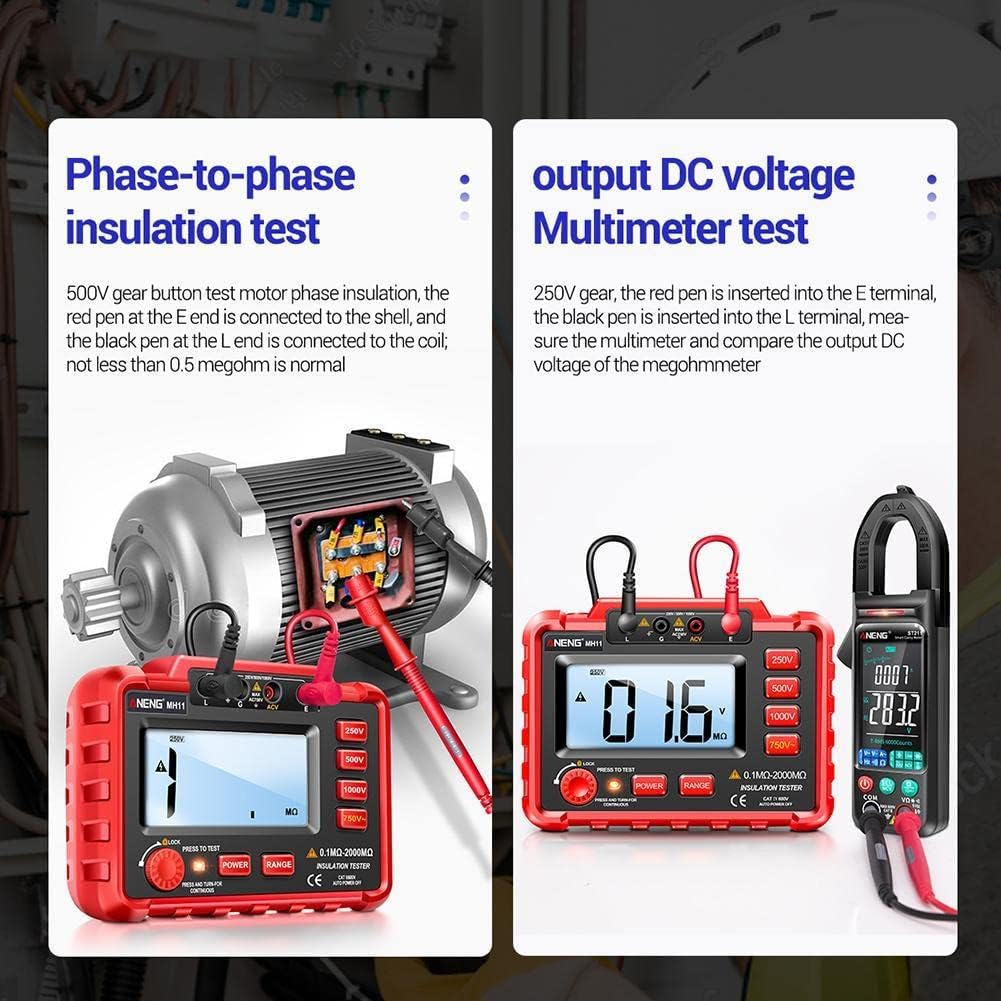
Figure 7.1: Examples of Phase-to-phase insulation test and output DC voltage Multimeter test.
Example: Phase-to-phase insulation test (500V gear)
Connect the red test lead to the 'E' terminal and the black test lead to the 'L' terminal. Connect the leads to the motor's phase and shell. A reading of not less than 0.5 megohm is typically considered normal.
Example: Output DC voltage Multimeter test (250V gear)
Insert the red test lead into the 'E' terminal and the black test lead into the 'L' terminal. Use an external multimeter to measure and compare the output DC voltage of the megohmmeter.
7.3 AC Voltage Measurement
- Ensure the device is powered on.
- Connect the test leads to the 'ACV' and 'G' terminals.
- Press the 750V~ button to select the AC voltage measurement mode.
- Connect the test leads to the AC voltage source. The voltage reading will appear on the LCD.
7.4 Range Selection
Press the RANGE button to cycle through available measurement ranges for certain functions, if applicable. The display will indicate the currently selected range.
7.5 Automatic Discharge Function

Figure 7.2: Illustration of the automatic discharge function.
After completing a test, the Aneng MH11 automatically discharges any residual voltage from the circuit under test. This professional and safe feature ensures intelligent and worry-free operation.
8. Technical Specifications
The following table details the technical parameters and specifications of the Aneng MH11 Megohmmeter:

Figure 8.1: Model MH11 Technical Data Sheet.
| Function | Measuring Range | Basic Accuracy |
|---|---|---|
| Output Voltage | 250V / 500V / 1000V | ±10% |
| Short Circuit Current | <1.6mA | |
| Test Current | 250V (R=250kΩ) 1mA 500V (R=500kΩ) 1mA 1000V (R=1MΩ) 1mA | ±10% |
| Insulation Resistance | 250V: 0.1MΩ-20MΩ 500V: 0.1MΩ-50MΩ 1000V: 0.1MΩ-100MΩ | ±(4% reading ± 2) |
| 250V: 20MΩ-500MΩ 500V: 50MΩ-1000MΩ 1000V: 100MΩ-2000MΩ | ±(4% reading ± 2) | |
| Median Resistance | 250V/500V: 2MΩ 1000V: 5MΩ | |
| Voltage Measurement | AC 750V | ±(1% reading ± 6) |
| Pen Material / Length | PVC/Brass 110cm/43.3in | |
| Material / Weight | ABS/Silicone (without battery) | |
| Auto Shut-down | It will automatically shut down after 15 minutes of inactivity | |
| Battery Model | 8*AA batteries | |
| Product Size | 165 * 120 * 57mm / 6.5in * 4.72 * 2.25in | |
| Max Display | 1999 count | |
| Hole Plug Position | Insulation resistance: L E AC750V: ACV G |
Note: AC750V input impedance: 1MΩ. AC750V frequency response: (50~200)Hz. Median resistance: The lower limit of resistance measurement that ensures the voltage across both ends of the measurement is not lower than 90% of the nominal value of the test voltage.
9. Maintenance
9.1 Cleaning
To clean the meter, wipe the case with a damp cloth and mild detergent. Do not use abrasives or solvents. Ensure the meter is completely dry before use.
9.2 Storage
When the meter is not in use for an extended period, remove the batteries to prevent leakage and damage to the device. Store the meter in a cool, dry place, away from direct sunlight and extreme temperatures.

Figure 9.1: The durable drop case provides all-round protection.
The durable anti-drop silicone case is designed to protect the hardware from damage due to accidental drops.
10. Troubleshooting
If you encounter issues with your Aneng MH11 Megohmmeter, refer to the following common problems and solutions:
- Meter does not power on:
- Check if the batteries are correctly installed and have sufficient charge. Replace if necessary.
- Ensure the POWER button is fully pressed to the 'on' position.
- No reading or incorrect reading:
- Verify that the test leads are securely connected to both the meter and the circuit under test.
- Ensure the correct measurement function and range are selected.
- Check for continuity in the test leads.
- Ensure the circuit under test is properly prepared (e.g., de-energized for resistance tests).
- Display is dim or flickering:
- Batteries may be low. Replace with new ones.
If the problem persists after attempting these troubleshooting steps, please contact customer support.
11. Warranty and Support
For warranty information and technical support, please refer to the documentation provided at the time of purchase or contact WAITLOVER customer service directly. Keep your purchase receipt as proof of purchase for any warranty claims.
Manufacturer: WAITLOVER
ASIN: B09SP8XW1N
UPC: 674012133140