
Introduction
This manual provides comprehensive instructions for the RETROSUN VAF7640 replacement remote control. This remote is designed to be compatible with specific Yamaha soundbar models, including the ATS-1080 and YAS-108. It offers direct functionality without the need for complex programming or pairing procedures.
Product Overview
The RETROSUN VAF7640 remote control is an ergonomic replacement unit constructed from durable ABS material with soft plastic buttons for comfortable use. It is designed to replicate the functionality of the original remote for compatible Yamaha soundbars.

Image: Front and back view of the RETROSUN VAF7640 replacement remote control, displaying all buttons and the battery compartment on the rear.
Compatibility: This remote is specifically designed for use with Yamaha Soundbar models ATS-1080 and YAS-108.

Image: Visual confirmation of compatibility with Yamaha YAS-108 and ATS-1080 soundbar models.
Key Features:
- No programming or pairing required.
- Sensitive and responsive buttons.
- Ergonomic design for comfortable handling.
- Durable ABS material construction.
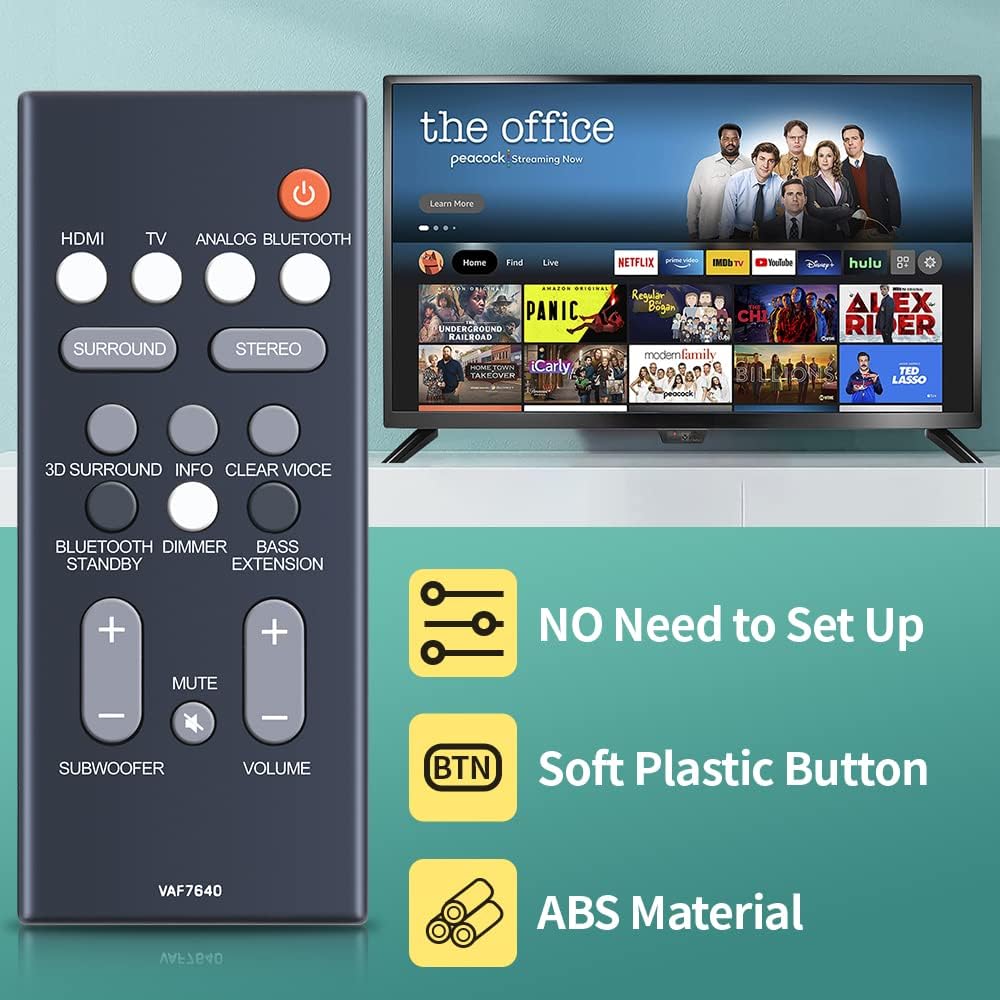
Image: The remote control positioned near a television, illustrating its ready-to-use nature, soft buttons, and durable ABS construction.
Dimensions:
- Length: Approximately 4.95 inches
- Width: Approximately 2.06 inches
- Thickness: Approximately 0.37 inches
- Weight: 1.44 ounces

Image: Detailed dimensional view of the remote control, showing its length, width, and thickness measurements.
Setup: Battery Installation
The remote control requires one CR2025 3V coin battery (not included). Please follow these steps to install the battery:
- Locate the battery compartment on the back of the remote control.
- Gently slide the battery cover open. If there is a battery insulating sheet, remove it before inserting the new battery.
- Insert one CR2025 3V coin battery with the positive (+) side facing upwards, as indicated inside the compartment.
- Close the battery cover securely.

Image: Illustration of removing the battery insulating sheet from the remote control's battery compartment.

Image: The remote's rear and a CR2025 battery, confirming the required battery type and that it is not included.
Operating Instructions
Once the battery is installed, the remote control is ready for immediate use with your compatible Yamaha soundbar. No additional programming or pairing is required. Ensure a clear line of sight between the remote control and the soundbar's infrared receiver.

Image: A user operating the remote control to navigate content on a television, demonstrating its direct functionality.
Button Functions:
- Power Button (Orange): Turns the soundbar on or off.
- HDMI: Selects the HDMI input source.
- TV: Selects the TV input source.
- ANALOG: Selects the analog input source.
- BLUETOOTH: Selects the Bluetooth input source.
- SURROUND: Activates or deactivates surround sound mode.
- STEREO: Activates or deactivates stereo sound mode.
- 3D SURROUND: Engages or disengages 3D surround sound.
- INFO: Displays information on the soundbar.
- CLEAR VOICE: Enhances dialogue clarity.
- BLUETOOTH STANDBY: Puts the soundbar into Bluetooth standby mode.
- DIMMER: Adjusts the brightness of the soundbar's display.
- BASS EXTENSION: Enhances bass output.
- SUBWOOFER (+/-): Adjusts the subwoofer volume level.
- VOLUME (+/-): Adjusts the main volume level.
- MUTE: Mutes or unmutes the sound.
Troubleshooting
If the remote control does not function as expected, consider the following:
- No Response: Ensure the battery is correctly installed with the correct polarity and is not depleted. Replace the battery if necessary.
- Intermittent Operation: Check for any obstructions between the remote control and the soundbar's infrared receiver. Ensure you are within the effective operating range and pointing the remote directly at the soundbar.
- Incorrect Function: Verify that your soundbar model is one of the compatible models (Yamaha ATS-1080 or YAS-108). This remote is a direct replacement and does not require programming.
Specifications
| Model Number | VAF7640 |
| Brand | RETROSUN |
| Compatible Devices | Yamaha Soundbar ATS-1080, YAS-108 |
| Connectivity Technology | Infrared (IR) |
| Battery Type | 1 x CR2025 3V Coin Battery (not included) |
| Material | ABS |
| Item Weight | 1.44 ounces |
| Package Dimensions | 5 x 2.05 x 0.67 inches |
Warranty and Support
For any issues encountered during the use of this product, please contact us directly via Amazon messenger. We are committed to resolving any problems within 24 hours.