Introduction
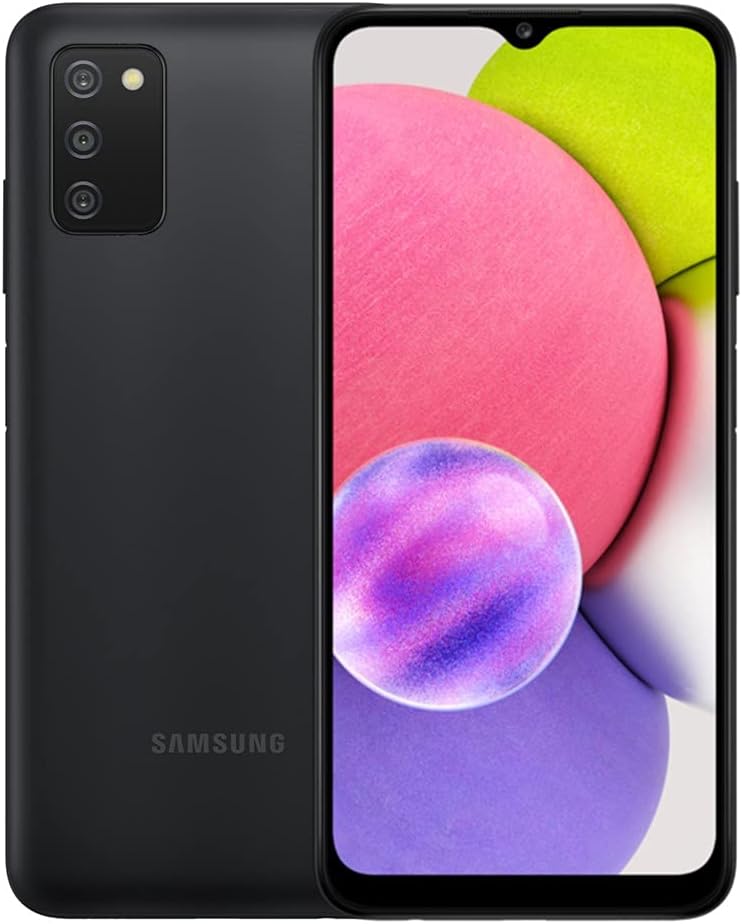
Welcome to the user manual for your Samsung Galaxy A03s. This guide provides essential information to help you set up, operate, maintain, and troubleshoot your device. The Samsung Galaxy A03s is an AT&T GSM Unlocked Android Smartphone featuring 32GB storage, a long-lasting battery, three camera lenses, and an Infinite Display.
Product Overview
Familiarize yourself with the physical components of your Samsung Galaxy A03s.


Setup
1. Inserting the SIM Card and microSD Card
Your Samsung Galaxy A03s uses a Hybrid SIM Tray, allowing for either two SIM cards or one SIM card and one microSD card for expandable storage.
- Locate the SIM tray on the side of the device.
- Insert the SIM ejection tool (not included with renewed product) into the small hole next to the tray to eject it.
- Place your Nano-SIM card(s) and/or microSD card into the tray with the gold contacts facing down.
- Carefully push the tray back into the slot until it clicks into place.
Note: Ensure the phone is powered off before inserting or removing SIM/microSD cards.
2. Initial Power On and Setup Wizard
- Press and hold the Power/Side key until the Samsung logo appears.
- Follow the on-screen instructions to complete the initial setup, including language selection, Wi-Fi connection, Google account sign-in, and security settings.
Operating Your Device
1. Basic Navigation
- Home Screen: Swipe left or right to navigate between home screens.
- App Drawer: Swipe up from the home screen to access all installed applications.
- Notifications Panel: Swipe down from the top of the screen to view notifications and quick settings.
- Recent Apps: Tap the Recent Apps button (three vertical lines) to view and switch between recently used applications.
2. Making Calls and Sending Messages
- Calls: Open the Phone app, enter the number, and tap the call icon.
- Messages: Open the Messages app, tap the new message icon, enter the recipient, and type your message.
3. Camera Usage
The Samsung Galaxy A03s features a triple camera system for versatile photography.
- Open the Camera app.
- Select your desired mode (Photo, Video, Portrait, etc.).
- Tap the shutter button to capture an image or start/stop video recording.
Video 1: Overview of the Samsung Galaxy A03s. This video demonstrates the physical appearance of the phone, its unlocked status, and basic navigation through the user interface, highlighting its suitability for various uses and good condition.
Maintenance
1. Battery Care
- To maximize battery life, avoid extreme temperatures.
- Use the original charger or a certified compatible charger.
- Enable power-saving modes when battery is low.
2. Software Updates
Regularly check for and install software updates to ensure optimal performance and security.
- Go to Settings > Software update.
- Tap Download and install.
3. Cleaning Your Device
- Use a soft, lint-free cloth to clean the screen and body.
- Avoid using harsh chemicals or abrasive materials.
Troubleshooting
| Issue | Possible Cause | Solution |
|---|---|---|
| Phone not turning on | Low battery, software glitch | Charge the phone for at least 30 minutes. Perform a forced restart by holding the Power and Volume Down buttons for 7-10 seconds. |
| Apps crashing or freezing | Insufficient RAM, app conflict, outdated app | Close background apps. Clear app cache/data (Settings > Apps > select app > Storage). Update apps from Play Store. |
| Poor battery life | High screen brightness, excessive background app usage, old battery | Reduce screen brightness. Enable power-saving mode. Restrict background data for certain apps. Consider battery replacement if device is old. |
| Network connectivity issues | SIM card issue, network settings, carrier problem | Ensure SIM card is properly inserted. Toggle Airplane mode on/off. Reset network settings (Settings > General management > Reset > Reset network settings). Contact your carrier. |
For more advanced troubleshooting or issues not listed here, please refer to Samsung's official support website or contact customer service.
Specifications
| Feature | Detail |
|---|---|
| Model Number | SM-A037W / SM-A037U |
| Operating System | Android |
| Display Size | 6.5 Inches |
| Resolution | 720 x 1560 |
| RAM | 2 GB |
| Internal Storage | 32 GB |
| Expandable Storage | Yes, via microSD (Hybrid SIM Tray) |
| Battery Capacity | 5000 Milliamp Hours |
| Rear Camera | Triple Camera Lenses |
| Connectivity | Bluetooth, Wi-Fi, USB |
| Dimensions (L x W x H) | 6.46 x 2.99 x 0.36 inches |
| Item Weight | 7 ounces |
| Audio Jack | 3.5 mm |
Warranty and Support
This product is part of Amazon Renewed. Amazon Renewed products are professionally inspected and tested to work and look like new. If not satisfied with the purchase, renewed products are eligible for replacement or refund under the Amazon Renewed Guarantee.
- Return Policy: Eligible for replacement or refund within 90 days under the Amazon Renewed Guarantee.
- Manufacturer Support: For specific technical support or warranty claims related to manufacturing defects, please visit the official Samsung support website or contact their customer service.
- Amazon Renewed Support: For issues related to the renewed condition or the Amazon Renewed Guarantee, please contact Amazon customer service.