
1. Introduction
Thank you for choosing Chicclly Professional Hair Clippers. This manual provides essential information for the safe and effective use, maintenance, and troubleshooting of your new hair cutting kit. Please read this manual thoroughly before first use and retain it for future reference.

Image: The Chicclly Professional Hair Clippers kit, including the main clipper unit, various color-coded guide combs, scissors, a cape, a cleaning brush, and a charging cable.
2. Safety Information
To ensure safe operation and prevent injury or damage, please observe the following safety precautions:
- Keep out of reach of children: The clippers and all accessories, including scissors and combs, contain sharp parts that could cause injury. Store them in a secure location away from children.
- Water Exposure: The blade is waterproof, but the main body of the clipper is not. Do not immerse the entire unit in water. Clean the blade under running water only after detaching it from the main body, if applicable, or as instructed in the maintenance section.
- Power Source: Use only the provided charging cable and a compatible power adapter. Ensure the voltage is correct before charging.
- Blade Care: Handle blades with care. Do not use damaged or bent blades.
- Operating Environment: Do not use the clippers in excessively wet or humid environments.
- Maintenance: Perform maintenance as described in this manual. Do not attempt to disassemble or repair the unit yourself. Contact customer support for assistance.
3. Package Contents
Verify that all items are present in your package:
- 1 x Cordless Hair Clipper
- 10 x Color-Coded Guide Combs (various lengths)
- 1 x Scissor
- 1 x Hair Cutting Cape
- 1 x Storage Bag
- 1 x Comb
- 1 x USB Charging Cable
- 1 x Cleaning Brush
- 1 x Blade Oil (if included)
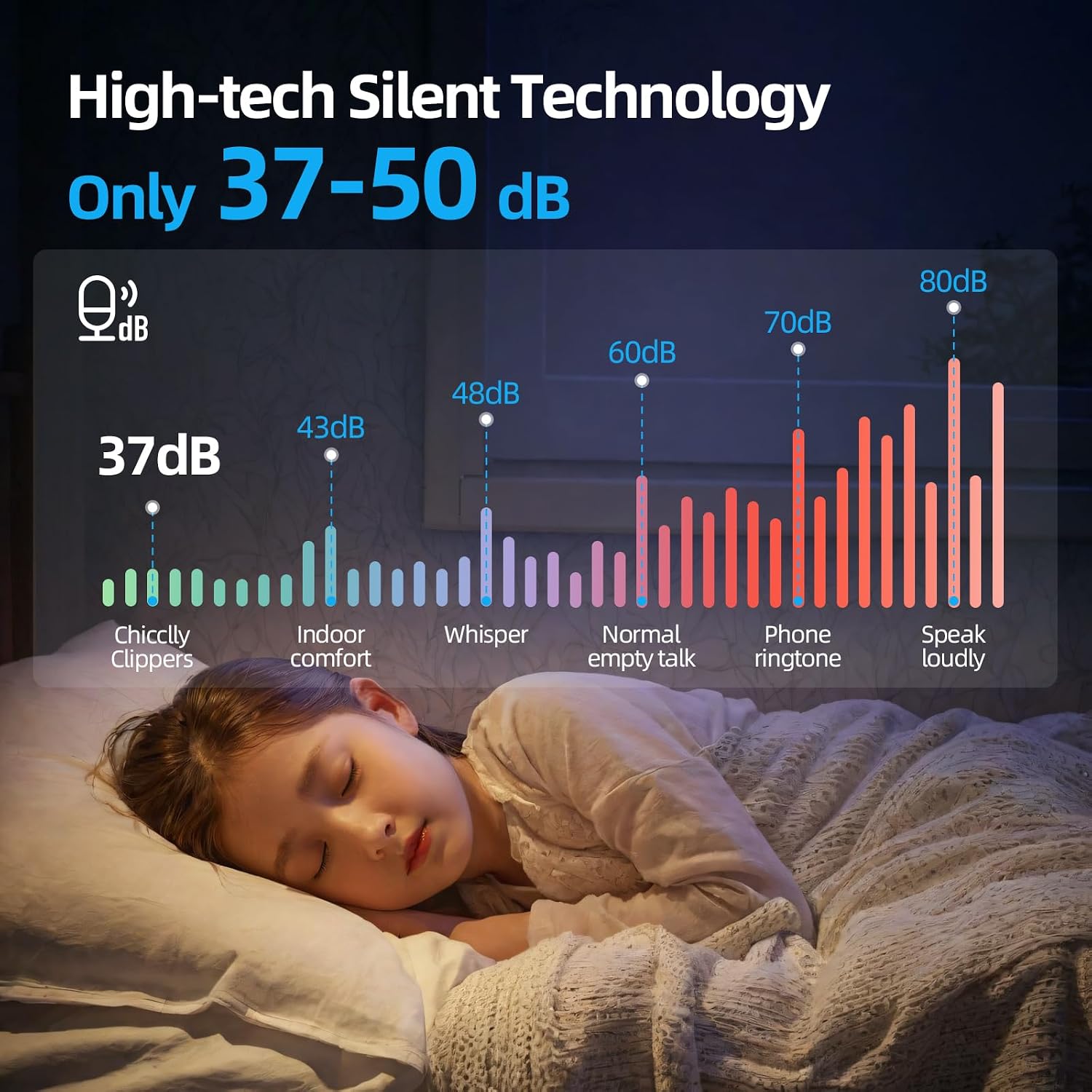
Image: A complete view of the Chicclly hair clipper kit, showcasing the clipper, multiple guide combs, scissors, cape, comb, and charging cable.
4. Product Features
- Low Noise Operation: Operates at 37-50dB, providing a quieter grooming experience.
- Sharp Carbon Blades: Features Double-Cut 440C Carbon Steel blades for efficient and snag-free cutting.
- Powerful Rotary Motor: Equipped with a 6000 RPM high-torque motor for fast and consistent performance.
- Long Battery Life: 2500mAh ultra-powerful battery provides over 5 hours of cordless running time on a 3-hour full charge. Quick charge function offers one full cut after only 15 minutes of charging.
- LED Display: Smart LED display indicates battery level and charging status.
- Adjustable Blade: Cutting lengths adjustable from 1/64'' to 1/8'' (0.5mm to 3mm) via a lever.
- Color-Coded Guide Combs: 10 guide combs ranging from 3mm to 25mm for various hair lengths.
- Waterproof Blade: The blade unit is designed to be waterproof for easy cleaning.
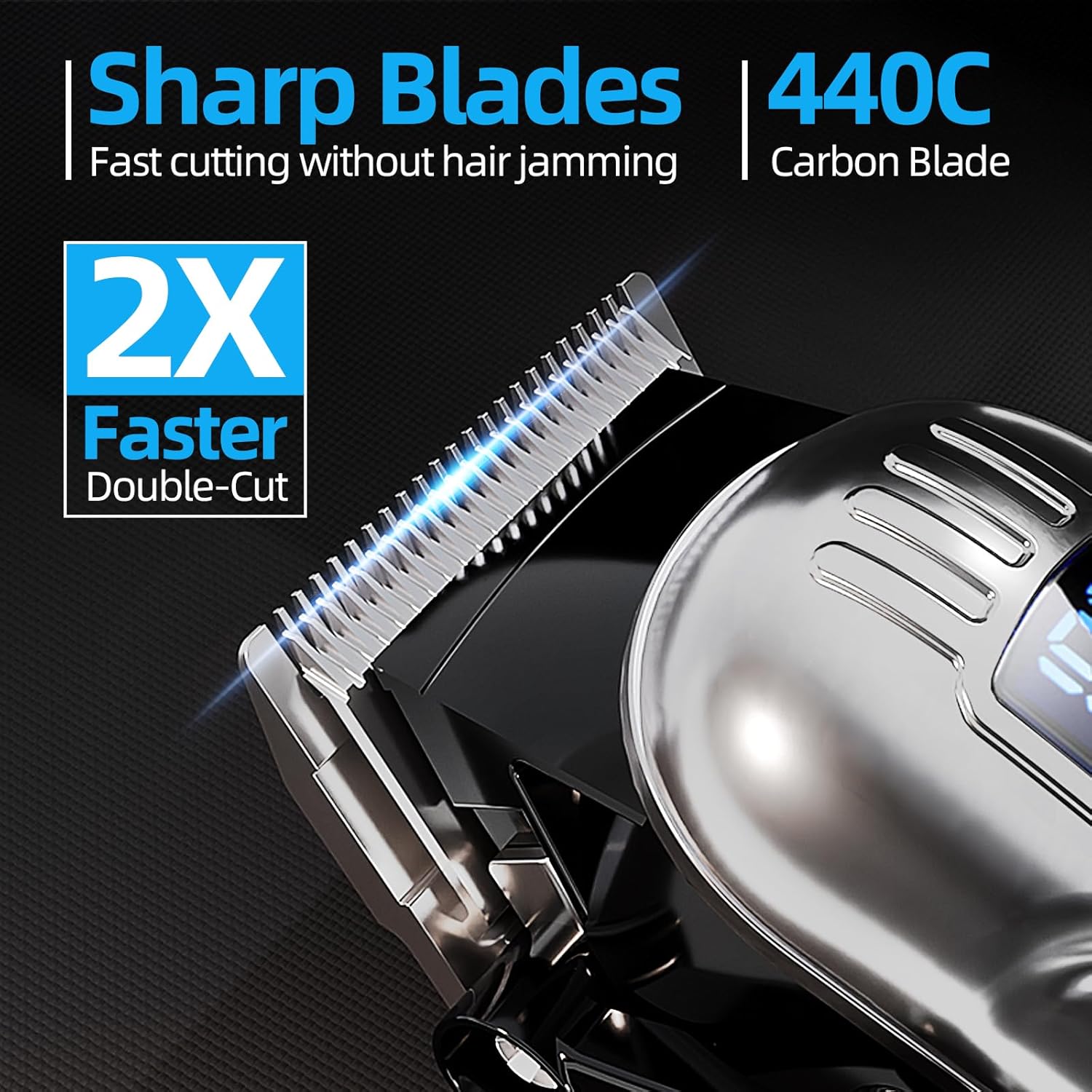
Image: A visual representation showing the low noise output (37dB) of the Chicclly clippers compared to common sounds like whispering or normal talk.

Image: A detailed view of the clipper's sharp 440C carbon steel blades, highlighting the "2X Faster Double-Cut" feature.

Image: The clipper's LED display showing battery capacity (2500mAh), cordless running time (5 hours), and charging time (3 hours), with a USB charging cable connected.
5. Setup
- Initial Charge: Before first use, fully charge the clipper for approximately 3 hours. Connect the USB charging cable to the clipper and a compatible USB power adapter (not included). The LED display will show the charging progress.
- Attach Guide Comb: Select the desired color-coded guide comb based on the hair length you wish to achieve. Align the comb with the clipper blade and push it firmly until it clicks into place.
- Adjust Blade Lever: Use the adjustable blade lever on the side of the clipper to fine-tune the cutting length. The lever allows for micro-adjustments between 1/64'' and 1/8'' (0.5mm to 3mm).
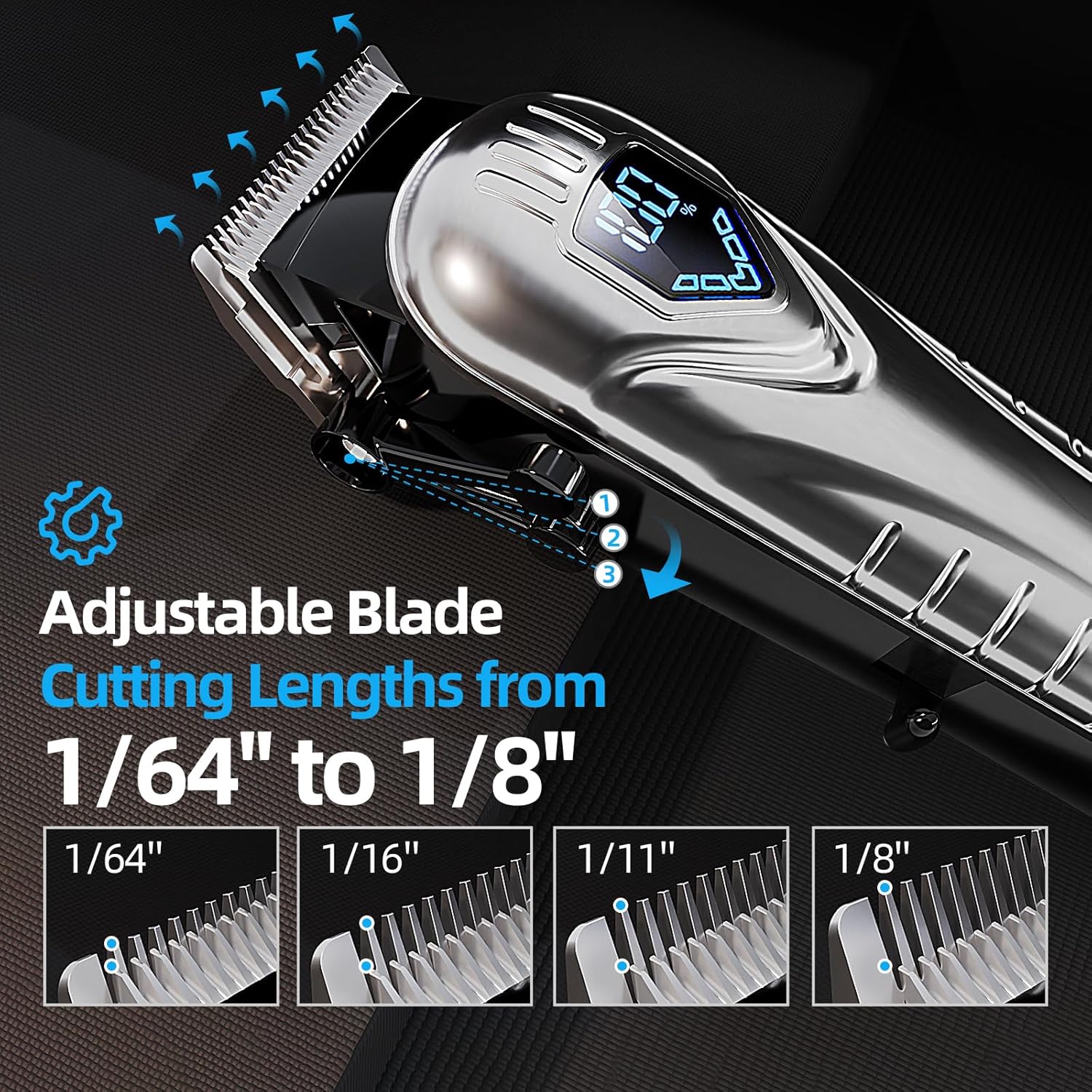
Image: A display of the 10 color-coded guide combs, ranging from 3mm to 25mm, designed for easy identification of hair cutting lengths.

Image: A close-up of the clipper's adjustable blade lever, illustrating how it changes cutting lengths from 1/64" to 1/8".
6. Operating Instructions
- Preparation: Ensure hair is clean and dry. Drape the provided cape around the person's neck to catch cut hair.
- Power On: Press the power button to turn on the clipper. The LED display will illuminate, showing the current battery percentage.
- Cutting Hair:
- Start with a longer guide comb than you think you need, and gradually switch to shorter combs if desired.
- Hold the clipper with the blade flat against the head.
- Move the clipper slowly against the direction of hair growth.
- Overlap strokes to ensure an even cut.
- For detailing or outlining, remove the guide comb and use the adjustable blade lever for precise cuts.
- Power Off: After use, press the power button to turn off the clipper.

Image: A composite image demonstrating the versatility of the hair clippers for various users, including a child, a man trimming his beard, and an elderly man getting a haircut.
7. Maintenance
Regular cleaning and maintenance will prolong the life of your clippers:
- Cleaning the Blades:
- After each use, turn off the clipper and remove the guide comb.
- Use the provided cleaning brush to brush away any loose hair from the blades and the clipper body.
- The blade unit can be rinsed under running water. Ensure the main clipper body does not get wet. Dry the blade thoroughly before reattaching.
- Oiling the Blades:
- Periodically, apply a few drops of lubricating oil (if provided, or standard clipper oil) to the teeth of the blades while the clipper is running. This helps maintain cutting performance and prevents rust.
- Wipe off any excess oil.
- Storage: Store the clipper and all accessories in the provided storage bag in a cool, dry place.

Image: A visual demonstrating the waterproof nature of the clipper's blade, showing water being rinsed over it.
8. Troubleshooting
| Problem | Possible Cause | Solution |
|---|---|---|
| Clipper does not turn on. | Low battery; Unit not charged. | Charge the clipper fully. Check the LED display for battery level. |
| Clipper pulls hair or cuts unevenly. | Blades are dull or dirty; Not enough oil; Hair is not clean/dry. | Clean and oil the blades. Ensure hair is clean and dry before cutting. If problem persists, blades may need replacement. |
| Clipper is unusually loud or vibrates excessively. | Blades are not properly aligned or oiled; Internal issue. | Clean and oil the blades. Ensure blades are securely attached. If issue continues, contact customer support. |
| LED display not working. | Unit is off; Malfunction. | Turn on the clipper. If still not working, contact customer support. |
9. Specifications
- Model: 094AS
- Brand: Chicclly
- Motor Speed: 6000 RPM
- Battery Capacity: 2500mAh
- Charging Time: Approximately 3 hours
- Running Time: Over 5 hours (cordless)
- Noise Level: 37-50dB
- Blade Material: 440C Carbon Steel
- Adjustable Blade Lengths: 1/64'' - 1/8'' (0.5mm - 3mm)
- Guide Comb Lengths: 3mm, 6mm, 10mm, 13mm, 16mm, 19mm, 22mm, 25mm (and two smaller ones implied by "10 color combs")
- Item Weight: 0.64 Kilograms (approx. 1.41 Pounds)
- Power Requirement: 1 9V battery (internal, rechargeable)
10. Warranty and Support
Chicclly is committed to your satisfaction. Your product comes with a 2-Year Warranty.
For any defective products, Chicclly will provide free replacement. For customer service or support, please contact us:
- Click on the seller's name on the product page and send us messages.
- Click on the store name in your order and click in to send us messages.
We continually provide full support to ensure your grooming tasks are met with ease and satisfaction.