
1. Introduction
This manual provides essential information for the safe and efficient operation, installation, and maintenance of your Hoover H-DRY 500 NDE H10A2TSBEXS-S Heat Pump Dryer. Please read all instructions carefully before using the appliance and retain this manual for future reference.
The Hoover H-DRY 500 is a 10 kg capacity heat pump dryer designed for energy-efficient clothes drying. It features smart control capabilities via Wi-Fi and Bluetooth, an AquaVision condensate reservoir, and a variety of drying programs.
2. Safety Information
Always follow basic safety precautions when using electrical appliances to reduce the risk of fire, electric shock, or injury to persons.
- Ensure the appliance is properly earthed.
- Do not allow children to play with or operate the dryer. Activate the child lock function when necessary.
- Do not dry unwashed items in the tumble dryer.
- Items that have been soiled with substances such as cooking oil, acetone, alcohol, petrol, kerosene, spot removers, turpentine, waxes, and wax removers should be washed in hot water with an extra amount of detergent before being dried in the tumble dryer.
- Remove all objects from pockets such as lighters and matches.
- The appliance must not be installed behind a lockable door, a sliding door, or a door with a hinge on the opposite side to that of the tumble dryer, in such a way that a full opening of the tumble dryer door is restricted.
- Always unplug the appliance before cleaning or performing maintenance.
3. Product Overview
The Hoover H-DRY 500 NDE H10A2TSBEXS-S is a high-capacity heat pump dryer designed for efficiency and convenience. Key features include:
- Energy Efficiency Class A++: Optimized for low energy consumption.
- 10 kg Capacity: Suitable for large loads.
- Smart Control: Integrated Wi-Fi and Bluetooth technology for remote operation and monitoring.
- AquaVision Condensate Reservoir: Conveniently located in the porthole with an optical fill indicator.
- Shoe Rack: Dedicated accessory for drying shoes.
- 5D Digital Display: Features a scrolling text display for clear information and precise remaining time indication.
- 15 + 1 Programs: A wide range of programs for various fabric types and drying needs.
- Crease Protection Function: Helps reduce wrinkles in dried laundry.
- Child Lock: Prevents unintended operation.


4. Setup and Installation
Proper installation is crucial for the dryer's performance and safety. It is recommended to have the appliance installed by a qualified technician.
4.1 Unpacking
- Carefully remove all packaging materials.
- Check the appliance for any transport damage. If damaged, do not install or use it, and contact your retailer.
- Ensure all accessories, such as the shoe rack and documentation, are present.
4.2 Positioning
- Place the dryer on a firm, level floor.
- Ensure adequate ventilation around the appliance. Do not block the air intake or exhaust vents.
- Avoid installing the dryer in rooms where the temperature may fall below 5°C, as this can affect performance.
4.3 Electrical Connection
- Connect the appliance to a properly earthed power socket.
- Ensure the voltage and frequency match the specifications on the rating plate.
- Do not use extension cords or multiple adapters.
5. Operating Instructions
5.1 Control Panel and Display
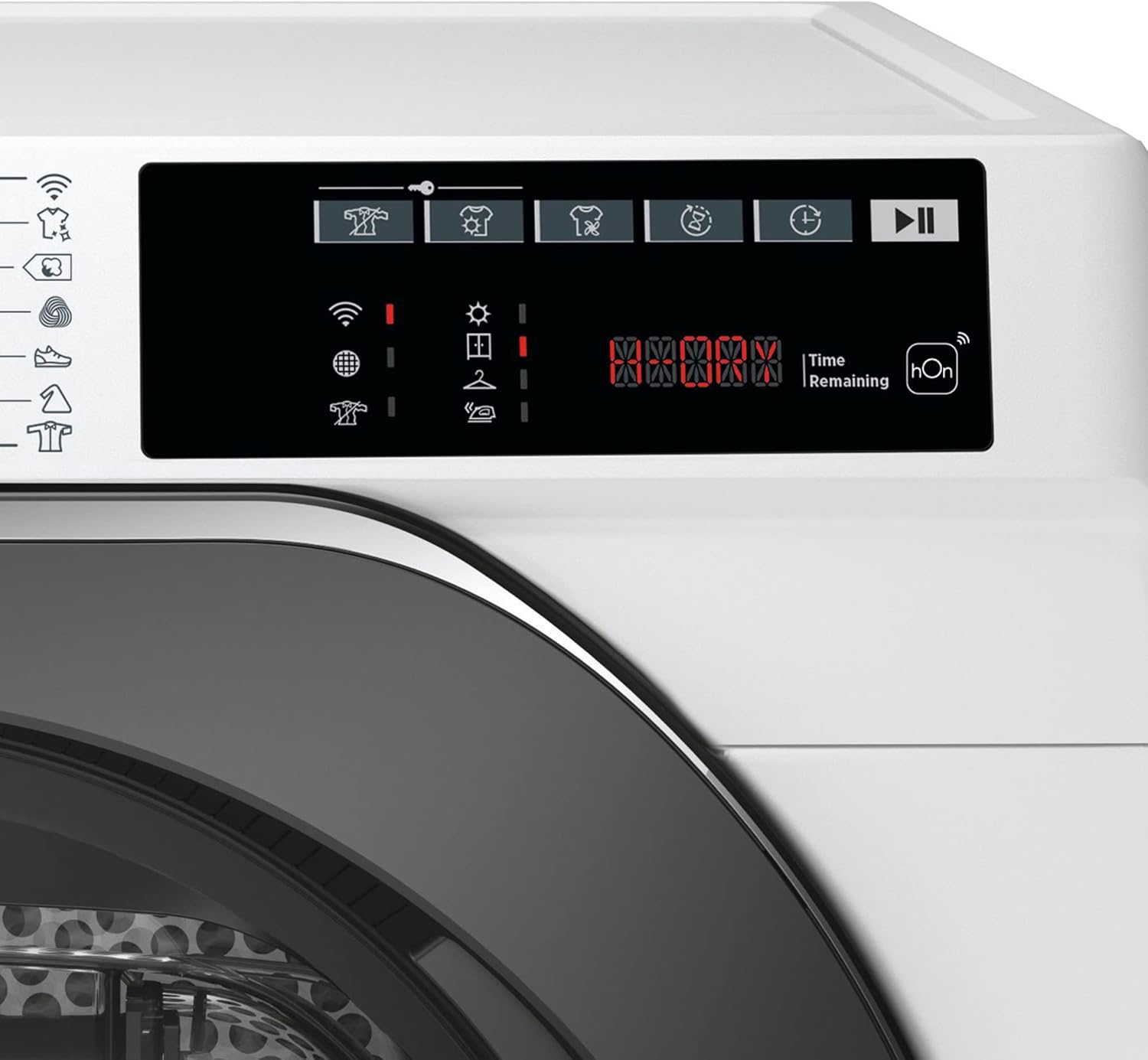
The dryer features a central program selector dial and a 5D digital display with touch controls for various functions.

5.2 Loading the Dryer
- Open the dryer door and load laundry, ensuring not to overload the drum.
- For best results, sort laundry by fabric type and desired dryness level.
- Close the door firmly.
5.3 Selecting a Program
Turn the program selector dial to choose one of the 15 + 1 available drying programs. The selected program will be indicated on the digital display.
- Common Programs:
- Boil Wash
- Cotton
- Woolmark Wool Program
- Sports Shoe
- Synthetic
- Shirts
- Jeans
- Sportswear
- SofteCare
- Fresh Care
- Allergy Care
- 3 Care Short Programs (30, 45, 59 minutes)
- All in One
- Auto Care
- Drying Options:
- Iron Dry
- Hang Dry
- Cupboard Dry
- Extra Dry
5.4 Additional Functions
- Crease Protection Function: Activates a gentle tumbling action at the end of the cycle to minimize wrinkles.
- Delayed Start Function: Allows you to postpone the start of the drying cycle for up to 24 hours.
- Child Lock: Press and hold the designated button (refer to display symbols) to activate or deactivate the child lock.
5.5 Smart Control (Wi-Fi + Bluetooth)
The dryer can be controlled remotely via the hOn app on your smartphone. Follow the instructions in the app to connect your dryer to your home Wi-Fi network and pair it via Bluetooth. This allows for remote program selection, monitoring, and access to additional features.
6. Maintenance and Cleaning
Regular maintenance ensures optimal performance and extends the lifespan of your dryer.
6.1 Emptying the AquaVision Condensate Reservoir
- The AquaVision reservoir is located in the porthole. The display will indicate when it needs emptying.
- Carefully pull out the reservoir and empty the collected water.
- Reinsert the reservoir securely.
6.2 Cleaning the Lint Filter
- The lint filter is located inside the door opening.
- Clean the filter after every drying cycle to maintain drying efficiency and prevent fire hazards.
- Remove lint by hand or with a soft brush.
6.3 Cleaning the Condenser
The condenser should be cleaned periodically (e.g., every few months) to ensure efficient operation. Refer to the full instruction manual for detailed steps on accessing and cleaning the condenser unit.
6.4 Exterior Cleaning
- Wipe the exterior surfaces with a soft, damp cloth.
- Do not use abrasive cleaners or solvents.
7. Troubleshooting
If you encounter issues with your dryer, consult the following common troubleshooting tips before contacting service.
7.1 Dryer Not Starting
- Check if the power cord is securely plugged in.
- Ensure the door is fully closed.
- Verify that the child lock is not activated.
- Check if a program has been selected and the start button pressed.
7.2 Poor Drying Results
- Clean the lint filter. A clogged filter reduces airflow.
- Empty the AquaVision condensate reservoir.
- Ensure the load size is appropriate for the selected program and not overloaded.
- Check if the correct drying program and dryness level option were selected for the fabric type.
- Clean the condenser periodically.
7.3 Display Error Codes
The 5D digital display may show error codes. Refer to the full user manual or the hOn app for a comprehensive list of error codes and their solutions. Common issues often relate to blocked filters, full water tanks, or door not being closed properly.
8. Specifications
| Feature | Specification |
|---|---|
| Brand | Hoover (Candy Hoover GmbH) |
| Model | H-DRY 500 NDE H10A2TSBEXS-S |
| Type | Heat Pump Dryer |
| Capacity | 10 kg |
| Energy Efficiency Class | A++ |
| Annual Energy Consumption | 282 kWh |
| Energy Consumption (Full Load) | 2.43 kWh |
| Energy Consumption (Partial Load) | 1.21 kWh |
| Noise Level (Drying) | 66 dB(A) |
| Drum Volume | 125 liters |
| Product Dimensions (H x W x D) | 85 x 59.6 x 58.5 cm (unpacked) |
| Net Weight | 42.2 kg |
| Connectivity | Wi-Fi, Bluetooth |
| GTIN | 08059019024936 |
9. Warranty and Support
Your Hoover H-DRY 500 NDE H10A2TSBEXS-S Heat Pump Dryer comes with a manufacturer's warranty. Please refer to the warranty card included with your appliance for specific terms and conditions, including the warranty period and coverage details.
For technical assistance, spare parts, or to schedule a service appointment, please contact Hoover customer support. Contact details can typically be found on the manufacturer's official website or in the warranty documentation.
When contacting support, please have your model number (H-DRY 500 NDE H10A2TSBEXS-S) and serial number (found on the rating plate) readily available.