
Lamps Hudson (B09SGY7H3L)
Sheffield Home Hudson Wireless Charging LED Desk Lamp
Model: Hudson (B09SGY7H3L)
1. Introduction
The Sheffield Home Hudson Wireless Charging LED Desk Lamp combines minimalist design with practical functionality, offering versatile lighting and convenient charging solutions. This manual provides essential information for the safe and efficient use of your new desk lamp.

Image 1.1: Front view of the Sheffield Home Hudson LED Desk Lamp, showcasing its integrated digital clock display and sleek design.
2. Safety Information
Please read all safety instructions carefully before using the lamp. Failure to follow these instructions may result in electric shock, fire, or serious injury.
- Do not expose the lamp to water or excessive humidity.
- Use only the provided DC adaptor. Using an incorrect power supply may damage the lamp or pose a safety risk.
- Do not disassemble or modify the lamp. Refer all servicing to qualified personnel.
- Keep the lamp away from heat sources and direct sunlight.
- Ensure the lamp is placed on a stable, flat surface to prevent tipping.
- Avoid looking directly into the LED light source for extended periods, as it may cause eye strain.
3. Package Contents
Verify that all items are present in the package:
- Sheffield Home Hudson LED Desk Lamp
- DC Power Adaptor
- Illustrated Owner's Manual and Guide (this document)
4. Product Features and Components
The Hudson desk lamp is designed with multiple functionalities for your convenience:
- LED Light Source: Energy-efficient and long-lasting illumination.
- Touch Control: Simple one-finger touch anywhere on the aluminum frame to power the light and adjust brightness.
- Three Brightness Levels: Easily cycle through low, medium, and high light intensities.
- LCD Display: High-contrast display on the lamp base shows time, date, and temperature.
- 10W Qi Inductive Wireless Charging Pad: Located on top of the rectangular base for compatible devices.
- USB-A Charging Port: Secondary charging option located at the rear of the base.
Component Overview
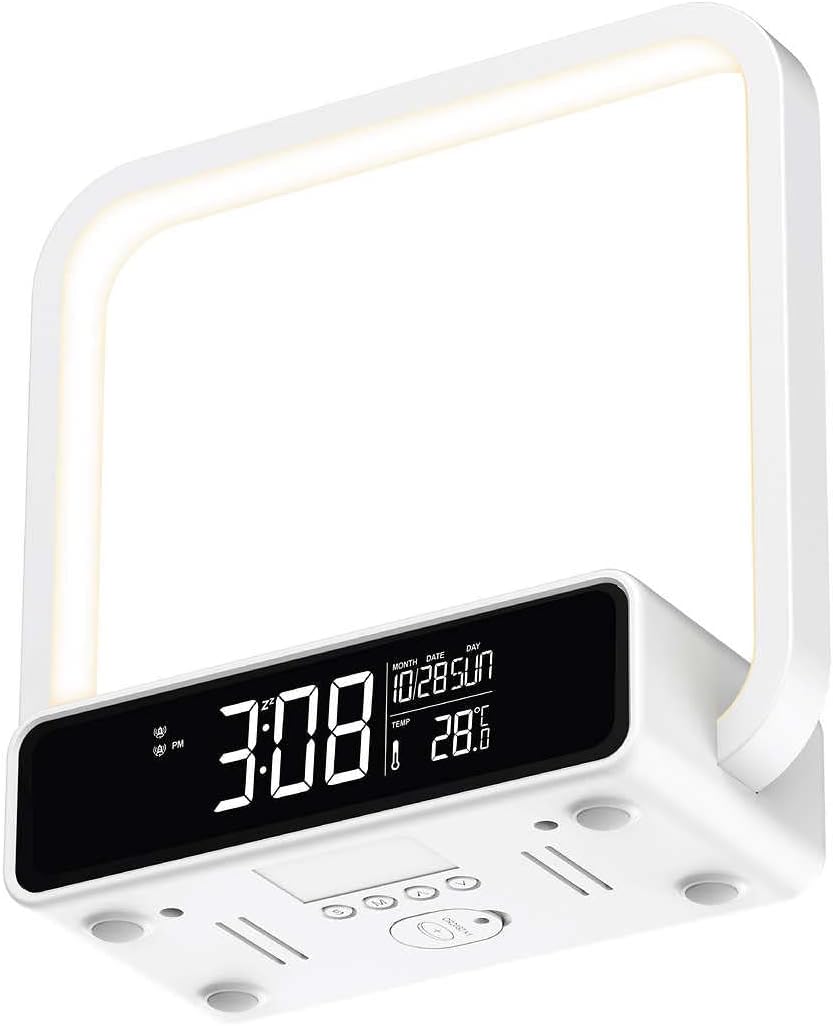
Image 4.1: Underside view of the lamp base, illustrating the various control buttons for setting time, date, and alarm functions.

Image 4.2: Rear view of the lamp base, highlighting the USB-A charging port and the DC power input.
5. Setup
- Unpack: Carefully remove all components from the packaging.
- Placement: Place the lamp on a stable, flat surface, such as a desk or nightstand. Ensure there is adequate space around the lamp for ventilation and access to charging areas.
- Connect Power: Insert the DC power adaptor into the power input port at the rear of the lamp base. Plug the other end of the adaptor into a standard electrical outlet. The LCD display should illuminate.
- Initial Setup (Time/Date): Refer to the control buttons on the underside of the lamp (as shown in Image 4.1) to set the current time, date, and any desired alarm functions. Consult the detailed instructions on the underside of the lamp or the included quick start guide for specific button functions.
6. Operating Instructions
6.1. Lamp Operation
- Turning On/Off: Lightly touch any part of the aluminum frame to turn the lamp on. Touch it again to turn it off.
- Adjusting Brightness: With the lamp on, repeatedly touch the aluminum frame to cycle through the three brightness levels (Low → Medium → High → Off).
6.2. Wireless Charging
The lamp features a 10W Qi inductive wireless charging pad for compatible devices.
- Placement: Place your Qi-compatible smartphone or device directly onto the wireless charging pad located on the top surface of the lamp base.
- Charging Indicator: Your device should indicate that it is charging. Ensure the device is centered on the pad for optimal charging efficiency.

Image 6.1: A smartphone placed on the integrated wireless charging pad of the lamp, demonstrating its charging capability.
6.3. USB-A Charging
A standard USB-A port is available for charging devices via a cable.
- Connect Cable: Plug one end of your device's USB charging cable into the USB-A port at the rear of the lamp base.
- Connect Device: Plug the other end of the cable into your device. Your device should begin charging.
7. Maintenance
- Cleaning: Disconnect the lamp from power before cleaning. Use a soft, dry cloth to wipe the surfaces. Do not use abrasive cleaners, solvents, or harsh chemicals, as they may damage the finish.
- Storage: If storing the lamp for an extended period, disconnect it from power and store it in a cool, dry place.
8. Troubleshooting
If you encounter issues with your lamp, refer to the following common problems and solutions:
| Problem | Possible Cause | Solution |
|---|---|---|
| Lamp does not turn on / LCD display is off. | No power connection. | Ensure the DC adaptor is securely plugged into the lamp and the wall outlet. Try a different outlet. |
| Wireless charging is not working. | Device not Qi-compatible; Device not properly aligned; Foreign objects on pad; Device case too thick. | Verify device supports Qi wireless charging. Re-position device to center it on the pad. Remove any metal objects or thick cases. |
| USB charging is not working. | Cable issue; Device issue. | Try a different USB cable. Ensure the device is properly connected. |
| Lamp makes a high-pitched ringing noise. | Internal component issue. | Disconnect power immediately. This indicates a potential internal fault. Contact customer support for assistance. Do not attempt to repair. |
9. Specifications
| Feature | Specification |
|---|---|
| Brand | Lamps |
| Model | Hudson (B09SGY7H3L) |
| Dimensions (L x W x H) | 10 cm x 5.2 cm x 10 cm (3.94 in. x 2.4 in. x 3.94 in.) |
| Weight | 0.43 kg (0.97 lb) / 1.09 kg (2.4 lb) (Note: Discrepancy in source data, using both for clarity) |
| Material | Aluminum |
| Power/Wattage | 10 watts |
| Wireless Charging Output | 10W Qi Inductive |
| USB Charging Port | USB-A |
| Light Type | LED (Light Emitting Diode) |
| Control Type | Touch |
| Color | White |

Image 9.1: Dimensional diagram of the lamp, indicating its height, width, and depth for reference.
10. Warranty and Support
For warranty information and customer support, please refer to the documentation provided at the time of purchase or contact the retailer/manufacturer directly. Keep your proof of purchase for warranty claims.
Ask a question about this manual
Ask about setup, troubleshooting, compatibility, parts, safety, or missing instructions. Manuals+ will review the question and use this page’s manual context to help answer it.