
Introduction
Thank you for choosing the LORPHEIR Car Backup Camera. This manual provides detailed instructions for the proper installation, operation, and maintenance of your new reverse camera. Please read this manual thoroughly before use to ensure optimal performance and safety.

Image: The LORPHEIR Car Backup Camera and its included components.
Package Contents
Verify that all items listed below are included in your package:
- Car Backup Camera
- 6M Data Cable (Video Cable)
- 1.5M Power Cable
- Mounting Screws
- Product Manual
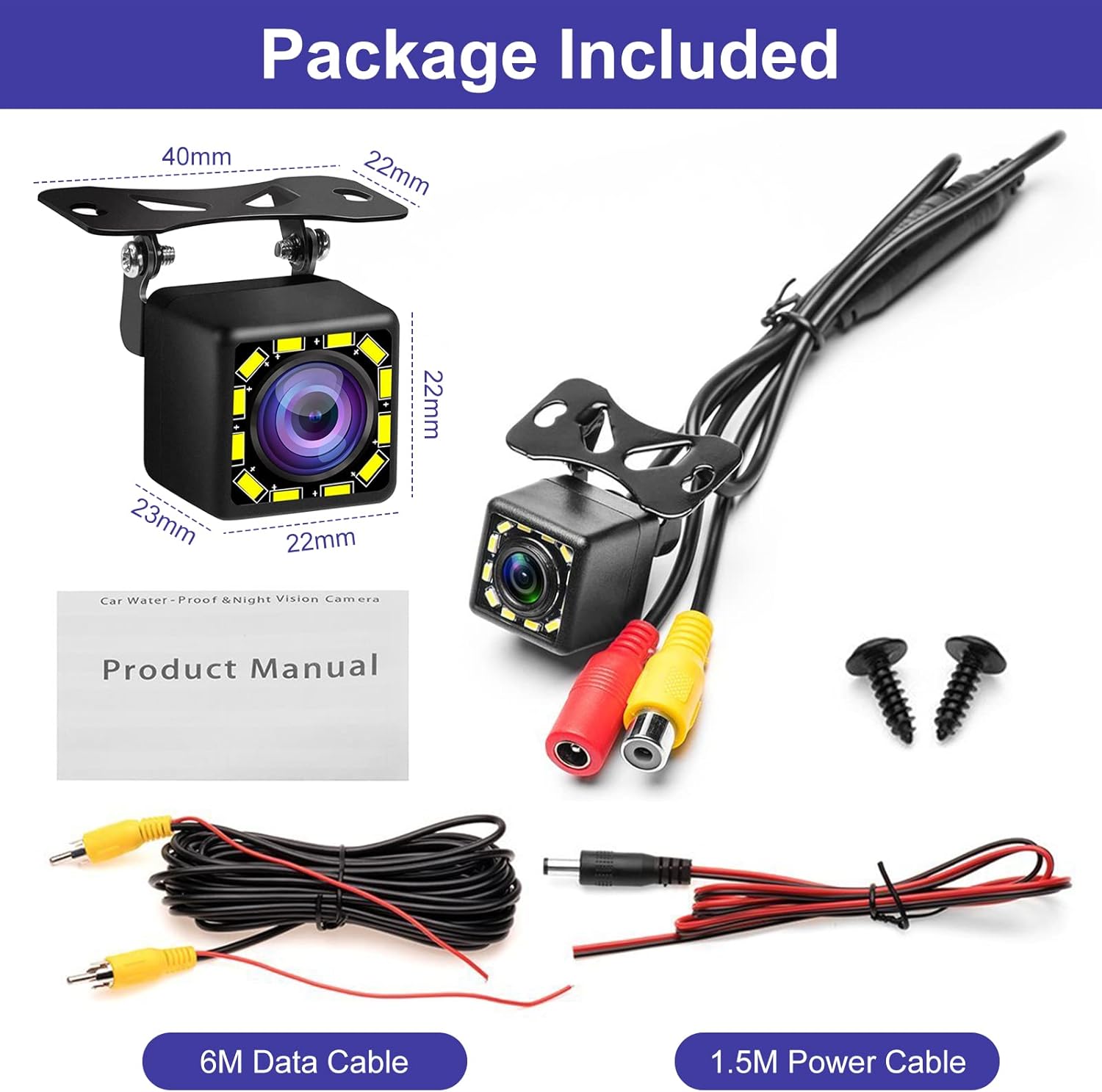
Image: All items included in the LORPHEIR Car Backup Camera package.
Setup and Installation
Follow these steps for proper installation of your LORPHEIR Car Backup Camera:
- Mount the Camera: Choose a suitable location on the rear of your vehicle, typically above the license plate. Secure the camera using the provided screws.
- Connect Power: Connect the camera's power cable (DC 12V) to your vehicle's reversing light power supply. This ensures the camera activates when the vehicle is in reverse.
- Connect Video Cable: Run the 6M data cable from the camera to your monitor. Connect the yellow RCA connector from the camera to the "CAM-in" or "Video(out)" input on your monitor.
- Trigger Wire Connection (Optional): If your monitor requires a trigger signal to switch to the backup camera view, connect the red trigger wire (often integrated with the video cable) from the camera's power line to the monitor's reverse trigger input.
- Ground Connection: Ensure the camera's ground wire is securely connected to a metal ground-iron part of the vehicle chassis.
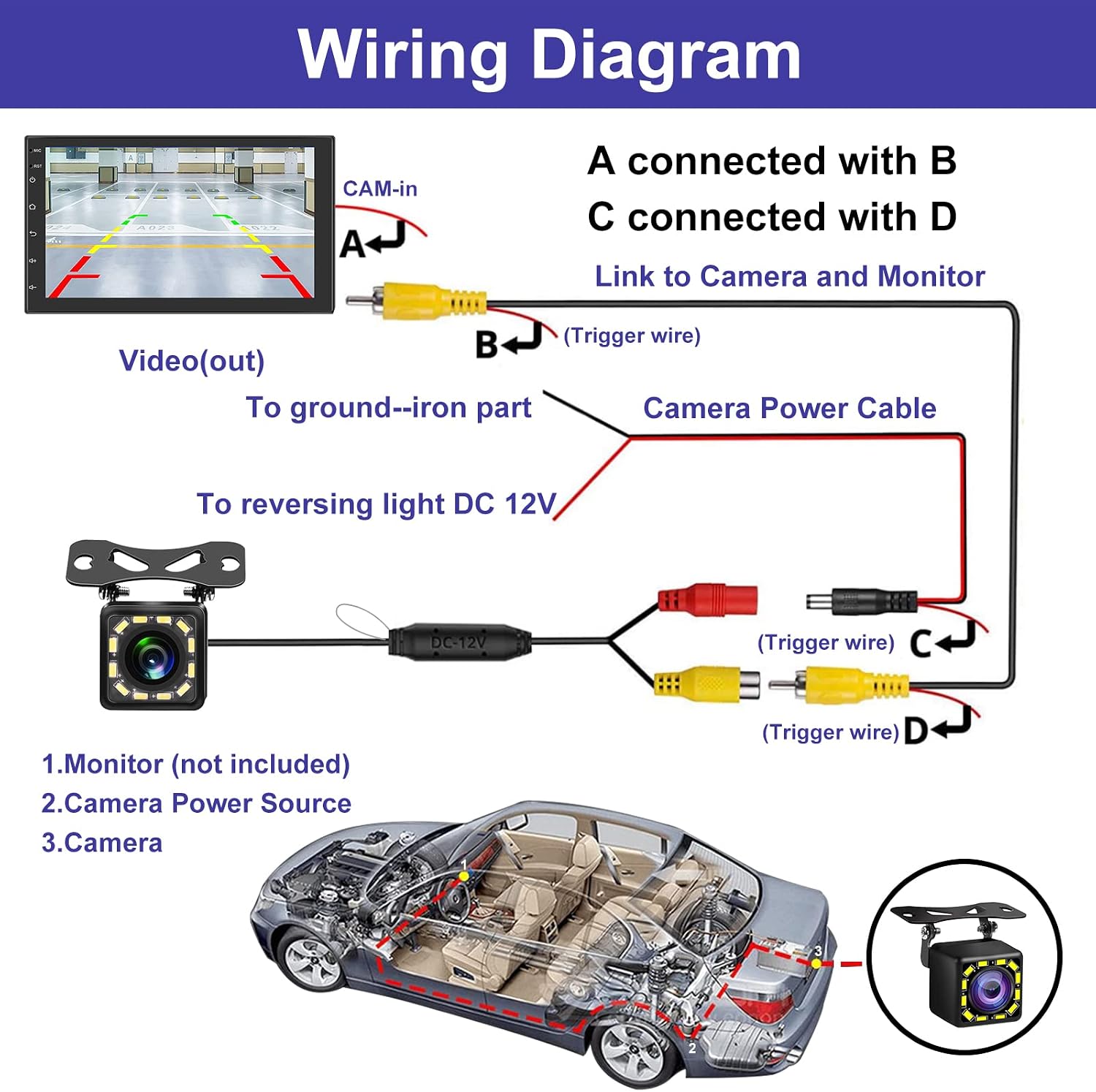
Image: Detailed wiring diagram illustrating how to connect the camera to the vehicle's power and monitor.
Operating Instructions
AHD/CVBS Signal Options
The camera supports both AHD (Analog High Definition) and CVBS (Composite Video Broadcast Signal) video formats. The default setting is typically AHD. To switch between signal sources, you must power off the camera and reconnect it after making the necessary adjustments (usually by cutting a specific loop wire on the camera cable, if applicable, or through monitor settings). Consult your monitor's manual for compatibility.

Image: Visual representation of CVBS and AHD signal output options and their corresponding display on a vehicle's screen.
Wide View Angle
The camera features a 170° wide viewing angle lens, providing an expansive view of the area behind your vehicle. This helps to minimize blind spots and improve safety during reversing maneuvers.

Image: Illustration demonstrating the benefit of a 170-degree wide-angle view compared to narrower angles for parking.
Day and Night Vision
Equipped with 12 LED lights and a low lux rating of 0.1 Lux/F1.2, the camera provides clear visibility in both daylight and low-light conditions. The night vision capability ensures you can see obstacles even in the dark.

Image: Side-by-side comparison of the camera's performance during daytime and nighttime, highlighting its night vision capabilities.
Waterproof Design
The camera is designed to be waterproof, allowing it to function reliably in various weather conditions, including rain and during car washes.

Image: The camera operating effectively under water splashes, demonstrating its waterproof construction.
Maintenance
To ensure the longevity and optimal performance of your backup camera, follow these maintenance guidelines:
- Regular Cleaning: Periodically clean the camera lens with a soft, damp cloth to remove dirt, dust, or water spots that may obstruct the view. Avoid abrasive cleaners.
- Cable Inspection: Routinely check all cables and connections for any signs of wear, damage, or loose connections. Secure any loose wiring.
- Mounting Check: Ensure the camera remains securely mounted to the vehicle. Tighten any loose screws if necessary.
- Avoid High-Pressure Spray: While the camera is waterproof, avoid directing high-pressure water sprays directly at the lens or housing during car washes, as this could potentially compromise seals over time.
Troubleshooting
| Problem | Possible Cause | Solution |
|---|---|---|
| No image on monitor |
|
|
| Image is blurry or distorted |
|
|
| Image flickers or cuts out |
|
|
| Night vision is poor |
|
|
Specifications
| Feature | Detail |
|---|---|
| Brand | LORPHEIR |
| Compatible Devices | Monitor |
| Installation Type | Surface Mount |
| Voltage | 12 Volts |
| Optical Sensor Technology | CMOS |
| Lens Type | Wide Viewing Angle Lens |
| Real Angle of View | 170 Degrees |
| Connector Type | RCA |
| Optical Sensor Size | 1/3 inch |
| Video Capture Format | NTSC or PAL |
| Effective Still Resolution | 921600 Pixels |
| Display Technology | LED |
| Lux Rating | 0.1 Lux |
| Video Capture Resolution | 720p |
Warranty and Support
For warranty information or technical support, please refer to the contact details provided with your purchase documentation or visit the official LORPHEIR website. Keep your purchase receipt as proof of purchase.