
1. Introduction
Thank you for choosing the MMLFX Replacement Remote Control for SANYO Air Conditioners. This remote is designed to function as a direct replacement for several original SANYO air conditioner remote models, providing seamless control over your unit's functions. Please ensure your original remote matches the appearance of this replacement for full compatibility.
2. Setup
2.1 Battery Installation
Before using your new remote control, you must install batteries. This remote requires two AAA batteries (not included).
- Locate the battery compartment cover on the back of the remote control.
- Slide the cover downwards or press the latch (if present) to open the compartment.
- Insert two AAA batteries, ensuring the positive (+) and negative (-) terminals align correctly with the markings inside the compartment.
- Slide the battery compartment cover back into place until it clicks securely.
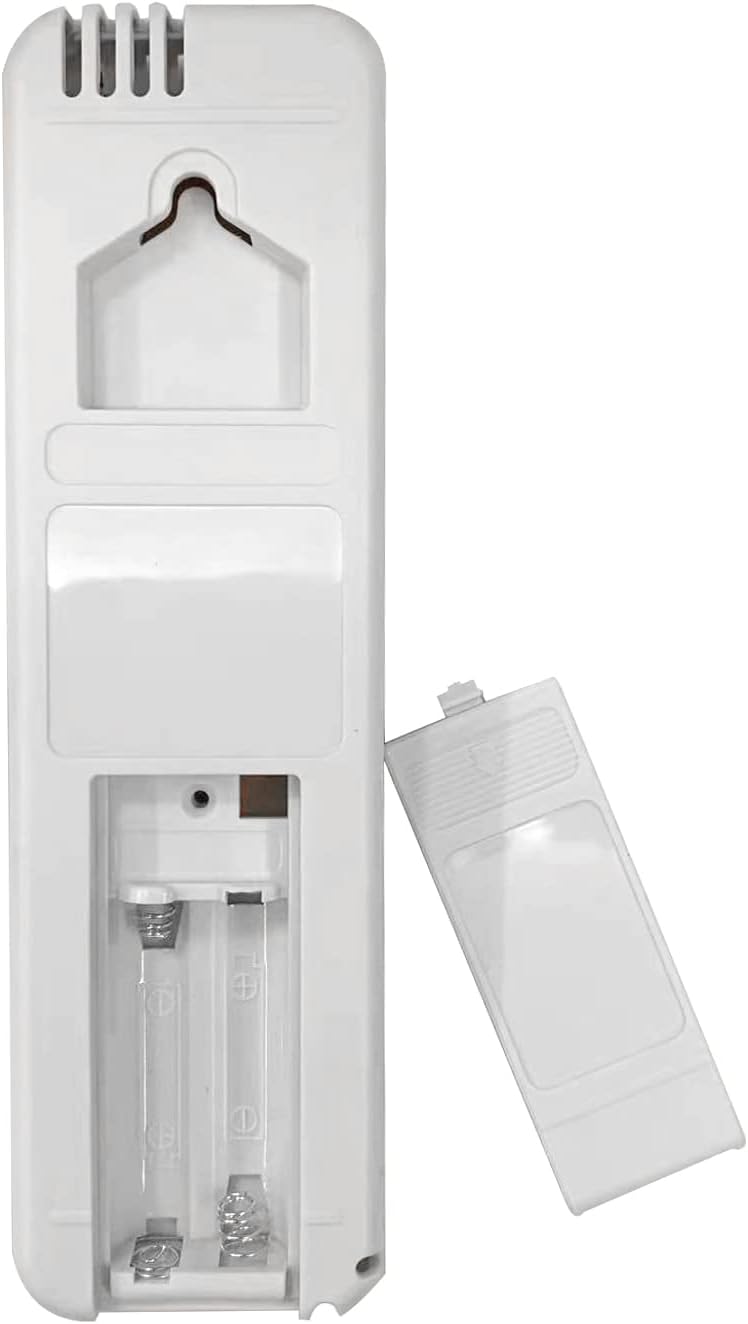
Image: Back of the remote control with the battery compartment open, ready for battery insertion.
Once batteries are installed, the remote is ready for use. No programming is typically required for direct replacement models.
3. Operating Instructions
This remote control provides access to the primary functions of your SANYO air conditioner. Point the remote directly at the air conditioner's receiver when operating.
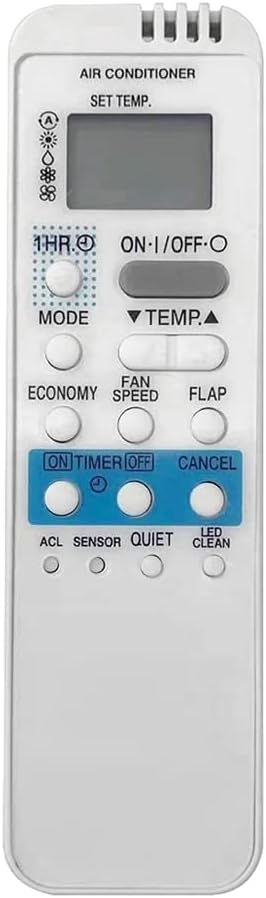
Image: Front view of the remote control, displaying all buttons and the LCD screen.
3.1 Key Functions
- ON/OFF: Powers the air conditioner on or off.
- TEMP ▲ / ▼: Adjusts the temperature setting up or down.
- MODE: Cycles through operating modes such as Cool, Heat, Fan, Dry, Auto.
- FAN SPEED: Adjusts the fan speed (e.g., Low, Medium, High, Auto).
- FLAP: Controls the louver/flap direction or swing function.
- ECONOMY: Activates or deactivates economy mode for energy saving.
- 1 HR. (Timer): Sets a 1-hour timer.
- ON TIMER / OFF TIMER: Sets the timer for the unit to turn on or off automatically.
- CANCEL: Cancels active timer settings.
- ACL (Reset): A small recessed button, often used for resetting the remote or unit settings. May require a pointed object to press.
- SENSOR: Activates or deactivates a sensor function (if available on your AC unit).
- QUIET: Activates a quiet operation mode, reducing fan noise.
- LED CLEAN: Controls the LED display or activates a self-clean function (if available on your AC unit).
Note: Not all functions may be supported by every SANYO air conditioner model. Refer to your air conditioner's original manual for specific feature compatibility.
4. Maintenance
4.1 Battery Replacement
Replace batteries when the remote's range decreases or the display becomes dim. Always replace both batteries at the same time with new ones of the same type (AAA). Do not mix old and new batteries, or different types of batteries.
4.2 Cleaning
To clean the remote control, wipe it with a soft, dry cloth. Do not use liquid cleaners, abrasive cleaners, or chemical solvents, as these can damage the remote's surface or internal components.
5. Troubleshooting
5.1 Remote Not Responding
- Check Batteries: Ensure batteries are inserted correctly with the correct polarity (+/-). Replace with fresh batteries if necessary.
- Line of Sight: Make sure there are no obstructions between the remote control and the air conditioner's receiver.
- Distance: Ensure you are within the effective operating range of the air conditioner's receiver.
- Infrared Interference: Bright sunlight or other strong light sources can interfere with the infrared signal. Try operating the remote in a different lighting condition.
- AC Unit Power: Confirm that the air conditioner unit itself is powered on and functioning correctly.
5.2 Specific Functions Not Working
If certain buttons or functions do not work, it is possible that your specific SANYO air conditioner model does not support that particular feature. This remote is a universal replacement for several models, and not all features are present on all original units.
6. Specifications
| Feature | Description |
|---|---|
| Brand | MMLFX |
| Compatible Models | RCS-7HS4E-G, RCS7HS4EG, RCS-5S1E, RCS-5S2E, RCS-7S2E, RCS-7S2E-G, RCS-1PS4U-G |
| Connectivity Technology | Infrared |
| Controller Type | Button Control |
| Max Number of Supported Devices | 1 |
| Item Weight | 0.035 ounces |
| Special Feature | Ergonomic |
7. Warranty and Support
This MMLFX replacement remote control is designed for reliable performance. For any issues not covered in this manual, or for further assistance, please contact the seller or manufacturer through your purchase platform. Please retain your proof of purchase for any warranty claims.