1. Introduction
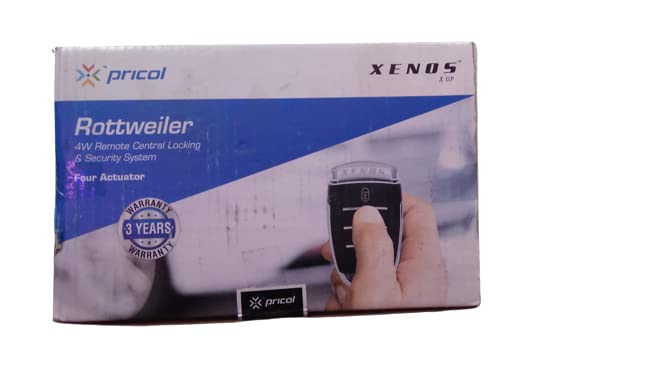
This manual provides essential instructions for the installation, operation, and maintenance of your Xenos X UP 4W Remote Central Locking & Car Security System. Please read this manual thoroughly before installation and use to ensure proper function and safety. This system is designed to enhance your vehicle's security and convenience by providing remote control over central locking and alarm functions.
2. Safety Information
- Professional Installation Recommended: Installation of this system involves electrical wiring and should ideally be performed by a qualified automotive technician to prevent damage to the vehicle or the system.
- Power Disconnection: Always disconnect the vehicle's battery before beginning any electrical installation work to avoid short circuits or electrical shock.
- Wiring: Ensure all wiring connections are secure and properly insulated to prevent short circuits and ensure reliable operation.
- Placement: Mount the main control unit in a secure, dry location away from excessive heat, moisture, and direct sunlight.
- Testing: After installation, thoroughly test all functions of the system before regular use.
- Remote Control: Keep remote controls away from children. Do not expose them to water or extreme temperatures.
3. Package Contents
Verify that all components are present in the package:
- XENOS X UP 4W Remote Central Locking & Car Security System unit
- Remote controls (quantity may vary)
- Wiring harness
- Installation accessories (screws, ties, etc.)
- User Manual (this document)
4. Setup and Installation
Installation of the Xenos X UP system requires knowledge of automotive electrical systems. It is strongly recommended to have this system installed by a certified professional to ensure correct wiring and optimal performance, and to avoid potential damage to your vehicle's electrical system.
General Installation Steps (for professional reference):
- Disconnect Battery: Before starting, disconnect the negative terminal of the vehicle's battery.
- Mount Control Unit: Select a secure, hidden, and dry location inside the vehicle for the main control unit.
- Wire Connections: Connect the power, ground, central locking, and other signal wires according to the detailed wiring diagram provided with the product (not included in this manual). Ensure all connections are soldered or crimped securely and insulated.
- Actuator Installation: Install the central locking actuators (if not already present in the vehicle) into the doors, connecting them to the control unit.
- Reconnect Battery: Once all connections are made and secured, reconnect the vehicle's battery.
- Test System: Perform a full test of all remote functions and security features.
5. Operating Instructions
The remote control provides convenient access to your vehicle's central locking and security features.
Remote Control Functions:
- Lock Button: Press once to lock all vehicle doors and arm the security system. The vehicle's indicators will flash, and a confirmation sound may be heard.
- Unlock Button: Press once to unlock all vehicle doors and disarm the security system. The vehicle's indicators will flash, and a confirmation sound may be heard.
- Trunk Release Button (if applicable): Press and hold to open the vehicle's trunk.
- Panic/Car Finder Button (if applicable): Press and hold to activate the alarm or locate your vehicle in a parking lot.
Note: Specific button functions and indicator responses may vary slightly based on the exact model and installation configuration. Refer to the detailed wiring diagram for advanced features.
6. Maintenance
- Remote Battery Replacement: If the remote control range decreases or it stops responding, the battery may need replacement. Refer to the remote's specific instructions for battery type and replacement procedure.
- Cleaning: Clean the remote control and main unit with a soft, dry cloth. Do not use harsh chemicals or abrasive cleaners.
- Avoid Moisture: Keep the remote control and main unit away from water and excessive humidity.
7. Troubleshooting
| Problem | Possible Cause | Solution |
|---|---|---|
| System not responding to remote. | Dead remote battery. Out of range. Interference. | Replace remote battery. Move closer to the vehicle. Check for strong radio interference. |
| Doors do not lock/unlock. | Wiring issue. Faulty actuator. Blown fuse. | Check all wiring connections. Inspect actuators. Check vehicle's central locking fuse. Consult a professional. |
| Alarm triggers randomly. | Sensitive sensor settings. Faulty sensor. Loose wiring. | Adjust sensor sensitivity (if adjustable). Check wiring. Consult a professional. |
| Remote range is poor. | Low remote battery. Antenna obstruction. Interference. | Replace remote battery. Ensure the control unit's antenna is not obstructed. Avoid areas with high radio frequency interference. |
If you encounter issues not listed here or if the suggested solutions do not resolve the problem, please contact a qualified automotive technician or the product support.
8. Specifications
| Feature | Detail |
|---|---|
| Model Number | BTCD-79 |
| Brand | Generic |
| Manufacturer | BTCD Pvt Ltd |
| Product Dimensions (LxWxH) | 10 x 8 x 10 cm |
| Remote Control Included | Yes |
| ASIN | B09S3WNXCS |
| Date First Available | 9 February 2022 |
9. Warranty Information
This Xenos X UP 4W Remote Central Locking & Car Security System comes with a 3-year warranty from the date of purchase. This warranty covers manufacturing defects and malfunctions under normal use. It does not cover damage caused by improper installation, misuse, accidents, unauthorized modifications, or normal wear and tear. Please retain your proof of purchase for warranty claims.
10. Support
For technical assistance, installation queries, or warranty claims, please contact your retailer or the manufacturer's customer support. Ensure you have your product model number (BTCD-79) and proof of purchase ready when contacting support.
Manufacturer: BTCD Pvt Ltd


