
1. Product Overview
The BALDR Wireless Digital Weather Station Model 0359V2 provides real-time indoor and outdoor temperature and humidity readings, weather forecasts, moon phase display, barometric pressure history, and an atomic alarm clock function. It includes a main display unit and one wireless remote sensor.

Image 1.1: The BALDR Wireless Digital Weather Station, including the main display unit and a remote sensor.
Key Features:
- Indoor/Outdoor Temperature and Humidity Monitoring
- 12-24 Hour Weather Forecast
- Moon Phase Display
- Barometric Pressure History Histogram
- Atomic Clock with Alarm and Snooze Function
- Customizable Backlight
- Supports up to 3 Remote Sensors (one included)

Image 1.2: Overview of the multifunctional digital weather station display and its capabilities.
2. Setup Guide
2.1 Unpacking and Powering On
- Carefully remove all components from the packaging.
- Main Unit: Connect the supplied AC power adapter to the main unit and plug it into a power outlet. The unit also has a built-in cell battery to retain settings during power outages, but it does not power the device for daily operation.
- Remote Sensor: Open the battery compartment on the back of the remote sensor and insert 2 AA batteries (not included), observing polarity. Close the compartment securely.
2.2 Initial Synchronization
Once both units are powered, the main unit will automatically attempt to connect with the remote sensor. This process may take a few minutes. Ensure the sensor is within range of the main unit during initial setup.
2.3 Time and Date Setting (Atomic Clock)
The atomic clock feature automatically adjusts the time and date. You may need to set your time zone manually:
- Refer to the specific buttons on your device (usually labeled 'SET' or 'MODE') to enter time setting mode.
- Adjust the time zone according to your location.
- Confirm settings to exit.
2.4 Sensor Placement
For accurate readings, consider the following:
- Main Unit: Place the main unit indoors on a flat surface or mount it on a wall. Avoid direct sunlight or heat sources.
- Remote Sensor: Place the remote sensor outdoors in a shaded area, protected from direct rain and sunlight, to ensure accurate temperature and humidity readings. The wireless range is up to 328 feet (100m) in open air.

Image 2.1: The weather station can monitor multiple locations with additional sensors (sold separately).

Image 2.2: The weather station offers flexible placement options: table-top with a stand or wall-mounted.
3. Operating Instructions
3.1 Display Overview
The large digital display provides a clear view of all information:
- Outdoor Section: Displays outdoor temperature and humidity, channel number.
- Indoor Section: Displays indoor temperature and humidity.
- Weather Forecast: Icons indicating predicted weather conditions (sunny, partly cloudy, cloudy, rainy, snow).
- Moon Phase: Graphical representation of the current moon phase.
- Barometric History: Histogram showing air pressure changes over the last 12 hours.
- Time/Date: Current time and date.
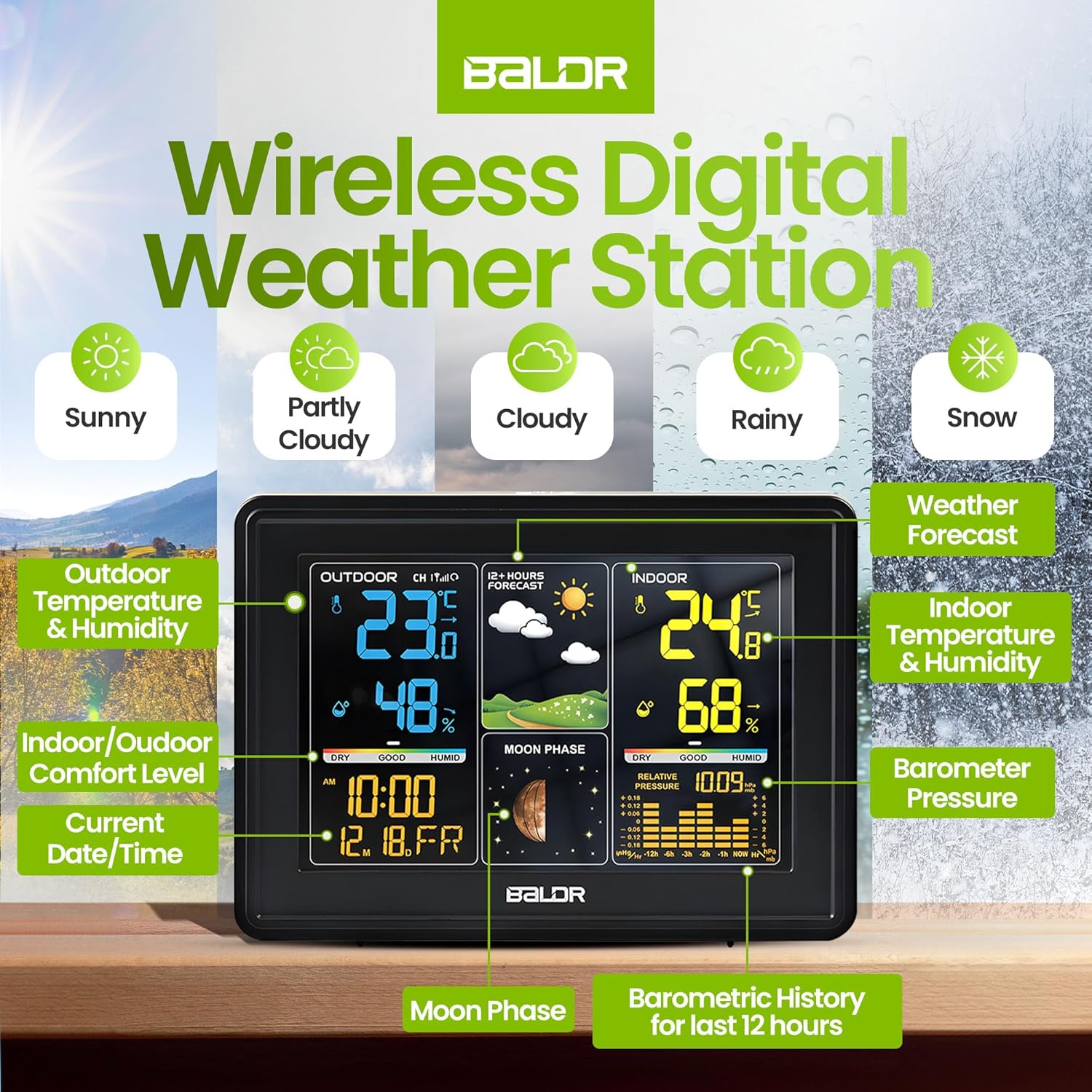
Image 3.1: Detailed display features of the BALDR Wireless Digital Weather Station.
3.2 Alarm Clock Function
The weather station includes an alarm with a snooze feature:
- Setting Alarm: Use the 'ALARM' button (or similar) to set daily or workday alarms.
- Snooze: Press the 'SNOOZE' button (often integrated with the backlight button) to activate a 5-minute snooze.

Image 3.2: Alarm and snooze button functions.
3.3 Backlight Customization
The display features a customizable backlight for optimal viewing:
- Press the backlight button (often on top) to cycle through different brightness levels or turn it off.

Image 3.3: Customizable backlight options for the display.
3.4 Unit Selection
You can switch between Celsius and Fahrenheit for temperature readings. Refer to your device's buttons (e.g., 'C/F' or 'TEMP') to change the unit.
4. Maintenance
4.1 Battery Replacement
- Remote Sensor: When the low battery indicator appears for the sensor, replace the 2 AA batteries. Ensure correct polarity.
- Main Unit: The main unit uses an AC adapter for primary power. The internal cell battery is for backup settings only and typically does not require user replacement.
4.2 Cleaning
- Wipe the display and unit surfaces with a soft, damp cloth.
- Do not use abrasive cleaners or solvents.
4.3 Environmental Considerations
- Avoid placing the remote sensor in direct sunlight or areas with extreme temperature fluctuations for prolonged periods.
- Ensure the main unit is kept in a dry, indoor environment.
5. Troubleshooting
5.1 Inaccurate Readings
- Outdoor Temperature/Humidity: Ensure the remote sensor is placed in a shaded, well-ventilated area, away from direct heat sources or moisture.
- Indoor Temperature/Humidity: Verify the main unit is not near heat-emitting appliances, direct sunlight, or drafts.
- Comparison: Allow up to 30 minutes for readings to stabilize after initial setup or relocation.
5.2 Sensor Not Connecting
- Check Batteries: Replace batteries in the remote sensor.
- Range: Ensure the sensor is within the 328ft (100m) wireless range of the main unit, free from major obstructions.
- Re-synchronize: Power off both the main unit and the sensor. Power on the main unit first, then the sensor. This may force a re-synchronization.
- Interference: Move the units away from other electronic devices that might cause interference.
5.3 Time Display Issues
- Time Zone: Double-check that the correct time zone is selected for your region.
- Atomic Signal: Ensure the main unit is in a location where it can receive the atomic time signal. Avoid placing it near large metal objects or in basements.
6. Specifications
| Feature | Detail |
|---|---|
| Model Number | 0359V2 |
| Product Dimensions | 5.4 x 0.7 x 3.5 inches (Main Unit) |
| Weight | 7.05 ounces |
| Power Source (Main Unit) | AC Power Adaptor (with cell battery backup) |
| Batteries (Remote Sensor) | 2 AA batteries (not included) |
| Material | Plastic |
| Connectivity Technology | Radio Frequency |
| Wireless Range | Up to 328 feet (100m) in open air |
| Display Style | Large LCD display |
| Color | Black |
7. Warranty and Support
For warranty information and customer support, please visit the official BALDR website or contact their customer service directly. You can find more information on the BALDR Store on Amazon.