
Introduction
Thank you for choosing the OUKANING 20-Inch Enclosed Low Profile Ceiling Fan with Light. This manual provides essential information for the safe installation, operation, and maintenance of your new ceiling fan. Please read these instructions thoroughly before installation and retain them for future reference.
Important Safety Instructions
- Read all instructions: Before beginning installation, read all instructions and safety information.
- Electrical Safety: All electrical connections must be performed by a qualified electrician or a person with electrical experience. Ensure the power is disconnected at the circuit breaker before installation or maintenance.
- Mounting: The mounting structure must be capable of supporting the weight of the fan (approximately 10-15 lbs). Ensure the fan is securely mounted to a ceiling joist or a suitable support structure.
- Wiring: Follow all local electrical codes and ordinances. Ensure proper grounding.
- Blade Clearance: Ensure there is adequate clearance between the fan blades and any obstacles. This fan features enclosed blades for enhanced safety.
- Cleaning: Always disconnect power before cleaning the fan. Use a soft, damp cloth for cleaning.
- Non-Reversible Fan: Note that this fan model is not reversible.
Package Contents
Verify that all components are present and undamaged before beginning installation.
- Ceiling Fan Unit (x1)
- Remote Control (x1)
- Screws Set (x1)
- Instruction Manual (x1)

Image: Contents of the OUKANING ceiling fan package, showing the remote control, mounting screws, and the instruction manual.
Specifications
| Fixture Height | 8.2 inches |
| Fixture Width | 20 inches |
| Product Dimensions (D x W x H) | 20"D x 20"W x 8.2"H |
| Bulb Type | Integrated LED |
| Color Temperature | 3000K (Warm), 4500K (Neutral), 6000K (White) |
| Wattage | 36-48W (Light), 48W (Fan) |
| Number of Fan Blades | 5 (Invisible/Enclosed) |
| Voltage | AC110-120V |
| Control Method | Remote Control |
| Fan Speeds | 3 (Low, Medium, High) |
| Timer Function | 1H / 2H / 4H |
| Material | Acrylic, Metal, Woodiness Case |
| Mounting Type | Flush Mount |
| Indoor/Outdoor Usage | Indoor Only |

Image: Detailed dimensions of the ceiling fan, indicating a 20-inch width and 8.2-inch height.

Image: Key components of the fan labeled, such as the metal mounting, wood-look casing, acrylic light cover, and the internal wind director.
Installation Instructions
This ceiling fan is designed for surface (flush) mounting. Professional installation is recommended. Ensure power is OFF at the circuit breaker before starting.
Tools Required (Not Included):
- Phillips screwdriver
- Wire strippers
- Electrical tape
- Ladder
- Voltage tester
Installation Steps:
- Turn off Power: Locate the circuit breaker for the room where you are installing the fan and turn off the power. Verify power is off using a voltage tester.
- Prepare Mounting Location: Ensure the ceiling junction box is securely mounted and capable of supporting the fan's weight. If replacing an existing fixture, carefully remove it.
- Attach Mounting Bracket: Secure the provided mounting bracket to the ceiling junction box using the screws provided. Ensure it is firmly attached.
- Wiring Connections:
- Connect the fan's live wire (usually black) to the house's live wire.
- Connect the fan's neutral wire (usually white) to the house's neutral wire.
- Connect the fan's ground wire (usually green or bare copper) to the house's ground wire.
- Secure all connections with wire nuts and electrical tape.
- Mount the Fan: Carefully lift the fan unit and align it with the mounting bracket. Secure the fan to the bracket using the provided screws.
- Final Check: Ensure all connections are secure and the fan is firmly mounted.
- Restore Power: Turn the power back on at the circuit breaker.
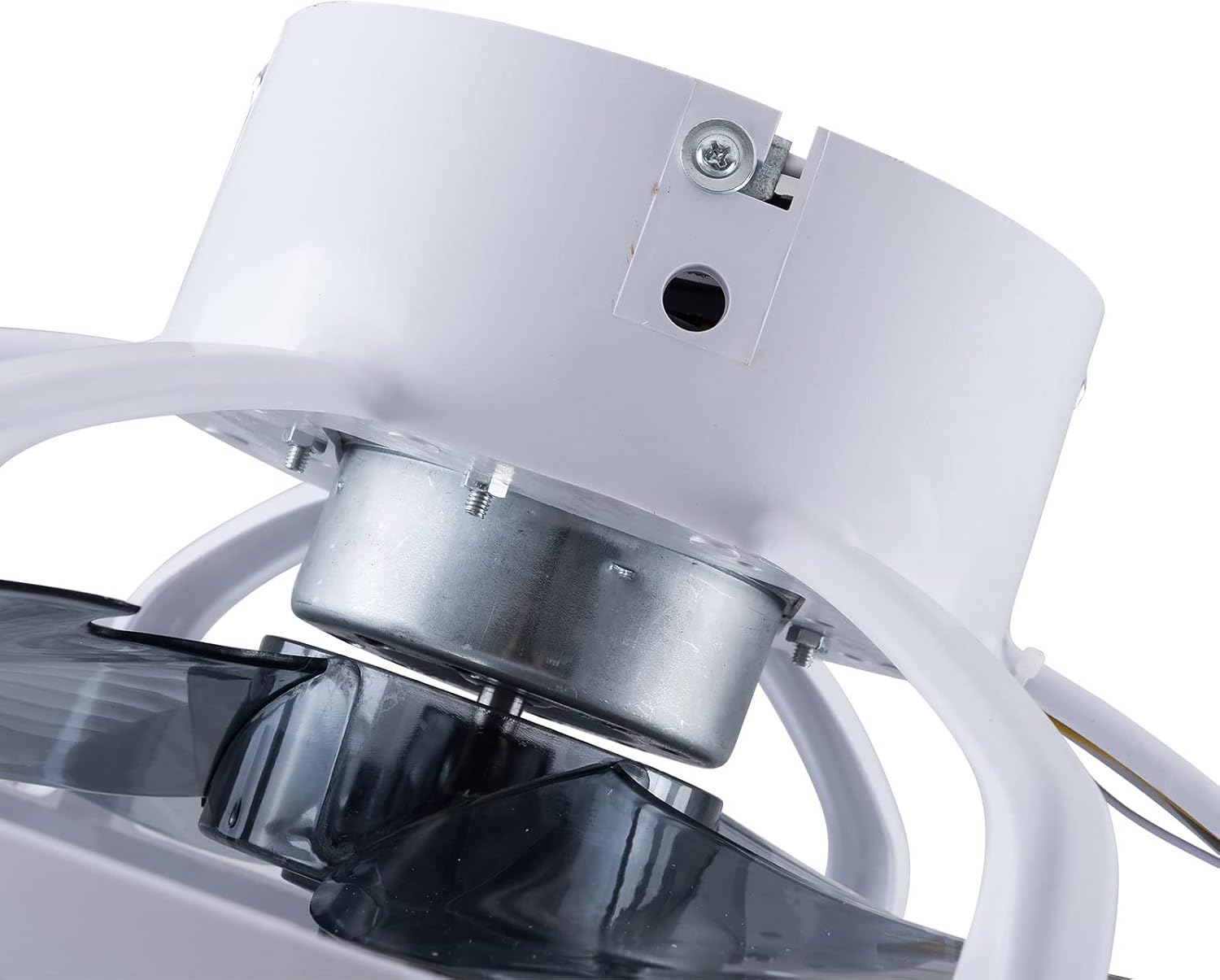
Image: Internal view showing the motor and wiring area, crucial for understanding electrical connections during installation.

Image: View of the fan's underside, illustrating the mounting bracket and internal components for flush installation.
Operating Instructions
Your OUKANING ceiling fan is operated using the included remote control.
Remote Control Functions:
- Power ON/OFF: Press to turn the fan and light on or off.
- Fan Speed Control: Cycle through 3 fan speeds: Low, Medium, High.
- Light Color Temperature: Switch between three light color temperatures:
- Warm Light (3000K)
- Neutral Light (4500K)
- White Light (6000K)
- Timer Function: Set the fan to automatically turn off after 1 hour, 2 hours, or 4 hours.


Image: Examples of the three available light color temperatures: Warm Light, Neutral Light, and White Light, demonstrating the fan's lighting versatility.
Maintenance
Regular maintenance ensures the longevity and optimal performance of your ceiling fan.
- Cleaning:
- Always turn off the power at the circuit breaker before cleaning.
- Use a soft, damp cloth to wipe down the fan housing and light cover.
- Do not use abrasive cleaners or solvents, as they may damage the finish.
- The fan is designed for easy removal for thorough cleaning if necessary.
- Tighten Fasteners: Periodically check all screws and fasteners on the fan and mounting bracket to ensure they are secure.
- No Lubrication Required: The motor is permanently lubricated and does not require additional oiling.
Troubleshooting
If you experience issues with your ceiling fan, refer to the following common problems and solutions:
| Problem | Possible Cause | Solution |
|---|---|---|
| Fan does not start | No power to the fan; Loose wire connections; Remote control battery low. | Check circuit breaker; Verify all wire connections are secure (power off first); Replace remote control battery. |
| Light does not work | No power to the light; Loose wire connections; LED driver issue. | Check circuit breaker; Verify wire connections; Contact customer support if LED driver is suspected. |
| Remote control not working | Battery low or dead; Remote not paired (if applicable); Obstruction between remote and receiver. | Replace battery; Ensure clear line of sight; Refer to remote pairing instructions (if provided separately). |
| Fan makes unusual noise | Loose mounting screws; Internal component issue. | Ensure all mounting screws are tight; If noise persists, contact customer support. |
Customer Support
For any questions, technical assistance, or if you encounter issues not covered in this manual, please contact our customer service team. Refer to your purchase documentation or the OUKANING website for specific contact information.
Please provide your product model number and a detailed description of the issue when contacting support.


