
CF-917FM
3-in-1 Folding Upright Exercise Bike User Manual
Model: CF-917FM
Introduction
This manual provides detailed instructions for the assembly, operation, maintenance, and troubleshooting of your 3-in-1 Folding Upright Exercise Bike. Please read this manual thoroughly before using the product to ensure safe and effective operation.
The 3-in-1 design allows for upright, semi-recumbent, and recumbent exercise positions, offering versatility for your fitness routine. It features resistance bands for arm and leg exercises, a comfortable seat with a high backrest, and an 8-level magnetic resistance system.
Important Safety Information
Before beginning any exercise program, consult with your physician. This is especially important for individuals over the age of 35 or those with pre-existing health conditions.
- Always place the exercise bike on a flat, stable surface.
- Keep children and pets away from the bike during operation.
- Ensure all bolts and nuts are securely tightened before each use.
- Wear appropriate exercise clothing and footwear.
- Stop exercising immediately if you feel faint, dizzy, or experience pain.
- The maximum user weight capacity for this bike is 260 lbs (117.93 kg).
Product Components and Features
Familiarize yourself with the key components of your exercise bike:

Image: An exploded view diagram highlighting key components such as the oversized bracket, large soft cushion, convenient transport wheel, riding angle adjustment, resistance adjustment knob, non-slip pedal, arm resistance bands, and leg resistance bands.
- Oversized Bracket: Provides stable support for the console.
- Large Soft Cushion: Ensures comfort during extended workouts.
- Convenient Transport Wheel: Allows for easy relocation of the bike.
- Riding Angle Adjustment: Enables switching between upright, semi-recumbent, and recumbent positions.
- Resistance Adjustment: Knob to select one of 8 magnetic resistance levels.
- Non-slip Pedal: Features soft shoe straps for secure foot placement.
- Arm Resistance Bands: Integrated bands for upper body workouts.
- Leg Resistance Bands: Integrated bands for lower body workouts.
Setup and Assembly
The exercise bike requires some assembly. Please follow these steps carefully:
- Unpack Components: Carefully remove all parts from the packaging. Verify all components listed in the parts diagram are present.
- Stabilizer Installation: Attach the front and rear stabilizers to the main frame using the provided bolts and washers. Ensure they are securely fastened.
- Pedal Attachment: Identify the left (L) and right (R) pedals. Attach them to the corresponding crank arms. Note that the left pedal tightens counter-clockwise.
- Seat Assembly: Assemble the seat and backrest, then attach the seat post to the main frame. Adjust the seat height to a comfortable position.
- Handlebar and Console Installation: Mount the handlebars and the digital monitor console onto the main frame. Connect any necessary sensor wires from the console to the main unit.
- Resistance Bands: Attach the arm and leg resistance bands to their designated points on the frame.
- Final Check: Before first use, double-check all bolts, nuts, and connections to ensure they are tight and secure.

Image: A front-angle view of the fully assembled 3-in-1 Folding Upright Exercise Bike, showcasing its pink and black color scheme, adjustable seat, handlebars, and pedals.
Operating Instructions
Adjusting Riding Position (3-in-1 Functionality)
This bike offers three primary riding positions:
- Upright: For an intense cardio workout, similar to a traditional upright bike.
- Semi-Recumbent: A more relaxed position, reducing strain on the back.
- Recumbent: Provides maximum back support, ideal for longer sessions or users needing extra comfort.
To switch positions, locate the adjustment pins or levers on the frame (refer to the assembly diagram for specific locations) and reconfigure the seat and frame angle as desired. Ensure the bike is stable in the chosen position before use.
Adjusting Resistance

Image: A close-up view of the resistance adjustment knob, clearly showing the numbers 1 through 8 and labels for "LOW" and "HIGH" tension control. This knob is used to increase or decrease the workout intensity.
The bike features 8 levels of magnetic resistance. To adjust the resistance, turn the tension control knob located on the main frame. Turn clockwise to increase resistance (making pedaling harder) and counter-clockwise to decrease resistance (making pedaling easier).
Using the Digital Monitor
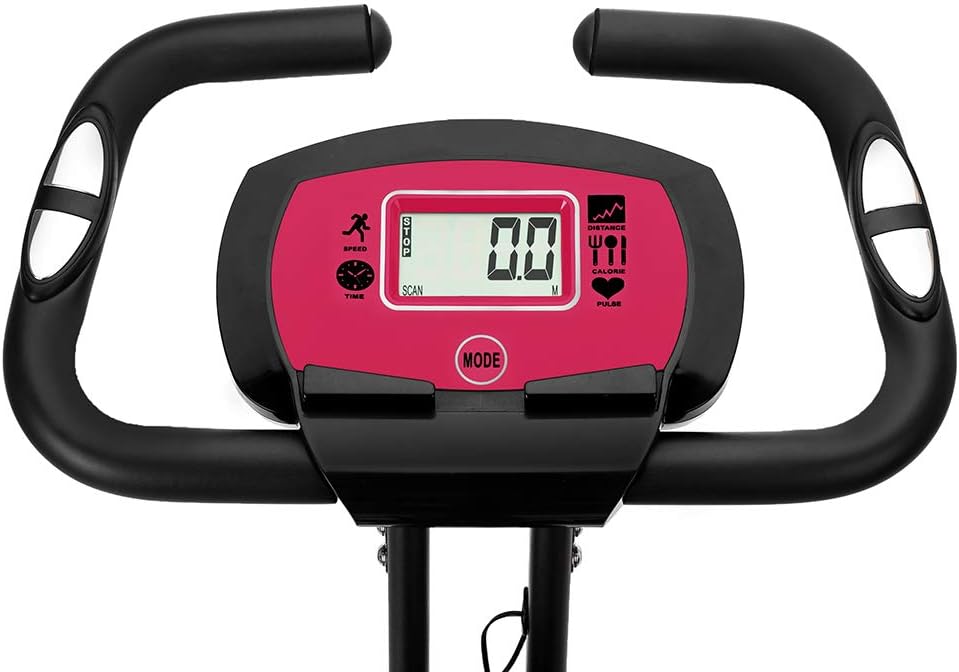
Image: A close-up of the digital LCD monitor, showing various metrics like SPEED, TIME, DISTANCE, CALORIE, and PULSE. A "MODE" button is visible below the screen.
The multi-functional digital LCD monitor tracks your workout data. It displays:
- TIME: Duration of your workout.
- SPEED: Current pedaling speed.
- DISTANCE: Total distance covered during the current workout.
- CALORIE: Estimated calories burned.
- PULSE: Your heart rate (measured via hand pulse sensors on the handlebars).
- SCAN: Automatically cycles through all display functions.
Press the "MODE" button to select a specific display function or to activate the SCAN mode. To reset the values, press and hold the "MODE" button for a few seconds.
Using Resistance Bands
The integrated arm and leg resistance bands allow for additional strength training exercises. These can be used simultaneously with cycling or independently. Ensure the bands are securely attached before applying tension.
Maintenance
Regular maintenance will prolong the life of your exercise bike and ensure safe operation:
- Cleaning: Wipe down the bike with a damp cloth after each use to remove sweat and dust. Do not use abrasive cleaners.
- Inspection: Periodically inspect all bolts, nuts, and moving parts for tightness and wear. Tighten any loose fasteners.
- Lubrication: The magnetic resistance system is generally maintenance-free. However, if you notice any squeaking from moving parts (e.g., pedals, seat post), apply a small amount of silicone-based lubricant.
- Storage: When not in use, the bike can be folded for compact storage. Ensure it is stored in a dry, cool place away from direct sunlight.

Image: A side view of the 3-in-1 Folding Upright Exercise Bike in its folded configuration, demonstrating its compact design for storage. The seat and handlebars are positioned closer to the main frame.

Image: A diagram illustrating the "Compact Foldable Design" of the exercise bike. It shows two silhouettes: one of the bike in its expanded state with dimensions (40.6in height, 26.7in length, 16.2in width) and another in its folded state with dimensions (51.2in height, 12.6in length, 16.2in width), highlighting the space-saving feature.
Troubleshooting
| Problem | Possible Cause | Solution |
|---|---|---|
| Squeaking or grinding noise during operation. | Loose bolts or lack of lubrication on moving parts. | Check and tighten all bolts. Apply silicone lubricant to pivot points if necessary. |
| Digital monitor not displaying data. | Loose sensor connection or dead batteries. | Check that all sensor wires are securely connected. Replace batteries in the monitor. |
| Resistance not changing or inconsistent. | Issue with the magnetic resistance mechanism or tension cable. | Ensure the resistance knob is properly engaged. If the issue persists, contact customer support. |
| Bike feels unstable. | Not on a level surface or stabilizers are loose. | Move the bike to a flat, stable surface. Check and tighten all stabilizer bolts. |
Product Specifications
| Feature | Detail |
|---|---|
| Model | CF-917FM |
| Material | Plastic, ABS, Carbon Steel |
| Color | Pink |
| Dimensions (Expanded) | 30.7" L x 16.14" W x 45.7" H (78 x 41 x 116 cm) |
| Dimensions (Folded) | Approx. 12.6" W x 51.2" H (refer to diagram for full folded dimensions) |
| Weight | 45.2 lbs (20.5 kg) |
| Weight Capacity | 260 lbs (117.93 kg) |
| Resistance System | 8-Level Magnetic Resistance |
| Monitor Functions | Time, Speed, Distance, Calories, Pulse, Scan |
| Special Features | 3-in-1 (Upright/Semi-Recumbent/Recumbent), Foldable, Arm & Leg Resistance Bands, Hand Pulse Sensors |
Warranty and Support
For warranty information or technical support, please refer to the documentation included with your purchase or contact the retailer where the product was acquired. Keep your proof of purchase for warranty claims.
If you encounter issues not covered in the troubleshooting section, please reach out to customer service for assistance. Provide your model number (CF-917FM) and a detailed description of the problem.