
Introduction
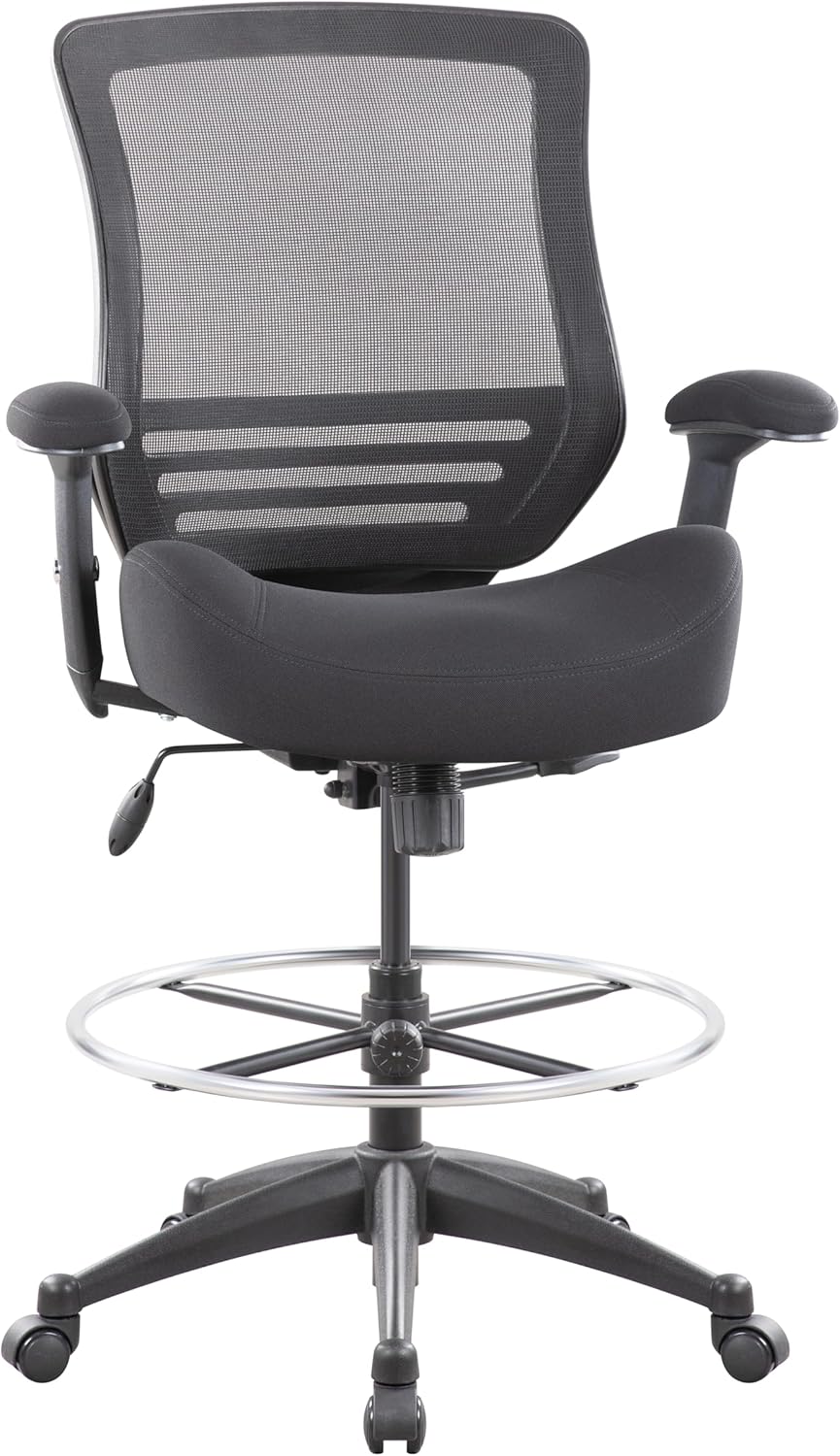
This manual provides detailed instructions for the assembly, operation, and maintenance of your BOLISS Mid Back Mesh Ergonomic Drafting Chair, Model LB-8810D. Designed for comfort and support, this chair features a wide seat, adjustable foot ring, and ergonomic lumbar support, suitable for various work environments including standing desks.
Safety Information
Important Safety Guidelines:
- The maximum weight capacity for this chair is 400 lbs. Do not exceed this limit to prevent damage or injury.
- Ensure all components are securely fastened during assembly and regularly check for loose parts.
- Use the chair on a stable, level surface.
- Avoid standing on the chair or using it as a step stool.
- Keep hands and feet clear of moving parts during adjustments.
This chair is designed for safe and comfortable usage when following these guidelines.
Product Features
The BOLISS LB-8810D Drafting Chair is equipped with several features designed for enhanced comfort and functionality:
- Wide Seat Cushion: Provides ample space for movement, reducing pressure on hips and thighs, and distributing body weight evenly for stability and posture support. The seat cushion is crafted with high-density molded foam for plush yet supportive comfort.
- Ergonomic Backrest: Features a breathable mesh back and an ergonomic design that provides support for your back, promoting comfort during long periods of sitting.
- Built-in Lumbar Support: Integrated into the backrest to support the natural curve of your spine.
- Adjustable Foot Ring: An oversized 24.016-inch diameter foot ring allows for comfortable foot placement, reducing leg pressure. It can be adjusted to suit individual height preferences.
- Height Adjustable Armrests: Armrests can be adjusted by 2.76 inches to provide optimal arm and shoulder support.
- Tilt Function: A 15-degree tilt function allows for comfortable working and breaks, with a locking mechanism to secure the desired angle.
- Heavy-Duty Construction: Features a durable nylon base and a robust cylinder column, tested for 120,000 up and down cycles, ensuring stability and longevity with a 400lbs weight capacity.
- Smooth-Rolling Casters: Silent PU wheels provide easy mobility across various floor surfaces.


Assembly Instructions
Your BOLISS Drafting Chair requires assembly. Please follow the included instructions carefully. All necessary assembly parts are provided.
- Unpack all components and verify against the parts list in your package.
- Before installing the gas lift cylinder, ensure to remove the protective cap cover from the top of the cylinder. If the cap cover is broken or stuck, use pliers to carefully remove it.
- Attach the casters to the chair base.
- Insert the gas lift cylinder into the center hole of the chair base.
- Secure the seat mechanism to the underside of the seat cushion.
- Attach the backrest to the seat mechanism.
- Install the armrests to the seat.
- Place the assembled seat and backrest onto the gas lift cylinder.
- Install the foot ring and adjust its height.
For a visual guide on removing the cap cover during assembly, please refer to the video below:
Operating Instructions
Familiarize yourself with the chair's adjustable functions to optimize your comfort:
- Chair Height Adjustment: To raise the chair, lift the handle located under the seat while standing. To lower the chair, lift the handle while seated.
- Backrest Tilt Adjustment: Push down the handle on the side of the seat mechanism to unlock the backrest tilt. Lean back to your desired angle, then pull the handle up to lock the tilt in place. The chair offers a 15-degree tilt function.
- Armrest Height Adjustment: Press the button located on the side of each armrest and slide the armrest up or down to your preferred height. Release the button to lock it.
- Foot Ring Adjustment: Loosen the knob on the foot ring to slide it up or down the gas lift cylinder. Tighten the knob firmly to secure the foot ring at your desired height.
For a general overview of the chair's features and adjustments, please watch the display video:
Maintenance
To ensure the longevity and optimal performance of your BOLISS Drafting Chair, follow these simple maintenance guidelines:
- Cleaning: Wipe clean with a damp cloth. Avoid harsh chemicals or abrasive cleaners that may damage the materials.
- Regular Checks: Periodically inspect all screws and bolts to ensure they are tight. Re-tighten if necessary.
- Caster Care: Keep casters free of debris (hair, dust, etc.) to ensure smooth rolling.
Troubleshooting
Here are solutions to common issues you might encounter:
- Foot Ring Slips Down: The foot ring may occasionally slip if not tightened sufficiently. To resolve this, ensure the locking knob is tightened very firmly. For a more permanent solution, some users have found success by adding a standard metal hose clamp just below the foot ring on the lift cylinder and tightening it securely.
- Chair Does Not Adjust Height: Ensure the protective cap cover has been completely removed from the gas lift cylinder during assembly. If it was not removed, the cylinder will not function correctly.
- Squeaking Noises: Check all bolted connections and tighten any loose screws. Applying a small amount of silicone lubricant to moving parts can also help.
Specifications
| Feature | Detail |
|---|---|
| Brand | BOLISS |
| Model Name | LB-8810D |
| Color | Black |
| Material | Plastic, Wood, Mesh (Back), Foam (Seat Fill) |
| Product Dimensions (D x W x H) | 19.9"D x 26.7"W x 41.1"H |
| Chair Height Range | 41.7 - 49.6 inches |
| Seat Height Range | 23.6 - 31.5 inches |
| Seat Depth | 18.9 inches |
| Arms Inner Width | 19.7 inches |
| Maximum Weight Recommendation | 400 Pounds |
| Item Weight | 41.2 Pounds |
| Assembly Required | Yes |
| Back Style | Mesh Back |
| Arm Style | Height Adjustable Arm |
| Furniture Base Movement | Swivel |

Warranty and Support
Warranty: Within two years of purchase, if you encounter any issues with your BOLISS Drafting Chair, please contact our after-sales service for assistance.
Contact Support: For any questions, troubleshooting, or warranty claims, please refer to the contact information provided with your purchase documentation or visit the official BOLISS website.