Introduction
This manual provides comprehensive instructions for the setup, operation, and maintenance of your Amtone AKB76037601 replacement remote control. Designed as a direct replacement for original LG Smart TV remotes, this unit offers full functionality without the need for complex programming. Please read this manual thoroughly to ensure optimal performance and longevity of your remote control.
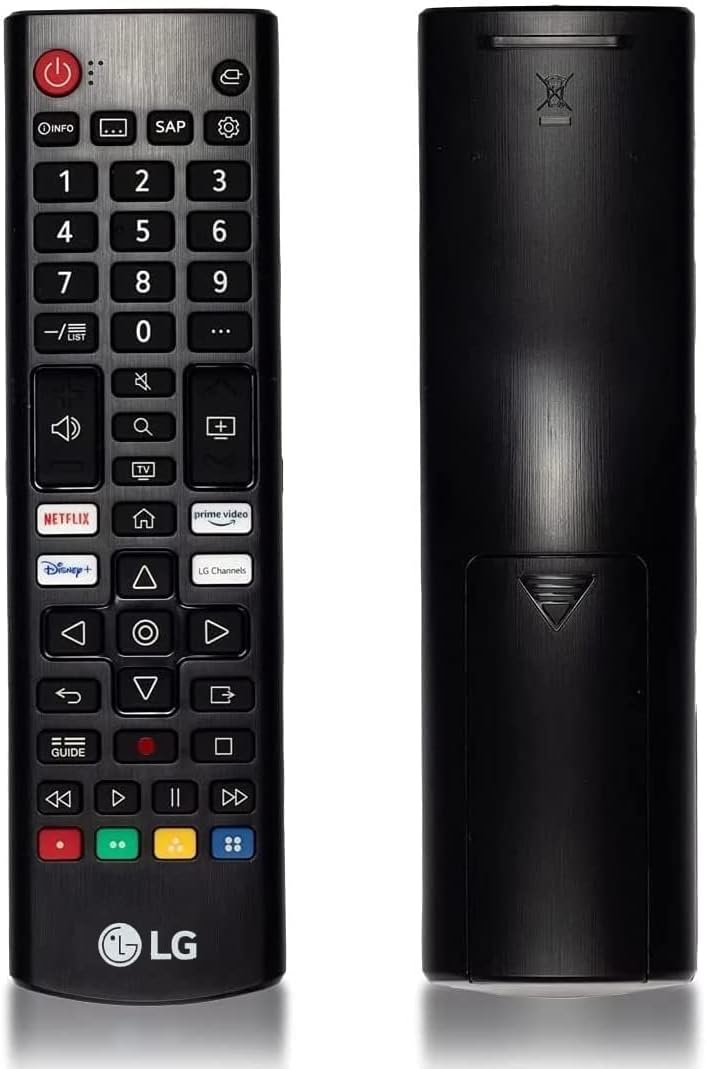
This image displays the front and back of the Amtone AKB76037601 remote control, highlighting its ergonomic design and button layout.
Compatibility
The Amtone AKB76037601 remote control is compatible with a wide range of LG Smart TVs, including LED, OLED, LCD, WebOS, 4K UHD, 8K UHD, HDTV, and HDR models. It is designed to function with the following LG Smart TV series and models:
- Compatible LG Smart TV Models: 43UP7100ZUF, 43UP7560AUD, 50UP7100ZUF, 50UP7560AUD, 55UP7100ZUF, 55UP7560AUD, 65UP7100ZUF, 65UP7560AUD, 70UP7070PUE, 70UP7170ZUC, 70UP7570AUD, 75UP7070PUD, 75UP7170ZUC, 75UP7570AUE, 43UP7700PUB, 50UP7700PUB, 55UP7700PUB, 60UP7700PUB, 65UP7700PUA, 65UP7700PUB, 70UP7770PUB, 75UP7770PUB, 43UP8000PUA, 50UP8000PUA, 55UP8000PUA, 60UP8000PUA, 65UP8000PUA, 70UP8070PUA, 75UP8070PUA, 82UP8770PUA, 86UP8770PUA, and others.

This image demonstrates the remote's broad compatibility with different LG Smart TV types, including LED, OLED, LCD, WebOS, 4K UHD, 8K UHD, HDR, HDTV, and 3D models.
Key Features
- No Programming Required: Functions immediately upon battery installation.
- Dedicated App Buttons: Quick access to Netflix, Prime Video, Disney+, and LG Channels.
- Wide Compatibility: Supports various LG Smart TV models (LED, OLED, LCD, WebOS, 4K/8K UHD, HDR).
- Durable Construction: Made from high-quality ABS material for extended lifespan.
- Ergonomic Design: Comfortable to hold and easy to operate.
- Extended Range: Effective transmission distance up to 33 feet (10 meters).

The image illustrates the remote control's effective operating range, capable of transmitting signals up to 33 feet (10 meters) for convenient use from various positions in a room.

This image shows the remote control held in a hand, emphasizing its comfortable size (6.69 inches long, 1.81 inches wide), easy grip, soft-touch buttons, and robust ABS material construction.
Installation and Setup
Battery Installation
The remote control requires two (2) AAA alkaline batteries (not included) for operation. Follow these steps to install the batteries:
- Locate the battery compartment cover on the back of the remote control.
- Press down on the tab and slide the cover downwards to open the compartment.
- Insert two new AAA batteries, ensuring the positive (+) and negative (-) terminals align correctly with the markings inside the compartment.
- Slide the battery cover back into place until it clicks securely.
Important: Ensure correct battery polarity. Do not mix old and new batteries, or different types of batteries. Remove batteries if the remote will not be used for an extended period.

A visual guide demonstrating how to open the battery compartment cover and correctly insert two AAA batteries, ensuring proper polarity for the remote control to function.
Operating Instructions
Once batteries are installed, the remote control is ready for immediate use with your compatible LG Smart TV. Point the remote directly at your television's infrared receiver.
Button Functions Overview

A detailed view of the remote control, emphasizing the dedicated quick-access buttons for popular streaming services like Netflix, Prime Video, Disney+, and LG Channels, along with navigation controls.
- Power Button (ⓘ): Turns the TV on or off.
- Number Buttons (0-9): Directly select channels.
- Volume Up/Down (🔊): Adjusts the TV volume.
- Channel Up/Down (▲/▼): Changes TV channels.
- Mute Button (🔇): Mutes or unmutes the TV audio.
- Navigation Pad (Up, Down, Left, Right, OK): Navigates menus and selects options.
- Back Button (↶): Returns to the previous screen or menu.
- Home Button (🏠): Accesses the TV's Smart Home interface.
- Input/Source Button (□): Changes the input source (HDMI, AV, etc.).
- Dedicated App Buttons (Netflix, Prime Video, Disney+, LG Channels): Launches the respective streaming applications directly.
- Guide Button: Displays the electronic program guide.
- Media Control Buttons (Play, Pause, Stop, Rewind, Fast Forward): Controls media playback.
Maintenance
- Cleaning: Use a soft, dry cloth to clean the remote control. Do not use liquid cleaners or abrasive materials.
- Battery Replacement: Replace batteries when the remote's response becomes sluggish or stops working. Always replace both batteries simultaneously.
- Storage: Store the remote in a cool, dry place away from direct sunlight and extreme temperatures. If storing for an extended period, remove the batteries to prevent leakage.
- Avoid Drops: Protect the remote from physical impact, as this can damage internal components.
Troubleshooting
If you experience issues with your remote control, please refer to the following common problems and solutions:
| Problem | Solution |
|---|---|
| Remote is not responding. |
|
| Some buttons are not working. |
|
| Remote works intermittently. |
|
Product Specifications
| Feature | Detail |
|---|---|
| Model Number | AKB76037601 (also compatible with AKB76040302) |
| Brand | Amtone |
| Compatible Brand | LG Smart TVs |
| Power Source | 2 x 1.5V AAA Alkaline Batteries (not included) |
| Material | ABS Material |
| Color | Black |
| Product Dimensions | 7 x 2 x 1 inches (approximately 17.8 x 5.1 x 2.5 cm) |
| Item Weight | 2.39 ounces (approximately 67.7 grams) |
| Special Feature | No Programming Required |
| Max Number of Supported Devices | 1 (LG Smart TV) |
Warranty and Customer Support
For specific warranty information or if you require further assistance, please refer to the product packaging or contact the seller directly. Amtone is committed to providing high-quality replacement products and customer satisfaction.
If you are unsure whether this remote is suitable for your specific LG TV model, please contact customer service for professional guidance.