
1. Introduction
The Dahua KTD01S is a comprehensive 2-wire video door phone kit designed to enhance the security of your home or office. This kit includes essential components for a reliable and high-quality video intercom system, offering clear communication and surveillance capabilities.
This manual provides detailed instructions for the proper installation, configuration, operation, and maintenance of your Dahua KTD01S kit. Please read all instructions carefully before beginning installation or operation to ensure correct usage and optimal performance.
2. Product Components
The Dahua KTD01S kit typically includes the following main components:
- 1x DHI-VTO2202F-P-S2 Outdoor Station: An Onvif PoE outdoor unit featuring a 2MP 160° camera, mechanical button, night vision, and voice indicator. It is designed to be anti-vandal (IK07) and weather-resistant (IP65).
- 1x VTM115 Flush Mount Box: A box made of AL5052 material, specifically designed for flush mounting the DHI-VTO2202F-P-S2 outdoor station. Dimensions: 129 x 95 x 28.5 mm.
- 1x DHI-VTH5422HW Indoor Monitor: A white 7-inch TFT capacitive touchscreen IP indoor monitor with 2-wire communication, 6 alarm inputs, 1 alarm output, and support for H.265/H.264 video compression.
- 1x VTNS2003B-2 2-Wire Switch: A dedicated switch for the 2-wire system, providing power and data communication for the indoor and outdoor units.
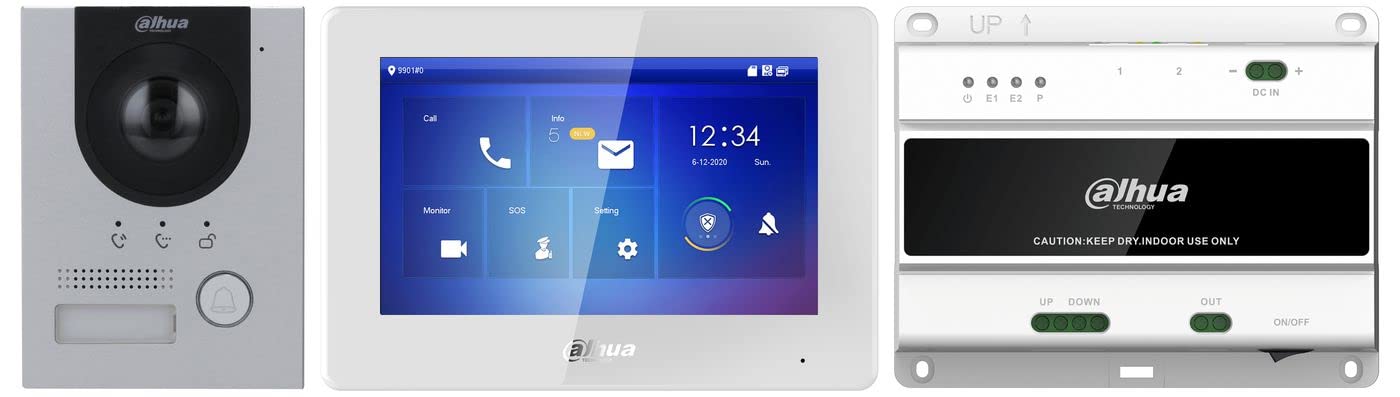
Figure 2.1: Overview of the Dahua KTD01S 2-Wire Video Door Phone Kit components. This image displays the outdoor station, indoor monitor, and associated mounting hardware.
3. Setup and Installation
Proper installation is crucial for the optimal performance and longevity of your Dahua KTD01S kit. This system uses a 2-wire digital communication method.
3.1 Outdoor Station (DHI-VTO2202F-P-S2) Installation
- The outdoor station supports both surface and flush mounting. Use the provided VTM115 flush mount box for recessed installation.
- Ensure the mounting location is secure and provides a clear view of the entrance area.
- For IP65 weather protection, it is recommended to apply silicone gel in the gap between the device and the wall after installation. Liquid sodium silicate is recommended for this purpose.
- Connect the 2-wire cable from the VTNS2003B-2 switch to the outdoor station.
3.2 Indoor Monitor (DHI-VTH5422HW) Installation
- Mount the indoor monitor in a convenient location within your home or office.
- Connect the 2-wire cable from the VTNS2003B-2 switch to the indoor monitor. The monitor can also be powered via standard PoE if an alternative network setup is used, but for this 2-wire kit, it receives power from the 2-wire switch.
3.3 2-Wire Switch (VTNS2003B-2) Connection
- Install the VTNS2003B-2 switch in a central location, typically near your network equipment or power source.
- Connect the outdoor station and indoor monitor to the appropriate 2-wire ports on the switch.
- Ensure the switch is powered on.
4. Operating Instructions
Once installed, the Dahua KTD01S kit is ready for operation.
4.1 Outdoor Station Functions
- Calling: Visitors press the mechanical button on the outdoor station to initiate a call to the indoor monitor.
- Video Surveillance: The 2MP camera provides a 160° wide-angle view. Night vision ensures clear images even in low-light conditions.
- Voice Indicator: Provides audio feedback to visitors.
4.2 Indoor Monitor Functions
- Answering Calls: When a visitor presses the outdoor station button, the indoor monitor will ring. Tap the screen to answer the call and view the visitor.
- Two-Way Communication: Engage in real-time audio communication with the visitor.
- Door Release: If connected to an electronic lock, you can unlock the door directly from the indoor monitor's touchscreen.
- Monitoring: You can manually activate the outdoor station camera to view the entrance area at any time.
- Alarm Integration: The monitor features 6 alarm inputs and 1 alarm output, allowing integration with other security sensors (e.g., door contacts, PIR sensors).
- Group Call: Supports group calling functionality.
- Motion Detection: The system can be configured to trigger alerts based on motion detected by the outdoor station camera.
5. Maintenance
Regular maintenance helps ensure the reliable operation and extends the lifespan of your Dahua KTD01S kit.
- Cleaning: Regularly clean the camera lens and the screen of the indoor monitor with a soft, damp cloth. Avoid abrasive cleaners.
- Outdoor Station: Periodically check the outdoor station for any signs of wear, damage, or obstruction to the camera or microphone. Ensure the silicone seal remains intact for weather protection.
- Wiring: Inspect all wiring connections periodically to ensure they are secure and free from corrosion or damage.
- Software Updates: Check the Dahua official website for any available firmware updates for your devices to ensure optimal performance and security.
6. Troubleshooting
If you encounter issues with your Dahua KTD01S kit, refer to the following troubleshooting steps:
- No Power/No Display:
- Check if the VTNS2003B-2 2-wire switch is properly powered and its indicator lights are on.
- Verify all 2-wire connections between the switch, outdoor station, and indoor monitor are secure.
- Ensure the power adapter for the switch (if external) is functioning correctly.
- No Video/Audio:
- Confirm that the outdoor station camera lens is clean and unobstructed.
- Check the 2-wire connections for any loose or damaged cables.
- Restart the indoor monitor and the 2-wire switch.
- Call Button Not Responding:
- Ensure the outdoor station has power.
- Check for any physical obstruction or damage to the mechanical button.
- Intermittent Operation (e.g., switch failure after short use):
- This could indicate a faulty component. First, ensure all connections are robust and there are no power fluctuations.
- If a specific component like the 2-wire switch (VTNS2003B-2) fails prematurely, contact Dahua support or your reseller for assistance, as it may require replacement under warranty.
If the problem persists after following these steps, please contact Dahua technical support or your authorized dealer for further assistance.
7. Specifications
| Feature | Specification |
|---|---|
| Model Number | KTD01S |
| Brand | Dahua |
| Outdoor Station Model | DHI-VTO2202F-P-S2 |
| Outdoor Station Camera | 2MP CMOS, 160° viewing angle |
| Outdoor Station Protection | IK07 (Vandal-proof), IP65 (Weather-resistant) |
| Indoor Monitor Model | DHI-VTH5422HW |
| Indoor Monitor Display | 7-inch TFT Capacitive Touchscreen |
| Indoor Monitor Alarm I/O | 6 Inputs, 1 Output |
| Video Compression | H.265, H.264 |
| Connectivity Technology | 2-Wire Digital Communication, Wired |
| Power Source | Cable Electric (via 2-wire switch) |
| Control Method | Touch |
| Alert Type | Motion only |
| Recommended Use | Home Security |
| Compatible Devices | Dahua devices (VTH5222CH-S1, VTNS1006A-2) |
8. Warranty and Support
Dahua products are typically covered by a manufacturer's warranty. Please refer to the warranty card included with your product or visit the official Dahua website for detailed warranty terms and conditions.
For technical support, product inquiries, or warranty claims, please contact your authorized Dahua dealer or visit the official Dahua support portal. Ensure you have your product model number (KTD01S) and purchase information available when seeking support.


