
1. Introduction and Overview
The Btuty AHAR-3 Harmonizer Harmonist Shifter is a compact electric guitar effect pedal designed to add harmonic intervals to your guitar signal. It features multiple modes for pitch shifting, including up, detune, and down, allowing for a wide range of tonal possibilities. This pedal is built with a durable aluminum alloy casing and includes true bypass functionality to preserve your guitar's original tone when the effect is disengaged.
2. Product Features
- 3 Controlling Knobs and 1 Switch: Accurate and highly sensitive controls for precise sound shaping.
- True Bypass Footswitch: Ensures signal integrity when the effect is off.
- Lever Design: Prevents accidental stamping on operation knobs during use.
- Output Jack: Standard 1/4-inch mono audio jack for signal output.
- Detune Mode: Offers pitch adjustments from -25 to +25 cents.
- Mode Switch: Allows selection between Up, Detune, and Down modes for various harmonic effects.
3. Setup Instructions
Follow these steps to set up your AHAR-3 Harmonizer pedal:
- Power Connection: Connect a 9V DC AC adapter (not included) to the DC IN jack on the pedal. Ensure the adapter's polarity is positive pole outside and negative pole inside. Incorrect polarity can damage the unit.
- Input Connection: Connect your electric guitar to the 1/4-inch mono audio INPUT jack on the pedal using a standard instrument cable.
- Output Connection: Connect the 1/4-inch mono audio OUTPUT jack of the pedal to your amplifier or the next effect pedal in your signal chain using another standard instrument cable.
- Power On: Once all connections are secure, plug in the power adapter to an electrical outlet. The LED indicator will illuminate when the pedal is powered on.

Figure 3.1: Diagram illustrating the input, output, DC power connections, and control layout of the AHAR-3 Harmonizer pedal.
4. Operating Instructions
The AHAR-3 Harmonizer pedal offers intuitive controls for shaping your sound:
- True Bypass Footswitch: Press this footswitch to toggle the effect on or off. When the effect is active, the LED indicator will light up.
- MODE Switch: This three-position toggle switch selects the harmonizer mode:
- UP: Shifts the pitch upwards.
- DETUNE: Provides a slight pitch variation for chorus-like effects, ranging from -25 to +25 cents.
- DOWN: Shifts the pitch downwards.
- DRY Knob: Adjusts the volume of your original, unprocessed guitar signal.
- WET Knob: Controls the volume of the harmonized (effected) signal.
- RANGE Knob: This large central knob selects the pitch shift interval. Depending on the selected mode (UP or DOWN), it allows you to choose intervals such as 1st, 2nd, 3rd, 4th, 5th, 6th, 7th, 9th, 10th, 11th, 12th, 1 OCT (one octave), and 2 OCT (two octaves). In DETUNE mode, this knob fine-tunes the detune amount.

Figure 4.1: Close-up view of the AHAR-3 Harmonizer pedal's controls, including DRY, WET, and RANGE knobs, and the MODE switch.
5. Specifications
| Specification | Value |
|---|---|
| Effect Type | Shifter (Harmonizer/Harmonist) |
| Material | Aluminium Alloy |
| Input Impedance | 470K Ohms |
| Output Impedance | 100 Ohms |
| Current Draw | 68 mA |
| Power Supply | AC Adapter 9V DC (not included), positive pole outside, negative pole inside |
| Item Size | 9 * 3.8 * 4.8 cm / 3.5 * 1.5 * 1.8 in |
| Item Weight | 151 g / 5.3 oz |
| Product Dimensions | 1.8"L x 1.5"W x 3.5"H |
| Model Number | FNI7442645271903XU |
6. Maintenance
To ensure the longevity and optimal performance of your AHAR-3 Harmonizer pedal, follow these maintenance guidelines:
- Cleaning: Use a soft, dry cloth to clean the pedal's exterior. Avoid using abrasive cleaners or solvents, as they may damage the finish or internal components.
- Storage: Store the pedal in a cool, dry place away from direct sunlight, extreme temperatures, and high humidity. If not in use for an extended period, disconnect the power adapter.
- Connections: Periodically check all cable connections for wear and tear. Ensure jacks are free of dust and debris.
- Handling: Handle the pedal with care. Avoid dropping it or subjecting it to strong impacts.
7. Troubleshooting
If you encounter issues with your AHAR-3 Harmonizer pedal, refer to the following common troubleshooting steps:
- No Sound:
- Ensure the power adapter is correctly connected and providing 9V DC power with the correct polarity (positive outside, negative inside).
- Check all instrument cables. Try replacing them to rule out faulty cables.
- Verify that your guitar and amplifier are working correctly.
- Make sure the True Bypass footswitch is engaged (LED lit) if you want to hear the effect, or disengaged (LED off) if you want to hear the dry signal.
- Weak or Distorted Sound:
- Check the DRY and WET knob settings. Adjust them to achieve the desired blend.
- Ensure the power supply is stable and providing sufficient current (68 mA minimum).
- Test with different cables and a different amplifier if possible.
- Effect Not Changing:
- Verify that the MODE switch is set to the desired position (UP, DETUNE, or DOWN).
- Adjust the RANGE knob to select different pitch intervals or detune amounts.
If these steps do not resolve the issue, please contact customer support for further assistance.
8. Package Contents
The following items are included in your product package:
- 1 x Guitar Effect Pedal (AHAR-3 Harmonizer)
- 2 x Adhesive Tape
- 1 x User Manual (English & Chinese)
- 1 x Hardcover Box
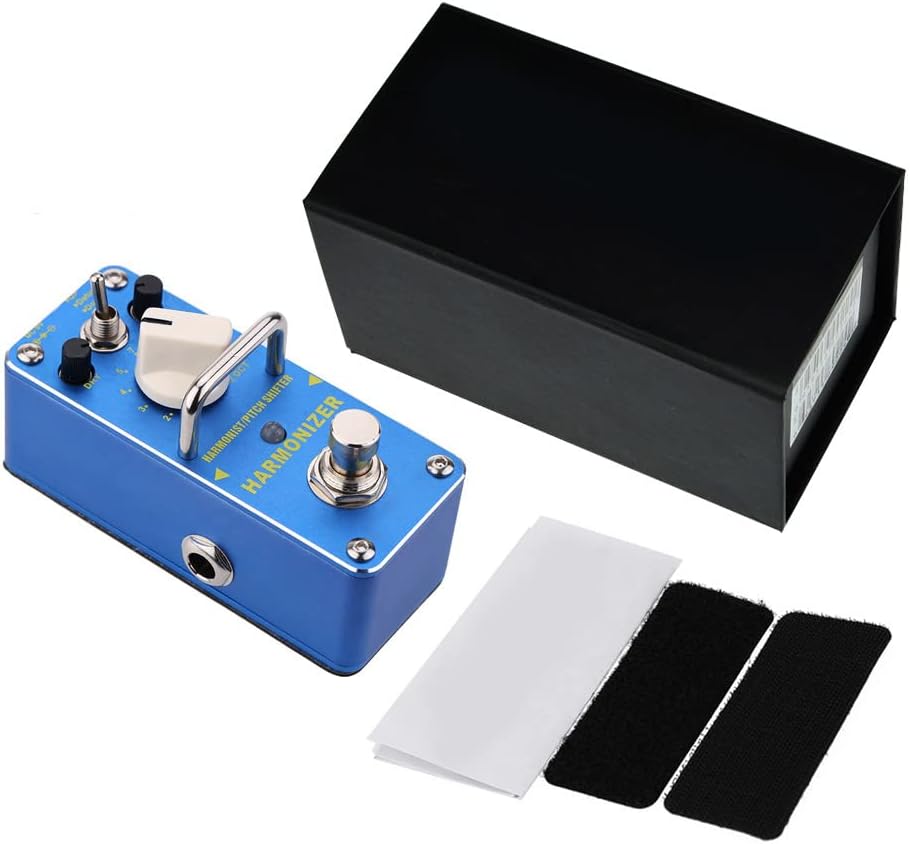
Figure 8.1: Contents of the AHAR-3 Harmonizer product package.
9. Important Safety Information
Please read and adhere to the following safety precautions:
- Power Adapter: Always use a 9V DC power adapter with the correct polarity: positive pole outside and negative pole inside. Using an adapter with incorrect polarity can cause severe damage to the pedal and void the warranty.
- Environment: Do not expose the pedal to water, moisture, or extreme temperatures. Avoid using it in dusty or dirty environments.
- Servicing: Do not attempt to open or service the pedal yourself. Refer all servicing to qualified personnel.
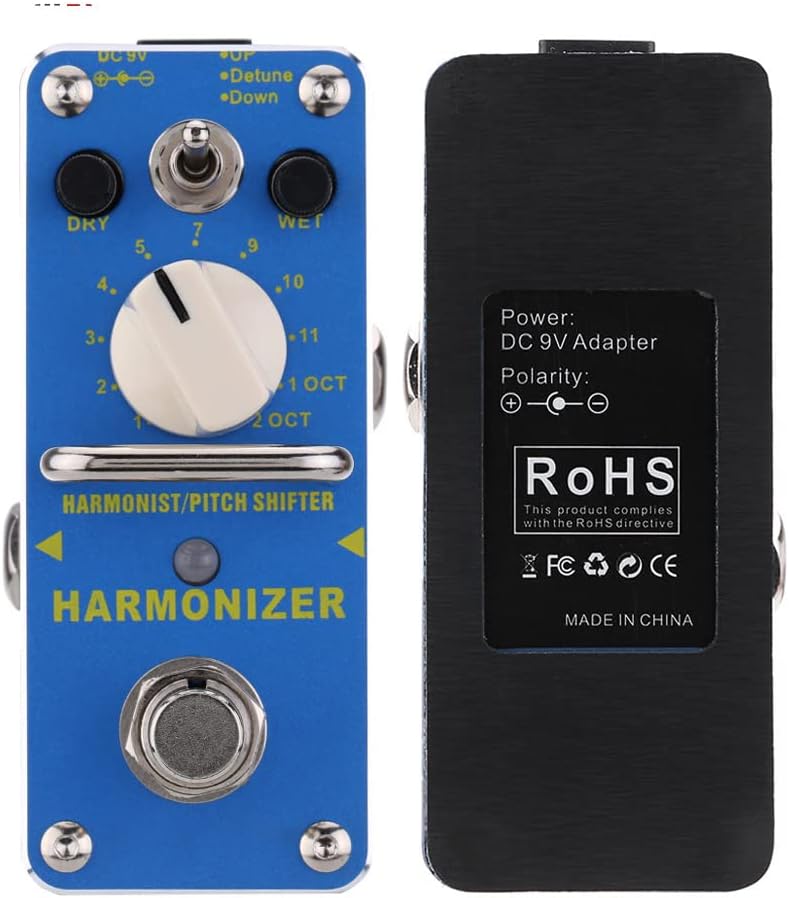
Figure 9.1: Back of the AHAR-3 Harmonizer pedal, indicating power requirements and compliance markings.
10. Warranty and Support
Specific warranty details for the Btuty AHAR-3 Harmonizer Harmonist Shifter Electric Guitar Effect Pedal are not provided within this manual. For information regarding warranty coverage, terms, and conditions, please refer to the documentation included with your purchase or visit the official Btuty website. For technical support or service inquiries, please contact the retailer where you purchased the product or the manufacturer directly.