
Tarrington House AIC006
Tarrington House AIC006 Air Cooler User Manual
Model: AIC006
1. Introduction
Thank you for purchasing the Tarrington House AIC006 Air Cooler. This manual provides important information regarding the safe operation, installation, maintenance, and troubleshooting of your new air cooler. Please read this manual thoroughly before using the appliance and keep it for future reference.
2. Important Safety Instructions
Always follow basic safety precautions when using electrical appliances to reduce the risk of fire, electric shock, and injury to persons.
- Read all instructions before using this appliance.
- Do not operate any appliance with a damaged cord or plug, or after the appliance malfunctions or has been dropped or damaged in any manner.
- Do not use outdoors.
- Do not immerse the appliance, cord, or plug in water or other liquids.
- Unplug from outlet when not in use and before cleaning.
- Close supervision is necessary when any appliance is used by or near children.
- Do not block air openings or operate on a soft surface where openings may become blocked.
- Use only on a flat, stable surface.
- Do not place near heat sources such as radiators, heat registers, stoves, or other appliances that produce heat.
- This appliance is for residential use only.
3. Package Contents
Carefully unpack your air cooler and check that all items are present and in good condition.
- Tarrington House AIC006 Air Cooler
- Remote Control
- User Manual (this document)
4. Product Overview
Familiarize yourself with the components of your Tarrington House AIC006 Air Cooler.

Figure 1: Front-right view of the Tarrington House AIC006 Air Cooler. It is a compact, white unit with a grey honeycomb-patterned grille on the front and a blue water tank lid on top.
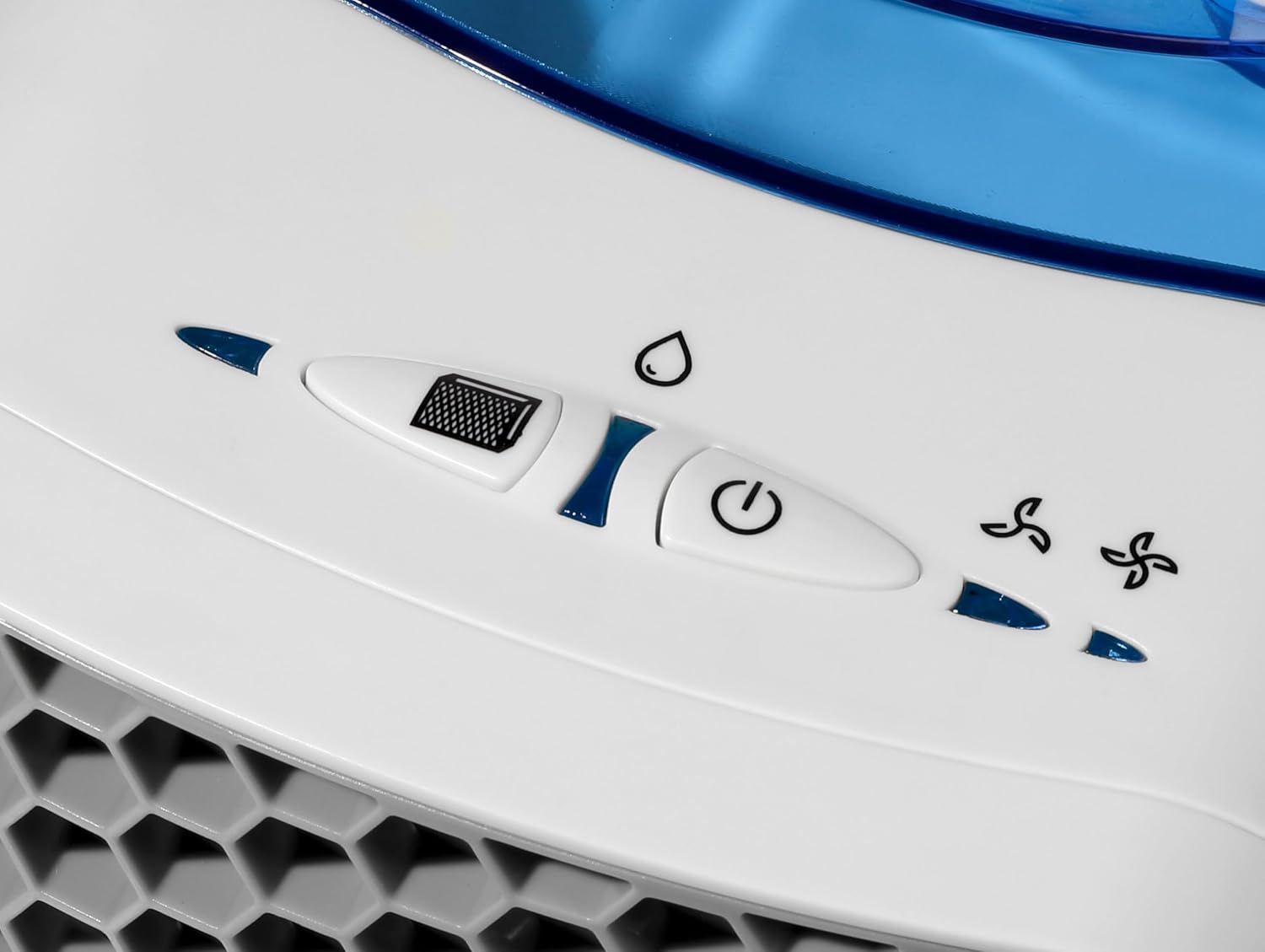
Figure 2: Close-up of the control panel located on the top of the air cooler. It features a fan speed slider, a water drop icon button for mist/humidification, and a power button.

Figure 3: Detailed view of the grey honeycomb-patterned air intake grille on the front of the air cooler, showing the blue internal components.

Figure 4: The Tarrington House AIC006 Air Cooler placed on a side table in a modern living room, demonstrating its compact size and suitability for residential use.
Components:
- Air Outlet Grille
- Control Panel
- Water Tank Lid
- Water Tank
- Power Cord Inlet
- Air Filter (behind grille)
5. Setup
5.1 Placement
Place the air cooler on a flat, stable surface. Ensure there is adequate space around the unit for proper airflow (at least 20 cm from walls or other objects).
5.2 Filling the Water Tank
- Open the water tank lid located on the top of the unit.
- Carefully fill the water tank with clean, cool water. Do not exceed the maximum fill line indicated inside the tank.
- Close the water tank lid securely.
Note: For enhanced cooling, you may add ice cubes to the water tank if the design allows, or use pre-chilled water.
5.3 Power Connection
Plug the power cord into a standard 230 Volt electrical outlet. Ensure the voltage matches your local power supply.
6. Operating Instructions
Your Tarrington House AIC006 Air Cooler can be operated using the control panel on the unit or the included remote control.
6.1 Control Panel Functions
- Fan Speed Control: A slider-like button with a fan icon. Slide or press to adjust the fan speed. The two fan blade icons to the right indicate the current fan speed setting.
- Mist/Humidification Button (💧): A button with a water drop icon. Press to activate or deactivate the misting/humidification function. This function requires water in the tank.
- Power Button (⏻): A button with a power symbol. Press to turn the unit ON or OFF.
6.2 Remote Control
The remote control duplicates the functions of the control panel. Ensure the remote control has batteries installed (not included, typically 2x AAA) and point it towards the front of the air cooler for optimal response.
6.3 Using the Air Cooler
- Ensure the water tank is filled (see Section 5.2).
- Plug in the unit.
- Press the Power Button to turn on the air cooler.
- Select your desired fan speed using the Fan Speed Control.
- If desired, activate the mist/humidification function.
- To turn off the unit, press the Power Button again.
7. Maintenance
Regular maintenance ensures optimal performance and extends the lifespan of your air cooler.
7.1 Cleaning the Exterior
- Always unplug the appliance before cleaning.
- Wipe the exterior surfaces with a soft, damp cloth. Do not use abrasive cleaners or solvents.
- Ensure no water enters the control panel or other electrical components.
7.2 Cleaning the Water Tank
- Empty any remaining water from the tank.
- Clean the water tank with a mild detergent and rinse thoroughly with clean water.
- Allow the tank to air dry completely before refilling or storing the unit.
- Clean the water tank regularly (e.g., weekly) to prevent mold and mildew growth.
7.3 Cleaning the Air Filter
The air filter should be cleaned periodically, depending on usage and air quality.
- Unplug the air cooler.
- Carefully remove the air filter from the back or side of the unit (refer to product diagram for exact location).
- Rinse the filter under running water to remove dust and debris. For stubborn dirt, use a soft brush and mild detergent.
- Allow the filter to air dry completely before reinserting it into the unit.
7.4 Storage
When not in use for extended periods:
- Empty and clean the water tank and air filter.
- Ensure the unit is completely dry.
- Store the air cooler in a cool, dry place, away from direct sunlight and extreme temperatures.
8. Troubleshooting
Before contacting customer support, please refer to the following table for common issues and their solutions.
| Problem | Possible Cause | Solution |
|---|---|---|
| Unit does not turn on. | No power supply. | Check if the power cord is securely plugged into a working outlet. |
| No mist/humidification. | Water tank is empty. | Fill the water tank with water. |
| Weak airflow. | Air filter is dirty. | Clean the air filter (see Section 7.3). |
| Unpleasant odor. | Stagnant water or dirty tank. | Empty and clean the water tank thoroughly (see Section 7.2). Use fresh water. |
9. Specifications
| Feature | Detail |
|---|---|
| Model Number | AIC006 |
| Brand | Tarrington House |
| Manufacturer | METRO SOURCING INTERNATIONAL LTD |
| Material | Plastic |
| Color | White |
| Mounting Type | Tabletop |
| Special Features | Remote Control |
| Control Type | Remote Control |
| Item Weight | 1.46 Kilograms |
| Wattage | 6 Watts |
| Voltage | 230 Volts |
| Recommended Use | Residential |
| Included Components | Air cooler |
10. Warranty Information
Tarrington House products are manufactured to high-quality standards. This product is covered by a limited warranty against manufacturing defects from the date of purchase. Please retain your proof of purchase for warranty claims. The warranty does not cover damage caused by misuse, neglect, accident, alteration, or unauthorized repair.
11. Customer Support
If you have any questions or require assistance with your Tarrington House AIC006 Air Cooler, please contact your retailer or the manufacturer's customer service department. Please have your model number (AIC006) and proof of purchase ready when contacting support.
For more information, visit the official Tarrington House website: www.tarringtonhouse.com (Note: This is a placeholder URL as no specific support link was provided.)
Ask a question about this manual
Ask about setup, troubleshooting, compatibility, parts, safety, or missing instructions. Manuals+ will review the question and use this page’s manual context to help answer it.