
1. Introduction
1.1 Product Overview
This manual provides instructions for the FUJIFILM XF 16-80mm f/4 R OIS WR lens and its accompanying accessory kit. The lens is a versatile zoom lens designed for FUJIFILM X-mount cameras, offering a 24-120mm equivalent focal range with a constant f/4 maximum aperture. It features optical image stabilization (OIS) and weather-resistant (WR) construction. The accessory kit includes various filters, lens attachments, and cleaning tools to enhance your photography experience.
1.2 What's Included
The following items are included in your purchase:
- FUJIFILM XF 16-80mm f/4 R OIS WR Lens
- FLCP-72II Front Lens Cap
- FUJIFILM Rear Lens Cap
- Lens Hood
- Lens Wrapping Cloth
- 6-Piece Gradual Color Filter Kit (Purple, Grey, Blue, Red, Orange, Yellow)
- 4-Piece Macro Close-Up Filter Kit (+1, +2, +4, +10 Diopter)
- Variable Neutral Density Filter (ND2 - ND400)
- 0.43x Wide-Angle Lens Attachment with Detachable Macro
- 2.2x Telephoto Lens Attachment
- Protective Multi-Coated Digital HD UV Filter
- Universal Lens Cap Keeper
- Lens Cleaning Pen
- Dust Blower / Air Pump
- Microfiber Cleaning Cloth
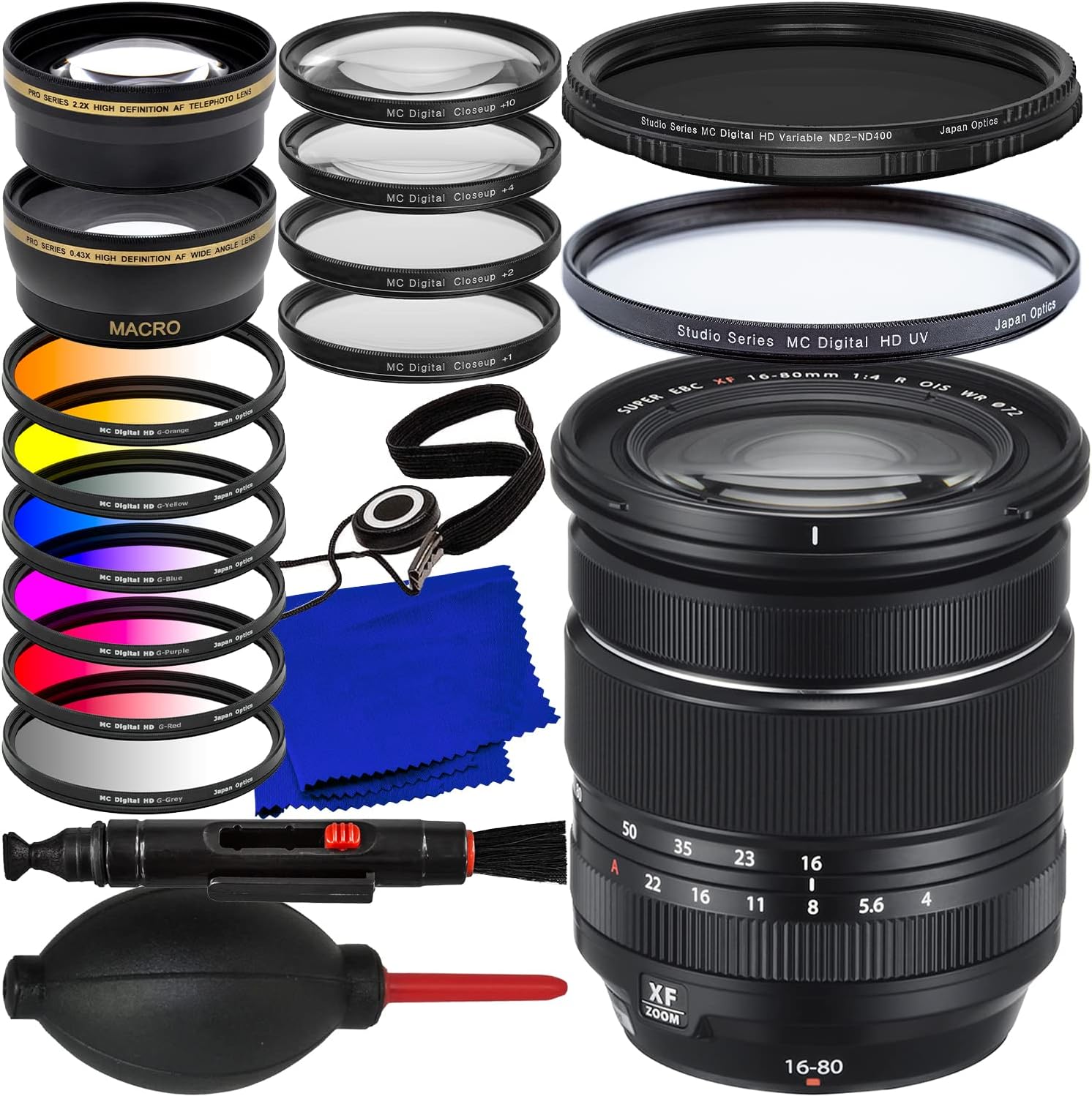
Figure 1.1: The FUJIFILM XF 16-80mm f/4 R OIS WR lens shown with the complete 23-piece accessory bundle, including various filters, lens attachments, and cleaning tools.
2. Setup
2.1 Attaching the Lens to Your Camera
- Ensure both the camera and lens are powered off.
- Remove the rear lens cap from the XF 16-80mm lens and the body cap from your camera.
- Align the white mounting mark on the lens with the corresponding mark on the camera body.
- Insert the lens into the camera mount and rotate it clockwise until it clicks into place.
- To remove the lens, press the lens release button on the camera body and rotate the lens counter-clockwise.

Figure 2.1: The FUJIFILM XF 16-80mm f/4 R OIS WR lens, illustrating its design and mounting interface.
2.2 Attaching the Lens Hood
The lens hood helps to block stray light, reducing flare and ghosting, and provides some physical protection to the front element.
- Align the red dot on the lens hood with the red dot on the front of the lens.
- Gently push the hood onto the lens and rotate it clockwise until it locks into position.
- To remove, press the release button on the hood (if present) and rotate counter-clockwise.

Figure 2.2: The FUJIFILM XF 16-80mm f/4 R OIS WR lens with its dedicated lens hood properly attached.
2.3 Attaching Filters and Lens Attachments
All filters and lens attachments in this kit are designed to screw onto the 72mm filter thread at the front of the lens.
- Ensure the lens cap is removed.
- Gently align the filter or attachment with the lens's front thread.
- Rotate clockwise until it is securely fastened. Do not overtighten.
- To remove, rotate counter-clockwise.
Note: Some attachments, like the 0.43x Wide-Angle and 2.2x Telephoto, may have their own filter threads for stacking additional filters. The Macro Close-Up filters can be stacked for increased magnification.
3. Operating the Lens and Accessories
3.1 Lens Functions
- Zoom Ring: Rotate the zoom ring to adjust the focal length between 16mm (wide-angle) and 80mm (medium-telephoto).
- Focus Ring: In manual focus mode, rotate this ring to adjust focus. In autofocus mode, it can be used for fine-tuning focus if enabled on your camera.
- Aperture Ring: Adjusts the lens aperture (f-stop). The lens maintains a constant f/4 maximum aperture throughout its zoom range.
- Optical Image Stabilization (OIS): This lens features built-in image stabilization to reduce camera shake. Ensure OIS is enabled in your camera's menu when shooting handheld, especially in low light or at longer focal lengths.
- Weather Resistance (WR): The lens is designed with seals to resist dust and moisture. While it can withstand light rain or dusty conditions, it is not waterproof. Avoid prolonged exposure to heavy rain or submersion.
3.2 Using Filters
Filters modify the light entering the lens to achieve various photographic effects.
3.2.1 Protective Multi-Coated Digital HD UV Filter
This filter blocks ultraviolet light, which can cause a bluish cast in images, particularly in outdoor scenes. Its primary function is to protect the front element of your lens from dust, scratches, and impacts. It can generally be left on the lens for everyday use.

Figure 3.1: Illustration of the Multi-Coated Digital HD UV Filter, demonstrating its protective qualities and effect on reducing bluish casts.
3.2.2 Variable Neutral Density Filter (ND2 - ND400)
A Neutral Density (ND) filter reduces the amount of light entering the lens without affecting color. A variable ND filter allows you to adjust the light reduction by rotating the filter. This is useful for:
- Using wider apertures in bright conditions to achieve shallow depth of field.
- Creating long exposure effects (e.g., smoothing water, blurring clouds) in daylight.
- Shooting video to maintain cinematic shutter speeds.
To use, attach the filter and rotate the outer ring to adjust the density from ND2 (1 stop) to ND400 (approx. 8-9 stops). Observe the effect through your camera's viewfinder or LCD.

Figure 3.2: The Variable Neutral Density Filter, illustrating its adjustable range from ND2 to ND400 and its application for controlling light and depth of field.
3.2.3 6-Piece Gradual Color Filter Kit
Gradual color filters introduce a color tint to a portion of the image, typically used to enhance skies or create artistic effects. The kit includes Purple, Grey, Blue, Red, Orange, and Yellow filters. Each filter is half-colored and half-clear, with a gradual transition between the two.
- Grey (Graduated ND): Balances exposure between a bright sky and a darker foreground.
- Blue: Enhances blue skies or adds a cool tone.
- Red, Orange, Yellow: Can be used to warm up scenes, enhance sunsets, or create dramatic effects.
- Purple: Adds a unique artistic hue.
Attach the desired filter and rotate it to position the colored portion over the area you wish to affect.

Figure 3.3: The 6-Piece Gradual Color Filter Kit, displaying each filter and examples of their application in landscape photography.
3.2.4 4-Piece Macro Close-Up Filter Kit (+1, +2, +4, +10 Diopter)
Close-up filters act like magnifying glasses, allowing your lens to focus closer to subjects, enabling macro photography without a dedicated macro lens. The diopter strength indicates the magnification level.
- Use individually for moderate magnification.
- Stack filters (e.g., +1 and +2 for +3 diopter) for increased magnification.
- The +10 diopter filter provides significant magnification.
Attach the desired filter(s) to the front of your lens. You will need to move closer to your subject to achieve focus. Autofocus may be less effective; manual focus is often recommended for macro photography.

Figure 3.4: The 4-Piece Macro Close-Up Filter Kit, illustrating the different diopter strengths and their effect on close-up photography.
3.3 Using Lens Attachments
These attachments modify the focal length of your primary lens.
3.3.1 0.43x Wide-Angle Lens Attachment with Detachable Macro
This attachment converts your lens into a wider-angle lens, effectively multiplying your current focal length by 0.43x. For example, a 16mm setting on your lens would become approximately 6.88mm with the attachment. This is useful for capturing expansive landscapes, interiors, or group shots.
The front element of this attachment can be detached to reveal a macro lens, allowing for extreme close-up photography. To use the macro function, unscrew the front portion of the wide-angle attachment and use only the rear portion attached to your lens.
3.3.2 2.2x Telephoto Lens Attachment
This attachment extends the reach of your lens, multiplying your current focal length by 2.2x. For example, an 80mm setting on your lens would become approximately 176mm with the attachment. This is beneficial for bringing distant subjects closer, such as in wildlife or sports photography.

Figure 3.5: The 0.43x Wide-Angle Lens Attachment (with detachable macro function) and the 2.2x Telephoto Lens Attachment, illustrating their respective uses.
4. Maintenance
4.1 Cleaning Your Lens and Accessories
Regular cleaning helps maintain optimal performance and extends the lifespan of your equipment. Use the provided cleaning tools:
- Dust Blower / Air Pump: Use to remove loose dust and debris from lens surfaces and camera body. Never use compressed air from a can, as it can contain propellants that damage coatings.
- Lens Cleaning Pen: Features a brush on one end for removing dust and a carbon cleaning tip on the other for fingerprints and smudges. Use the brush first, then the carbon tip with gentle circular motions.
- Microfiber Cleaning Cloth: For final polishing or stubborn smudges. Use with a small amount of lens cleaning solution if necessary, applying the solution to the cloth, not directly to the lens.
- Lens Wrapping Cloth: Use to protect the lens when stored or transported.
Caution: Avoid touching lens elements with bare fingers. Do not use harsh chemicals or abrasive materials for cleaning.

Figure 4.1: The included cleaning accessories: dust blower, lens cleaning pen, microfiber cloth, and lens cap keeper.
4.2 Storage
- Always attach front and rear lens caps when the lens is not in use.
- Store the lens and accessories in a cool, dry place, away from direct sunlight and extreme temperatures.
- If storing for extended periods, consider using a dehumidifying agent to prevent mold growth, especially in humid climates.
- Keep the lens and accessories in their protective pouches or cases when transporting.
5. Troubleshooting
- Lens not attaching securely: Ensure the lens is aligned correctly with the camera mount marks and rotated until it clicks. Check for any obstructions.
- Autofocus not working:
- Check if the camera is set to autofocus mode.
- Ensure the lens is properly attached.
- Clean the lens and camera contacts.
- In very low light or with very low contrast subjects, autofocus may struggle. Try manual focus or use an external light source.
- When using close-up or wide-angle attachments, autofocus performance may be affected.
- Images are blurry:
- Check your camera's focus settings.
- Ensure OIS is enabled if shooting handheld in low light or at longer focal lengths.
- Use a faster shutter speed or a tripod.
- Clean the lens elements.
- Vignetting (dark corners) with attachments/filters: This can occur when stacking multiple filters or using certain attachments, especially at wider focal lengths. Try removing some filters or zooming in slightly.
- "X" pattern with Variable ND filter: This is a common phenomenon with variable ND filters when rotated to their maximum density settings, especially at wider focal lengths. Reduce the density setting or zoom in slightly to mitigate.
6. Specifications
| Feature | Specification |
|---|---|
| Lens Model | FUJIFILM XF 16-80mm f/4 R OIS WR |
| Focal Length | 16-80mm (24-120mm equivalent on APS-C) |
| Maximum Aperture | f/4 (constant) |
| Minimum Aperture | f/22 |
| Image Stabilization | Optical Image Stabilization (OIS) |
| Weather Resistance | Yes (WR) |
| Filter Thread Size | 72mm |
| Coating Description | Multi Coating (Super EBC) |
| UPC | 810103160064 |
6.1 Accessory Specifications
- Variable Neutral Density Filter: ND2 - ND400 (adjustable)
- Macro Close-Up Filters: +1, +2, +4, +10 Diopter
- Wide-Angle Attachment: 0.43x magnification, with detachable macro
- Telephoto Attachment: 2.2x magnification
- UV Filter: Multi-Coated Digital HD UV
- Gradual Color Filters: Purple, Grey, Blue, Red, Orange, Yellow
7. Warranty and Support
For warranty information and technical support regarding your FUJIFILM XF 16-80mm f/4 R OIS WR lens, please refer to the official FUJIFILM documentation included with your camera or visit the official FUJIFILM website. For support related to the PhoenixPhoto accessory bundle, please contact the retailer or manufacturer directly.
Please retain your proof of purchase for warranty claims.