
1. Overview
The Acer Aspire 5 A515-56-32DK Slim Laptop is a versatile and portable computing device designed for everyday productivity and entertainment. Featuring an 11th Gen Intel Core i3 processor, a 15.6-inch Full HD IPS display, and Wi-Fi 6 connectivity, it offers a balanced performance for various tasks. This model includes 4GB DDR4 RAM and a 128GB NVMe SSD, with options for future upgrades. It runs on Windows 11 Home in S mode, providing enhanced security and a streamlined user experience. Integrated Amazon Alexa functionality further enhances convenience, allowing voice commands for various tasks. The laptop's slim design and comprehensive port selection make it suitable for both home and on-the-go use.

Figure 1.1: Front view of the Acer Aspire 5 A515-56-32DK Slim Laptop.
2. Setup
2.1 Initial Power-On
Upon first use, connect the AC adapter to the laptop and a power outlet. Press the power button to turn on the device. Follow the on-screen prompts to complete the initial Windows setup.

Figure 2.1: Items included in the product box.
2.2 Operating System Setup (Windows 11 Home in S mode)
Your laptop comes pre-installed with Windows 11 Home in S mode, which offers enhanced security and performance by exclusively running apps from the Microsoft Store. If you require to install applications from outside the Microsoft Store, you can switch out of S mode. Please note that switching out of S mode is a one-way process and cannot be undone.
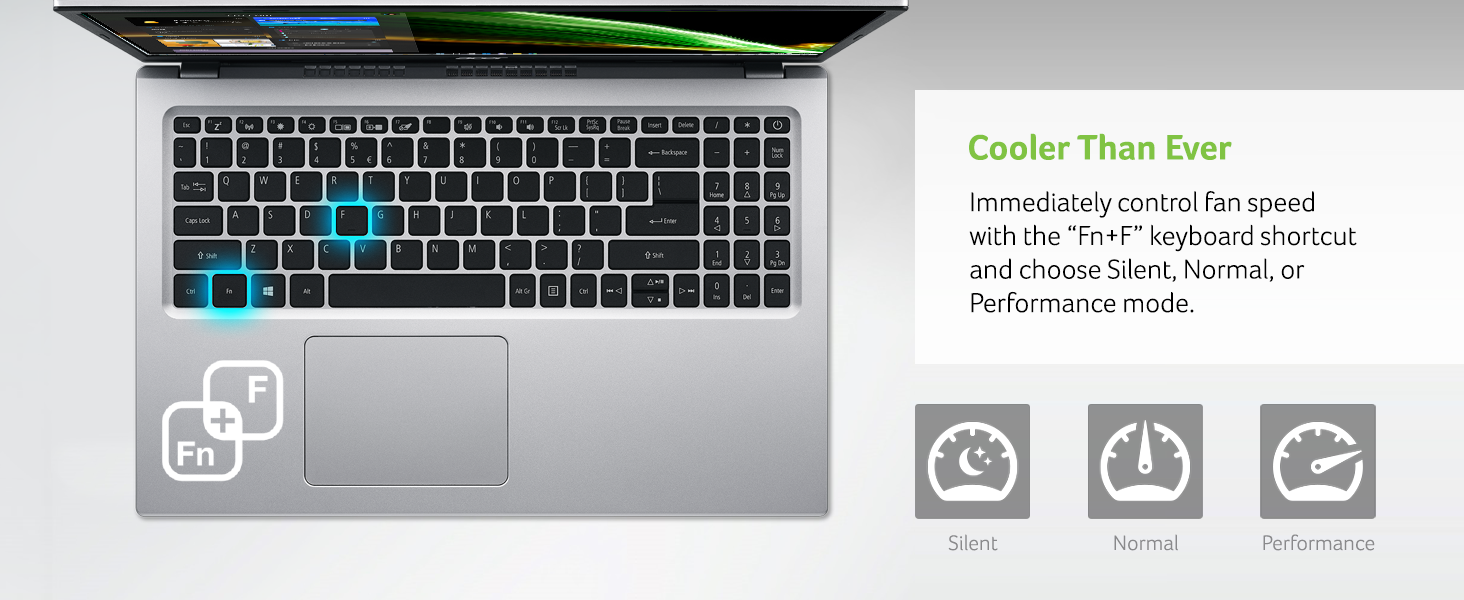
Figure 2.2: Windows 11 Home (S mode) interface.
2.3 Network Connectivity (Wi-Fi 6)
The Acer Aspire 5 supports Wi-Fi 6 (802.11ax) for faster and more efficient wireless connections. During initial setup or at any time, navigate to the network settings to connect to your preferred Wi-Fi network. This ensures reliable access to online applications and services.

Figure 2.3: Laptop demonstrating reliable Wi-Fi 6 connections.
3. Operating Your Laptop
3.1 Keyboard and Touchpad
The laptop features a full-size keyboard and a large, responsive touchpad for navigation. The ergonomically designed hinge lifts the keyboard slightly when the lid is open, providing a more comfortable typing experience and improved airflow for cooling.

Figure 3.1: Laptop with keyboard elevated by the lift-hinge.
3.2 Port Connections
The Acer Aspire 5 is equipped with a variety of ports for connecting external devices and peripherals:
- USB 3.2 Type-C: For high-speed data transfer and power delivery.
- USB 3.2 Gen 1 (x2): One port supports power-off charging.
- USB 2.0 (x1): For standard USB devices.
- HDMI 2.0: For connecting to external displays.
- Ethernet (RJ-45): For wired network connections.
- Headphone/Speaker/Line-Out Jack: For audio output.
- DC-in for AC adapter: For power input.

Figure 3.2: Overview of laptop ports.
3.3 Amazon Alexa Integration
The laptop features built-in Amazon Alexa, allowing you to use voice commands for various tasks such as checking your calendar, creating lists, playing music, and getting news updates. Simply ask Alexa as you would with an Echo device.

Figure 3.3: Laptop in Alexa Show Mode.
3.4 Fan Modes
To manage system cooling and noise, the laptop offers three fan modes: Silent, Normal, and Performance. You can switch between these modes using the 'Fn + F' keyboard shortcut to optimize for quiet operation, balanced use, or maximum performance during demanding tasks.

Figure 3.4: Fan mode selection via keyboard shortcut.
4. Maintenance
4.1 Cleaning
Regularly clean the laptop's screen with a soft, lint-free cloth and a screen-safe cleaning solution. Use a soft brush or compressed air to remove dust from the keyboard and vents to ensure proper airflow and prevent overheating.
4.2 Storage and RAM Upgrades
The Acer Aspire 5 comes with 4GB DDR4 on-board memory and a 128GB NVMe solid-state drive. It includes one available slot for additional DDR4 memory and one hard drive bay for an additional storage drive (HDD/SSD), allowing for future performance and storage upgrades.
5. Troubleshooting
5.1 Common Issues
If you experience issues such as slow performance, ensure all background applications are closed and check for available Windows updates. For display issues, verify external monitor connections and update graphics drivers.
5.2 Performance Slowdown During Updates
Some users may experience temporary performance slowdowns during significant Windows updates. This is typically normal as the system processes and installs new features. Allow the updates to complete fully, and performance should return to normal. Ensure your device is connected to power during updates.
6. Technical Specifications
| Feature | Specification |
|---|---|
| Brand | acer |
| Model Name | A515-56-32DK |
| Screen Size | 15.6 Inches |
| Screen Resolution | 1920 x 1080 pixels |
| Processor | 11th Gen Intel Core i3-1115G4 Dual Core (up to 4.1 GHz) |
| RAM | 4 GB DDR4 (on-board, 1 slot available) |
| Hard Drive | 128 GB NVMe SSD (1 hard drive bay available) |
| Graphics Coprocessor | Intel UHD Graphics |
| Operating System | Windows 11 Home in S mode |
| Wireless Type | 802.11ax (Wi-Fi 6) |
| Ports | USB 3.2 Type-C, 2x USB 3.2 Gen 1 (1 Power-off Charging), USB 2.0, HDMI 2.0, Headphone/Speaker/Line-Out Jack, Ethernet (RJ-45), DC-in |
| Average Battery Life | 8 Hours |
| Item Weight | 5.4 pounds |
| Product Dimensions | 14.31 x 0.7 x 9.39 inches |

Figure 6.1: Product dimensions.
7. Warranty and Support
For detailed warranty information and comprehensive support, please refer to the official User Manual PDF provided by Acer. This document contains in-depth instructions, safety guidelines, and troubleshooting steps specific to your model.
Official User Manual (PDF): Download Here
Optional protection plans are available for extended coverage. These plans offer additional peace of mind beyond the standard manufacturer's warranty. For more information on available plans, please visit the product page or contact Acer support.
You can also visit the official Acer Store for additional product information and accessories: Acer Store