
Introduction
This manual provides essential information for the safe and efficient operation of your Chef Master Grill Boss Dual Fuel Camp Stove. Please read all instructions carefully before use and retain this manual for future reference.
Safety Information
- Outdoor Use Only: This appliance is designed for outdoor use only. Do not operate indoors or in enclosed spaces.
- Ventilation: Ensure adequate ventilation to prevent oxygen depletion and carbon monoxide buildup.
- Fuel: Use only 8 oz butane canisters or 16.4 oz propane cylinders. Do not use any other fuel types.
- Clearance: Maintain a safe distance from flammable materials.
- Automatic Gas Shutoff: The stove is equipped with an automatic gas shutoff system that activates in case of irregular gas flow or overheating.
- Children and Pets: Keep children and pets away from the stove during operation.
Setup
Unpacking and Components
Carefully remove all components from the packaging. Verify that all parts are present:
- Grill Boss Dual Fuel Camp Stove
- Propane Conversion Hose
- Hard-shell Carrying Case
Installing Butane Canister
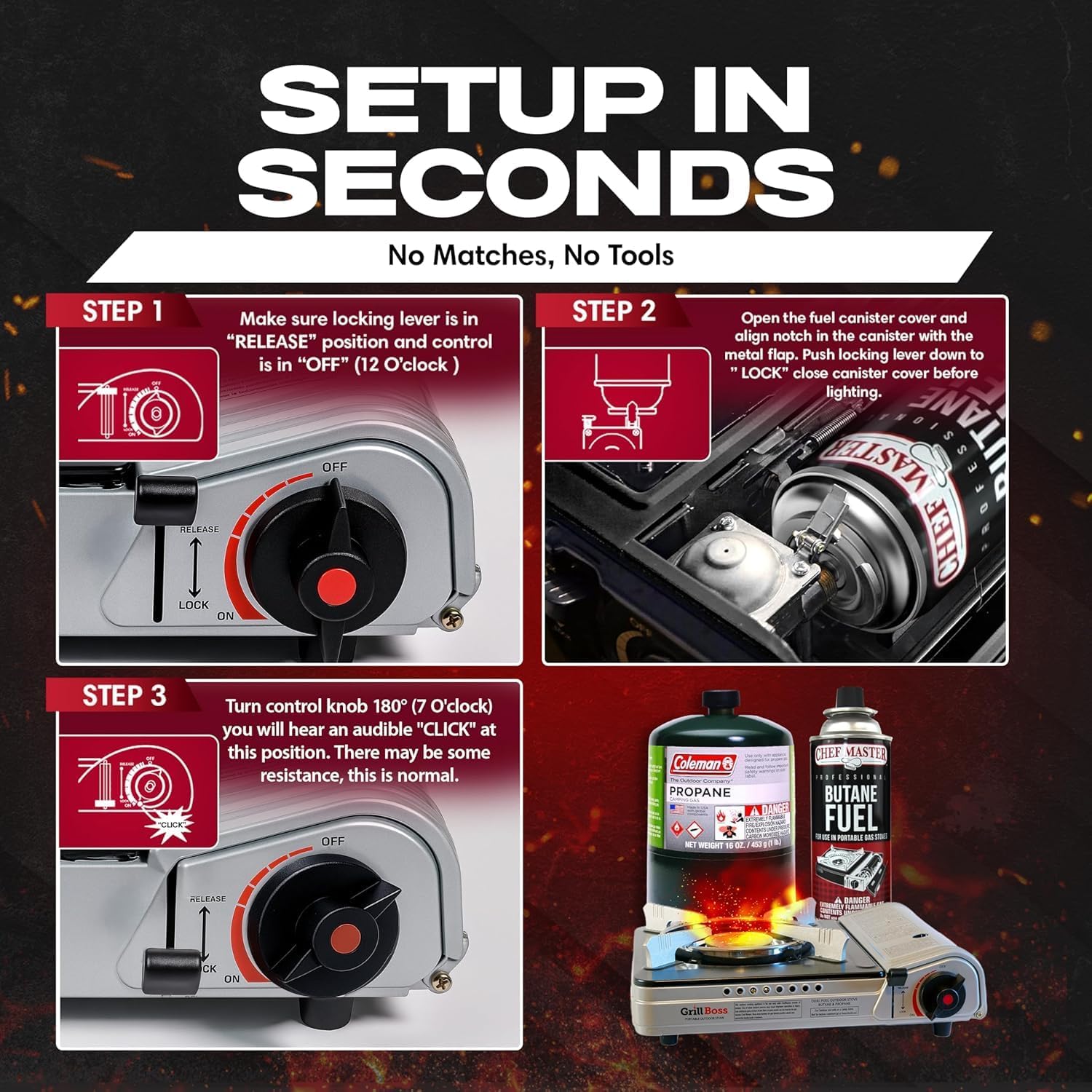
- Ensure the control knob is in the "OFF" position and the locking lever is in the "RELEASE" position.
- Open the fuel canister cover on the side of the stove.
- Align the notch on the butane canister with the metal flap inside the stove's fuel compartment.
- Push the canister firmly into place.
- Push the locking lever down to the "LOCK" position to secure the canister and close the cover.
Text Description: This image shows a step-by-step guide for setting up the Grill Boss Dual Fuel Camp Stove. Step 1 illustrates ensuring the locking lever is in 'RELEASE' and the control knob is 'OFF'. Step 2 shows opening the fuel canister cover and aligning the butane canister notch with the metal flap. Step 3 demonstrates turning the control knob 180 degrees to ignite the stove.
Connecting Propane Cylinder
- Ensure the control knob is in the "OFF" position and the locking lever is in the "RELEASE" position.
- Attach the propane conversion hose to the stove's propane inlet.
- Screw the other end of the hose onto a 16.4 oz propane cylinder until secure.
- Open the valve on the propane cylinder.
Text Description: This video demonstrates how to properly connect and use the Grill Boss Dual Fuel Camp Stove with a propane cylinder. It covers attaching the hose to the stove and then to the propane tank, ensuring a secure connection for safe operation.
Operating Instructions
Ignition
- After connecting the fuel source (butane or propane), ensure the locking lever is in the "LOCK" position (for butane) or the propane cylinder valve is open (for propane).
- Turn the control knob counter-clockwise past the resistance point until you hear a "CLICK" sound. This activates the automatic piezo ignition.
- If the burner does not light immediately, continue turning the knob until the flame starts.
Adjusting Flame
Rotate the control knob to adjust the flame intensity. Turn clockwise to decrease the flame and counter-clockwise to increase it.
Safety Features During Operation
The stove is equipped with an automatic gas shutoff system. In the event of irregular gas flow or excessive pressure, the system will automatically shut off the gas supply to prevent hazards. If this occurs, turn the control knob to "OFF", remove the fuel source, and allow the stove to cool before investigating the cause.
Text Description: This image highlights the built-in safety features of the Grill Boss Dual Fuel Camp Stove, including an automatic gas shutoff system, automatic piezo ignition, and an in-line gas regulator for consistent flame control and pressure regulation.

Text Description: This image shows a person cooking outdoors with the Grill Boss Dual Fuel Camp Stove, demonstrating its use in a camping environment. A pot is placed on the burner, and a campfire is visible in the background.

Maintenance
Cleaning
Allow the stove to cool completely before cleaning. Wipe down the exterior with a damp cloth. Do not use abrasive cleaners or pads that could scratch the surface. Ensure the burner area is free of food debris.
Storage
When not in use, remove the fuel canister or disconnect the propane hose. Store the stove in its durable hard-shell carrying case in a cool, dry place away from direct sunlight and heat sources. Keep out of reach of children.
Troubleshooting
- Burner Fails to Light:
- Ensure the fuel canister is properly installed and locked, or the propane hose is securely connected and the valve is open.
- Check if the fuel canister is empty and replace if necessary.
- Verify the control knob is turned fully to the ignition point.
- If using butane, ensure the locking lever is fully in the "LOCK" position.
- Flame is Weak or Irregular:
- Check fuel levels.
- Ensure proper connection of the fuel source.
- Clean the burner head if it appears clogged.
- Automatic Gas Shutoff Activates:
- This indicates irregular gas flow or overheating. Turn off the stove and remove the fuel source. Allow the stove to cool down completely.
- Inspect the fuel canister or propane hose for damage or improper connection.
Text Description: This video provides guidance on how to troubleshoot common issues with a Chef Master Butane Stove, specifically addressing problems with ignition and gas flow. It offers practical steps to resolve lighting difficulties.
Specifications
| Feature | Detail |
|---|---|
| Brand | Chef Master |
| Model Number | 90057 |
| Fuel Type | Butane, Propane |
| Material | Metal |
| Product Dimensions (L x W x H) | 12"L x 14"W x 4"H |
| Maximum Energy Output | 12,000 BTU (3516.85 Watts) |
| Item Weight | 8 Ounces |
| Included Components | Propane Conversion Hose, Hard-shell Carrying Case |
Text Description: This image displays the key features and dimensions of the Grill Boss Dual Fuel Camp Stove, highlighting its 12,000 BTU output, instant start ignition, and included hard storage case. Dimensions are shown as 13 inches in length, 10 inches in width, and 2.95 inches in height.

Warranty and Support
Warranty
The Chef Master Grill Boss Dual Fuel Camp Stove includes a 1-Year U.S. Support warranty. Please retain your proof of purchase for warranty claims.
Customer Support
For further assistance, technical support, or warranty inquiries, please contact Chef Master customer service. Refer to the product packaging or the official Chef Master website for contact details.